
keystore password was incorrect
一、问题由来
最近在部署后台系统项目的时候,希望给项目增加一些安全措施,在项目中添加了SSL证书,可是在自己添加完该证书后,测试启动项目立马报错。
报错信息如下:
org.springframework.boot.web.server.WebServerException: Unable to start embedded Tomcat server
at org.springframework.boot.web.embedded.tomcat.TomcatWebServer.start(TomcatWebServer.java:215)
at org.springframework.boot.web.servlet.context.ServletWebServerApplicationContext.startWebServer(ServletWebServerApplicationContext.java:297)
at org.springframework.boot.web.servlet.context.ServletWebServerApplicationContext.finishRefresh(ServletWebServerApplicationContext.java:163)
at org.springframework.context.support.AbstractApplicationContext.refresh(AbstractApplicationContext.java:553)
at org.springframework.boot.web.servlet.context.ServletWebServerApplicationContext.refresh(ServletWebServerApplicationContext.java:141)
at org.springframework.boot.SpringApplication.refresh(SpringApplication.java:747)
at org.springframework.boot.SpringApplication.refreshContext(SpringApplication.java:397)
at org.springframework.boot.SpringApplication.run(SpringApplication.java:315)
at org.springframework.boot.SpringApplication.run(SpringApplication.java:1226)
at org.springframework.boot.SpringApplication.run(SpringApplication.java:1215)
at com.kaishun.study.WebBackendApplication.main(WebBackendApplication.java:20)
at sun.reflect.NativeMethodAccessorImpl.invoke0(Native Method)
at sun.reflect.NativeMethodAccessorImpl.invoke(NativeMethodAccessorImpl.java:62)
at sun.reflect.DelegatingMethodAccessorImpl.invoke(DelegatingMethodAccessorImpl.java:43)
at java.lang.reflect.Method.invoke(Method.java:498)
at org.springframework.boot.devtools.restart.RestartLauncher.run(RestartLauncher.java:49)
Caused by: java.lang.IllegalArgumentException: standardService.connector.startFailed
at org.apache.catalina.core.StandardService.addConnector(StandardService.java:231)
at org.springframework.boot.web.embedded.tomcat.TomcatWebServer.addPreviouslyRemovedConnectors(TomcatWebServer.java:278)
at org.springframework.boot.web.embedded.tomcat.TomcatWebServer.start(TomcatWebServer.java:197)
... 15 common frames omitted
Caused by: org.apache.catalina.LifecycleException: Protocol handler start failed
at org.apache.catalina.connector.Connector.startInternal(Connector.java:1008)
at org.apache.catalina.util.LifecycleBase.start(LifecycleBase.java:183)
at org.apache.catalina.core.StandardService.addConnector(StandardService.java:227)
... 17 common frames omitted
Caused by: java.lang.IllegalArgumentException: keystore password was incorrect
at org.apache.tomcat.util.net.AbstractJsseEndpoint.createSSLContext(AbstractJsseEndpoint.java:99)
at org.apache.tomcat.util.net.AbstractJsseEndpoint.initialiseSsl(AbstractJsseEndpoint.java:71)
at org.apache.tomcat.util.net.NioEndpoint.bind(NioEndpoint.java:217)
at org.apache.tomcat.util.net.AbstractEndpoint.bindWithCleanup(AbstractEndpoint.java:1141)
at org.apache.tomcat.util.net.AbstractEndpoint.start(AbstractEndpoint.java:1227)
at org.apache.coyote.AbstractProtocol.start(AbstractProtocol.java:586)
at org.apache.catalina.connector.Connector.startInternal(Connector.java:1005)
... 19 common frames omitted
Caused by: java.io.IOException: keystore password was incorrect
at sun.security.pkcs12.PKCS12KeyStore.engineLoad(PKCS12KeyStore.java:2015)
at java.security.KeyStore.load(KeyStore.java:1445)
at org.apache.tomcat.util.security.KeyStoreUtil.load(KeyStoreUtil.java:67)
at org.apache.tomcat.util.net.SSLUtilBase.getStore(SSLUtilBase.java:217)
at org.apache.tomcat.util.net.SSLHostConfigCertificate.getCertificateKeystore(SSLHostConfigCertificate.java:206)
at org.apache.tomcat.util.net.SSLUtilBase.getKeyManagers(SSLUtilBase.java:283)
at org.apache.tomcat.util.net.SSLUtilBase.createSSLContext(SSLUtilBase.java:247)
at org.apache.tomcat.util.net.AbstractJsseEndpoint.createSSLContext(AbstractJsseEndpoint.java:97)
... 25 common frames omitted
Caused by: java.security.UnrecoverableKeyException: failed to decrypt safe contents entry: javax.crypto.BadPaddingException: Given final block not properly padded
... 33 common frames omitted
大致意思是说服务器不能正常启动,keystore 的密码无效。
二、问题分析
这个是配置信息
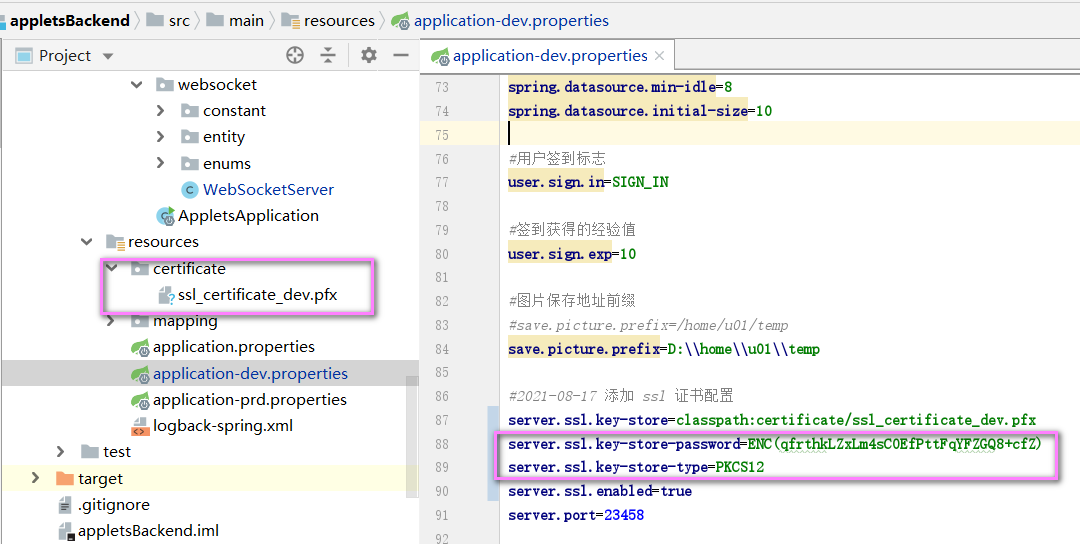
对于这个错误信息感到一头雾水,之前也是使用这种配置方式来进行配置的,怎么突然就不行了呢,让我很是意外。自己也反复的回想
自己在这当中进行的一些操作,第一次部署SSL证书时,是直接从阿里云官网上面下载下来的,密码和证书是成对出现的。我第二次配置
这个证书的时候,也是从阿里元官网上面下载的,密码是使用新的,可是pfx证书却是从之前那个项目当中拷贝过来的。因为密码全部做了加密操作,
忘记了之前的密码,才使用最新下载的SSL证书的密码,证书确是使用旧有的。

分析到这里,自己也知道出问题的原因了。我立马又去阿里云重新下载了一个tomcat的SSL证书,发现密码又变了。因此确定这个问题的原因
所在,每次下载阿里云的SSL证书时,pfx证书和密码都是成对出现的,不能混用。
三、解决方案
搞清楚问题的原因之后,我立马进行修改,使用正确的、配对的证书,重新启动项目,出现新问题。
jsse.alias_no_key_entry
我倒回去查看之前的配置信息,发现最新项目的配置中多了一行配置,立马删除。
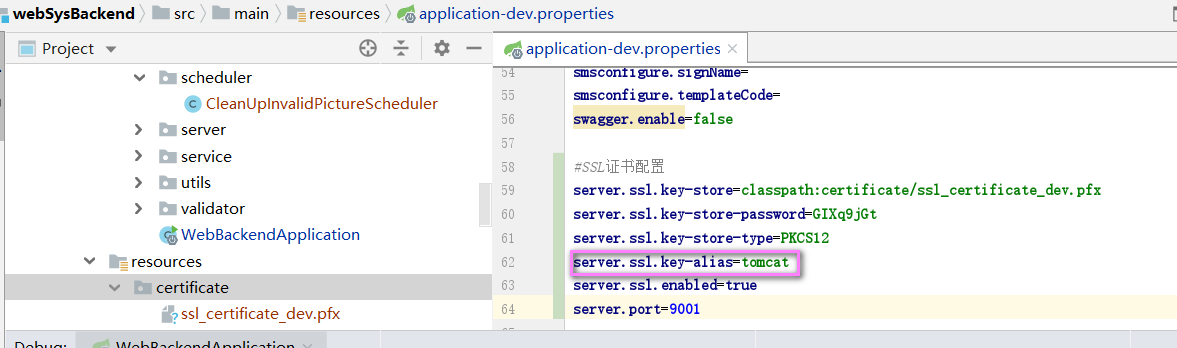
重新启动项目,正常启动,问题解决。
keystore password was incorrect的更多相关文章
- Java导入证书失败Keystore was tampered with, or password was incorrect
keytool 错误: java.io.IOException: Keystore was tampered with, or password was incorrect 在进行证书相关操作, ...
- android 签名被篡改(Keystore was tampered with, or password was incorrect)
在配置自定义签名时出现了"Keystore was tampered with, or password was incorrect"错误! 参考文档发现: If necessar ...
- 解决Keystore was tampered with, or password was incorrect
使用签名文件keystore查看生成的数字签名中报错解决 Keystore was tampered with, or password was incorrect 这是由于android规定自己定义 ...
- mongodb 安装遇到问题:the domain,user name and/or password are incorrect.remember to use"." for the domain if the account is on the local machine
安装mongoDB遇到如下问题:the domain,user name and/or password are incorrect.remember to use"." for ...
- Keystore was tampered with, or password was incorrect
#修改key条目密码 # keytool -keypasswd -alias test.com -keypass oldkeypwd -new newkeypwd -storepass storepw ...
- win10安装MongoDB提示 the domain,user name and/or password are incorrect. Remember to use "." for the domain if the account is on the local machine.
好心塞,提示输入不合法. 后来发现这样可以解决.退出安装.重新打开()因为我第一次打开时是没有卡在这一步的,只不过返回上一页时就一直卡在验证的页面了),默认,默认,默认,
- Eureka【启用https】
上一篇主要说的是开启http basic认证,从安全角度来讲,基于base64编码,容易被抓包后破解,在公网中很不安全,本文详谈如何在eureka server和eureka client中开启htt ...
- 【转】eclipse android 设置及修改生成apk的签名文件 -- custom debug keystore
原文网址:http://hold-on.iteye.com/blog/2064642 android eclipse 设置及修改生成apk的签名文件 1. 问题: 平时在使用eclipse进行andr ...
- Eclipse ADT的Custom debug keystore所需证书规格
最近开始研究Google Play的In-app Billing IAB内置计费API,发现一个比较烦人的问题就是测试时应用必须经过正式签名,而默认Eclipse ADT调试运行使用的是临时生成的De ...
随机推荐
- 使用volatile的条件
使用volatile的值不能依赖于它之前的值: volatile这个关键字可能很多朋友都听说过,或许也都用过.在Java 5之前,它是一个备受争议的关键字,因为在程序中使用它往往会导致出人意料的结果. ...
- playwright-python 截图、录制视频、录制接口(二)
截图 fullPage为True时,截取全屏,默认为False clip截取特定部分的图片,{"x": float, "y": float, "wid ...
- go测试--进阶
目录 前言 控制编译的参数 -args -json -o 控制测试的参数 -bench regexp -benchtime s -cpu 1,2,4 -count n -failfast -list ...
- springboot中redis取缓存类型转换异常
异常如下: [dispatcherServlet] in context with path [] threw exception [Request processing failed; nested ...
- seo高手教你seo优化排名该怎么做
seo高手教你seo优化排名该怎么做 第一节:如何在本地搭建服务器环境 本节课程主要是讲如何利用 Xampp在本地搭建服务器环境 .网站使用asp和php比较常见,当然,就目前而言,使用php搭建网站 ...
- 174道 JavaScript 面试题,助你查漏补缺
最近在整理 JavaScript 的时候发现遇到了很多面试中常见的面试题,本部分主要是作者在 Github 等各大论坛收录的 JavaScript 相关知识和一些相关面试题时所做的笔记,分享这份总结给 ...
- centos7安装privoxy
本文分为三部分,第一部分是在阿里云的ECS上安装Privoxy,第二部分是在AWS的EC2上安装Privoxy,第三部分是Privoxy的配置. 第一部分:阿里云ECS安装Privoxy 配置yum源 ...
- NAT-T下的端口浮动
1. IKE端口浮动 IPsec在隧道建立第一第二阶段主要进行加密方式.加密策略等信息的协商,这部分功能是通过IKE协议来实现的. IKE协议默认端口为500,但是如果IPsec隧道传输路径上存在NA ...
- JVM-深入
目录 Java类的加载机制 什么是类的加载 类的生命周期 加载 连接 类加载器 类的加载 双亲委派模型 自定义类加载器 JVM内存结构 Java堆(Heap) 方法区(Method Area) 程序计 ...
- PTA——c++函数
1.在C++中,关于下列设置缺省参数值的描述中,()是正确的. 在指定了缺省值的参数右边,不能出现没有指定缺省值的参数: 2.使用地址作为实参传给形参,下列说法正确的是() 实参与形参操作的是同一对象 ...