
android开发_SimpleAdapter适配器
android开发_SimpleAdapter适配器
新建项目:
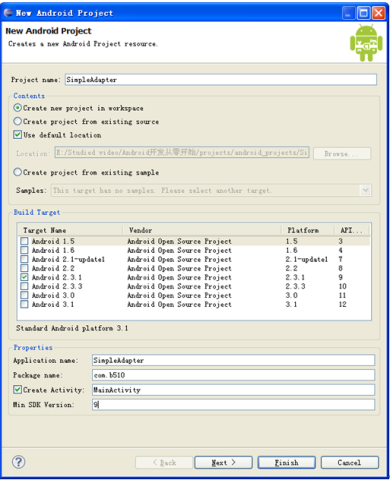
项目结构:
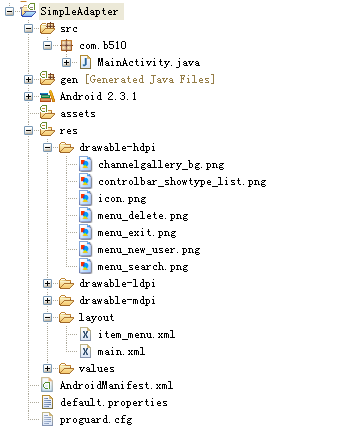
drawable-hdpi文件夹中的图片是自己加入的。主要是在菜单选项中显示的图片:
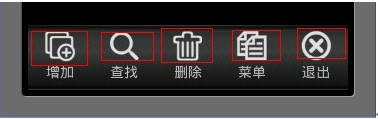
运行效果:
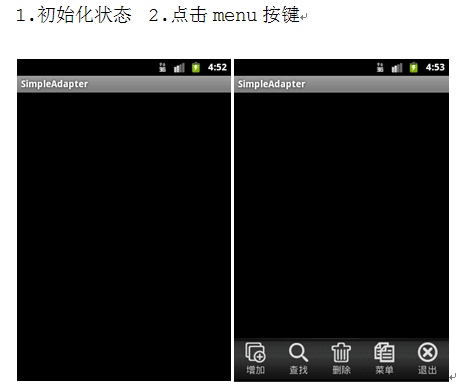
代码部分:
main.xml

 1 <?xml version="1.0" encoding="utf-8"?>

 2 <RelativeLayout xmlns:android="http://schemas.android.com/apk/res/android"

 3     android:orientation="vertical"

 4     android:layout_width="fill_parent"

 5     android:layout_height="fill_parent"

 6     >

 7     <!-- 菜单选项的布局,设置高为"65sp",位置是在父窗口的底部,设置为不可见-->

 8     <GridView

 9         android:id="@+id/gv_buttom_menu"

10         android:layout_width="fill_parent"

11         android:layout_height="65sp"

12         android:layout_alignParentBottom="true"

13         android:visibility="gone"

14     ></GridView>

15 </RelativeLayout>
item_menu.xml
 1 <?xml version="1.0" encoding="utf-8"?>

 2 <RelativeLayout xmlns:android="http://schemas.android.com/apk/res/android"

 3     android:layout_width="fill_parent"

 4     android:layout_height="wrap_content"

 5     android:paddingBottom="5dip"

 6     >

 7     <!-- 这个布局文件是用来布局菜单选项的 -->

 8     <!-- 菜单中图片的显示 -->

 9       <ImageView

10           android:id="@+id/item_image"

11           android:layout_centerHorizontal="true"

12           android:layout_width="wrap_content"

13           android:layout_height="wrap_content"

14       ></ImageView>

15       <!-- 菜单中图片下面的文字 -->

16     <TextView

17         android:id="@+id/item_text"

18         android:layout_below="@id/item_image"

19         android:layout_width="wrap_content"

20         android:layout_height="wrap_content"

21         android:layout_centerHorizontal="true"

22     ></TextView>

23 </RelativeLayout>
MainActivity.java
  1 package com.b510;

  2

  3 import java.util.ArrayList;

  4 import java.util.HashMap;

  5

  6 import android.app.Activity;

  7 import android.os.Bundle;

  8 import android.view.Gravity;

  9 import android.view.KeyEvent;

 10 import android.view.View;

 11 import android.widget.GridView;

 12 import android.widget.SimpleAdapter;

 13

 14 public class MainActivity extends Activity {

 15     /** 定义底部菜单选项 */

 16     GridView gv_buttom_menu;

 17

 18     /** Called when the activity is first created. */

 19     @Override

 20     public void onCreate(Bundle savedInstanceState) {

 21         super.onCreate(savedInstanceState);

 22         setContentView(R.layout.main);

 23     }

 24

 25     /**

 26      * 当按键被按下的时候调用此方法

 27      */

 28     @Override

 29     public boolean onKeyDown(int keyCode, KeyEvent event) {

 30         if (keyCode == KeyEvent.KEYCODE_MENU) {

 31             if (gv_buttom_menu == null) {

 32                 loadButtomMenu();

 33             }

 34             // 默认情况下面是View.GONE

 35             if (gv_buttom_menu.getVisibility() == View.GONE) {

 36                 gv_buttom_menu.setVisibility(View.VISIBLE);// 菜单设置可见

 37             } else {

 38                 gv_buttom_menu.setVisibility(View.GONE);// 菜单设置不可见

 39             }

 40         }

 41

 42         return super.onKeyDown(keyCode, event);

 43     }

 44

 45     /**

 46      * 加载菜单

 47      */

 48     private void loadButtomMenu() {

 49         gv_buttom_menu = (GridView) findViewById(R.id.gv_buttom_menu);

 50         // 设置菜单选项的背景图片

 51         gv_buttom_menu.setBackgroundResource(R.drawable.channelgallery_bg);

 52         // 设置列数,为5列

 53         gv_buttom_menu.setNumColumns(5);

 54         // 设置位置

 55         gv_buttom_menu.setGravity(Gravity.CENTER);

 56         // 垂直间隔10

 57         gv_buttom_menu.setVerticalSpacing(10);

 58         // 水平间隔10

 59         gv_buttom_menu.setHorizontalSpacing(10);

 60         ArrayList data = new ArrayList();

 61         // 定义菜单选项的图片和文字

 62         // 增加菜单

 63         HashMap map = new HashMap();

 64         map.put("itemImage", R.drawable.menu_new_user);

 65         map.put("itemText", "增加");

 66         data.add(map);

 67         // 查找菜单

 68         map = new HashMap();

 69         map.put("itemImage", R.drawable.menu_search);

 70         map.put("itemText", "查找");

 71         data.add(map);

 72         // 删除菜单

 73         map = new HashMap();

 74         map.put("itemImage", R.drawable.menu_delete);

 75         map.put("itemText", "删除");

 76         data.add(map);

 77         // 菜单选项

 78         map = new HashMap();

 79         map.put("itemImage", R.drawable.controlbar_showtype_list);

 80         map.put("itemText", "菜单");

 81         data.add(map);

 82         // 退出菜单

 83         map = new HashMap();

 84         map.put("itemImage", R.drawable.menu_exit);

 85         map.put("itemText", "退出");

 86         data.add(map);

 87

 88         // 设置SimpleAdapter

 89         // 1.Context 上下文

 90         // 2.data 是菜单中显示数据信息,包括图片和说明文字

 91         // 3.R.layout.item_ment 从data中取出数据map类型,用此布局文件来展示数据信息,包括图片和说明文字

 92         // 4,5 是将data和布局文件联系起来

 93         // 4 放入map中的key值

 94         // 5 按照map中的key值,把相应的数据传递过来,最后展现出来

 95         SimpleAdapter adapter = new SimpleAdapter(this, data,

 96                 R.layout.item_menu, new String[] { "itemImage", "itemText" },

 97                 new int[] { R.id.item_image, R.id.item_text });

 98

 99         // gv_buttom_menu只是负责展现,他是没有数据的

100         // adapter是把展现方式和数据联系在一起的一种工具,按照某种特定方式展现出来

101         gv_buttom_menu.setAdapter(adapter);

102

103     }

104 }
android开发_SimpleAdapter适配器的更多相关文章
- Android开发之适配器-ListView适配器的重复数据
适配器是Android中的数据与View视图的桥梁,作用就是将数据通过适配器显示到对应的View视图上. 工作中,在用ListView做适配器数据时候,有些人肯定碰见过,如何优化效率,但是又出现重复数 ...
- Android 开发ListView适配器优化
我们都知道Android中Adapter的作用就是ListView界面与数据之间的桥梁,当列表里的每一项显示到页面时,都会调用Adapter的getView方法返回一个View.想过没有? 在我们的列 ...
- Android开发工程师文集-Fragment,适配器,轮播图,ScrollView,Gallery 图片浏览器,Android常用布局样式
Android开发工程师文集-Fragment,适配器,轮播图,ScrollView,Gallery 图片浏览器,Android常用布局样式 Fragment FragmentManager frag ...
- Android开发进阶 -- 通用适配器 CommonAdapter
在Android开发中,我们经常会用到ListView 这个组件,为了将ListView 的内容展示出来,我们会去实现一个Adapter来适配,将Layout中的布局以列表的形式展现到组件中. ...
- Android开发之自定义的ListView(UITableViewController)
Android开发中的ListView, 顾名方法思义,就是表视图.表示图在iOS开发中就是TableView.两者虽然名称不一样,但是其使用方法,使用场景以及该控件的功能都极为相似,都是用来展示大量 ...
- Android开发3:Intent、Bundle的使用和ListView的应用 、RelativeLayout(相对布局)简述(简单通讯录的实现)
前言 啦啦啦~博主又来骚扰大家啦~大家是不是感觉上次的Android开发博文有点长呢~主要是因为博主也是小白,在做实验的过程中查询了很多很多概念,努力去理解每一个知识点,才完成了最终的实验.还有就是随 ...
- 让你Android开发更简单
转载:http://www.jianshu.com/p/22ff8b5fdadc 搭建一个新的Android项目,你会怎么做? 每个人对应用框架的理解不相同,但是最终达到的效果应该是一样: ①降低项目 ...
- Android开发App工程结构搭建
本文算是一篇漫谈,谈一谈关于android开发中工程初始化的时候如何在初期我们就能搭建一个好的架构. 关于android架构,因为手机的限制,目前我觉得也确实没什么大谈特谈的,但是从开发的角 ...
- Android开发中,那些让您觉得相见恨晚的方法、类或接口
Android开发中,那些让你觉得相见恨晚的方法.类或接口本篇文章内容提取自知乎Android开发中,有哪些让你觉得相见恨晚的方法.类或接口?,其实有一部是JAVA的,但是在android开发中也算常 ...
随机推荐
- php composer包管理工具
一 . 包管理工具 你在Centos上装工具的时候直接yum -y install xx 比你去rpm -ivh xx.rpm 是不是爽很多呢? composer 就是安装php 代码的一个类似工具. ...
- java面向对象之 多态 Polymorphism
多态(Polymorphism):用我们通俗易懂的话来说就是子类就是父类(猫是动物,学生也是人),因此多态的意思就是:父类型的引用可以指向子类的对象. 1.多态的含义:一种类型,呈现出多种状态 主要讨 ...
- css 清除浮动 兼容IE+, FF
上代码: <!doctype html> <html> <head> <meta charset="utf-8"> <titl ...
- Django里面的自定义tag和filter
Django的文档里面有这么一句 The app that contains the custom tags must be in INSTALLED_APPS in order for the { ...
- CSliderCtrl鼠标点击精确定位
实现CSliderCtrl的子类CXXCtrl 响应左键按下消息 ON_WM_LBUTTONDOWN() void CXXCtrl::OnLButtonDown(UINT nFlags, CPoint ...
- C. Table Decorations(Codeforces Round 273)
C. Table Decorations time limit per test 1 second memory limit per test 256 megabytes input standard ...
- c/c++中与字符串处理相关的函数
void *memccpy (void *dest, const void *src, int c, size_t n); 从src所指向的对象复制n个字符到dest所指向的对象中.如果复制过程中遇到 ...
- Jar包下载地址
Download Apache log4j 1.2.17下载: http://logging.apache.org/log4j/1.2/download.html jsoup http://jsoup ...
- [转载]VMWare网络连接透析
http://blog.csdn.net/struggleyb/article/details/1102214 以前在学校,VMWare里面的Gentoo Linux是采用network bridge ...
- 0. chromium源代码分析 - 序
本打算在CSDN写完这系列文字,却因为在CSDN中误删了一篇blog,该篇blog被移到了回收站.然而CSDN居然没有从回收站撤销删除的操作方法.联想到之前CSDN泄密的问题,其可靠性值得怀疑.随转向 ...