
Springboot+SpringSecurity实现图片验证码登录问题
这个问题,网上找了好多,结果代码都不全,找了好多,要不是就自动注入的类注入不了,编译报错,要不异常捕获不了浪费好多时间,就觉得,框架不熟就不能随便用,全是坑,气死我了,最后改了两天.终于弄好啦;
问题主要是:
- 返回的验证码不知道在SpringSecurity的什么地方和存在内存里的比较?我用的方法是前置一个过滤器,插入到表单验证之前。
- 比较之后应该怎么处理,:比较之后要抛出一个继承了AuthenticationException的异常
- 其次是捕获验证码错误异常的处理? 捕获到的异常交给自定义验证失败处理器AuthenticationFailureHandler处理,这里,用的处理器要和表单验证失败的处理器是同一个处理器,不然会报异常,所以在需要写一个全局的AuthenticationFailureHandler的实现类,专门用来处理异常。表单验证有成功和失败两个处理器,我们一般直接以匿名内部类形似写。要是加了验证码,就必须使用统一的失败处理器。
效果图:
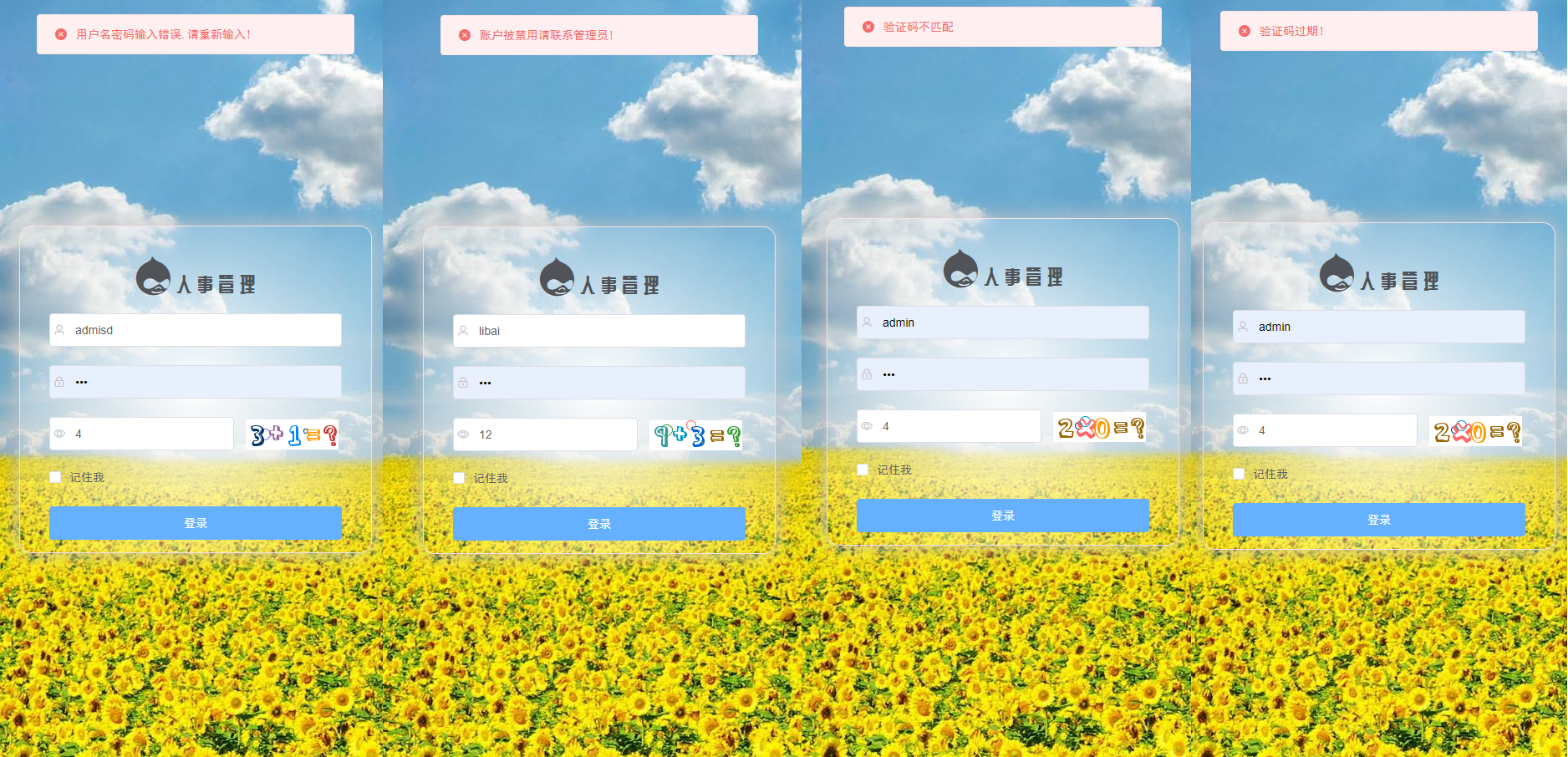
网上大都是直接注入一个AuthenticationFailureHandler,我当时就不明白这个咋注进去的,我这个一写就报错,注入不进去,后来就想自己new一个哇,可以是可以了,但是还报异常,java.lang.IllegalStateException: Cannot call sendError() after the response has been committed,后来想表单验证的时候,失败用的也是这个处理器,就想定义一个全局的处理器,
package com.liruilong.hros.config;

import com.fasterxml.jackson.databind.ObjectMapper;

import com.liruilong.hros.Exception.ValidateCodeException;

import com.liruilong.hros.model.RespBean;

import org.springframework.context.annotation.Bean;

import org.springframework.security.authentication.*;

import org.springframework.security.core.AuthenticationException;

import org.springframework.security.web.authentication.AuthenticationFailureHandler;

import org.springframework.stereotype.Component;

import javax.servlet.ServletException;

import javax.servlet.http.HttpServletRequest;

import javax.servlet.http.HttpServletResponse;

import java.io.IOException;

import java.io.PrintWriter;

/**

 * @Description :

 * @Author: Liruilong

 * @Date: 2020/2/11 23:08

 */

@Component

public class MyAuthenticationFailureHandler implements AuthenticationFailureHandler {

    @Override

    public void onAuthenticationFailure(HttpServletRequest httpServletRequest, HttpServletResponse httpServletResponse, AuthenticationException e) throws IOException, ServletException {

        httpServletResponse.setContentType("application/json;charset=utf-8");

        PrintWriter out = httpServletResponse.getWriter();

        RespBean respBean = RespBean.error(e.getMessage());

           // 验证码自定义异常的处理

        if (e instanceof ValidateCodeException){

            respBean.setMsg(e.getMessage());

            //Security内置的异常处理

        }else if (e instanceof LockedException) {

            respBean.setMsg("账户被锁定请联系管理员!");

        } else if (e instanceof CredentialsExpiredException) {

            respBean.setMsg("密码过期请联系管理员!");

        } else if (e instanceof AccountExpiredException) {

            respBean.setMsg("账户过期请联系管理员!");

        } else if (e instanceof DisabledException) {

            respBean.setMsg("账户被禁用请联系管理员!");

        } else if (e instanceof BadCredentialsException) {

            respBean.setMsg("用户名密码输入错误,请重新输入!");

        }

        //将hr转化为Sting

        out.write(new ObjectMapper().writeValueAsString(respBean));

        out.flush();

        out.close();

    }

    @Bean

    public  MyAuthenticationFailureHandler getMyAuthenticationFailureHandler(){

        return new MyAuthenticationFailureHandler();

    }

}
流程
请求登录页,将验证码结果存到基于Servlet的session里,以JSON格式返回验证码,
之后前端发送登录请求,SpringSecurity中处理,自定义一个filter让它继承自OncePerRequestFilter,然后重写doFilterInternal方法,在这个方法中实现验证码验证的功能,如果验证码错误就抛出一个继承自AuthenticationException的验证吗错误的异常消息写入到响应消息中.
之后返回异常信息交给自定义验证失败处理器处理。
下面以这个顺序书写代码:
依赖大家照着import导一下吧,记得有这两个,验证码需要一个依赖,之后还使用了一个工具包
<!--图片验证-->
<dependency>
<groupId>com.github.whvcse</groupId>
<artifactId>easy-captcha</artifactId>
<version>1.6.2</version>
</dependency>
<dependency>
<groupId>org.apache.commons</groupId>
<artifactId>commons-lang3</artifactId>
</dependency>
前端使用Vue+ElementUI
        <div class="login-code">

          <img :src="codeUrl"

               @click="getCode">

        </div>
后端代码:
获取验证码,将结果放到session里
package com.liruilong.hros.controller;

import com.liruilong.hros.model.RespBean;

import org.springframework.web.bind.annotation.GetMapping;

import org.springframework.web.bind.annotation.RestController;

import com.wf.captcha.ArithmeticCaptcha;

import javax.servlet.http.HttpServletRequest;

import javax.servlet.http.HttpServletResponse;

import java.util.HashMap;

import java.util.Map;

/**

 * @Description :

 * @Author: Liruilong

 * @Date: 2019/12/19 19:58

 */

@RestController

public class LoginController {

    @GetMapping(value = "/auth/code")

    public Map getCode(HttpServletRequest request,HttpServletResponse response){

        // 算术类型 https://gitee.com/whvse/EasyCaptcha

        ArithmeticCaptcha captcha = new ArithmeticCaptcha(111, 36);

        // 几位数运算,默认是两位

        captcha.setLen(2);

        // 获取运算的结果

        String result = captcha.text();

        System.err.println("生成的验证码:"+result);

        // 保存

        // 验证码信息

        Map<String,Object> imgResult = new HashMap<String,Object>(2){{

            put("img", captcha.toBase64());

        }};

        request.getSession().setAttribute("yanzhengma",result);

        return imgResult;

    }

}
定义一个VerifyCodeFilter 过滤器
package com.liruilong.hros.filter;

import com.liruilong.hros.Exception.ValidateCodeException;

import com.liruilong.hros.config.MyAuthenticationFailureHandler;

import org.apache.commons.lang3.StringUtils;

import org.springframework.beans.factory.annotation.Autowired;

import org.springframework.context.annotation.Bean;

import org.springframework.security.core.AuthenticationException;

import org.springframework.stereotype.Component;

import org.springframework.web.filter.OncePerRequestFilter;

import javax.servlet.FilterChain;

import javax.servlet.ServletException;

import javax.servlet.http.HttpServletRequest;

import javax.servlet.http.HttpServletResponse;

import java.io.IOException;

/**

 * @Description :

 * @Author: Liruilong

 * @Date: 2020/2/7 19:39

 */

@Component

public class VerifyCodeFilter extends OncePerRequestFilter {

    @Bean

    public VerifyCodeFilter getVerifyCodeFilter() {

        return new VerifyCodeFilter();

    }

    @Autowired

    MyAuthenticationFailureHandler myAuthenticationFailureHandler;

    @Override

    protected void doFilterInternal(HttpServletRequest request, HttpServletResponse response, FilterChain filterChain) throws ServletException, IOException {

        if (StringUtils.equals("/doLogin", request.getRequestURI())

                && StringUtils.equalsIgnoreCase(request.getMethod(), "post")) {

            // 1. 进行验证码的校验

            try {

            String requestCaptcha = request.getParameter("code");

                if (requestCaptcha == null) {

                    throw new ValidateCodeException("验证码不存在");

                }

            String code = (String) request.getSession().getAttribute("yanzhengma");

                if (StringUtils.isBlank(code)) {

                    throw new ValidateCodeException("验证码过期!");

                }

            code = code.equals("0.0") ? "0" : code;

            logger.info("开始校验验证码,生成的验证码为:" + code + " ,输入的验证码为:" + requestCaptcha);

                if (!StringUtils.equals(code, requestCaptcha)) {

                    throw new ValidateCodeException("验证码不匹配");

                }

            } catch (AuthenticationException e) {

                // 2. 捕获步骤1中校验出现异常,交给失败处理类进行进行处理

                myAuthenticationFailureHandler.onAuthenticationFailure(request, response, e);

            } finally {

                filterChain.doFilter(request, response);

            }

        } else {

            filterChain.doFilter(request, response);

        }

    }

}
定义一个自定义异常处理,继承AuthenticationException
package com.liruilong.hros.Exception;

import org.springframework.security.core.AuthenticationException;

/**

 * @Description :

 * @Author: Liruilong

 * @Date: 2020/2/8 7:24

 */

public class ValidateCodeException extends AuthenticationException  {

    public ValidateCodeException(String msg) {

        super(msg);

    }

}
security配置.
在之前的基础上加filter的基础上加了
http.addFilterBefore(verifyCodeFilter, UsernamePasswordAuthenticationFilter.class),验证处理上,验证码和表单验证失败用同一个失败处理器,
package com.liruilong.hros.config;

import com.fasterxml.jackson.databind.ObjectMapper;

import com.liruilong.hros.filter.VerifyCodeFilter;

import com.liruilong.hros.model.Hr;

import com.liruilong.hros.model.RespBean;

import com.liruilong.hros.service.HrService;

import org.springframework.beans.factory.annotation.Autowired;

import org.springframework.context.annotation.Bean;

import org.springframework.context.annotation.Configuration;

import org.springframework.security.authentication.*;

import org.springframework.security.config.annotation.ObjectPostProcessor;

import org.springframework.security.config.annotation.authentication.builders.AuthenticationManagerBuilder;

import org.springframework.security.config.annotation.web.builders.HttpSecurity;

import org.springframework.security.config.annotation.web.builders.WebSecurity;

import org.springframework.security.config.annotation.web.configuration.WebSecurityConfigurerAdapter;

import org.springframework.security.core.Authentication;

import org.springframework.security.core.AuthenticationException;

import org.springframework.security.crypto.bcrypt.BCryptPasswordEncoder;

import org.springframework.security.crypto.password.PasswordEncoder;

import org.springframework.security.web.AuthenticationEntryPoint;

import org.springframework.security.web.access.intercept.FilterSecurityInterceptor;

import org.springframework.security.web.authentication.AuthenticationSuccessHandler;

import org.springframework.security.web.authentication.UsernamePasswordAuthenticationFilter;

import org.springframework.security.web.authentication.logout.LogoutSuccessHandler;

import javax.servlet.ServletException;

import javax.servlet.http.HttpServletRequest;

import javax.servlet.http.HttpServletResponse;

import java.io.IOException;

import java.io.PrintWriter;

/**

 * @Description :

 * @Author: Liruilong

 * @Date: 2019/12/18 19:11

 */

@Configuration

public class SecurityConfig extends WebSecurityConfigurerAdapter {

    @Autowired

    HrService hrService;

    @Autowired

    CustomFilterInvocationSecurityMetadataSource customFilterInvocationSecurityMetadataSource;

    @Autowired

    CustomUrlDecisionManager customUrlDecisionManager;

     @Autowired

    VerifyCodeFilter verifyCodeFilter ;

    @Autowired

    MyAuthenticationFailureHandler myAuthenticationFailureHandler;

    @Bean

    PasswordEncoder passwordEncoder() {

        return new BCryptPasswordEncoder();

    }

    @Override

    protected void configure(AuthenticationManagerBuilder auth) throws Exception {

        auth.userDetailsService(hrService);

    }

    /**

     * @Author Liruilong

     * @Description  放行的请求路径

     * @Date 19:25 2020/2/7

     * @Param [web]

     * @return void

     **/

    @Override

    public void configure(WebSecurity web) throws Exception {

        web.ignoring().antMatchers("/auth/code","/login","/css/**","/js/**", "/index.html", "/img/**", "/fonts/**","/favicon.ico");

    }

    @Override

    protected void configure(HttpSecurity http) throws Exception {

        http

                .addFilterBefore(verifyCodeFilter, UsernamePasswordAuthenticationFilter.class)

                .authorizeRequests()

                //.anyRequest().authenticated()

                .withObjectPostProcessor(new ObjectPostProcessor<FilterSecurityInterceptor>() {

                    @Override

                    public <O extends FilterSecurityInterceptor> O postProcess(O object) {

                        object.setAccessDecisionManager(customUrlDecisionManager);

                        object.setSecurityMetadataSource(customFilterInvocationSecurityMetadataSource);

                        return object;

                    }

                })

                .and().formLogin().usernameParameter("username").passwordParameter("password") .loginProcessingUrl("/doLogin")

                .loginPage("/login")

                //登录成功回调

                .successHandler(new AuthenticationSuccessHandler() {

                    @Override

                    public void onAuthenticationSuccess(HttpServletRequest httpServletRequest, HttpServletResponse httpServletResponse, Authentication authentication) throws IOException, ServletException {

                        httpServletResponse.setContentType("application/json;charset=utf-8");

                        PrintWriter out = httpServletResponse.getWriter();

                        Hr hr = (Hr) authentication.getPrincipal();

                        //密码不回传

                        hr.setPassword(null);

                        RespBean ok = RespBean.ok("登录成功!", hr);

                        //将hr转化为Sting

                        String s = new ObjectMapper().writeValueAsString(ok);

                        out.write(s);

                        out.flush();

                        out.close();

                    }

                })

                //登失败回调

                .failureHandler(myAuthenticationFailureHandler)

                //相关的接口直接返回

                .permitAll()

                .and()

                .logout()

                //注销登录

                // .logoutSuccessUrl("")

                .logoutSuccessHandler(new LogoutSuccessHandler() {

                    @Override

                    public void onLogoutSuccess(HttpServletRequest httpServletRequest,

                                                HttpServletResponse httpServletResponse,

                                                Authentication authentication) throws IOException, ServletException {

                        httpServletResponse.setContentType("application/json;charset=utf-8");

                        PrintWriter out = httpServletResponse.getWriter();

                        out.write(new ObjectMapper().writeValueAsString(RespBean.ok("注销成功!")));

                        out.flush();

                        out.close();

                    }

                })

                .permitAll()

                .and()

                .csrf().disable().exceptionHandling()

                //没有认证时,在这里处理结果,不要重定向

                .authenticationEntryPoint(new AuthenticationEntryPoint() {

                    @Override

                    public void commence(HttpServletRequest req, HttpServletResponse resp, AuthenticationException authException) throws IOException, ServletException {

                        resp.setContentType("application/json;charset=utf-8");

                        resp.setStatus(401);

                        PrintWriter out = resp.getWriter();

                        RespBean respBean = RespBean.error("访问失败!");

                        if (authException instanceof InsufficientAuthenticationException) {

                            respBean.setMsg("请求失败,请联系管理员!");

                        }

                        out.write(new ObjectMapper().writeValueAsString(respBean));

                        out.flush();

                        out.close();

                    }

                });

    }

}
--------------------------------------------------------------------------------------
Springboot+SpringSecurity实现图片验证码登录问题的更多相关文章
- Python 实现简单图片验证码登录
朋友说公司要在测试环境做接口测试,登录时需要传入正确的图片的验证码,本着懒省事的原则,推荐他把测试环境的图片验证码写死,我们公司也是这么做的^_^.劝说无果/(ㄒoㄒ)/~~,只能通过 OCR 技术来 ...
- springboot security+redis+jwt+验证码 登录验证
概述 基于jwt的token认证方案 验证码 框架的搭建,可以自己根据网上搭建,或者看我博客springboot相关的博客,这边就不做介绍了.验证码生成可以利用Java第三方组件,引入 <dep ...
- SpringBoot应用篇(二):SpringSecurity实现带验证码的登录认证 附代码
一.文章简介 本文简要介绍了spring security的基本原理和实现,并基于springboot整合了spring security实现了基于数据库管理的用户的登录和登出,登录过程实现了验证码的 ...
- SpringBoot + Spring Security 学习笔记(五)实现短信验证码+登录功能
在 Spring Security 中基于表单的认证模式,默认就是密码帐号登录认证,那么对于短信验证码+登录的方式,Spring Security 没有现成的接口可以使用,所以需要自己的封装一个类似的 ...
- SpringBoot + Spring Security 学习笔记(三)实现图片验证码认证
整体实现逻辑 前端在登录页面时,自动从后台获取最新的验证码图片 服务器接收获取生成验证码请求,生成验证码和对应的图片,图片响应回前端,验证码保存一份到服务器的 session 中 前端用户登录时携带当 ...
- Springboot +redis+⾕歌开源Kaptcha实现图片验证码功能
Springboot +redis+⾕歌开源Kaptcha实现图片验证码功能 背景 注册-登录-修改密码⼀般需要发送验证码,但是容易被 攻击恶意调⽤ 什么是短信-邮箱轰炸机 手机短信轰炸机是批.循环给 ...
- Springboot实现验证码登录
Springboot实现验证码登录 1.背景 本人近期正在完成毕业设计(旅游信息管理系统)的制作,采用的SpringBoot+Thymeleaf的模式.在登录网站时想要添加验证码验证,通过网上查找资料 ...
- springboot +spring security4 自定义手机号码+短信验证码登录
spring security 默认登录方式都是用户名+密码登录,项目中使用手机+ 短信验证码登录, 没办法,只能实现修改: 需要修改的地方: 1 .自定义 AuthenticationProvide ...
- 【python】带图片验证码的登录自动化实战
近期在跟进新项目的时候,整体的业务线非常之长,会一直重复登录退出不同账号的这个流程,所以想从登录开始实现部分的自动化.因为是B/S的架构,所以采用的是selenium的框架来实现.大致实现步骤如下: ...
随机推荐
- [02]java数据类型和运算符等知识
00 Java中的注释 为了方便程序的阅读,Java语言允许程序员在程序中写上一些说明性的文字,用来提高程序的可读性,这些文字性的说明就称为注释.注释不会出现在字节码文件中,即Java编译器编译时会跳 ...
- 「洛谷P2891」[USACO07OPEN]吃饭Dining 解题报告
P2891 [USACO07OPEN]吃饭Dining 题目描述 Cows are such finicky eaters. Each cow has a preference for certain ...
- Java江湖之设计模式
Java江湖之设计模式 ps:最近在学习设计模式,感觉这个是个装逼神器呀,就跟武功一样. 某日,senior同学看见rookie同学在练功. 问,"你练得什么武功?" ...
- [技术翻译]Web网页内容是如何影响电池使用寿命的?
本周再来翻译一些技术文章,本次预计翻译三篇文章如下: 04.[译]使用Nuxt生成静态网站(Generate Static Websites with Nuxt) 05.[译]Web网页内容是如何影响 ...
- 浅谈Java三大特性之多态
目录 一.前言 二.发生的条件 三.多态包含(或者说体现在)两个方面: 四.示例 感谢阅读 一.前言 这篇讲下三大特性之一的多态,可以通俗得去理解,多种形态,多种姿态... 那么在面向对象的程序设计中 ...
- IDEA错误: 找不到或无法加载主类
错误: 找不到或无法加载主类 idea本身缓存问题 解决:清理缓存重启IDEA file-->invalidate Cache/restart 之后再重新build.
- Git 合并多次提交
在合并分支的时候,希望将多次提交合并成一个,然后再 cherry-pick 到主分支. 合并分支 develop 分支做开发,可能会进行多次提交,但是在发布或者进行 PR 的时候,我们只希望看到一次提 ...
- 【转】JavaScript 3D图表
文章系本人原创,转载请保持完整性并注明出自<四火的唠叨> 在说3D图表以前,首先要明确两个概念,一个是数据的维度,一个是呈现数据载体的维度.对于数据的维度,一维的数据呈现,但是呈现的载体是 ...
- ArcEngine 里面的日期
问题: 将自己做的GIS系统放到其他系统上的时候发现用 IQueryFilter 进行时间查询的时候报错,原来的系统没有这个问题. 原因: 后来调试代码发现查询的时间里面有中文,显示格式 " ...
- 快速回顾MySQL:简单查询操作
利用空闲时间花几分钟回顾一下 7.1 检索数据 为了查询出数据库表中的行(数据),使用SELECE语句. 格式: # 第一种 SELECT * FROM <table_name>; # 第 ...