
ros中launch启动文件的使用方法
launch文件:通过XML文件实现多节点的配置和启动(可自动启动ROS Master)
launch文件中包含很多标签和属性
*launch文件语法
<launch>

        <node pkg="turtlesim" name = "sim1" type="turtlesim_nade"/>

        <node pkg="turtlesim" name = "sim2" type="turtlesim_node"/>

</launch>
<launch> launch文件中的根元素采用<launch>标签定义
启动节点
<node pkg="package-name"type="executable-name"name="node-name"/>
* pkg: 节点所在的功能包名称
<node> * type:节点的可执行文件名称
* name: 节点运行时的名称
* output 、respawn、required 、ns 、args
参数设置
<paran>/
<rosparam>
设置ROS系统运行中的参数,存储在参数服务器中
<param name="output_frame"value="odom"/>
*name:参数名
*value:参数值
加载参数文件中的多个参数
<rosparam file="params.yaml" command="load" ns= "params"/>
<arg>

launch文件内部的局部变量,仅限于launch文件使用

<arg name="arg-name" default="arg-value"/>

* name: 参数名

* value: 参数值

调用如下

<param name="foo" value="$(arg arg-value"/>

<node name="node" pkg="package"type="type" args="$(arg arg-name)"/>
重映射
标签<remap>

重映射RoS计算图资源的命名

<remap from="/turtlebot/cmd_vel"to="/cmd_vel"/>

*from :原命名

* to : 映射之后的命名
嵌套
<include>

包含其他launch文件,类似C语言中的头文件包含

<include file="$(dirname)/other.launch"/>

*file :包含的其他launch文件路径
我习惯的在src目录下创建对应的功能包,为了更好的管理代码空间
$ cd ~/catkin_ws/src
$ catkin_create_pkg learning_launch
下面介绍一些launch文件的应用例子
例1:simple.launch
 1 <launch>

 2     <node pkg="learning_topic" type="person_subscriber" name="talk   er" output="screen" />

 3     <node pkg="learning_topic" type="person_publisher" name="liste   ner" output="screen" />

 4 </launch>
这个launch文件比较简单,用一个根标签包含两个node标签,启动两个node节点,启动launch文件如下,观察到两个节点并行运行。而且不需要再去启动roscore,已经自动启动了。
qqtsj ~ roslaunch learning_launch simple.launch
... logging to /home/qqtsj/.ros/log/a8e85210-44bd-11ea-aa0f-9822efa1466f/roslaunch-qqtsj-Nitro-AN515-51-21388.log
Checking log directory for disk usage. This may take awhile.
Press Ctrl-C to interrupt
Done checking log file disk usage. Usage is <1GB. started roslaunch server http://qqtsj-Nitro-AN515-51:35961/ SUMMARY
======== PARAMETERS
* /rosdistro: melodic
* /rosversion: 1.14.3 NODES
/
listener (learning_topic/person_publisher)
talker (learning_topic/person_subscriber) auto-starting new master
process[master]: started with pid [21398]
ROS_MASTER_URI=http://localhost:11311 setting /run_id to a8e85210-44bd-11ea-aa0f-9822efa1466f
process[rosout-1]: started with pid [21409]
started core service [/rosout]
process[talker-2]: started with pid [21412]
process[listener-3]: started with pid [21414]
[ INFO] [1580539196.883750317]: Publish Person Info: name:Tom age:18 sex:1
[ INFO] [1580539197.883984881]: Publish Person Info: name:Tom age:18 sex:1
[ INFO] [1580539197.884465911]: Subcribe Person Info: name:Tom age:18 sex:1
[ INFO] [1580539198.883864113]: Publish Person Info: name:Tom age:18 sex:1
[ INFO] [1580539198.884350887]: Subcribe Person Info: name:Tom age:18 sex:1
例2: turtlesim_parameter_config.launch
 1 <launch>

 2

 3     <param name="/turtle_number"   value="2"/>

 4

 5     <node pkg="turtlesim" type="turtlesim_node" name="turtlesim_no   de">

 6         <param name="turtle_name1"   value="Tom"/>

 7         <param name="turtle_name2"   value="Jerry"/>

 8

 9         <rosparam file="$(find learning_launch)/config/param.yaml"    command="load"/>

10     </node>

11

12     <node pkg="turtlesim" type="turtle_teleop_key" name="turtle_te   leop_key" output="screen"/>

13

14 </launch>

15

16
这个launch文件用于参数设置
qqtsj ~ roslaunch learning_launch turtlesim_parameter_config.launch
... logging to /home/qqtsj/.ros/log/fffc0146-44c2-11ea-aa0f-9822efa1466f/roslaunch-qqtsj-Nitro-AN515-51-23633.log
Checking log directory for disk usage. This may take awhile.
Press Ctrl-C to interrupt
Done checking log file disk usage. Usage is <1GB. started roslaunch server http://qqtsj-Nitro-AN515-51:36955/ SUMMARY
======== PARAMETERS
* /rosdistro: melodic
* /rosversion: 1.14.3
* /turtle_number: 2
* /turtlesim_node/A: 123
* /turtlesim_node/B: hello
* /turtlesim_node/group/C: 456
* /turtlesim_node/group/D: hello
* /turtlesim_node/turtle_name1: Tom
* /turtlesim_node/turtle_name2: Jerry NODES
/
turtle_teleop_key (turtlesim/turtle_teleop_key)
turtlesim_node (turtlesim/turtlesim_node) auto-starting new master
process[master]: started with pid [23643]
ROS_MASTER_URI=http://localhost:11311 setting /run_id to fffc0146-44c2-11ea-aa0f-9822efa1466f
process[rosout-1]: started with pid [23654]
started core service [/rosout]
process[turtlesim_node-2]: started with pid [23661]
process[turtle_teleop_key-3]: started with pid [23662]
Reading from keyboard
---------------------------
Use arrow keys to move the turtle.
qqtsj ~ rosparam list
/background_b
/background_g
/background_r
/rosdistro
/roslaunch/uris/host_qqtsj_nitro_an515_51__36955
/rosversion
/run_id
/turtle_number
/turtlesim_node/A
/turtlesim_node/B
/turtlesim_node/group/C
/turtlesim_node/group/D
/turtlesim_node/turtle_name1
/turtlesim_node/turtle_name2
例3:start_tf_demo_c++.launch
 1  <launch>

 2

 3     <!-- Turtlesim Node-->

 4     <node pkg="turtlesim" type="turtlesim_node" name="sim"/>

 5     <node pkg="turtlesim" type="turtle_teleop_key" name="teleop" o   utput="screen"/>

 6

 7     <node pkg="learning_tf" type="turtle_tf_broadcaster" args="/tu   rtle1" name="turtle1_tf_broadcaster" />

 8     <node pkg="learning_tf" type="turtle_tf_broadcaster" args="/tu   rtle2" name="turtle2_tf_broadcaster" />

 9

10     <node pkg="learning_tf" type="turtle_tf_listener" name="listen   er" />

11

12   </launch>
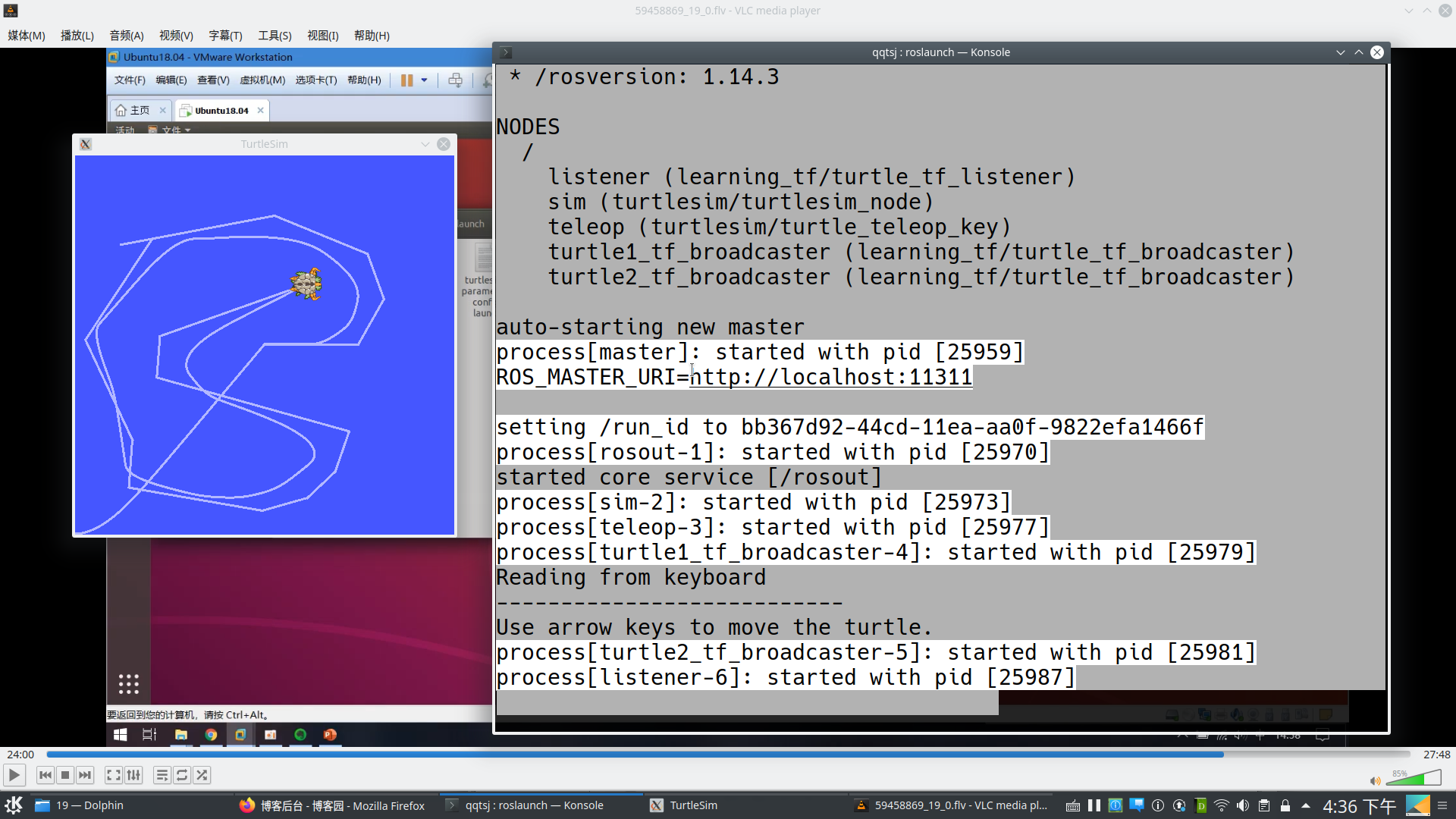
这个launch文件是上讲说的小海龟跟随实例,这里不需要开启5个终端,只需要运行对应的launch文件就可以了
qqtsj ~ roslaunch learning_launch start_tf_demo_c++.launch
... logging to /home/qqtsj/.ros/log/bb367d92-44cd-11ea-aa0f-9822efa1466f/roslaunch-qqtsj-Nitro-AN515-51-25949.log
Checking log directory for disk usage. This may take awhile.
Press Ctrl-C to interrupt
Done checking log file disk usage. Usage is <1GB. started roslaunch server http://qqtsj-Nitro-AN515-51:39467/ SUMMARY
======== PARAMETERS
* /rosdistro: melodic
* /rosversion: 1.14.3 NODES
/
listener (learning_tf/turtle_tf_listener)
sim (turtlesim/turtlesim_node)
teleop (turtlesim/turtle_teleop_key)
turtle1_tf_broadcaster (learning_tf/turtle_tf_broadcaster)
turtle2_tf_broadcaster (learning_tf/turtle_tf_broadcaster) auto-starting new master
process[master]: started with pid [25959]
ROS_MASTER_URI=http://localhost:11311 setting /run_id to bb367d92-44cd-11ea-aa0f-9822efa1466f
process[rosout-1]: started with pid [25970]
started core service [/rosout]
process[sim-2]: started with pid [25973]
process[teleop-3]: started with pid [25977]
process[turtle1_tf_broadcaster-4]: started with pid [25979]
Reading from keyboard
---------------------------
Use arrow keys to move the turtle.
process[turtle2_tf_broadcaster-5]: started with pid [25981]
process[listener-6]: started with pid [25987]
ros中launch启动文件的使用方法的更多相关文章
- ROS launch启动文件的理解与编写
博客参考:https://blog.csdn.net/weixin_41995979/article/details/81784987 和 https://www.cnblogs.com/zjiaxi ...
- 由浅到深理解ROS(5)- launch启动文件的理解与编写
ROS提供了一个同时启动节点管理器(master)和多个节点的途径,即使用启动文件(launch file).事实上,在ROS功能包中,启动文件的使用是非常普遍的.任何包含两个或两个以上节点的系统都可 ...
- 在TC(Total Commander)中添加启动Cygwin快捷键的方法
在TC(Total Commander)中添加启动Cygwin快捷键的方法 1.在Cygwin的安装目录下,增加文件tc-cygwin.bat(例如C:\cygwin-177\tc-cygwin.ba ...
- 在.net中读写config文件的各种方法
阅读目录 开始 config文件 - 自定义配置节点 config文件 - Property config文件 - Element config文件 - CDATA config文件 - Collec ...
- 在.net中读写config文件的各种方法(自定义config节点)
http://www.cnblogs.com/fish-li/archive/2011/12/18/2292037.html 阅读目录 开始 config文件 - 自定义配置节点 config文件 - ...
- 在.net中读写config文件的各种方法【转】
今天谈谈在.net中读写config文件的各种方法. 在这篇博客中,我将介绍各种配置文件的读写操作. 由于内容较为直观,因此没有过多的空道理,只有实实在在的演示代码, 目的只为了再现实战开发中的各种场 ...
- 【AT91SAM3S】英蓓特EM-SAM3S开发板例子工程中的启动文件分析
手上一块英倍特的EM-SAM3S开发板,拿到已经有一个月了.本来是做uLoong活动使用的板子,可当初由于不熟悉这个芯片,使用了STM32F4当作了替代.最近准备抽点时间折腾下这个板子. 这个板子的资 ...
- iOS:Xcode中SVN不能提交CocoaPods中的.a文件的解决方法
不能提交.a文件, 这个与SVN的配置有关, 其实与xcode倒没有关系. 解决方法: 1. 打开终端, 在命令行中输入: vi ~/.subversion/config 来打开配置文件.2. 然 ...
- ROS中.launch文件的remap标签详解
https://www.cnblogs.com/LiuQiang921202/p/7679943.html
随机推荐
- 基于FPGA的SPI FLASH控制器设计
1.SPI FLASH的基本特征 本文实现用FPGA来设计SPI FLASH,FLASH型号为W25Q128BV.支持3种通信方式,SPI.Dual SPI和Quad SPI.FLASH的存储单元无法 ...
- 洛谷$P2617\ Dynamic\ Rankings$ 整体二分
正解:整体二分 解题报告: 传送门$w$ 阿查询带修区间第$k$小不显然整体二分板子呗,,, 就考虑先按时间戳排序(,,,其实并不需要读入的时候就按着时间戳排的鸭$QwQ$ 每次二分出$mid$先把所 ...
- 如何根据HttpServletRequets获取用户真实IP地址
最近的一个项目的某个功能获取用户的ip地址,添加用户的系统使用记录. 我发现当我直接使用getRemoteAddr()方法从HttpServletRequet中获取用户的ip时,获取到的是服务器的ip ...
- 1029 旧键盘 (20 分)C、Java、python
题目描述 旧键盘上坏了几个键,于是在敲一段文字的时候,对应的字符就不会出现.现在给出应该输入的一段文字.以及实际被输入的文字,请你列出 肯定坏掉的那些键. 输入描述: 输入在2行中分别给出应该输入的文 ...
- 1043 输出PATest (20 分)C语言
给定一个长度不超过 10^4的.仅由英文字母构成的字符串.请将字符重新调整顺序,按 PATestPATest- 这样的顺序输出,并忽略其它字符.当然,六种字符的个数不一定是一样多的,若某种字符已经输 ...
- Spring Boot中利用递归算法查询到所有下级用户,并手动进行分页
Spring Boot中利用递归算法查询到所有下级用户,并手动进行分页 前提:语言用的是kotlin(和Java一样,但更简洁),写下这篇文章用来记录编程过程中遇到的一些难点 1.功能需求 前端用户A ...
- Eclipse直接运行算法第4版例子(重定向和读取指定路径文件)
Eclipse直接运行算法第4版例子(重定向和读取指定路径文件) 版权声明:本文为博主原创文章,遵循CC 4.0 BY-SA版权协议,转载请附上原文出处链接和本声明. 本文链接:https://b ...
- 【JavaWeb学习】过滤器Filter
一.简介 Filter也称之为过滤器,它是Servlet技术中最激动人心的技术,WEB开发人员通过Filter技术,对web服务器管理的所有web资源:例如Jsp, Servlet, 静态图片文件或静 ...
- Netty快速入门(10)Reactor与Netty
Reactor模式 Reactor是1995年由道格拉斯提出的一种高性能网络编程模式.由于好多年了,当时的一些概念与现在略有不同,reactor模式在网络编程中是非常重要的,可以说是NIO框架的典型模 ...
- 【转】ArcGIS Server 10.1 动态图层—更改风格
在 ArcGIS Server REST API中我们可以通过向Graphicslayer中添加临时图元的方法来完成对显示结果的渲染:如果仅仅是更改原有地图服务显示风格,在ArcGIS10.1下使用动 ...