
python学习记录(八)
0910--https://www.cnblogs.com/fnng/archive/2013/04/28/3048356.html
Python异常
Python用异常对象(exception object)来表示异常情况。遇到错误后。会引发异常。如果异常对象未被处理或捕捉,程序就会用所谓的回溯(Traceback,一种错误信息)终止执行:
>>> 1/0

Traceback (most recent call last):

  File "<pyshell#0>", line 1, in <module>

    1/0

ZeroDivisionError: division by zero
raise语句
为了引发异常,可以使用一个类(Exception的子类)或者实例参数调用raise语句。下面的例子使用内建的Exception异常类:
>>> raise Exception('hyperdrive overload')

Traceback (most recent call last):

  File "<pyshell#2>", line 1, in <module>

    raise Exception('hyperdrive overload')

Exception: hyperdrive overload
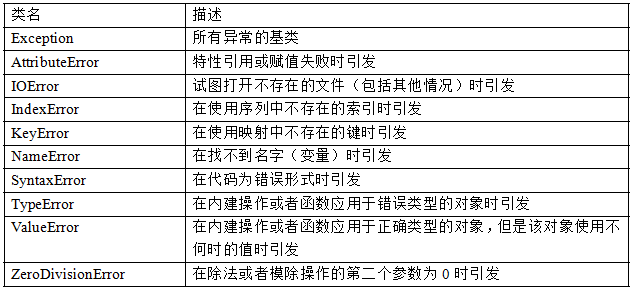
系统自带的内建异常类:
自定义异常
尽管内建的异常已经包括了大部分的情况,而且对于很多要求都已经足够了,但有些时候还是需要创建自己的异常类。
和其他类一样,只是要确保从Exception类继承,不管是直接继承还是间接继承。像下面这样:
>>> class someCustomException(Exception):pass
捕捉异常
使用try/except来实现异常的捕捉处理。
假设创建了一个让用户输入两个数,然后进行相除的程序:
try:

    x = int(input('Enter the first number:'))

    y = int(input('Enter the sencond number:'))

    z = x/y

    print(z)

except ZeroDivisionError:

    print('输入的数字不能为0!')

#输入

Enter the first number:1

Enter the sencond number:0

输入的数字不能为0!
假如,我们再调试的时候引发异常会好些,如果在与用户的进行交互的过程中又是不希望用户看到异常信息的。如何开启/关闭“屏蔽”机制?
class MuffledCalulator:

    muffled = False    #这里默认关闭屏蔽

    def calc(self,expr):

        try:

            return eval(expr)

        except ZeroDivisionError:

            if self.muffled:

                print ('Division by zero is illegal')

            else:

                raise

#运行程序:

>>> calculator = MuffledCalulator()

>>> calculator.calc('10/2')

5

>>> calculator.clac('10/0')

Traceback (most recent call last):

  File "<pyshell#30>", line 1, in <module>

    calculator.clac('10/0')

AttributeError: MuffledCalulator instance has no attribute 'clac'   #异常信息被输出了

>>> calculator.muffled = True   #现在打开屏蔽

>>> calculator.calc('10/0')

Divsion by zero is illagal
多个except子句
如果运行输入两个数,求除法程序,输入非数字的内容,还会产生另外一个异常:
try:

    x = int(input('Enter the first number:'))

    y = int(input('Enter the sencond number:'))

    z = x/y

    print(z)

except ZeroDivisionError:

    print('输入的数字不能为0!')

except ValueError:

    print('请输入数字')

#运行程序

Enter the first number: 10

Enter the second number: 'hello,word'

请输入数字!
一个块获取多个异常
try:

    x = int(input('Enter the first number:'))

    y = int(input('Enter the second number:'))

    print(x/y)

except (ZeroDivisionError,TypeError,NameError,ValueError):

    print("输入的内容有误,请输入非0数字!")

#运行程序

Enter the first number:1

Enter the second number:0

输入的内容有误,请输入非0数字!

#输入非数字

Enter the first number:a

输入的内容有误,请输入非0数字!
捕捉全部异常
就算以上处理了好几种异常,总有不小心忽略处理的情况,如果真想用一段代码捕捉所有异常,那么可在except子句中忽略所有的异常类:
try:

    x = int(input('Enter the first number:'))

    y = int(input('Enter the second number:'))

    print (x/y)

except:

    print ('Sorry,Please enter again!')

#运行程序

Enter the first number:1

Enter the second number:djfjshfjkd

Sorry,Please enter again!
加入循环,若用户输入了错误信息,允许重新输入
while True:

    try:

        x = int(input('Enter the first number:'))

        y = int(input('Enter the second number:'))

        value = x/y

        print ('x/y is',value)

        break

    except:

        print ('输入的内容无效,请重新输入!')

#执行程序

Enter the first number:a

输入的内容无效,请重新输入!

Enter the first number:

输入的内容无效,请重新输入!

Enter the first number:1

Enter the second number:0

输入的内容无效,请重新输入!

Enter the first number:1

Enter the second number:3

x/y is 0.3333333333333333
python学习记录(八)的更多相关文章
- Python学习记录day5
title: Python学习记录day5 tags: python author: Chinge Yang date: 2016-11-26 --- 1.多层装饰器 多层装饰器的原理是,装饰器装饰函 ...
- Python学习记录day6
title: Python学习记录day6 tags: python author: Chinge Yang date: 2016-12-03 --- Python学习记录day6 @(学习)[pyt ...
- python学习第八讲,python中的数据类型,列表,元祖,字典,之字典使用与介绍
目录 python学习第八讲,python中的数据类型,列表,元祖,字典,之字典使用与介绍.md 一丶字典 1.字典的定义 2.字典的使用. 3.字典的常用方法. python学习第八讲,python ...
- Python学习记录day8
目录 Python学习记录day8 1. 静态方法 2. 类方法 3. 属性方法 4. 类的特殊成员方法 4.1 __doc__表示类的描述信息 4.2 __module__ 和 __class__ ...
- Python学习记录day7
目录 Python学习记录day7 1. 面向过程 VS 面向对象 编程范式 2. 面向对象特性 3. 类的定义.构造函数和公有属性 4. 类的析构函数 5. 类的继承 6. 经典类vs新式类 7. ...
- Python学习记录:括号配对检测问题
Python学习记录:括号配对检测问题 一.问题描述 在练习Python程序题的时候,我遇到了括号配对检测问题. 问题描述:提示用户输入一行字符串,其中可能包括小括号 (),请检查小括号是否配对正确, ...
- 实验楼Python学习记录_挑战字符串操作
自我学习记录 Python3 挑战实验 -- 字符串操作 目标 在/home/shiyanlou/Code创建一个 名为 FindDigits.py 的Python 脚本,请读取一串字符串并且把其中所 ...
- 我的Python学习记录
Python日期时间处理:time模块.datetime模块 Python提供了两个标准日期时间处理模块:--time.datetime模块. 那么,这两个模块的功能有什么相同和共同之处呢? 一般来说 ...
- Python 学习记录
记录一些 学习python 的过程 -------------------------------------- 1. 初始学习 @2013年10月6日 今天开始学习python 了 遇到好多困难但是 ...
随机推荐
- linux(raspbian)下mysql的安装,权限设置和用户管理
一 MySQL安装:(1) 使用apt-get安装, 由于raspbian是基于Debian的自由操作系统,debian默认自带apt-get指令安装应用因此可以使用来安装 sudo apt-get ...
- 用python做推荐系统(一)
一.简介: 推荐系统是最常见的数据分析应用之一,包含淘宝.豆瓣.今日头条都是利用推荐系统来推荐用户内容.推荐算法的方式分为两种,一种是根据用户推荐,一种是根据商品推荐,根据用户推荐主要是找出和这个用户 ...
- 导出 CVS
function ExportStoreInfoAction() { set_time_limit(0); $table = "xd_store"; $res = [[...].. ...
- java实现阿里云短信服务发送验证码
由于做项目的时候遇到了接第三方短信服务,所以记录一下. 一.新建一个maven项目并导入相关依赖 <!--手机发送短信验证码--> <dependency> <group ...
- Redis-缓存穿透、缓存雪崩、缓存击穿、缓存一致性、并发竞争
缓存流程 在讲这五个问题之前,首先我们回顾下正常的缓存的使用流程 程序在处理请求时,会先从缓存中进行查询,如果缓存中没有对应的key,则会从数据库中查询,如果查询到结果,并将查询结果添加到缓存中去,反 ...
- 来自PTA Basic Level的三只小野兽
点我阅读原文 最近利用闲暇时间做了一下 PTA Basic Level[1] 里的题,里面现在一共有 95 道题,这些题大部分很基础,对于刷倦了 leetcode 的小伙伴可以去里面愉快的玩耍哦. 这 ...
- Manacher 学习
推荐博客 :https://blog.csdn.net/zzkksunboy/article/details/72600679 作用 线性时间解决最长回文子串问题. 思想 Manacher充分利用了回 ...
- Webpack实战(五):轻松读懂Webpack如何分离样式文件
在上一篇文章中我给大家分享了预处理器(loader),里面讲到了style-loader 和css-loader,有关样式引入的问题,但是上面的样式文件只是引入到style标签里面,并不是我想要的样式 ...
- Docker windows nanoserver/mysql镜像root用户密码错误
由于需要在Windows server上的Docker中部署mysql服务,为了方便起见所以在Docker hub找到了nanoserver/mysql (https://hub.docker.com ...
- 使用eNSP配置QinQ
参考链接:https://blog.csdn.net/alone_map/article/details/52217094 本文主要记录使用华为eNSP模拟器来实现配置QinQ,并对QinQ的报文进行 ...