
Leetcode500.Keyboard Row键盘行
给定一个单词列表,只返回可以使用在键盘同一行的字母打印出来的单词。键盘如下图所示。
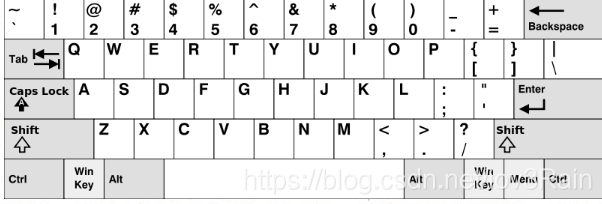
示例:
输入: ["Hello", "Alaska", "Dad", "Peace"] 输出: ["Alaska", "Dad"]
注意:
- 你可以重复使用键盘上同一字符。
- 你可以假设输入的字符串将只包含字母。
class Solution {

public:

    vector<string> findWords(vector<string>& words) {

        map<char, int> check;

        check['Q'] = 1;check['q'] = 1;

        check['W'] = 1;check['w'] = 1;

        check['E'] = 1;check['e'] = 1;

        check['R'] = 1;check['r'] = 1;

        check['T'] = 1;check['t'] = 1;

        check['Y'] = 1;check['y'] = 1;

        check['U'] = 1;check['u'] = 1;

        check['I'] = 1;check['i'] = 1;

        check['O'] = 1;check['o'] = 1;

        check['P'] = 1;check['p'] = 1;

        check['A'] = 2;check['a'] = 2;

        check['S'] = 2;check['s'] = 2;

        check['D'] = 2;check['d'] = 2;

        check['F'] = 2;check['f'] = 2;

        check['G'] = 2;check['g'] = 2;

        check['H'] = 2;check['h'] = 2;

        check['J'] = 2;check['j'] = 2;

        check['K'] = 2;check['k'] = 2;

        check['L'] = 2;check['l'] = 2;

        check['Z'] = 3;check['z'] = 3;

        check['X'] = 3;check['x'] = 3;

        check['C'] = 3;check['c'] = 3;

        check['V'] = 3;check['v'] = 3;

        check['B'] = 3;check['b'] = 3;

        check['N'] = 3;check['n'] = 3;

        check['M'] = 3;check['m'] = 3;

        vector<string> res;

        int len = words.size();

        for(int i = 0; i < len; i++)

        {

            int flag = true;

            int temp = check[words[i][0]];

            for(int j = 0; j < words[i].size(); j++)

            {

                if(check[words[i][j]] != temp)

                {

                    flag =false;

                    break;

                }

            }

            if(flag)

                res.push_back(words[i]);

        }

        return res;

    }

};
Leetcode500.Keyboard Row键盘行的更多相关文章
- [LeetCode] Keyboard Row 键盘行
Given a List of words, return the words that can be typed using letters of alphabet on only one row' ...
- [LeetCode] 500. Keyboard Row 键盘行
Given a List of words, return the words that can be typed using letters of alphabet on only one row' ...
- 500 Keyboard Row 键盘行
给定一个单词列表,只返回可以使用在键盘同一行的字母打印出来的单词. 详见:https://leetcode.com/problems/keyboard-row/description/ C++: cl ...
- Leetcode#500. Keyboard Row(键盘行)
题目描述 给定一个单词列表,只返回可以使用在键盘同一行的字母打印出来的单词.键盘如下图所示. 示例1: 输入: ["Hello", "Alaska", &quo ...
- 46. leetcode 500. Keyboard Row
500. Keyboard Row Given a List of words, return the words that can be typed using letters of alphabe ...
- LeetCode 键盘行-Python3.7<四>
500. 键盘行 题目网址:https://leetcode-cn.com/problems/keyboard-row/hints/ 给定一个单词列表,只返回可以使用在键盘同一行的字母打印出来的单词. ...
- LeetCode——Keyboard Row
LeetCode--Keyboard Row Question Given a List of words, return the words that can be typed using lett ...
- [LeetCode] 651. 4 Keys Keyboard 四键的键盘
Imagine you have a special keyboard with the following keys: Key 1: (A): Print one 'A' on screen. Ke ...
- Week4 - 500.Keyboard Row & 557.Reverse Words in a String III
500.Keyboard Row & 557.Reverse Words in a String III 500.Keyboard Row Given a List of words, ret ...
随机推荐
- 18-1-函数中this的指向
<!DOCTYPE html> <html lang="en"> <head> <meta charset="UTF-8&quo ...
- 13-5-let和()的作用域
<!DOCTYPE html> <html lang="en"> <head> <meta charset="UTF-8&quo ...
- Linux-c对一个十六进制数的某一位取反
enum SWITCH_FLAG { SWITCH_ALL_FLAG = , SWITCH_WEB_FLAG = , …… } unsigned int switch_by_bit_value = 0 ...
- Luogu P1039 侦探推理(模拟+枚举)
P1039 侦探推理 题意 题目描述 明明同学最近迷上了侦探漫画<柯南>并沉醉于推理游戏之中,于是他召集了一群同学玩推理游戏.游戏的内容是这样的,明明的同学们先商量好由其中的一个人充当罪犯 ...
- 初探Remax微信小程序
1.创建项目 npx degit remaxjs/template-wechat my-app cd my-app && npm install 2.运行项目 npm run dev ...
- 环信Demo 导入错误
今天想导入环信的Demo 去看一看环信学习一下 谁知道导入出现这么个问题 Error:(1, 0) Minimum supported Gradle version is 3.3. Current v ...
- [ javasript ] javascript中的each遍历!
1.数组中的each var arr = [ "one", "two", "three", "four"]; $.eac ...
- Windows相关命令
1.查看端口8080被哪个进程占用 netstat -ano | findstr "8080" 2.查看进程号为5768对应的进程 tasklist | findstr " ...
- logcat日志文件
android日志系统提供了记录和查看系统调试信息的功能,日志都是从各个软件和一些系统的缓冲区中记录下来的,缓冲区可以通过logcat命令来进行查看和使用 开发者选项,有个选项叫做“日志记录器缓冲区大 ...
- Java 多线程同步和异步详解
java线程 同步与异步 线程池 1)多线程并发时,多个线程同时请求同一个资源,必然导致此资源的数据不安全,A线程修改了B线 程的处理的数据,而B线程又修改了A线程处理的数理.显然这是由于全局资源造成 ...