
Spring与RestHighLevelClient
- Elasticsearch连接方式有两种;分别为TCP协议与HTTP协议
最近使用es比较多,之前使用一直是使用spring封装的spring-data-elasticsearch;关于spring-data-elasticsearch有以下几点比较难受:
基于TCP协议的使用(不确定是否支持http, 公司XX云大佬推荐使用HTTP协议,好像是官方推荐?)
版本对应比较恶心人
不好用
基于以上几点,索性抛弃spring-data-elasticsearch,自己造轮子;
根据 官方文档 描述,我们选择使用RestHighLevelClient来实现es基础查询;
官方描述:
The Java REST Client comes in 2 flavors:
Java Low Level REST Client: the official low-level client for Elasticsearch. It allows to communicate with an Elasticsearch cluster through http. Leaves requests marshalling and responses un-marshalling to users. It is compatible with all Elasticsearch versions.
Java High Level REST Client: the official high-level client for Elasticsearch. Based on the low-level client, it exposes API specific methods and takes care of requests marshalling and responses un-marshalling.
提供Java Low Level REST Client 版本和 Java High Level REST Client 版本:
- Java Low Level REST Client 与所有Elasticsearch版本兼容(版本问题舒服)
- 通过HTTP协议与Elasticsearch集群进行通信(大佬推荐)
- Java High Level REST Client 是基于Java Low Level REST Client 版本实现更多高级API
很显然我们选择RestHighLevelClient
Spring整合RestHighLevelClient
构建ElasticsearchClient
- 查看RestHighLevelClient构造器可以发现可以使用RestClientBuilder来构建,简单demo如下
    /**

     * 连接超时时间

     */

    private final static int CONNECT_TIMEOUT = 5000;

    /**

     * 连接超时时间

     */

    private final static int SOCKET_TIMEOUT = 40000;

    /**

     * 获取连接的超时时间

     */

    private final static int CONNECTION_REQUEST_TIMEOUT = 1000;

    /**

     * 最大连接数

     */

    private final static int MAX_CONNECT_NUM = 100;

    /**

     * 最大路由连接数

     */

    private final static int MAX_CONNECT_ROUTE = 100;

    @Bean(name = "elasticsearchClient", destroyMethod = "close")

    public RestHighLevelClient client() {

        RestClientBuilder builder = RestClient.builder(new HttpHost("host", "port", "http"));

        // 配置一些请求配置的参数

        builder.setRequestConfigCallback(requestConfigBuilder -> {

            requestConfigBuilder.setConnectTimeout(CONNECT_TIMEOUT);

            requestConfigBuilder.setSocketTimeout(SOCKET_TIMEOUT);

            requestConfigBuilder.setConnectionRequestTimeout(CONNECTION_REQUEST_TIMEOUT);

            return requestConfigBuilder;

        });

        // 配置一些httpClient的参数

        builder.setHttpClientConfigCallback(httpClientBuilder -> {

            httpClientBuilder.setMaxConnTotal(MAX_CONNECT_NUM);

            httpClientBuilder.setMaxConnPerRoute(MAX_CONNECT_ROUTE);

            return httpClientBuilder;

        });

        builder.setFailureListener(new RestClient.FailureListener(){

            @Override

            public void onFailure(HttpHost host) {

                // TODO do something when failed

                super.onFailure(host);

            }

        });

        return new RestHighLevelClient(builder);

    }
- 支持一些回调与参数的配置,具体的API可自行查看RestClientBuilder的源码
- 配置完client后我们可以使用client造一些简单的轮子, 如es默认查询只可以查询1000条数据,我们可以封装查询所有数据
    public List<SearchHit> searchAll(SearchRequest searchRequest) {

        try {

            List<SearchHit> hits = new ArrayList<>(16);

            int maxNum = searchRequest.source().size();

            searchRequest.scroll(TimeValue.timeValueMinutes(10));

            SearchResponse search = client.search(searchRequest);

            hits.addAll(Arrays.asList(search.getHits().getHits()));

            while (search.getHits().getHits().length == maxNum) {

                SearchScrollRequest searchScrollRequest = new SearchScrollRequest(search.getScrollId());

                searchScrollRequest.scroll(TimeValue.timeValueMinutes(10));

                search = client.searchScroll(searchScrollRequest);

                hits.addAll(Arrays.asList(search.getHits().getHits()));

            }

            return hits;

        } catch (IOException e) {

            log.error("Get message error.", e);

            return null;

        }

    }
- 有了以上接口,我们可以查询一些常用数据,如以下为查询数据的简单使用:
        BoolQueryBuilder boolBuilder = QueryBuilders.boolQuery();

        boolBuilder.filter(QueryBuilders.termQuery("type", 0));

        boolBuilder.filter(QueryBuilders.termsQuery("id.keyword", id));

        RangeQueryBuilder rangeQueryBuilder = QueryBuilders.rangeQuery("createTime");

        rangeQueryBuilder.gte(startTime);

        rangeQueryBuilder.lte(endTime);

        boolBuilder.filter(rangeQueryBuilder);

        SearchSourceBuilder sourceBuilder = new SearchSourceBuilder();

        sourceBuilder.size(9999);

        sourceBuilder.fetchSource(new String[]{"field1", "field2", "field3"}, new String[]{});

        sourceBuilder.query(boolBuilder);

        SearchRequest searchRequest = new SearchRequest("index");

        searchRequest.source(sourceBuilder);

        List<SearchHit> searchHits = repository.searchAll(searchRequest);
- 具体API使用可查看官方文档
更新于2019-10-28
IndexRequest indexRequest = new IndexRequest(index, type, id);

indexRequest.source(entityMapper.mapToString(map), Requests.INDEX_CONTENT_TYPE);

return client.index(indexRequest);
官方API中IndexRequest提供以下几种source方法:
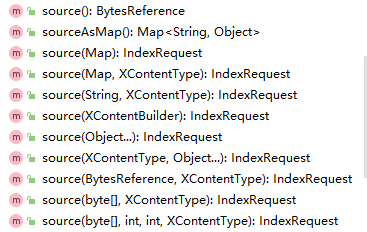
- 值得注意的是source(Map source) 与 source(Map source, XContentType contentType) 方法,对于Map的传参,会进行类型校验;
- 源码如下:
 public IndexRequest source(Map source, XContentType contentType) throws ElasticsearchGenerationException {

     try {

         XContentBuilder builder = XContentFactory.contentBuilder(contentType);

         builder.map(source);

         return source(builder);

     } catch (IOException e) {

         throw new ElasticsearchGenerationException("Failed to generate [" + source + "]", e);

     }

 }
其中builder.map中的unknownValue方法会遍历参数进行逐一校验:
源码如下:
   private XContentBuilder map(Map<String, ?> values, boolean ensureNoSelfReferences) throws IOException {

       if (values == null) {

           return this.nullValue();

       } else {

           if (ensureNoSelfReferences) {

               ensureNoSelfReferences(values);

           }

           this.startObject();

           Iterator var3 = values.entrySet().iterator();

           while(var3.hasNext()) {

               Entry<String, ?> value = (Entry)var3.next();

               this.field((String)value.getKey());

               this.unknownValue(value.getValue(), false);

           }

           this.endObject();

           return this;

       }

   }
- 检验方法源码
    private void unknownValue(Object value, boolean ensureNoSelfReferences) throws IOException {

        if (value == null) {

            this.nullValue();

        } else {

            XContentBuilder.Writer writer = (XContentBuilder.Writer)WRITERS.get(value.getClass());

            if (writer != null) {

                writer.write(this, value);

            } else if (value instanceof Path) {

                this.value((Path)value);

            } else if (value instanceof Map) {

                Map<String, ?> valueMap = (Map)value;

                this.map(valueMap, ensureNoSelfReferences);

            } else if (value instanceof Iterable) {

                this.value((Iterable)value, ensureNoSelfReferences);

            } else if (value instanceof Object[]) {

                this.values((Object[])value, ensureNoSelfReferences);

            } else if (value instanceof ToXContent) {

                this.value((ToXContent)value);

            } else {

                if (!(value instanceof Enum)) {

                    throw new IllegalArgumentException("cannot write xcontent for unknown value of type " + value.getClass());

                }

                this.value(Objects.toString(value));

            }

        }

    }
- 为了避免这个坑,可以使用jsonString来规避,具体使用如下:
	IndexRequest indexRequest = new IndexRequest(index, type, id);

        indexRequest.source(JSON.toJSONString(map), Requests.INDEX_CONTENT_TYPE);

        client.index(indexRequest);
Spring与RestHighLevelClient的更多相关文章
- springboot使用RestHighLevelClient批量插入
1.引入maven(注意版本要一致) <dependency> <groupId>org.springframework.boot</groupId> <ar ...
- elasticsearch系列七:ES Java客户端-Elasticsearch Java client(ES Client 简介、Java REST Client、Java Client、Spring Data Elasticsearch)
一.ES Client 简介 1. ES是一个服务,采用C/S结构 2. 回顾 ES的架构 3. ES支持的客户端连接方式 3.1 REST API ,端口 9200 这种连接方式对应于架构图中的RE ...
- Elasticsearch Java client(ES Client 简介、Java REST Client、Java Client、Spring Data Elasticsearch)
elasticsearch系列七:ES Java客户端-Elasticsearch Java client(ES Client 简介.Java REST Client.Java Client.Spri ...
- elasticsearch RestHighLevelClient 使用方法及封装工具
目录 EsClientRHL 更新日志 开发原因: 使用前你应该具有哪些技能 工具功能范围介绍 工具源码结构介绍 开始使用 未来规划 git地址:https://gitee.com/zxporz/ES ...
- ElasticSearch使用RestHighLevelClient进行搜索查询
Elasticsearch Java API有四类client连接方式:TransportClient. RestClient .Jest. Spring_Data_Elasticsearch.其中 ...
- ElasticSearch RestHighLevelClient 通用操作
项目中使用到ElasticSearch作为搜索引擎.而ES的环境搭建自然是十分简单,且本身就适应于分布式环境,因此这块就不多赘述.而其本身特性和查询语句这篇博文不会介绍,如果有机会会深入介绍. 所 ...
- 20191127 Spring Boot官方文档学习(4.11)
4.11.使用NoSQL技术 Spring Data提供了其他项目来帮助您访问各种NoSQL技术,包括: Redis MongoDB Neo4J Solr Elasticsearch Cassandr ...
- 3.3_springBoot2.1.x检索之RestHighLevelClient方式
1.版本依赖 注意对 transport client不了解先阅读官方文档: transport client(传送门) 这里需要版本匹配,如失败查看官网或百度. pom.xml <?xml v ...
- Spring Boot 教程 - Elasticsearch
1. Elasticsearch简介 Elasticsearch是一个基于Lucene的搜索服务器.它提供了一个分布式多用户能力的全文搜索引擎,基于RESTful web接口.Elasticsearc ...
随机推荐
- 【干货】Python基础——列表
1.列表的创建 列表是多个.有序.可重复的元素集合,数据包装在“[]”里,列表中的元素可以是任何类型,甚至可以是一个列表.创建列表有两种方法: A 对于规模比较小的列表可以直接定义和赋值,列表可以嵌套 ...
- C# 调用WCF服务的两种方法
项目简介 之前领导布置一个做单点登录的功能给我,实际上就是医院想做一个统一的平台来实现在这个统一的平台登录后不需要在His.Emr.Lis等系统一个个登录,直接可以登录到对应的系统,然后进行相应的操作 ...
- C#_Excel数据读取与写入_自定义解析封装类_支持设置标题行位置&使用excel表达式收集数据&单元格映射&标题映射&模板文件的参数数据替换
本篇博客园是被任务所逼,而已有的使用nopi技术的文档技术经验又不支持我需要的应对各种复杂需求的苛刻要求,只能自己造轮子封装了,由于需要应对很多总类型的数据采集需求,因此有了本篇博客的代码封装,下面一 ...
- 在Idea中jdk11和jdk8环境变量的切换
先配置好jdk11和jdk8环境变量 idea(2019.3)中jdk版本切换(jdk8和jdk11) 快捷键ctrl + shift + alt +s ,将jdk11修改为jdk1.8 完成后,显示 ...
- 本地服务器热更新 插件 live-server
本地服务器热更新 插件 live-server 超级好用 强烈种草一波 无需安装到项目中 使用方法如下: 1.先全局安装live-server: npm i http-server -g 2.在需要热 ...
- java 和js 时间 格式化(yyyy-MM-dd HH:mm:ss) 以及获取当前时间
1.js var myDate = new Date(); myDate.getYear(); //获取当前年份(2位) myDate.getFullYear(); //获取完整的年份(4位,1970 ...
- 如何在CentOS上安装Tensorflow的gpu版本?
系统配置 系统版本: Centos7.6 语言: Python3.5(anaconda3 4.2) 框架: Tensorflow 安装依赖 sudo yum install openjdk-8-jdk ...
- 170.分组-group、permission、user的操作
分组 1.Group.objects.create(group_name):创建分组. 2.group.permissions:某个分组上的权限.多对多关系. (1)group.permissions ...
- B-S 期权定价模型
Black-Scholes 期权定价模型概述 1997年10月10日,第二十九届诺贝尔经济学奖授予了两位美国学者,哈佛商学院教授罗伯特·默顿(RoBert Merton)和斯坦福大学教授迈伦·斯克尔斯 ...
- 在windows系统下,配置vue项目一键启动文件
我的项目由客户端.后台管理.数据库和服务器三部分组件,每次启动项目都要一个一个启动,挺麻烦的,现在写一个.bat文件来批处理命令. 这个是我的启动文件内容. 第一行运行的我wampServer服务器, ...