
shelve模块、re模块
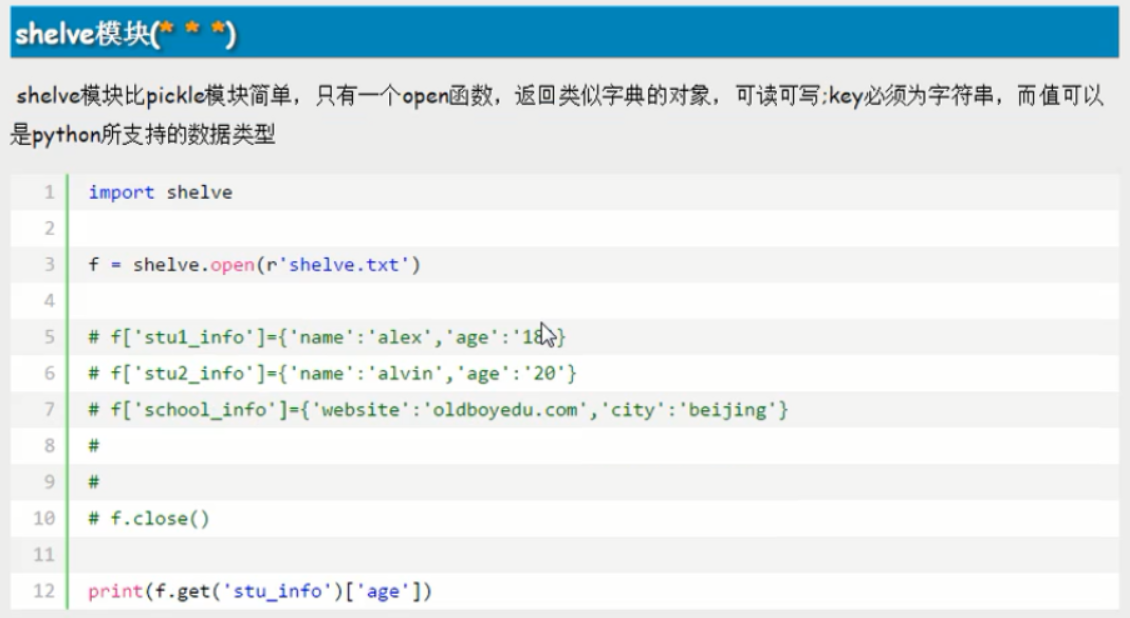
cnblogs.com/linhaifeng/articles/6384466.html#_label13

在模糊匹配时使用
一:什么是正则?
正则就是用一些具有特殊含义的符号组合到一起(称为正则表达式)来描述字符或者字符串的方法。或者说:正则就是用来描述一类事物的规则。(在Python中)它内嵌在Python中,并通过 re 模块实现。正则表达式模式被编译成一系列的字节码,然后由用 C 编写的匹配引擎执行。
生活中处处都是正则:
比如我们描述:4条腿
你可能会想到的是四条腿的动物或者桌子,椅子等
继续描述:4条腿,活的
就只剩下四条腿的动物这一类了
二:常用匹配模式(元字符)
http://blog.csdn.net/yufenghyc/article/details/51078107

import re

ret=re.findall('a..in','helloalvin')

print(ret)#['alvin']

ret=re.findall('^a...n','alvinhelloawwwn')

print(ret)#['alvin']

ret=re.findall('a...n$','alvinhelloawwwn')

print(ret)#['awwwn']

ret=re.findall('a...n$','alvinhelloawwwn')

print(ret)#['awwwn']

ret=re.findall('abc*','abcccc')#贪婪匹配[0,+oo]

print(ret)#['abcccc']

ret=re.findall('abc+','abccc')#[1,+oo]

print(ret)#['abccc']

ret=re.findall('abc?','abccc')#[0,1]

print(ret)#['abc']

ret=re.findall('abc{1,4}','abccc')

print(ret)#['abccc'] 贪婪匹配
注意:前面的*,+,?等都是贪婪匹配,也就是尽可能匹配,后面加?号使其变成惰性匹配
ret=re.findall('abc*?','abcccccc')

print(ret)#['ab']
元字符之字符集[]:或
在字符集里有功能的符号: - ^ \
#--------------------------------------------字符集[]

ret=re.findall('a[bc]d','acd')

print(ret)#['acd']

ret=re.findall('[a-z]','acd')

print(ret)#['a', 'c', 'd']

ret=re.findall('[.*+]','a.cd+')

print(ret)#['.', '+']

#在字符集里有功能的符号: - ^ \

ret=re.findall('[1-9]','45dha3')

print(ret)#['4', '5', '3']

ret=re.findall('[^ab]','45bdha3')#^在这里表示非

print(ret)#['4', '5', 'd', 'h', '3']

ret=re.findall('[\d]','45bdha3')

print(ret)#['4', '5', '3']
re.findall('\([^()]*\)','12+(34*6+2-5*(2-1))')

['(2-1)']
元字符之转义符\
反斜杠后边跟元字符去除特殊功能,比如\.
反斜杠后边跟普通字符实现特殊功能,比如\d
\d 匹配任何十进制数;它相当于类 [0-9]。
\D 匹配任何非数字字符;它相当于类 [^0-9]。
\s 匹配任何空白字符;它相当于类 [ \t\n\r\f\v]。
\S 匹配任何非空白字符;它相当于类 [^ \t\n\r\f\v]。
\w 匹配任何字母数字字符;它相当于类 [a-zA-Z0-9_]。
\W 匹配任何非字母数字字符;它相当于类 [^a-zA-Z0-9_]
\b 匹配一个特殊字符边界,比如空格 ,&,#等
ret=re.findall('I\b','I am LIST')

print(ret)#[]

ret=re.findall(r'I\b','I am LIST')

print(ret)#['I']
#-----------------------------eg1:

import re

ret=re.findall('c\l','abc\le')

print(ret)#[]

ret=re.findall('c\\l','abc\le')

print(ret)#[]

ret=re.findall('c\\\\l','abc\le')

print(ret)#['c\\l']

ret=re.findall(r'c\\l','abc\le')

print(ret)#['c\\l']

#-----------------------------eg2:

#之所以选择\b是因为\b在ASCII表中是有意义的

m = re.findall('\bblow', 'blow')

print(m)

m = re.findall(r'\bblow', 'blow')

print(m)

元字符之分组()
m = re.findall(r'(ad)+', 'add')

print(m)

ret=re.search('(?P<id>\d{2})/(?P<name>\w{3})','23/com')

print(ret.group())#23/com

print(ret.group('id'))#23
元字符之|
ret=re.search('(ab)|\d','rabhdg8sd')

print(ret.group())#ab
re模块下的常用方法
(?P< >)分组
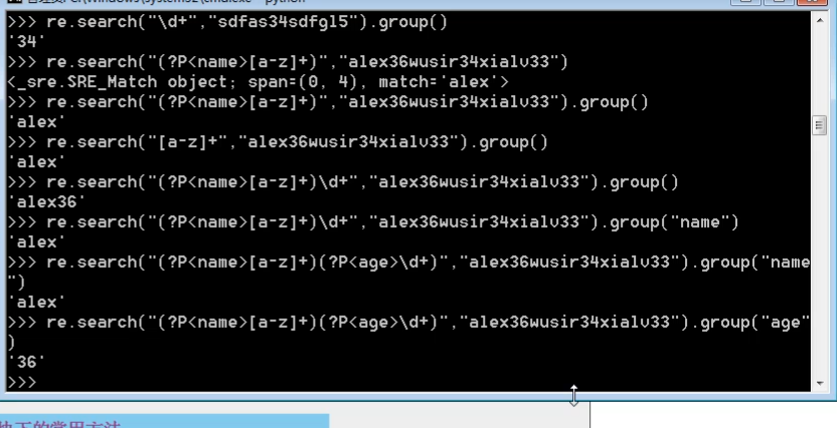
import re

#1

re.findall('a','alvin yuan')    #返回所有满足匹配条件的结果,放在列表里

#2

re.search('a','alvin yuan').group()  #函数会在字符串内查找模式匹配,只到找到第一个匹配然后返回一个包含匹配信息的对象,该对象可以

                                     # 通过调用group()方法得到匹配的字符串,如果字符串没有匹配,则返回None。

#3

re.match('a','abc').group()     #同search,不过尽在字符串开始处进行匹配

#4

ret=re.split('[ab]','abcd')     #先按'a'分割得到''和'bcd',在对''和'bcd'分别按'b'分割

print(ret)#['', '', 'cd']

#5

ret=re.sub('\d','abc','alvin5yuan6',1)      #用于替换字符串中的匹配项,1为次数

print(ret)#alvinabcyuan6

ret=re.subn('\d','abc','alvin5yuan6')             #得到次数

print(ret)#('alvinabcyuanabc', 2)

#6

obj=re.compile('\d{3}')               #compile 函数用于编译正则表达式,生成一个正则表达式( Pattern )对象,供 match() 和 search() 这两个函数使用。#相当于提前写好匹配规则

ret=obj.search('abc123eeee')

print(ret.group())#123
import re

ret=re.findall('www.(baidu|oldboy).com','www.oldboy.com')

print(ret)#['oldboy']     这是因为findall会优先把匹配结果组里内容返回,如果想要匹配结果,取消权限即可

ret=re.findall('www.(?:baidu|oldboy).com','www.oldboy.com')    #去优先级

print(ret)#['www.oldboy.com']
import re

print(re.findall("<(?P<tag_name>\w+)>\w+</(?P=tag_name)>","<h1>hello</h1>"))

print(re.search("<(?P<tag_name>\w+)>\w+</(?P=tag_name)>","<h1>hello</h1>"))

print(re.search(r"<(\w+)>\w+</\1>","<h1>hello</h1>"))

#匹配出所有的整数

import re

#ret=re.findall(r"\d+{0}]","1-2*(60+(-40.35/5)-(-4*3))")

ret=re.findall(r"-?\d+\.\d*|(-?\d+)","1-2*(60+(-40.35/5)-(-4*3))")

ret.remove("")

print(ret)
re.finditer
和 findall 类似,在字符串中找到正则表达式所匹配的所有子串,并把它们作为一个迭代器返回。
https://www.cnblogs.com/yuanchenqi/articles/5732581.html
1
shelve模块、re模块的更多相关文章
- Python(文件、文件夹压缩处理模块,shelve持久化模块,xml处理模块、ConfigParser文档配置模块、hashlib加密模块,subprocess系统交互模块 log模块)
OS模块 提供对操作系统进行调用的接口 os.getcwd() 获取当前工作目录,即当前python脚本工作的目录路径 os.chdir("dirname") 改变当前脚本工作目 ...
- Python学习笔记——基础篇【第六周】——json & pickle & shelve & xml处理模块
json & pickle 模块(序列化) json和pickle都是序列化内存数据到文件 json和pickle的区别是: json是所有语言通用的,但是只能序列化最基本的数据类型(字符串. ...
- s14 第5天 时间模块 随机模块 String模块 shutil模块(文件操作) 文件压缩(zipfile和tarfile)shelve模块 XML模块 ConfigParser配置文件操作模块 hashlib散列模块 Subprocess模块(调用shell) logging模块 正则表达式模块 r字符串和转译
时间模块 time datatime time.clock(2.7) time.process_time(3.3) 测量处理器运算时间,不包括sleep时间 time.altzone 返回与UTC时间 ...
- 序列化模块— json模块,pickle模块,shelve模块
json模块 pickle模块 shelve模块 序列化——将原本的字典.列表等内容转换成一个字符串的过程就叫做序列化. # 序列化模块 # 数据类型转化成字符串的过程就是序列化 # 为了方便存储和网 ...
- shelve模块,sys模块,logging模块
1.shelve模块 用于序列化的模块,shelve模块比pickle模块简单,只有open函数,返回类似字典的对象,可读可写;key必须为字符串,而值可以是python所支持的数据类型. impor ...
- 常用模块:re ,shelve与xml模块
一 shelve模块: shelve模块比pickle模块简单,只有一个open函数,所以使用完之后要使用f.close关闭文件.返回类似字典的对象,可读可写;key必须为字符串,而值可以是pytho ...
- python 常用模块 time random os模块 sys模块 json & pickle shelve模块 xml模块 configparser hashlib subprocess logging re正则
python 常用模块 time random os模块 sys模块 json & pickle shelve模块 xml模块 configparser hashlib subprocess ...
- python-Day5-深入正则表达式--冒泡排序-时间复杂度 --常用模块学习:自定义模块--random模块:随机验证码--time & datetime模块
正则表达式 语法: mport re #导入模块名 p = re.compile("^[0-9]") #生成要匹配的正则对象 , ^代表从开头匹配,[0 ...
- Python第十四天 序列化 pickle模块 cPickle模块 JSON模块 API的两种格式
Python第十四天 序列化 pickle模块 cPickle模块 JSON模块 API的两种格式 目录 Pycharm使用技巧(转载) Python第一天 安装 shell 文件 Py ...
- day 20 - 1 序列化模块,模块的导入
序列化模块 首先我们来看一个序列:'sdfs45sfsgerg4454287789sfsf&*0' 序列 —— 就是字符串序列化 —— 从数据类型 --> 字符串的过程反序列化 —— 从 ...
随机推荐
- c50决策树借款风险
Decision Trees/ Machine Learning Durga Gaddam August 29, 2016 Objective: The objective of the articl ...
- github怎样改动源代码并进行提交方法小结
/********************************************************************* * Author : Samson * Date ...
- asp.net抓取网页html源代码失败 只因UserAgent作怪
asp.net抓取网页html源代码,我想对于任何一个asp.net程序员来说都不再陌生,这是一个非常简单容易就能实现的功能.下面便是一个通用的asp.net获得网页源代码的程序. 首先引用 usin ...
- MyEclipse2016项目内复制一个项目,如何更改项目的访问路径
在MyEclipse2010版本如果复制了一个项目,需要改项目的访问路径的话,可以选中项目右键,点开Properties,在顶部搜索web,就会出现如下内容,这是只需要在里面更改路径就可以了. 而在2 ...
- npm基础用法
一. 安装 npm基于nodejs,因此应该先安装nodejs 可在nodejs官网中下载安装 我们一般选择安装稳定版,即长期支持版 安装过程很简单,和普通的软件一样,一直 下一步 就好了 nodej ...
- springboot&mybatis 增删改查系列(一)
创建父项目 首先,我们需要创建一个Maven项目. 在这个项目的pom文件中加入以下几个依赖: <!-- spring boot --> <parent> <groupI ...
- H3C V.35接口线缆
- Pytorch | BERT模型实现,提供转换脚本【横扫NLP】
<谷歌终于开源BERT代码:3 亿参数量,机器之心全面解读>,上周推送的这篇文章,全面解读基于TensorFlow实现的BERT代码.现在,PyTorch用户的福利来了:一个名为Huggi ...
- H3C ISDN DCC基本配置示例
- C#的循环语句(四)
一.while 循环(1).while 其实是for循环的变形写法for(int i = 1; i<=5;i++) {循环体:} 上面的for循环可以写成int i= 1:for(;i< ...