
ActiveReports 报表应用教程 (16)---报表导出
葡萄城ActiveReports报表支持多种格式的报表导出,包括PDF、Excel、Word、RTF、HTML、Text、TIFF以及其它图片格式,用户可以将它们应用到Windows Forms、Web、WPF、Silverlight等应用系统中。
在专业版的葡萄城ActiveReports报表里,对PDF格式的数据输出又有了增强功能。现在用户可以将不可见的数字签名或者可见的文字图案加入到报表里。通过多种属性对数字签名进行个性化设置, 用数字签名验证报表作者,还可通过Certification Level 来设定用户访问权限。用时间印章功能建立第三方授权版本。这些新功能完全和Adobe的新安全机制兼容。
本文以客户订单为例演示如何将葡萄城ActiveReports报表导出为各种格式。
1、创建报表文件
在应用程序中创建一个名为 rptInvoice.rdlx 的 ActiveReports 报表文件,使用的项目模板为 ActiveReports 页面报表。
2、打开报表资源管理器,并按照以下信息创建报表数据源
| 名称: | NWind_CHS |
| 类型: | Micorsoft OleDb Provider |
| OLE DB 提供程序: | Microsoft.Jet.OLEDB.4.0 |
| 服务器或文件名称: | Data\NWind_CHS.mdb |
3、 添加数据集
在新建的 NWind_CHS 数据源上鼠标右键并选择添加数据集菜单项,添加以下两个数据集:
常规-名称:OrderDetails
查询-查询:
SELECT TOP 10 订单.订单ID, 订单.客户ID, 订单.订购日期, 产品.产品名称, 订单明细.数量, 订单明细.单价, 订单明细.折扣, 订单.货主城市, 订单.货主地址, 订单.货主名称, 订单.货主邮政编码, 客户.电话
FROM ((订单 INNER JOIN 订单明细 ON 订单.订单ID = 订单明细.订单ID) INNER JOIN 产品 ON 订单明细.产品ID = 产品.产品ID) INNER JOIN 客户 ON 订单.客户ID = 客户.客户ID
ORDER BY 订单.订购日期 DESC;
4、设计报表界面
4.1、选中报表文件,并设置以下属性:
| 常规-数据集名称: | OrderDetails |
| 分组: | 名称:FixedPage1_Group 表达式:=[订单ID] |
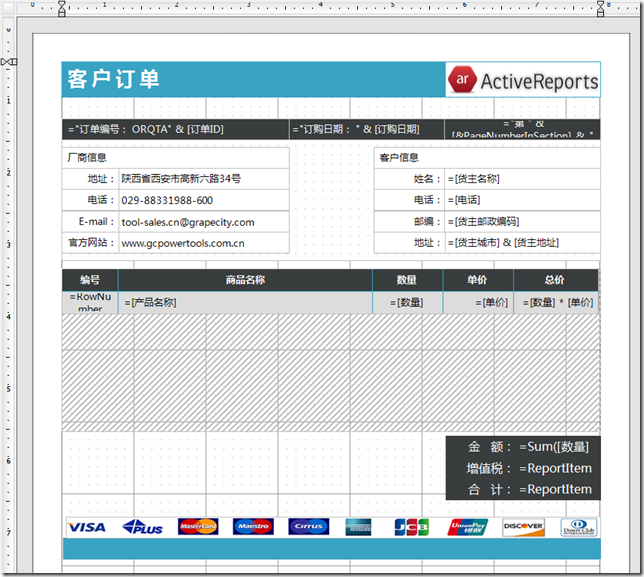
4.2、从 VS 中将 Table 控件添加到报表设计界面,并按照以下列表设置相应属性:
| 表格 | 属性 |
| DataSetname | OrderDetails |
| FixedSize | 19cm*15.75cm |
| RepeatHeaderOnNewPage | True |
| RepeatToFill | True |
| 单元格 | 属性 |
| Cells[2,1] | Value:=RowNumber("Table1") |
| Cells[2,2] | Value:=Fields!产品名称.Value |
| Cells[2,3] | Value:=Fields!数量.Value |
| Cells[2,4] | Value:=Fields!单价.Value |
| Cells[2,5] | Value:=Fields!数量.Value * Fields!单价.Value |
| 合计单元格 | 属性 |
| TextBox38 | Value:=Sum(Fields!数量.Value * Fields!单价.Value,"FixedPage1_Group") |
| TextBox42 | Value:=ReportItems!TextBox38.Value * 0.17 |
| TextBox39 | Value:=ReportItems!TextBox38.Value + ReportItems!TextBox42.Value |
最终设计界面如下:
5、添加报表导出功能
5.1、Excel导出代码:
protected void btnExcel_Click(object sender, EventArgs e)
{
GrapeCity.ActiveReports.PageReport _reportDef = new GrapeCity.ActiveReports.PageReport(new System.IO.FileInfo(Server.MapPath("../") + "Reports/" + report + ".rdlx"));
_reportDef.Report.DataSources[0].DataSourceReference = Server.MapPath("../Data/NWind_CHS_Access.rdsx");
GrapeCity.ActiveReports.Document.PageDocument _reportRuntime = new GrapeCity.ActiveReports.Document.PageDocument(_reportDef);
GrapeCity.ActiveReports.Export.Excel.Section.XlsExport XlsExport1 = new GrapeCity.ActiveReports.Export.Excel.Section.XlsExport();
System.IO.MemoryStream ms = new System.IO.MemoryStream();
XlsExport1.FileFormat = GrapeCity.ActiveReports.Export.Excel.Section.FileFormat.Xlsx;
XlsExport1.Export(_reportRuntime, ms);
Response.ContentType = "application/vnd.openxmlformats-officedocument.spreadsheetml.sheet";
Response.AddHeader("content-disposition", Server.UrlPathEncode("attachment;filename=客户订单.xlsx"));
Response.BinaryWrite(ms.ToArray());
Response.End();
}
5.2、Word导出代码:
protected void btnWord_Click(object sender, EventArgs e)
{
GrapeCity.ActiveReports.PageReport _reportDef = new GrapeCity.ActiveReports.PageReport(new System.IO.FileInfo(Server.MapPath("../") + "Reports/" + report + ".rdlx"));
_reportDef.Report.DataSources[0].DataSourceReference = Server.MapPath("../Data/NWind_CHS_Access.rdsx");
GrapeCity.ActiveReports.Document.PageDocument _reportRuntime = new GrapeCity.ActiveReports.Document.PageDocument(_reportDef);
GrapeCity.ActiveReports.Export.Word.Page.WordRenderingExtension _renderingExtension = new GrapeCity.ActiveReports.Export.Word.Page.WordRenderingExtension();
GrapeCity.ActiveReports.Rendering.IO.MemoryStreamProvider _provider = new GrapeCity.ActiveReports.Rendering.IO.MemoryStreamProvider();
GrapeCity.ActiveReports.Export.Word.Page.Settings s = new GrapeCity.ActiveReports.Export.Word.Page.Settings();
s.UseMhtOutput = true;
_reportRuntime.Render(_renderingExtension, _provider, s);
Response.ContentType = "application/msword";
Response.AddHeader("content-disposition", Server.UrlPathEncode("attachment;filename=客户订单.doc"));
System.IO.MemoryStream ms = new System.IO.MemoryStream();
_provider.GetPrimaryStream().OpenStream().CopyTo(ms);
Response.BinaryWrite(ms.ToArray());
Response.End();
}
5.3、常规PDF导出代码:
protected void btnPdf_Click(object sender, EventArgs e)
{
GrapeCity.ActiveReports.PageReport _reportDef = new GrapeCity.ActiveReports.PageReport(new System.IO.FileInfo(Server.MapPath("../") + "Reports/" + report + ".rdlx"));
_reportDef.Report.DataSources[0].DataSourceReference = Server.MapPath("../Data/NWind_CHS_Access.rdsx");
GrapeCity.ActiveReports.Document.PageDocument _reportRuntime = new GrapeCity.ActiveReports.Document.PageDocument(_reportDef);
GrapeCity.ActiveReports.Export.Pdf.Page.PdfRenderingExtension _renderingExtension = new GrapeCity.ActiveReports.Export.Pdf.Page.PdfRenderingExtension();
GrapeCity.ActiveReports.Rendering.IO.MemoryStreamProvider _provider = new GrapeCity.ActiveReports.Rendering.IO.MemoryStreamProvider();
_reportRuntime.Render(_renderingExtension, _provider);
Response.ContentType = "application/pdf";
Response.AddHeader("content-disposition", Server.UrlPathEncode("attachment;filename=客户订单.pdf"));
System.IO.MemoryStream ms = new System.IO.MemoryStream();
_provider.GetPrimaryStream().OpenStream().CopyTo(ms);
Response.BinaryWrite(ms.ToArray());
Response.End();
}
5.4、HTML导出代码:
protected void btnHtml_Click(object sender, EventArgs e)
{
GrapeCity.ActiveReports.PageReport _reportDef = new GrapeCity.ActiveReports.PageReport(new System.IO.FileInfo(Server.MapPath("../") + "Reports/" + report + ".rdlx"));
_reportDef.Report.DataSources[0].DataSourceReference = Server.MapPath("../Data/NWind_CHS_Access.rdsx");
GrapeCity.ActiveReports.Document.PageDocument _reportRuntime = new GrapeCity.ActiveReports.Document.PageDocument(_reportDef);
GrapeCity.ActiveReports.Export.Html.Page.HtmlRenderingExtension _renderingExtension = new GrapeCity.ActiveReports.Export.Html.Page.HtmlRenderingExtension();
GrapeCity.ActiveReports.Rendering.IO.MemoryStreamProvider _provider = new GrapeCity.ActiveReports.Rendering.IO.MemoryStreamProvider();
GrapeCity.ActiveReports.Export.Html.Page.Settings s = new GrapeCity.ActiveReports.Export.Html.Page.Settings();
s.StyleStream = false;
s.MhtOutput = false;
s.Fragment = false;
s.OutputTOC = true;
s.Mode = GrapeCity.ActiveReports.Export.Html.Page.RenderMode.Paginated;
_reportRuntime.Render(_renderingExtension, _provider, s);
Response.ContentType = "text/html";
Response.AddHeader("content-disposition", Server.UrlPathEncode("attachment;filename=客户订单.html"));
System.IO.MemoryStream ms = new System.IO.MemoryStream();
_provider.GetPrimaryStream().OpenStream().CopyTo(ms);
Response.BinaryWrite(ms.ToArray());
Response.End();
}
5.5、 Text导出代码:
protected void btnText_Click(object sender, EventArgs e)
{
GrapeCity.ActiveReports.PageReport _reportDef = new GrapeCity.ActiveReports.PageReport(new System.IO.FileInfo(Server.MapPath("../") + "Reports/" + report + ".rdlx"));
_reportDef.Report.DataSources[0].DataSourceReference = Server.MapPath("../Data/NWind_CHS_Access.rdsx");
GrapeCity.ActiveReports.Document.PageDocument _reportRuntime = new GrapeCity.ActiveReports.Document.PageDocument(_reportDef);
GrapeCity.ActiveReports.Export.Xml.Section.TextExport txtExport1 = new GrapeCity.ActiveReports.Export.Xml.Section.TextExport();
txtExport1.Encoding = Encoding.Unicode;
System.IO.MemoryStream ms = new System.IO.MemoryStream();
txtExport1.Export(_reportRuntime, ms);
Response.ContentType = "text/plain";
Response.AddHeader("content-disposition", Server.UrlPathEncode("attachment;filename=客户订单.txt"));
Response.BinaryWrite(ms.ToArray());
Response.End();
}
5.6、CSV导出代码:
protected void btnCSV_Click(object sender, EventArgs e)
{
GrapeCity.ActiveReports.PageReport _reportDef = new GrapeCity.ActiveReports.PageReport(new System.IO.FileInfo(Server.MapPath("../") + "Reports/" + report + ".rdlx"));
_reportDef.Report.DataSources[0].DataSourceReference = Server.MapPath("../Data/NWind_CHS_Access.rdsx");
GrapeCity.ActiveReports.Document.PageDocument _reportRuntime = new GrapeCity.ActiveReports.Document.PageDocument(_reportDef);
GrapeCity.ActiveReports.Export.Xml.Section.TextExport csvExport1 = new GrapeCity.ActiveReports.Export.Xml.Section.TextExport();
csvExport1.Encoding = Encoding.Unicode;
csvExport1.TextDelimiter = "\t";
csvExport1.SuppressEmptyLines = true;
System.IO.MemoryStream ms = new System.IO.MemoryStream();
csvExport1.Export(_reportRuntime, ms);
Response.ContentType = "text/plain";
Response.AddHeader("content-disposition", Server.UrlPathEncode("attachment;filename=客户订单.csv"));
Response.BinaryWrite(ms.ToArray());
Response.End();
}
5.7、高级PDF导出代码:
protected void btnExport_Click(object sender, EventArgs e)
{
GrapeCity.ActiveReports.PageReport report = new GrapeCity.ActiveReports.PageReport(new System.IO.FileInfo(Server.MapPath("../Reports/" + reportname + ".rdlx")));
report.Report.DataSources[0].DataSourceReference = "";
report.Report.DataSources[0].ConnectionProperties.DataProvider = "OLEDB";
report.Report.DataSources[0].ConnectionProperties.ConnectString = string.Format("Provider=Microsoft.Jet.OLEDB.4.0;Data Source={0};", Server.MapPath("../Data/NWind_CHS.mdb"));
GrapeCity.ActiveReports.Document.PageDocument document = new GrapeCity.ActiveReports.Document.PageDocument(report);
GrapeCity.ActiveReports.Export.Pdf.Section.PdfExport pdfExport1 = new GrapeCity.ActiveReports.Export.Pdf.Section.PdfExport();
switch (C1Tabs1.Selected)
{
case 0:
break;
case 1:
pdfExport1.Security.Encrypt = true;
pdfExport1.Security.Use128Bit = true;
if (txtPwd.Text.Length > 0)
pdfExport1.Security.UserPassword = txtPwd.Text;
pdfExport1.Security.Permissions = GrapeCity.ActiveReports.Export.Pdf.Section.PdfPermissions.None;
if (chkCopy.Checked)
pdfExport1.Security.Permissions |= GrapeCity.ActiveReports.Export.Pdf.Section.PdfPermissions.AllowCopy;
if (chkEidt1.Checked)
{
pdfExport1.Security.Permissions |= GrapeCity.ActiveReports.Export.Pdf.Section.PdfPermissions.AllowFillIn;
pdfExport1.Security.Permissions |= GrapeCity.ActiveReports.Export.Pdf.Section.PdfPermissions.AllowModifyAnnotations;
pdfExport1.Security.Permissions |= GrapeCity.ActiveReports.Export.Pdf.Section.PdfPermissions.AllowModifyContents;
}
if (chkPrint.Checked)
pdfExport1.Security.Permissions |= GrapeCity.ActiveReports.Export.Pdf.Section.PdfPermissions.AllowPrint;
break;
case 2:
// ImageText signature.
pdfExport1.Signature.VisibilityType = GrapeCity.ActiveReports.Export.Pdf.Section.Signing.VisibilityType.ImageText;
// Bounds (Container of Text & Image).
pdfExport1.Signature.Stamp.Bounds = new RectangleF(0, 0, 4, 1);
// Text area.
pdfExport1.Signature.Stamp.TextAlignment = GrapeCity.ActiveReports.Export.Pdf.Section.Signing.Alignment.Left;
pdfExport1.Signature.Stamp.Font = new Font("Comic Sans MS", 8, FontStyle.Regular);
// Note: Specify (x, y) in relative coordinate from Bounds top-left.
pdfExport1.Signature.Stamp.TextRectangle = new RectangleF(1, 0, 3, 1);
// Image area.
pdfExport1.Signature.Stamp.Image = System.Drawing.Image.FromFile(Server.MapPath("../Resources/Grapecity_powertools_bg.png"));
pdfExport1.Signature.Stamp.ImageAlignment = GrapeCity.ActiveReports.Export.Pdf.Section.Signing.Alignment.Center;
// Note: Specify (x, y) in relative coordinate from Bounds top-left.
pdfExport1.Signature.Stamp.ImageRectangle = new RectangleF(0, 0, 1, 1);
// Set certificate & password.
pdfExport1.Signature.Certificate = new System.Security.Cryptography.X509Certificates.X509Certificate2(Server.MapPath("../Resources/ActiveReports6.pfx"), "");
// set the certifiation level
if (chkEidt2.Checked)
pdfExport1.Signature.CertificationLevel = GrapeCity.ActiveReports.Export.Pdf.Section.Signing.CertificationLevel.FormFillingAnnotations;
else
pdfExport1.Signature.CertificationLevel = GrapeCity.ActiveReports.Export.Pdf.Section.Signing.CertificationLevel.NoChangesAllowed;
//Signature items.
pdfExport1.Signature.Contact = new GrapeCity.ActiveReports.Export.Pdf.Section.Signing.SignatureField<string>(txtEmail.Text, true);
if (chkDate.Checked)
pdfExport1.Signature.SignDate = new GrapeCity.ActiveReports.Export.Pdf.Section.Signing.SignatureField<System.DateTime>(System.DateTime.Now, true);
break;
default:
break;
}
System.IO.MemoryStream ms = new System.IO.MemoryStream();
pdfExport1.Export(document,ms);
Response.ContentType = "application/pdf";
Response.AddHeader("content-disposition", Server.UrlPathEncode("attachment;filename=客户订单.pdf"));
Response.BinaryWrite(ms.ToArray());
Response.End();
}
在线演示及源码下载地址:
http://www.gcpowertools.com.cn/products/activereports_demo.htm
相关阅读:
ActiveReports 报表应用教程 (16)---报表导出的更多相关文章
- ActiveReports 报表应用教程 (15)---报表换肤
在葡萄城ActiveReports报表中,可以设置报表中不同控件的样式,然后把这些样式保存到一个外部的XML文件当中,供其他报表使用.如果用户希望同一份报表以不用的外观分发,只需要简单地修改样式表单, ...
- ActiveReports 9实战教程(3): 图文并茂的报表形式
基于上面2节内容,我们搭建了AR9的开发环境,配置好了数据源.在本节,我们以官方提供的3个中文图文并茂的报表来展示AR9的功能,并通过实战的方式一一分享. 以往做报表相关的工作时,最害怕的是报表的UI ...
- ActiveReports 报表应用教程 (1)---Hello ActiveReports
在开始专题内容之前,我们还是了解一下 ActiveReports 是一款什么产品:ActiveReports是一款在全球范围内应用非常广泛的报表控件,以提供.NET报表所需的全部报表设计功能领先于同类 ...
- ActiveReports 报表应用教程 (9)---交互式报表之动态排序
在 ActiveReports 中除了提供对数据源进行排序的功能之外,还提供了最终用户排序功能,最终用户可以对报表进行区域内排序和整个数据源排序,结合数据钻取.过滤等功能可以让用户更方便地分析报表数据 ...
- ActiveReports 报表应用教程 (8)---交互式报表之动态过滤
用户可以使用ActiveReports参数 (Parameters)集合把数据提供给报表中的文本框或图表,也可以选择数据的一个子集显示到报表的特定区域,或者是把数据从主报表象子报表传递.用户可以通过三 ...
- ActiveReports 报表应用教程 (7)---交叉报表及数据透视图实现方案
在 ActiveReports 中可以通过矩阵控件非常方便的实现交叉报表,同时还可以设置数据的分组.排序.过滤.小计.合计等操作,可以满足您报表的智能数据分析等需求.在矩阵控件中组的行数和列数由每个行 ...
- ActiveReports 报表应用教程 (6)---分组报表
在 ActiveReports 中可以设置单级分组.嵌套分组,同时,还可以使用表格.列表以及矩阵等数据区域控件对数据源进行分组操作.分组报表在商业报表系统中应用不胜枚举,客户信息归类统计表.商品分类统 ...
- ActiveReports 报表应用教程 (4)---分栏报表
在 ActiveReports 中可以实现分栏报表布局样式,可以设置横向分栏.纵向分栏,同时进行分栏和分组设置,统计分栏分组的小计.合计等.在商业报表系统中常见的分栏报表有商品标签.员工工卡.条码打印 ...
- ActiveReports 报表应用教程 (2)---清单类报表
在大多报表系统中都有清单类报表的身影,比如:客户清单.商品信息清单.设备清单.物品采购清单.记账凭证.货品发货清单.员工清单等等.清单类报表看视乎比较简单,但是,由清单类报表演变而来的报表类型却十分丰 ...
随机推荐
- Ubuntu 14.04TLS Nginx搭建静态文件服务器
Nginx搭建静态文件服务器 [官方教程]https://www.nginx.com/resources/admin-guide/serving-static-content/ 打开Nginx的配置文 ...
- 10-03 Java 包的概述和讲解
带包的编译和运行 A:手动式 a:编写一个带包的java文件. b:通过javac命令编译该java文件. c:手动创建包名. d:把b步骤的class文件放到c步骤的最底层包 e:回到和包根目录在同 ...
- Mac下使用Typora的一些简单操作
说明: 以下方法并不是唯一的,我只是选择了我验证成功或者比较喜欢的一种 以下基本所有操作符都是在英文输入法下进行的,中文输入法有时下达不到所要的效果 如果您在浏览本博文的时候发现有侵权行为,请及时与博 ...
- JVM中OutOFMemory和StackOverflowError异常代码
1.Out of Memory 异常 右键Run As --->Run Configuration 设置JVM参数 -Xms20m -Xmx20m 上代码: /** * VM Args:-Xms ...
- MySQL笔记(4)---表
1.前言 上一章记录了MySQL中的一些文件组成,以及相关作用和参数配置,本章开始记录深层次的存储结构,以便更好理解MySQL的设计. 2.索引组织表 InnoDB中,表都是根据主键顺序组织存放的,这 ...
- 九、将cs文件快速的转换成可执行文件和响应文件(配置编译开关的文件)
1.将包含多个类型的源代码文件转换为可以部署的文件.有如下Program.cs的文件,代码如下: public sealed class Program { public static void Ma ...
- Android:异步处理之Handler、Looper、MessageQueue之间的恩怨(三)
前言 如果你在阅读本文之前,你不知道Handler在Android中为何物,我建议你先看看本系列的第一篇博文<Android:异步处理之Handler+Thread的应用(一)>:我们都知 ...
- Spring Boot 解决方案 - JUnit 测试
简单的 JUnit 项目 回顾一下创建并运行简单的 JUnit 测试项目,先添加 JUnit 依赖然后编写类似如下模板的测试类,使用 IDE 的话直接用插件运行就行, 使用 Maven 的话运行命令 ...
- Python常见问题
1. 处理中文时出现的错误'ascii' codec can't decode byte 0xe9 in position 0: ordinal not in range(128)" 解决方 ...
- docker部署jenkinsci blueocean
1.使用docker-compose # cat docker-compose.ymlversion: '2'services: jenkinsci: image: jenkinsci/blueoce ...