
centos7 防火墙 开启端口 并测试
1、防火墙
CentOS升级到7之后,发现无法使用iptables控制Linuxs的端口,google之后发现Centos 7使用firewalld代替了原来的iptables。下面记录如何使用firewalld开放Linux端口:
查看防火墙状态
systemctl status firewalld
开启防火墙
systemctl start firewalld
关闭防火墙
systemctl stop firewalld
查看当前firewall状态
firewall-cmd --state
重启firewall
firewall-cmd --reload
禁止开机启动
systemctl disable firewalld.service
2、开启端口
查看已经开放的端口:
firewall-cmd --list-ports
开启端口
firewall-cmd --zone=public --add-port=80/tcp --permanent
命令含义:
--zone #作用域
--add-port=80/tcp #添加端口,格式为:端口/通讯协议
--permanent #永久生效,没有此参数重启后失效
开启断绝口后需要重启防火墙

3、测试端口
在开启的端口启动一个服务,如tomcat,我使用的是zookeeper。

在dos中输入
telnet 服务器ip 端口
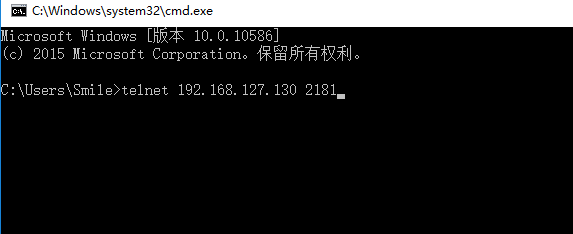
回车后

表明端口开启成功
Centos 7 firewall 命令:
查看已经开放的端口:
firewall-cmd --list-ports开启端口
firewall-cmd --zone=public --add-port=80/tcp --permanent命令含义:
–zone #作用域
–add-port=80/tcp #添加端口,格式为:端口/通讯协议
–permanent #永久生效,没有此参数重启后失效
重启防火墙
firewall-cmd --reload #重启firewall

systemctl stop firewalld.service #停止firewall

systemctl disable firewalld.service #禁止firewall开机启动
firewall-cmd --state #查看默认防火墙状态(关闭后显示notrunning,开启后显示running)
CentOS 7 以下版本 iptables 命令
如要开放80,22,8080 端口,输入以下命令即可
/sbin/iptables -I INPUT -p tcp --dport 80 -j ACCEPT

/sbin/iptables -I INPUT -p tcp --dport 22 -j ACCEPT

/sbin/iptables -I INPUT -p tcp --dport 8080 -j ACCEPT
然后保存:
/etc/rc.d/init.d/iptables save查看打开的端口:
/etc/init.d/iptables status关闭防火墙
1) 永久性生效,重启后不会复原
开启: chkconfig iptables on
关闭: chkconfig iptables off
2) 即时生效,重启后复原
开启: service iptables start
关闭: service iptables stop
查看防火墙状态: service iptables status
下面说下CentOS7和6的默认防火墙的区别
CentOS 7默认使用的是firewall作为防火墙,使用iptables必须重新设置一下
1、直接关闭防火墙
systemctl stop firewalld.service #停止firewall
systemctl disable firewalld.service #禁止firewall开机启动
2、设置 iptables service
yum -y install iptables-services
如果要修改防火墙配置,如增加防火墙端口3306
vi /etc/sysconfig/iptables
增加规则
-A INPUT -m state --state NEW -m tcp -p tcp --dport 3306 -j ACCEPT
保存退出后
systemctl restart iptables.service #重启防火墙使配置生效
systemctl enable iptables.service #设置防火墙开机启动
最后重启系统使设置生效即可。
systemctl start iptables.service #打开防火墙
systemctl stop iptables.service #关闭防火墙
解决主机不能访问虚拟机CentOS中的站点
1. 本机能ping通虚拟机2. 虚拟机也能ping通本机3.虚拟机能访问自己的web4.本机无法访问虚拟机的web
/sbin/iptables -I INPUT -p tcp --dport 80 -j ACCEPT
/etc/rc.d/init.d/iptables save
/etc/init.d/iptables restart
查看CentOS防火墙信息:/etc/init.d/iptables status关闭CentOS防火墙服务:/etc/init.d/iptables stop
centos7 防火墙 开启端口 并测试的更多相关文章
- centos7防火墙开放端口等命令
CentOS 7 开放防火墙端口 命令 最近公司新的server要求用CentOS7, 发现以前CentOS 6 系列中的 iptables 相关命令不能用了,查了下,发现Centos 7使用fire ...
- Centos7 防火墙开放端口,查看状态,查看开放端口
CentOS7 端口的开放关闭查看都是用防火墙来控制的,具体命令如下: 查看防火墙状态:(active (running) 即是开启状态) [root@WSS bin]# systemctl fire ...
- linux centos7 防火墙及端口开放相关命令
一.防火墙相关命令 1.查看防火墙状态 : systemctl status firewalld.service 注:active是绿的running表示防火墙开启 2.关闭防火墙 :systemct ...
- CentOS7下开启端口
开启端口: firewall-cmd --zone=public --add-port=80/tcp --permanent 含义: --zone #作用域 --add-port=80/tcp #添加 ...
- centos7 防火墙开启 (重点)
如果在自己服务器上想开启远端访问功能,需要开启防火墙 1.通过systemctl status firewalld查看firewalld状态,发现当前是dead状态,即防火墙未开启. 2.通过syst ...
- Linux Centos7配置防火墙开启端口
在使用centos7安装完mysql.tomcat.nginx后,都需要配置防火墙才能正常访问. 下面系统的学习一下防火墙的配置. centos7默认使用firewall,需要关闭,然后使用iptab ...
- Centos7防火墙开启3306端口
CentOS7的默认防火墙为firewall,且默认是不打开的. systemctl start firewalld # 启动friewall systemctl status firewalld # ...
- CentOS7防火墙开启与关闭以及开放6379,3306,80等端口
CentOS7用firewall防火墙替代了原来的iptables,所以我们应该使用firewall的一些命令.如下:1.关闭防火墙 systemctl stop firewalld.service ...
- centos7 防火墙与端口设置、linux端口范围
防火墙 启动防火墙: systemctl start firewalld 查看防火墙状态: systemctl status firewalld 关闭防火墙: systemctl stop firew ...
随机推荐
- CentOS网络设置 couldn't resolve host 'mirrorlist.centos.org问题解决
在VBox上安装完CentOS6.5之后,首次使用时yum命令安装软件时,经常遇到"couldn't resolve host 'mirrorlist.centos.org"这个问 ...
- 原生javascript AJAX 三级联动
<!DOCTYPE html> <html lang="en"> <head> <meta charset="UTF-8&quo ...
- <spark> hadoop/spark 集群搭建
参考的这3个文档,虽然搭建花了挺长时间也遇到挺多问题,但是这3个文档对我的帮助确实挺大,如果有兴趣的或者有需要的可以参考以下文档. http://blog.csdn.net/wy250229163/a ...
- 使用uni-app开发微信小程序之登录模块
从微信小程序官方发布的公告中我们可获知:小程序体验版.开发版调用 wx.getUserInfo 接口,将无法弹出授权询问框,默认调用失败,需使用 <button open-type=" ...
- python中的upper、lower、capitalize、title
upper()字符串中字母由小写变为大写 lower()字符串中字母由大写变为小写 capitalize()字符串中字母首字母大写其余小写 title()字符串中字母每个单词的首字母大写其余小写 举个 ...
- mybatis-spring 集成
http://www.mybatis.org/spring/zh/index.html http://www.mybatis.org/mybatis-3/zh/java-api.html 编程API: ...
- 2. springboot启动报错:Field userMapper in com.service.UserService required a bean of type 'com.dao.UserMapper' that could not be found.
报错信息: 2018-06-25 14:26:17.103 WARN 49752 --- [ restartedMain] ationConfigEmbeddedWebApplicationCon ...
- workerman-todpole 执行流程(3)
通过前两篇文章的分析: workerman-todpole 执行流程(1) workerman-todpole 执行流程(2) 我们已经详细了解了主进程以及子进程的启动细节,但之前的文章并没有考虑 W ...
- Android呼吸灯效果实现
最近需要做一个搜索动画的呼吸灯效果,在网上查了下有以下两种实现方式,现记录下来. 实现呼吸灯效果本质上都是使用ImageView动画,实现alpha值变化. 第一种方式,直接使用动画实现,代码如下: ...
- Django models模型(1)
1)使用模型需要在INSTALLED_APPS中注册 2)模型字段(字段类型和字段选项) 1.字段类型 常用: CharField,TextField: 对应字符串对象 DateTimeField和D ...