
Building and using plug-ins for Android
【Building and using plug-ins for Android】
1、AAR plug-ins and Android Libraries
Android Archive (AAR) plug-ins are bundles that include compiled Java and native (C/C++) code, resources, and an Android Manifest. The .aar file itself is a zip archive which contains all of the Assets.
To add an AAR plug-in to your project, copy the .aar file into any of your project folders, then select it in Unity to open the Import Settings in the Inspector window. Tick the Android checkbox to mark this .aar file as compatible with Unity:
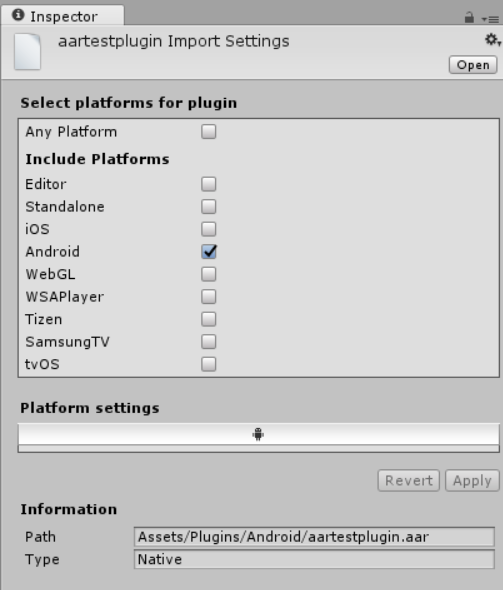
AAR is the recommended plug-in format for Unity Android applications.
2)Android Library
Android Library projects are similar to AAR plug-ins: they contain native and Java code, resources, and an Android Manifest. However, an Android Library is not a single archive file, but a directory with a special structure which contains all of the Assets.
Unity treats any subfolder of Assets/Plugins/Android as a potential Android Library, and disables Asset importing from within these subfolders. The subfolder is recognized as an Android Library if it contains the AndroidManifest.xml file, and the project.properties file contains the string android.library=true.
3)Providing additional Android Assets and resources
If you need to add Assets to your Unity application that should be copied unchanged into the output package, import them into the Assets/Plugins/Android/assets directory. They appear in the assets/ directory of your APK, and are accessed by using the getAssets() Android API from your Java code.
2、JAR plug-ins
They can only contain Java code (for example, they can’t contain Android resources), which makes their use very limited.
To add a JAR plug-in to your project, copy the .jar file into any of your project folders, then select it in Unity to open the Import Settings in the Inspector window. Tick the Android checkbox to mark this .jar file as compatible with Android:
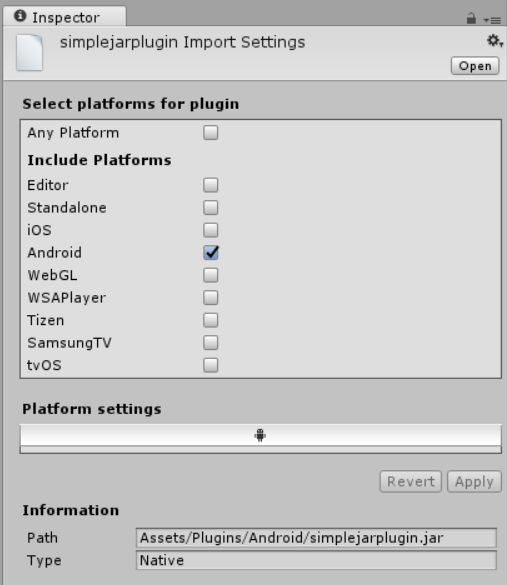
Using Java plug-ins Unity uses the Java Native Interface (JNI) both when calling code from Java and when interacting with Java or the Java VM(Virtual Machine) from native code or C# scripts.
2)Using your Java plug-in from C# scripts with helper classes
The AndroidJNIHelper and AndroidJNI Unity API classes are used as a wrapper around a “raw” JNI interface.
The AndroidJavaObject and AndroidJavaClass Unity API classes automate a lot of tasks when using JNI calls, and they also use caching to make calls to Java faster. The combination of AndroidJavaObject and AndroidJavaClass is built on top ofAndroidJNI and AndroidJNIHelper, but also has some additional functionality.
 AndroidJavaObject jo = new AndroidJavaObject("java.lang.String", "some_string");

 // jni.FindClass("java.lang.String");

 // jni.GetMethodID(classID, "<init>", "(Ljava/lang/String;)V");

 // jni.NewStringUTF("some_string");

 // jni.NewObject(classID, methodID, javaString);

 int hash = jo.Call<int>("hashCode");

 // jni.GetMethodID(classID, "hashCode", "()I");

 // jni.CallIntMethod(objectID, methodID);
AndroidJavaClass jc = new AndroidJavaClass("com.unity3d.player.UnityPlayer");

 // jni.FindClass("com.unity3d.player.UnityPlayer");

 AndroidJavaObject jo = jc.GetStatic AndroidJavaObject>("currentActivity");

 // jni.GetStaticFieldID(classID, "Ljava/lang/Object;");

 // jni.GetStaticObjectField(classID, fieldID);

 // jni.FindClass("java.lang.Object");

 Debug.Log(jo.Call AndroidJavaObject>("getCacheDir").Call<string>("getCanonicalPath"));

 // jni.GetMethodID(classID, "getCacheDir", "()Ljava/io/File;"); // or any baseclass thereof!

 // jni.CallObjectMethod(objectID, methodID);

 // jni.FindClass("java.io.File");

 // jni.GetMethodID(classID, "getCanonicalPath", "()Ljava/lang/String;");

 // jni.CallObjectMethod(objectID, methodID);

 // jni.GetStringUTFChars(javaString);
public class NewBehaviourScript : MonoBehaviour {

    void Start () {

        AndroidJNIHelper.debug = true;

        using (AndroidJavaClass jc = new AndroidJavaClass("com.unity3d.player.UnityPlayer")) {

        jc.CallStatic("UnitySendMessage", "Main Camera", "JavaMessage", "NewMessage");

        }

    }

    void JavaMessage(string message) {

        Debug.Log("message from java: " + message);

    }

}
The Mono garbage collector should release all created instances of AndroidJavaObject and AndroidJavaClass after use, but it is advisable to keep them in a using(){} statement to ensure they are deleted as soon as possible.
//Getting the system language safely

void Start () {

    using (AndroidJavaClass cls = new AndroidJavaClass("java.util.Locale")) {

        using(AndroidJavaObject locale = cls.CallStatic<AndroidJavaObject>("getDefault")) {

            Debug.Log("current lang = " + locale.Call<string>("getDisplayLanguage"));

        }

    }

}
Building and using plug-ins for Android的更多相关文章
- Building and running Node.js for Android
转自: http://www.goland.org/nodejsonandroid/ Building and running Node.js for Android October 14, 2014 ...
- Android二维码开源项目zxing编译
ZXing是一个开放源代码的,用Java实现的多种格式的1D/2D条码图像处理库,它包括了联系到其它语言的port.Zxing能够实现使用手机的内置的摄像头完毕条形码的扫描及解码.该项目可实现的条形码 ...
- Unity3d导出Android的apk文件时相关问题的解决办法
今天上午着手将一个unity3d开发的小游戏build到android手机上运行,结果遇到了不少问题. 首先遇到的第一个问题是在build到一半的时候,弹出如下报错: Error building P ...
- Android Weekly Notes Issue #284
November 19th, 2017 Android Weekly Issue #284 本期内容丰富.有趣的有如何搭建真机测试平台,Proguard里面各类keep的区别,如何运行时获得泛型类型, ...
- Android Getting Started
Building Your First App Creating an Android Project 介绍如何Android开发环境,具体是:怎么使用Eclipse工具 Create a Proje ...
- Announcing the Updated NGINX and NGINX Plus Plug‑In for New Relic (Version 2)
In March, 2013 we released the first version of the “nginx web server” plug‑in for New Relic monitor ...
- Unity打安卓包 Android 所有错误解决方案大全(几乎囊括所有打包错误 )
Unity打包出错解决方案 本文提供全流程,中文翻译. Chinar 坚持将简单的生活方式,带给世人!(拥有更好的阅读体验 -- 高分辨率用户请根据需求调整网页缩放比例) Chinar -- 心分享. ...
- 第五章:Reminders实验:第一部分[Learn Android Studio 汉化教程]
Learn Android Studio 汉化教程 By now you are familiar with the basics of creating a new project, program ...
- ionic build android log
RubertdeMacBook-Pro:~ Rubert$ ionic build android Current working directory is not a Cordova-based p ...
- android开发中遇到的问题汇总【九】
244.http请求的url含有中字符时.须要Uri编码.Uri.encoder() 245.使用androidstudio时,不知道什么原因svn不见了 Android Studio missing ...
随机推荐
- h5py库安装问题解决
H5py官网教程完全有问题,这个大家都这么说,但是貌似问题出现在Numpy上,由于numpy的版本过高! 这里是官网的教程:http://docs.h5py.org/en/latest/build.h ...
- [Unity插件]AI行为树使用总结
参考链接: https://blog.csdn.net/linxinfa/article/details/72937709 https://blog.csdn.net/wanghaodiablo/ar ...
- SDE在64位Server2008下Post启动服务失败官方解释
解决了一个SDE启动问题,在此记录一下 在server 2008 64位下安装完arcgis sde之后,Post启动服务,总是失败 查看SDE日志(etc目录下) DB_open_instance( ...
- winform菜单栏、工具栏
MenuStrip:菜单 -第一格为选项名,子单可隐藏 --在其中键入”-”可出现分割线或在其上-右键-插入- Sparator -右键-插入标准项,可输入基本菜单项 -右键选项卡--设置图像 --设 ...
- ubuntu14.04 rabbitmq安装与使用 --修改RabbitMQ数据存储位置
参考:https://blog.csdn.net/tianjiewang/article/details/58383062 说明: ubuntu14.04 rabiitmq 默认 安装路径 /va ...
- springBoot整合MongoDB(单机)
依赖: <!-- https://mvnrepository.com/artifact/org.springframework.boot/spring-boot-starter-data-mon ...
- java abstract构造函数调用
构造函数是对象的基本,没有构造函数就没有对象.如果在父类中(这里就是你的抽象类)中显示的写了有参数的构造函数,在子类继承是就必须写一个构造函数来调用父类的构造函数 public abstract cl ...
- node.js 递归创建多级目录
fs.mkdir只能创建一级目录,所以我们可以自定义一个mkdirs函数,利用递归和回调来实现创建多级目录. function mkdirs(dirname, callback) { //检测目录是否 ...
- ADOQuery.Parameters: Property Parameters does not exist
Exception class EReadError with message 'Property Parameters does not exist'. Exception class EReadE ...
- js页面百分比缩放
<script> var docEl = document.documentElement, resizeEvt = 'orientationchange' in window ? 'or ...