
[Winform]基于Emgu.CV人脸识别
摘要
“OpenCV是一个开源的计算机视觉库。OpenCV采用C/C++语言编写,可以运行在Linux/Windows/Mac等操作系统上。OpenCV还提供了Python、Ruby、MATLAB以及其他语言的接口。OpenCV的一个目标是构建一个简单易用的计算机视觉框架,以帮助开发人员更便捷地设计更复杂得计算机视觉相关应用程序。OpenCV包含的函数有500多个,覆盖了计算机视觉的许多应用。
Emgu
Emgu CV是将OpenCV使用.net编程语言(C#)封装成的.net库,使用Emgu CV就可以在.net平台上调用OpenCV的功能,同时,Emgu CV也是开源的。
Emgu CV官网:http://www.emgu.com
从官网上你可以下载最新版本,我采用的是3.2.0.2682版本的。
安装成功之后,打开目录

打开解决方案,你可以看到很多demo,可以根据自己需求研究下
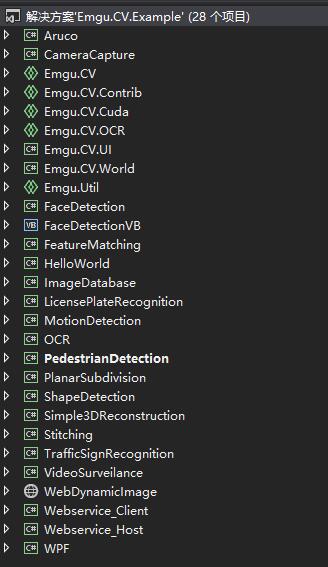
新建winform程序,添加引用,Emgu安装目录下的dll

并将所需的文件从Emgu的bin目录下拷贝到你的程序debug下
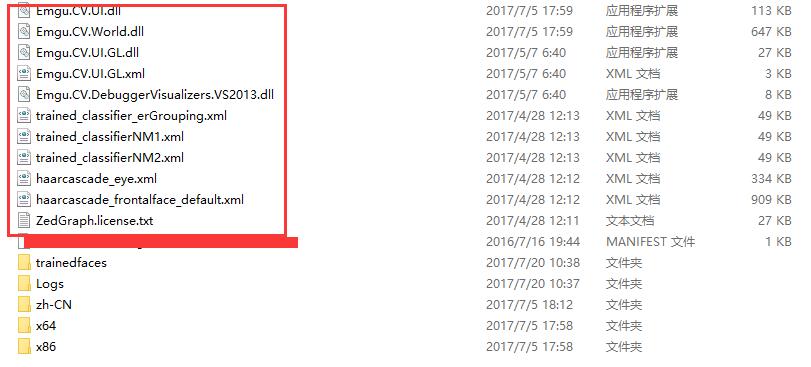
测试核心代码
  public partial class MainFrm : Form

    {

        /// <summary>

        /// 摄像头

        /// </summary>

        private VideoCapture _capture = null;

        private Mat _frame;

        private string _exePath = AppDomain.CurrentDomain.BaseDirectory;

        private string _trainedFacePath = string.Empty;

        /// <summary>

        /// 3.5s 保存一次图片

        /// </summary>

        private const double Interval = 3.5;

        long detectionTime;

        List<Rectangle> faces = new List<Rectangle>();

        List<Rectangle> eyes = new List<Rectangle>();

        /// <summary>

        /// 上次保存图片时间

        /// </summary>

        private DateTime _lastSaveDt = DateTime.Now;

        /// <summary>

        /// 窗口坐标

        /// </summary>

        private Point _frmPoint;

        /// <summary>

        /// 是否抓取到人脸

        /// </summary>

        private bool _isHavePersonFace = false;

        public MainFrm()

        {

            InitializeComponent();

            this.TopMost = true;

            CheckForIllegalCrossThreadCalls = false;

            _frmPoint = new Point();

        }

        private void MainFrm_Load(object sender, EventArgs e)

        {

            //无边框

            this.FormBorderStyle = System.Windows.Forms.FormBorderStyle.None;

            //不出现在任务栏

            this.ShowInTaskbar = false;

            //去掉滑轮放大或者缩小

            this.VideoImageBox.Enabled = false;

            this.MouseDown += MainFrm_MouseDown;

            this.MouseMove += MainFrm_MouseMove;

            _trainedFacePath = _exePath + "trainedfaces";

            this.Location = new Point(Screen.PrimaryScreen.WorkingArea.Width - this.Width - ,
 Screen.PrimaryScreen.WorkingArea.Height - this.Height);

            if (!Directory.Exists(_trainedFacePath))

            {

                Directory.CreateDirectory(_trainedFacePath);

            }

            CvInvoke.UseOpenCL = false;

            try

            {

                _capture = new VideoCapture();

                _frame = new Mat();

                _capture.ImageGrabbed += ProcessFrame;

                _capture.Start();

            }

            catch (NullReferenceException excpt)

            {

                MessageBox.Show(excpt.Message);

            }

        }

        void MainFrm_MouseMove(object sender, MouseEventArgs e)

        {

            if (e.Button == MouseButtons.Left)

            {

                Point myPosittion = MousePosition;

                myPosittion.Offset(-_frmPoint.X, -_frmPoint.Y);

                Location = myPosittion;

            }

        }

        void MainFrm_MouseDown(object sender, MouseEventArgs e)

        {

            _frmPoint.X = e.X;

            _frmPoint.Y = e.Y;

        }

        private void ReleaseData()

        {

            if (_capture != null)

                _capture.Dispose();

        }

        private void ProcessFrame(object sender, EventArgs e)

        {

            if (_capture != null && _capture.Ptr != IntPtr.Zero)

            {

                bool isOk = _capture.Retrieve(_frame, );

                VideoImageBox.Image = _frame;

                if (isOk && !_isHavePersonFace)

                {

                    Run(_frame);

                }

            }

        }

        private void UploadFile(string filePath)

        {

            try

            {

                FileInfo file = new FileInfo(filePath);

                FileLogHelper.WriteFileLog(file.Name);

            }

            catch (Exception ex)

            {

                FileLogHelper.WriteFileLog(ex);

            }

        }

        private void Run(Mat mat)

        {

            IImage image = mat;

            DetectFace.Detect(

                  image, "haarcascade_frontalface_default.xml", "haarcascade_eye.xml",

                  faces, eyes,

                  out detectionTime);

            string fileName = DateTime.Now.ToString("yyyyMMddHHmmssfff") + ".jpg";

            string path = Path.Combine(_trainedFacePath, fileName);

            foreach (Rectangle face in faces)

            {

                try

                {

                    _isHavePersonFace = true;

                    CvInvoke.Rectangle(image, face, new Bgr(Color.Red).MCvScalar, );

                    using (Bitmap bm = new Bitmap(face.Width, face.Height))

                    using (Graphics g = Graphics.FromImage(bm))

                    {

                        g.DrawImage(image.Bitmap, new Rectangle(, , face.Width, face.Height),
new Rectangle(face.X + , face.Y + , face.Width - , face.Height - ), GraphicsUnit.Pixel);

                        bm.Save(path, System.Drawing.Imaging.ImageFormat.Jpeg);

                    }

                    break;

                }

                catch (Exception ex)

                {

                    FileLogHelper.WriteFileLog(ex);

                }

            }

            _isHavePersonFace = false;

        }

    }
[Winform]基于Emgu.CV人脸识别的更多相关文章
- Emgu cv人脸检测识别
Emgu cv人脸检测识别 1.开发平台:WIN10 X64 VS2012 Emgucv版本:3.1 2.先给大家分享一个官网给的示例源代码: https://ncu.dl.sourcef ...
- 基于 OpenCV 的人脸识别
基于 OpenCV 的人脸识别 一点背景知识 OpenCV 是一个开源的计算机视觉和机器学习库.它包含成千上万优化过的算法,为各种计算机视觉应用提供了一个通用工具包.根据这个项目的关于页面,OpenC ...
- 【计算机视觉】基于OpenCV的人脸识别
一点背景知识 OpenCV 是一个开源的计算机视觉和机器学习库.它包含成千上万优化过的算法,为各种计算机视觉应用提供了一个通用工具包.根据这个项目的关于页面,OpenCV 已被广泛运用在各种项目上,从 ...
- 基于MATLAB的人脸识别算法的研究
基于MATLAB的人脸识别算法的研究 作者:lee神 现如今机器视觉越来越盛行,从智能交通系统的车辆识别,车牌识别到交通标牌的识别:从智能手机的人脸识别的性别识别:如今无人驾驶汽车更是应用了大量的机器 ...
- 基于 HTML5 的人脸识别技术
基于 HTML5 的人脸识别技术 https://github.com/auduno/headtrackr/
- 基于node.js人脸识别之人脸对比
基于node.js人脸识别之人脸对比 Node.js简介 Node.js 是一个基于 Chrome V8 引擎的 JavaScript 运行环境. Node.js 使用了一个事件驱动.非阻塞式 I/O ...
- java基于OpenCV的人脸识别
基于Java简单的人脸和人眼识别程序 使用这个程序之前必须先安装配置OpenCV详细教程见:https://www.cnblogs.com/prodigal-son/p/12768948.html 注 ...
- 基于Emgu CV+百度人脸识别,实现视频动态 人脸抓取与识别
背景 目前AI 处于风口浪尖,作为 公司的CTO,也作为自己的技术专研,开始了AI之旅,在朋友圈中也咨询 一些大牛对于AI 机器学习框架的看法,目前自己的研究方向主要开源的 AI 库,如:Emgu C ...
- 可学习的多人人脸识别程序(基于Emgu CV)
源代码下载(需要安装Emgu CV,安装方法请百度) 很多朋友使用Emgu CV遇到CvInvoke()的报错,我找到一种解决方法. 把EmguCV目录下bin里面的所有dll复制到C:\WINDOW ...
随机推荐
- 洛谷 P4656: LOJ 2484: [CEOI2017]Palindromic Partitions
菜菜只能靠写简单字符串哈希维持生活. 题目传送门:LOJ #2484. 题意简述: 题面讲得很清楚了. 题解: 很显然从两边往中间推,能选的就选上这个贪心策略是对的. 如何判断能不能选上,直接字符串哈 ...
- Shell-遍历删除指定目录
Code: find $LibPath/ -name .svn | xargs rm -rf
- php中数据库连接方式pdo和mysqli对比分析
1)总的比较 PDO MySQLi 数据库支持 12种不同的数据库支持 支持MySQL API OOP OOP + 过程 Connection Easy Easy 命名参数 支持 不支持 对象映射 ...
- 用一句SQL查询相对复杂的统计报表
--统计从2017年3月份开始每个月金融服务支付前分期申请数以及通过(核账完成)数 ,ApplyTime)) ,ApplyTime)) as varchar)+'月' as 日期,count(*) a ...
- 公共语言运行库(CLR)开发系列课程(2):Pinvoke 进阶 学习笔记
上一章地址 API版本 具有字符串参数的API通常有两种版本 GetWindowText GetWindowTextA GetWindowTextW 缺省情况下CLR会自动寻找合适的匹配 CharSe ...
- Restful对于URL的简化
REST是英文representational state transfer(表象性状态转变)或者表述性状态转移,它是web服务的一种架构风格.使用HTTP,URI,XML,JSON,HTML等广泛流 ...
- Heist
CF#509 div2 A 第一次用自己的号打CF祭. 题目描述 昨晚有一家电子商店被抢劫了. 昨天在商店里的所有键盘都是从x开始按升序编号的.例如,如果x=4,并且商店中有3个键盘,那么编号就为4, ...
- sql语句添加查询字段
SELECT * FROM( SELECT ROW_NUMBER() OVER (ORDER BY r.UpdateTime desc) tempRowNum,h.BizID,h.OrgID FROM ...
- Sqlserver中PIVOT行转列透视操作
创建表: IF OBJECT_ID('T040_PRODUCT_SALES') IS NOT NULL DROP TABLE T040_PRODUCT_SALES create table T040_ ...
- Dynamic Rankings || 动态/静态区间第k小(主席树)
JYF大佬说,一星期要写很多篇博客才会有人看 但是我做题没有那么快啊QwQ Part1 写在前面 区间第K小问题一直是主席树经典题=w=今天的重点是动态区间第K小问题.静态问题要求查询一个区间内的第k ...