
SQLCE使用
Windows Phone的本地数据库SQL Server CE是7.1版本即芒果更新的新特性,所以你要在应用程序中使用SQL Server CE数据库必须使用Windows Phone 7.1的API才行 。这个数据库是用Linq来执行查询等操作。
我们现在用数据库来保存城市的数据,包括所属省份,城市名称,城市代码。在程序中我们只做了简单的插入和查询,需要详细的数据库操作可以参考
http://windowsphonegeek.com/tips/Windows-Phone-Mango-Local-Database(SQL-CE)-Introduction或者MSDN。
现在回到工程上,先创建一个数据表,CityInfoTable.
在工程上右键---添加--类。命名为CityInfoTable.cs ,接着添加引用。工程----右键---添加引用。

找到System.Data.Linq.点击确定。
接着在CityInfoTable.cs添加命名空间。
- using System.Data.Linq.Mapping;
- using System.ComponentModel;
using System.Data.Linq.Mapping;

using System.ComponentModel;
然后在CItyInfoTable这个数据表定义主键等属性,给出完整的CityInfoTable.cs代码
- using System;
- using System.Net;
- using System.Windows;
- using System.Windows.Controls;
- using System.Windows.Documents;
- using System.Windows.Ink;
- using System.Windows.Input;
- using System.Windows.Media;
- using System.Windows.Media.Animation;
- using System.Windows.Shapes;
- using System.Data.Linq.Mapping;
- using System.ComponentModel;
- namespace WeatherForecast
- {
- [Table]//把CItyInfoTable定义为表
- public class CityInfoTable
- {
- //定义表的自增ID。设置为主键
- private int _cityInfoid;
using System;

using System.Net;

using System.Windows;

using System.Windows.Controls;

using System.Windows.Documents;

using System.Windows.Ink;

using System.Windows.Input;

using System.Windows.Media;

using System.Windows.Media.Animation;

using System.Windows.Shapes;

using System.Data.Linq.Mapping;

using System.ComponentModel;

namespace WeatherForecast

{

    [Table]//把CItyInfoTable定义为表

    public class CityInfoTable

    {

        //定义表的自增ID。设置为主键

        private int _cityInfoid;
- <span style="white-space: pre;"> </span>//Column这个是定义一个成员为表字段。如果没有这个,那么这个成员不是字段
//Column这个是定义一个成员为表字段。如果没有这个,那么这个成员不是字段
- [Column(IsPrimaryKey = true, IsDbGenerated = true,
- DbType = "INT NOT NULL Identity", CanBeNull = false, AutoSync = AutoSync.OnInsert)]
- public int CityInfoid
- {
- get
- {
- return _cityInfoid;
- }
- set
- {
- _cityInfoid = value;
- }
- }
- //定义省份名称:
- private string _province;
- [Column]
- public string Province
- {
- get
- {
- return _province;
- }
- set
- {
- _province = value;
- }
- }
- //定义城市名称
- private string _cityName;
- [Column]
- public string CityName
- {
- get
- {
- return _cityName;
- }
- set
- {
- _cityName = value;
- }
- }
- //定义城市代码
- private string _cityCode;
- [Column]
- public string CityCode
- {
- get
- {
- return _cityCode;
- }
- set
- {
- _cityCode = value;
- }
- }
- }
- }
        [Column(IsPrimaryKey = true, IsDbGenerated = true,

            DbType = "INT NOT NULL Identity", CanBeNull = false, AutoSync = AutoSync.OnInsert)]

        public int CityInfoid

        {

            get

            {

                return _cityInfoid;

            }

            set

            {

                _cityInfoid = value;

            }

        }

        //定义省份名称:

        private string _province;

        [Column]

        public string Province

        {

            get

            {

                return _province;

            }

            set

            {

                _province = value;

            }

        }

        //定义城市名称

        private string _cityName;

        [Column]

        public string CityName

        {

            get

            {

                return _cityName;

            }

            set

            {

                _cityName = value;

            }

        }

        //定义城市代码

        private string _cityCode;

        [Column]

        public string CityCode

        {

            get

            {

                return _cityCode;

            }

            set

            {

                _cityCode = value;

            }

        }

    }

}
现在再定义一个数据库。工程---右键---新建类,命名为CityDataContext.cs。
添加命名空间。
- using System.Data.Linq;
using System.Data.Linq;
然后让这个类继承于DataContext。
给出CityDataContext.cs的完整代码:
- using System;
- using System.Net;
- using System.Windows;
- using System.Windows.Controls;
- using System.Windows.Documents;
- using System.Windows.Ink;
- using System.Windows.Input;
- using System.Windows.Media;
- using System.Windows.Media.Animation;
- using System.Windows.Shapes;
- using System.Data.Linq;
- namespace WeatherForecast
- {
- /// <summary>
- /// 定义一个数据库
- /// </summary>
- public class CityDataContext : DataContext
- {
- //定义数据库连接字符串
- public static string connectionString = "Data Source=isostore:/CityInfo.sdf";
- //// 传递数据库连接字符串到DataContext基类
- public CityDataContext(string connectionString) : base(connectionString) { }
- //定义一个数据表,如果有多个数据表也可以继续添加为成员变量
- public Table<CityInfoTable> CityInfos
- {
- get
- {
- return this.GetTable<CityInfoTable>();
- }
- }
- }
- }
using System;

using System.Net;

using System.Windows;

using System.Windows.Controls;

using System.Windows.Documents;

using System.Windows.Ink;

using System.Windows.Input;

using System.Windows.Media;

using System.Windows.Media.Animation;

using System.Windows.Shapes;

using System.Data.Linq;

namespace WeatherForecast

{

    /// <summary>

    /// 定义一个数据库

    /// </summary>

    public class CityDataContext : DataContext

    {

        //定义数据库连接字符串

        public static string connectionString = "Data Source=isostore:/CityInfo.sdf";

        //// 传递数据库连接字符串到DataContext基类

        public CityDataContext(string connectionString) : base(connectionString) { }

        //定义一个数据表,如果有多个数据表也可以继续添加为成员变量

        public Table<CityInfoTable> CityInfos

        {

            get

            {

                return this.GetTable<CityInfoTable>();

            }

        }

    }

}
到这里,数据库算是写好了。新手肯定会有疑问,没有看到什么数据库。也没在工程里面看到什么SDF文件。
因为,我们要在程序构建的时候用代码创建数据库,由上面的连接字符串可以知道,数据库创建后放在Isolatedstorage里面,创建这个在App.xaml里面的Launching事件里面实现。
可以在这个事件里添加这样的代码创建数据库:
- using (CityDataContext db = new CityDataContext(CityDataContext.connectionString))
- {
- if (db.DatabaseExists() == false)
- {
- //创建一个数据库
- db.CreateDatabase();
- <span style="white-space: pre;"> </span>}
- <span style="white-space: pre;"> </span>}
 using (CityDataContext db = new CityDataContext(CityDataContext.connectionString))

            {

                if (db.DatabaseExists() == false)

                {

                    //创建一个数据库

                    db.CreateDatabase();

		}

	}
这个我们暂时不做。现在我们先添加一个城市信息的XML文件。下载:http://dl.dbank.com/c02jod17n0
复制这个文件。在工程上面右键--粘贴。就把这个citycode.xml文件加入到了工程上。
接下来就做XML解析。用的XDocument类。这里只是简单应用了下。
我们要在App.xaml里面的Launching 事件添加代码。因为我们要在初次运行程序的时候要建立数据库,并且解析citycode.xml的数据添加到数据库里面。
要读取工程里面的文件。要用到的是Application.GetResourceStream.这个函数只能读取资源文件。那么我们要将citycode.xml文件的Building属性改为Resource。
操作方法:选择citycode.xml-----点击属性---生成操作(Building)改为Resource。
要使用XDocument类,需要添加引用。添加System.Xml.Linq。已经添加很多次引用了,那么这次就不详细说怎么操作了。
在App.xaml.cs里面添加命名空间;
- using System.Windows.Resources;
- using System.IO;
- using System.Xml.Linq;
using System.Windows.Resources;

using System.IO;

using System.Xml.Linq;
添加成员函数:
- private void CreatDB()
- {
- using (CityDataContext db = new CityDataContext(CityDataContext.connectionString))
- {
- if (db.DatabaseExists() == false)
- {
- //创建一个数据库
- db.CreateDatabase();
- //读取资源文件。文件为XML格式。这个文件的Building属性为Resource
- StreamResourceInfo sri = Application.GetResourceStream(new Uri("/WeatherForecast;component/citycode.xml",
- UriKind.Relative));
- //读取所以数据保存到String类型的result中
- string result;
- using (StreamReader sr = new StreamReader(sri.Stream))
- {
- result = sr.ReadToEnd();
- }
- //用XDocument类解析数据
- XDocument doc = XDocument.Parse(result);
- //解析数据并且存入数据库
- foreach (XElement item in doc.Descendants("root").Nodes())
- {
- //由文件中的数据可以知道。我们需要的数据在那么两个节点。Descendants就是寻找子节点。
- string province = item.Attribute("data").Value;
- foreach (XElement itemnode in item.Descendants("city"))
- {
- string cityname = itemnode.Element("cityname").Value;
- string cityid = itemnode.Element("cityid").Value;
- //把数据存入数据库
- CityInfoTable cityInfo = new CityInfoTable();
- cityInfo.CityCode = cityid;
- cityInfo.Province = province;
- cityInfo.CityName = cityname;
- db.CityInfos.InsertOnSubmit(cityInfo);
- }
- }
- //数据库提交更新
- db.SubmitChanges();
- }
- }
- }
 private void CreatDB()

        {

            using (CityDataContext db = new CityDataContext(CityDataContext.connectionString))

            {

                if (db.DatabaseExists() == false)

                {

                    //创建一个数据库

                    db.CreateDatabase();

                    //读取资源文件。文件为XML格式。这个文件的Building属性为Resource

                    StreamResourceInfo sri = Application.GetResourceStream(new Uri("/WeatherForecast;component/citycode.xml",

                        UriKind.Relative));

                    //读取所以数据保存到String类型的result中

                    string result;

                    using (StreamReader sr = new StreamReader(sri.Stream))

                    {

                        result = sr.ReadToEnd();

                    }

                    //用XDocument类解析数据

                    XDocument doc = XDocument.Parse(result);

                    //解析数据并且存入数据库

                    foreach (XElement item in doc.Descendants("root").Nodes())

                    {

                        //由文件中的数据可以知道。我们需要的数据在那么两个节点。Descendants就是寻找子节点。

                        string province = item.Attribute("data").Value;

                        foreach (XElement itemnode in item.Descendants("city"))

                        {

                            string cityname = itemnode.Element("cityname").Value;

                            string cityid = itemnode.Element("cityid").Value;

                            //把数据存入数据库

                            CityInfoTable cityInfo = new CityInfoTable();

                            cityInfo.CityCode = cityid;

                            cityInfo.Province = province;

                            cityInfo.CityName = cityname;

                            db.CityInfos.InsertOnSubmit(cityInfo);

                        }

                    }

                    //数据库提交更新

                    db.SubmitChanges();

                }

            }

        }
在Launching事件添加如下代码:
- CreatDB();
CreatDB();
这样,我们就能在第一次执行程序的时候,创建数据库,并且解析XML数据,把城市信息存入数据库。
那么还是测试下吧。
在MainPage的Loaded事件中测试,查询北京的数据,弹窗显示。
在Loaded事件中添加如下代码:
- using (CityDataContext db = new CityDataContext(CityDataContext.connectionString))
- {
- IQueryable<CityInfoTable> queries =
- from c in db.CityInfos where c.Province == "北京" && c.CityName == "北京" select c;
- MessageBox.Show(queries.First().CityName + queries.First().CityCode);
- }
using (CityDataContext db = new CityDataContext(CityDataContext.connectionString))

            {

                IQueryable<CityInfoTable> queries =

                    from c in db.CityInfos where c.Province == "北京" && c.CityName == "北京" select c;

                MessageBox.Show(queries.First().CityName + queries.First().CityCode);

            }
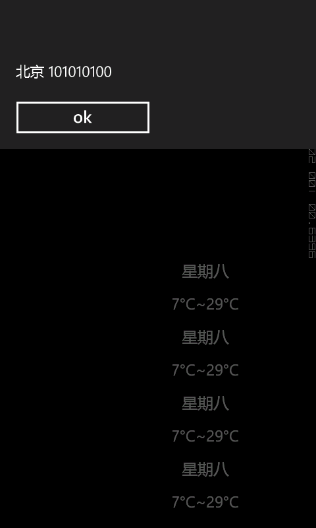
成功!那么就把刚才添加的测试代码注释掉吧。。。
PS:调试数据库,XML解析的时候我可是相当纠结了。都是心理默念不要出错,不要出错。。。
因为出错的话,数据库是建立了。但是数据八成没有加入进去。要删除数据库,就要重启模拟器了。因为重启模拟器IsolatedStorage里面的数据就没了。但是,我的机子如果重启模拟器的话,没有个五六分钟不行。。多出错几次半小时都没了。。
提示:如果在建立数据库处出错了。记得重启模拟器再调试。
SQLCE使用的更多相关文章
- Rafy 领域实体框架演示(4) - 使用本地文件型数据库 SQLCE 绿色部署
本系列演示如何使用 Rafy 领域实体框架快速转换一个传统的三层应用程序,并展示转换完成后,Rafy 带来的新功能. <福利到!Rafy(原OEA)领域实体框架 2.22.2067 发布!> ...
- Wince下sqlce数据库开发(二)
上次写到使用数据绑定的方法测试本地sqlce数据库,这次使用访问SQL Server的方法访问sqlce,你会发现他们是如此的相似... 参考资料:http://www.cnblogs.com/rai ...
- Wince下sqlce数据库开发(一)
对于Wince下的sqlce数据库虽然很多人在用,但在我查找资料时,却发现资料是多么的匮乏,在此对自己这几天的了解做个简单介绍,希望对大家能有所帮助! 本文的最后附有所使用到的sqlce在wince下 ...
- WP8 SqlCE和SqlLite数据存储性能比较
在平时的开发中一定会用到本地数据存储,除了独立存储外我们还可以选择SqlCE和SqlLite:于是在选择上我们就必须权衡他们两者的性能择优选择. 测试代码:(这个例子是在msdn sqllite例子上 ...
- 让Dapper+SqlCE支持ntext数据类型和超过4000字符的存储
使用Dapper和SqlCE进行开发的时候,如果数据库的某字段是采用的ntext数据类型,并且在这个字段存储的数据超过了4000个字符,会报如下的错误: Invalid parameter Size ...
- 推荐一个sqlce,sqllite等数据库管理工具
推荐一个sqlce,sqllite等数据库管理工具 下载地址: http://fishcodelib.com/files/DatabaseNet4.zip 支持sqlserver,sqlce, sql ...
- 为VS2013添加SQLCE的支持
解决 下载SQL Server Compact Toolbox by ErikEJ并安装 打开VS2013,新建一工程,在“视图>其它窗口>SQL Server Compact Toolb ...
- 打开和创建SqlCe(.sdf文件)
打开SqlCe的工具有些少,目前能看到Vs2010安装插件之后打开.sdf文件 [转载]https://weblogs.asp.net/scottgu/vs-2010-sp1-and-sql-ce 需 ...
- 【原创】手动导入SQLServer数据到SQLCE方法
我找到一个工具,可以很容易把SQLServer里的数据导入到SQLCE: 工具名:Export2SqlCe.exe, 下载路径: http://exportsqlce.codeplex.com/rel ...
- Windows Phone本地数据库(SQLCE):14、删除数据(翻译)
这是“windows phone mango本地数据库(sqlce)”系列短片文章的最后一篇第十四篇. 为了让你开始在Windows Phone Mango中使用数据库,这一系列短片文章将覆盖所有你需 ...
随机推荐
- lombok使用说明
简介lombok 的官方网址:http://projectlombok.org/lombok 提供了简单的注解的形式来帮助我们简化消除一些必须有但显得很臃肿的 java 代码.特别是相对于 POJO, ...
- C# 特性(Attribute)详细介绍
1.什么是Atrribute 首先,我们肯定Attribute是一个类,下面是msdn文档对它的描述:公共语言运行时允许你添加类似关键字的描述声明,叫做attributes, 它对程序中的元素进行标注 ...
- CentOS7上安装与配置Tomcat8与MySQL5.7
一.安装tomcat Tomcat 的安装依赖 JDK,在安装 Tomcat 之前需要先安装 Java JDK.输入命令 java -version,如果显示 JDK 版本,证明已经安装了 JDK.
- snmp信息的查询命令snmpwalk
在日常监控中,经常会用到 snmp 服务,而 snmpwalk 命令则是测试系统各种信息最有效的方法,现总结一些常用的方法如下: 获取所有信息snmpwalk -v 2c -c public 52.0 ...
- h5手势密码开发(使用jq)
直接上代码: 目录结构: 本次开用到的技术jq,以及引入的jq插件jquery.gesture.password.min.js index.html <!DOCTYPE html> < ...
- SecureCRT中常用linux命令 -《转载》
常用命令: 一.ls 只列出文件名 (相当于dir,dir也可以使用) -A:列出所有文件,包含隐藏文 件. -l:列表形式,包含文件的绝大部分属性. -R:递归显示. --help:此命令的帮助. ...
- 1 、在Linux(centos6.8)系统下的JDK安装与配置
一.解压jdk安装包: 附上jdk1.8的下载地址: http://www.oracle.com/technetwork/java/javase/downloads/jdk8-downloads-21 ...
- java List去重方式及效率对比
对List去重并保证添加顺序主要有三种方式: 方式一,利用HashSet不能添加重复数据的特性 由于HashSet不能保证添加顺序,所以只能作为判断条件: private static void re ...
- python selenium-webdriver 环境搭建(一)
selenium 虽然过了这么多年,但是到目前为止依然是比较流行的自动化框架了,还有很多的初学者在学习,所以根据自己的时间将把相关的资料汇总一下,下面首先我们需要搭建一下基础环境. 首先自己本身比较笨 ...
- 升级到AndroidStudio3.2.1的注意事项
升级到AndroidStudio3.2.1的注意事项 即不用再在二级结构的build.gradle中的compileSdkVersion 28 下声明 buildToolsVersion &q ...