
线特征---LineMatching代码运行(五)
[1] https://github.com/dlut-dimt/LineMatching
The code is based on Matlab.
https://github.com/kailigo/LineSegmentMatching
The code is based on the following two papers. The code is based on OpenCV, and you need CMake to build a project from the code.
@article{li2016hierarchical, title={Hierarchical line matching based on Line--Junction--Line structure descriptor and local homography estimation}, author={Li, Kai and Yao, Jian and Lu, Xiaohu and Li, Li and Zhang, Zhichao}, journal={Neurocomputing}, volume={184}, pages={207--220}, year={2016}, publisher={Elsevier} }
@inproceedings{li2014robust, title={Robust line matching based on ray-point-ray structure descriptor}, author={Li, Kai and Yao, Jian and Lu, Xiaohu}, booktitle={Asian Conference on Computer Vision}, pages={554--569}, year={2014}, organization={Springer} }
[3] https://github.com/chishuideyu/LBD_and_LineMatching
The code is based on OpenCV ,arpack++.
安装BIAS(没安装完成,由于此库比较老,而且opencv中的函数可代替)
1.BIAS的简单介绍 ---http://www.mip.informatik.uni-kiel.de/tiki-index.php?page=BIAS&highlight=BIAS.
2.How to get it ---http://www.mip.informatik.uni-kiel.de/~wwwadmin/Software/index.html
我下载的是:BIAS-2.8.0.tar.gz
查看imagemagick的版本: convert –version,出现:
Version: ImageMagick 6.7.- -- Q16 http://www.imagemagick.org

Copyright: Copyright (C) - ImageMagick Studio LLC

Features: OpenMP
ImageMagick的源码: https://github.com/ImageMagick/
下载下来:ImageMagick-master.zip,解压,由于我是在linux安装,查看它的Install-unix.txt,并将其重命名为了:ImageMagick-7.0.
安装过程:
cd ImageMagick-7.0.

./configure

make   //build ImageMagick

sudo make install   //install ImageMagick

make check     //Run tests using the installed ImageMagick(可选指令)
ImageMagick is installs binaries in /../usr/local/bin, libraries in /../usr/local/lib, header files in /../usr/local/include and documentation in /../usr/local/share.
安装ARPACK++
下载:https://github.com/m-reuter/arpackpp
阅读“README.md”,对arpackpp (ARPACK++)有大致的了解,并且主要看其Dependencies依赖项,然后看“INSTALL.md”,进行安装:
安装:
[1]只安装头文件,通过cmake
mkdir build

cd build

cmake ..

sudo make install
-- A library with BLAS API found.

-- Looking for Fortran cheev

-- Looking for Fortran cheev - found

-- A library with LAPACK API found.

-- LAPACK_LIBRARIES: /usr/lib/liblapack.a;/usr/lib/libf77blas.a;/usr/lib/libatlas.a

-- ARPACK_LIB found: /usr/lib/libarpack.a

//--ARPACK 头文件:/usr/local/include/arpackpp/
//将其头文件连接到工程中
[2]System Libraries: GFORTRAN, BLAS, LAPACK, ARPACK,通过ubuntu软件源安装。
$ sudo apt-get install -y gfortran libopenblas-dev liblapack-dev libarpack2-dev
先运行了一下程序,在CMakelists.txt中这句话的执行出现错误
TARGET_LINK_LIBRARIES(LineMatchingLib ${OpenCV_LIBS} arpack /usr/lib/x86_64-linux-gnu/libsuperlu.so arpack++)
error:
[100%] Building CXX object CMakeFiles/TestLineMatchingAlgorithm.dir/TestLineMatchingAlgorithm.cpp.o

Linking CXX executable TestLineMatchingAlgorithm

libLineMatchingLib.so: undefined reference to `set_default_options'

libLineMatchingLib.so: undefined reference to `dCreate_Dense_Matrix'

libLineMatchingLib.so: undefined reference to `cgstrs'

libLineMatchingLib.so: undefined reference to `sp_ienv'

libLineMatchingLib.so: undefined reference to `sgstrs'

libLineMatchingLib.so: undefined reference to `StatFree'

libLineMatchingLib.so: undefined reference to `debug_'

libLineMatchingLib.so: undefined reference to `Destroy_CompCol_Matrix'

libLineMatchingLib.so: undefined reference to `dCreate_CompCol_Matrix'

libLineMatchingLib.so: undefined reference to `sgstrf'

libLineMatchingLib.so: undefined reference to `dsaupd_'

libLineMatchingLib.so: undefined reference to `dgstrs'

libLineMatchingLib.so: undefined reference to `Destroy_CompCol_Permuted'

libLineMatchingLib.so: undefined reference to `zgstrs'

libLineMatchingLib.so: undefined reference to `cgstrf'

libLineMatchingLib.so: undefined reference to `StatInit'

libLineMatchingLib.so: undefined reference to `zgstrf'

libLineMatchingLib.so: undefined reference to `dcopy_'

libLineMatchingLib.so: undefined reference to `Destroy_SuperNode_Matrix'

libLineMatchingLib.so: undefined reference to `get_perm_c'

libLineMatchingLib.so: undefined reference to `dseupd_'

libLineMatchingLib.so: undefined reference to `Destroy_SuperMatrix_Store'

libLineMatchingLib.so: undefined reference to `dgstrf'

libLineMatchingLib.so: undefined reference to `sp_preorder'

collect2: error: ld returned 1 exit status

make[2]: *** [TestLineMatchingAlgorithm] Error 1

make[1]: *** [CMakeFiles/TestLineMatchingAlgorithm.dir/all] Error 2

make: *** [all] Error
查看是否安装了superlu:
$ dpkg -L libsuperlu-dev

dpkg-query: package 'libsuperlu-dev' is not installed

Use dpkg --info (= dpkg-deb --info) to examine archive files,

and dpkg --contents (= dpkg-deb --contents) to list their contents.
通过ubuntu软件源安装superlu遇到了困难,出现了错误:
$ sudo apt-get install libsuperlu-dev

Reading package lists... Done

Building dependency tree

Reading state information... Done

E: Unable to locate package libsuperlu-dev
上网搜索后说是
#sudo apt-get update   //更新

    执行完后,问题就解决了。
但是我执行完后,依然没有什么卵用。。。反正,网上说的各种都有,后来想着要不下载下来编译再安装吧:
下载superlu:[SuperLU (Version 5.2.x)] --- https://github.com/xiaoyeli/superlu
阅读README,知道有两种方法安装,so我使用CMake安装:
mkdir build

cd build

cmake ..

make

sudo make install

libblas.a
libsuperlu.a
libmatgen.a

//库文件:/usr/local/lib/libsuperlu.a
         /usr/local/lib/pkgconfig/superlu.pc
//头文件:/usr/local/include/supermatrix.h
       /usr/local/include/slu_Cnames.h
/usr/local/include/slu_dcomplex.h
/usr/local/include/slu_scomplex.h
/usr/local/include/slu_util.h
 /usr/local/include/superlu_enum_consts.h
 /usr/local/include/slu_sdefs.h
 /usr/local/include/slu_ddefs.h
/usr/local/include/slu_cdefs.h
 /usr/local/include/slu_zdefs.h

过程中生成了几个测试文件:build/TESTING/s_test.out   # single precision, real
               build/TESTING/d_test.out   # double precision, real
               build/TESTING/c_test.out   # single precision, complex
               build/TESTING/z_test.out   # double precision, complex
由于生成的是静态库libsuperlu.a,不知道怎样连接到自己的库上,感觉用不到就删了,但是库文件都在,如果想看可以参照/home/wj/Downloads/arpackpp/external/SuperLU_5.2.1-build。还得仿照人家写的,最终安了个类似的:
$ sudo apt-get install libsuperlu3-dev
这次终于看见曙光了找到了libsuperlu.so:/usr/lib/libsuperlu.so
$ sudo apt-get install libarpack++-dev
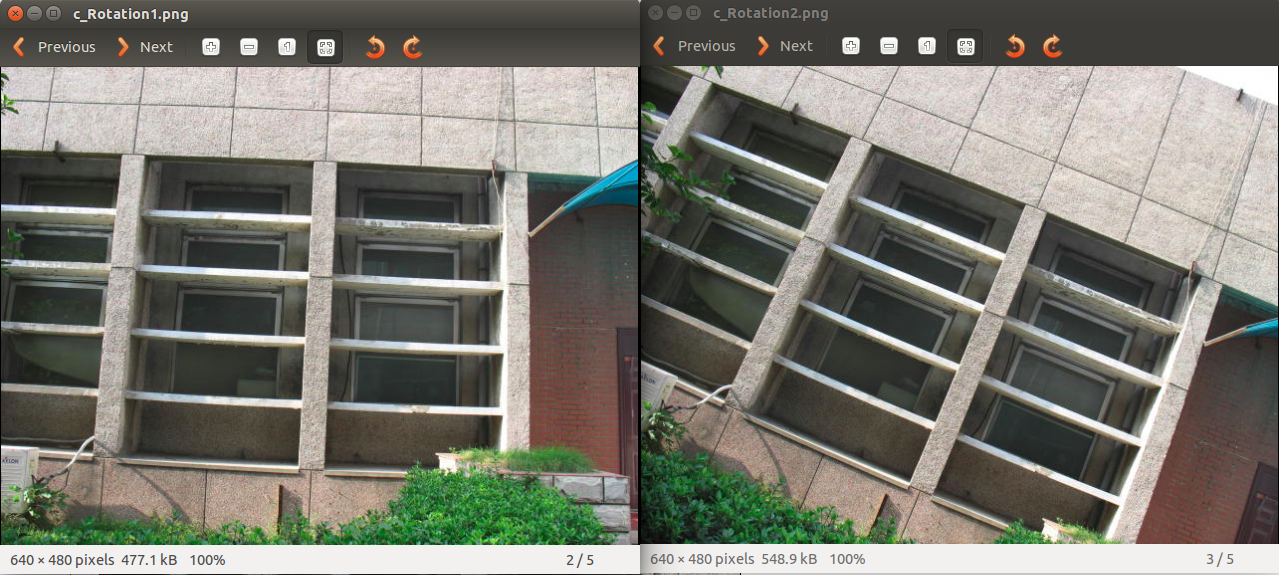
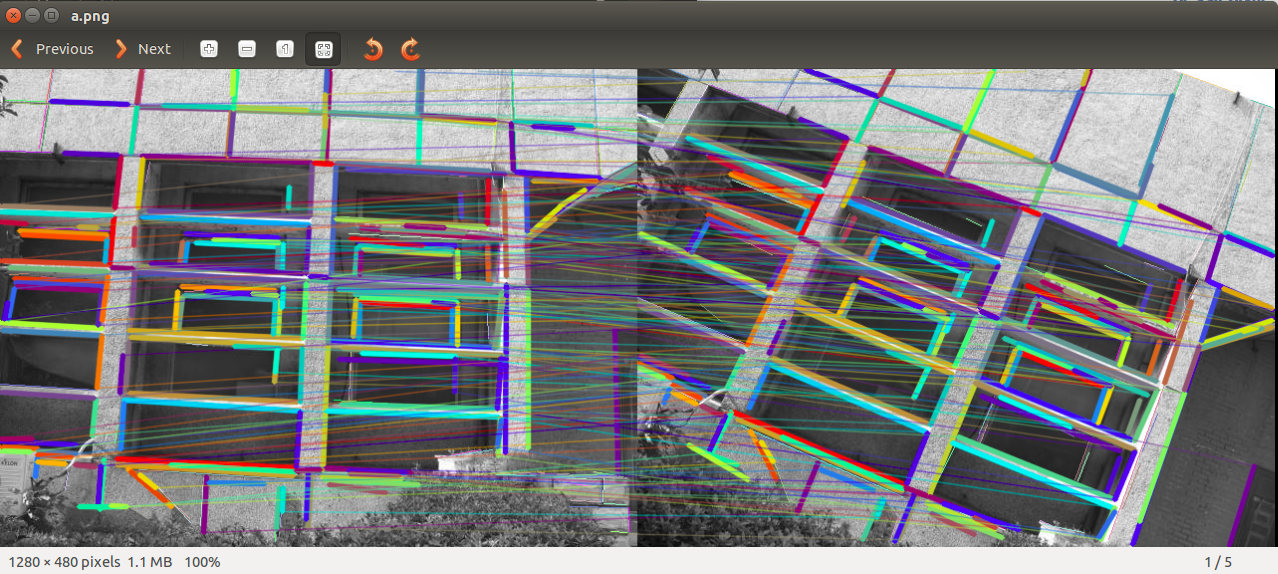
运行结果:

线特征---LineMatching代码运行(五)的更多相关文章
- 线特征---LineMatching原理(四)
参考文章:An efficient and robust line segment matching approach based on LBD descriptor and pairwise geo ...
- 线特征---LSD and LBD程序运行(一)
最近在看有关特征提取的线特征,暑期就看了相关的论文:<基于点线综合特征的双目视觉SLAM方法_谢晓佳>,最近呢,把里面有关线特征提取LSD和描述子LBD的代码跑了一遍,记录如下: [1]L ...
- Hbase集群搭建及所有配置调优参数整理及API代码运行
最近为了方便开发,在自己的虚拟机上搭建了三节点的Hadoop集群与Hbase集群,hadoop集群的搭建与zookeeper集群这里就不再详细说明,原来的笔记中记录过.这里将hbase配置参数进行相应 ...
- 第十章实践——系统级I/O代码运行
第十章实践——系统级I/O代码运行 实验代码清单如下: 1. cp1——复制一个文件到另一个文件中(两个已经存在的文件) 复制前: 执行后结果 2. setecho.echostate——改变.显示输 ...
- 如何加速MATLAB代码运行
学习笔记 V1.0 2015/4/17 如何加速MATLAB代码运行 概述 本文源于LDPCC的MATLAB代码,即<CCSDS标准的LDPC编译码仿真>.由于代码的问题,在信息位长度很长 ...
- Spark菜鸟学习营Day6 分布式代码运行调试
Spark菜鸟学习营Day6 分布式代码运行调试 作为代码调试,一般会分成两个部分 语法调试,也就是确定能够运行 结果调试,也就是确定程序逻辑的正确 其实这个都离不开运行,所以我们说一下如何让开发的S ...
- 监控代码运行时长 -- StopWatch用法例程
在.net环境下,精确的测量出某段代码运行的时长,在网络通信.串口通信以及异步操作中很有意义.现在做了简单的总结.具体代码如下: (1).首先 using System.Diagnostics; (2 ...
- 解决“无法连接到Python代码运行助手。请检查本机的设置”问题
廖雪峰老师python课程里有个代码运行助手,可以让你在线输入Python代码,然后通过本机运行的一个Python脚本来执行代码,很方便的一个脚本工具,但是很多人用过之后出现了这样的提示:“无法连接到 ...
- Swift学习笔记(一)搭配环境以及代码运行成功
原文:Swift学习笔记(一)搭配环境以及代码运行成功 1.Swift是啥? 百度去!度娘告诉你它是苹果最新推出的编程语言,比c,c++,objc要高效简单.能够开发ios,mac相关的app哦!是苹 ...
随机推荐
- js相关文章
1.js获取网页屏幕可见区域高度 2.JS组件系列——BootstrapTable 行内编辑解决方案:x-editable 3.Bootstrap table 服务器端分页示例
- Eclipse实用操作
1.缩进:Tab 2.退格:Shift+Tab 3.包结构展开方式:Package Presentation 4.快速定位文件:按ctrl键不放,鼠标移至链接处 5.为属性快速生成相应的get和set ...
- mac下node安装提示command not found
官网下载了node的.pkg文件安装node,安装好后,在mac终端下输入npm -v 和 node -v均提示 command not found,参考了网上的方法,终于得解 第一步:创建.bash ...
- Apache Mina UDP连接目标服务器地址时出现异常
俩种情形,第一种是开始连接时候就没连上服务器:第二种是服务器关闭连接,出现的异常: 第一种: java.lang.reflect.InvocationTargetException at sun.re ...
- java.io.Closeable 接口
package java.io; import java.io.IOException; /** * 关闭数据资源*/public interface Closeable extends AutoCl ...
- idea git 从github上拉取项目 更改上传
更改上传: 新增文件上传时注意:
- Mysql 表约束 非空、唯一、主键、自增长、默认、外键约束(基础6)
非空(not null).唯一(unique key).主键(primary key).自增长(auto_increment).默认约束(default) 准备基础环境: mysql> crea ...
- Charles界面介绍及使用方法
本随笔主要内容: 一.Charles界面介绍 二.Charles使用 1.会话(Repeat.Focus.Compare.黑白名单等) 2.模拟请求做mock,使用断点.Map或Rewrite 3.指 ...
- 二进制中1的个数(python)
题目描述 输入一个整数,输出该数二进制表示中1的个数.其中负数用补码表示. # -*- coding:utf-8 -*- class Solution: def NumberOf1(self, n): ...
- NumPy IO
NumPy IO Numpy 可以读写磁盘上的文本数据或二进制数据. NumPy 为 ndarray 对象引入了一个简单的文件格式:npy. npy 文件用于存储重建 ndarray 所需的数据.图形 ...