
定时任务 Wpf.Quartz.Demo.2
定时任务 Wpf.Quartz.Demo.1已经能运行了,本节开始用wpf搭界面。
准备工作:
1.界面选择MahApp.Metro
在App.xaml添加资源
 <Application.Resources>

        <ResourceDictionary>

            <ResourceDictionary.MergedDictionaries>

                <ResourceDictionary Source="pack://application:,,,/MahApps.Metro;component/Styles/Controls.xaml" />

                <ResourceDictionary Source="pack://application:,,,/MahApps.Metro;component/Styles/Fonts.xaml" />

                <ResourceDictionary Source="pack://application:,,,/MahApps.Metro;component/Styles/Colors.xaml" />

                <ResourceDictionary Source="pack://application:,,,/MahApps.Metro;component/Styles/Accents/Blue.xaml" />

                <ResourceDictionary Source="pack://application:,,,/MahApps.Metro;component/Styles/Accents/BaseLight.xaml" />

                <ResourceDictionary>

                    <System:Double x:Key="WindowTitleFontSize"></System:Double>

                    <System:Double x:Key="NormalFontSize"></System:Double>

                    <System:Double x:Key="ContentFontSize"></System:Double>

                    <System:Double x:Key="FlatButtonFontSize"></System:Double>

                    <System:Double x:Key="MenuFontSize"></System:Double>

                    <System:Double x:Key="ContextMenuFontSize"></System:Double>

                    <System:Double x:Key="StatusBarFontSize"></System:Double>

                    <System:Double x:Key="ToggleSwitchFontSize"></System:Double>

                    <System:Double x:Key="ToggleSwitchHeaderFontSize"></System:Double>

                    <System:Double x:Key="UpperCaseContentFontSize"></System:Double>

                    <System:Double x:Key="TabItemFontSize"></System:Double>

                </ResourceDictionary>

            </ResourceDictionary.MergedDictionaries>

        </ResourceDictionary>

    </Application.Resources>
App.xaml
其中 <System:Double x:Key="WindowTitleFontSize">12</System:Double> ...为改变整个app的相关字体大小。
2.添加log4net记录异常
安装log4net。
在App.config内配置log4net
<log4net>

    <!--按日期分割日志文件 一天一个-->

    <appender name="LogFileAppenderByDate" type="log4net.Appender.RollingFileAppender">

      <!--是否续写-->

      <param name="AppendToFile" value="true" />

      <!--最小锁定模型以允许多个进程可以写入同一个文件-->

      <param name="LockingModel" value="log4net.Appender.FileAppender.MinimalLock" />

      <param name="StaticLogFileName" value="true" />

      <!--保存路径-->

      <param name="File" value="Log\" />

      <param name="DatePattern" value="yyyy-MM-dd.LOG" />

      <param name="StaticLogFileName" value="false" />

      <param name="RollingStyle" value="Date" />

      <layout type="log4net.Layout.PatternLayout">

        <param name="ConversionPattern" value="%n-----------------------------------------%n时间:%d %n级别:%level %n类名:%c%n文件:%F 第%L行%n日志内容:%m%n-----------------------------------------%n%n" />

      </layout>

    </appender>

    <root>

      <!--文件形式记录日志-->

      <appender-ref ref="LogFileAppenderByDate" />

    </root>

  </log4net>
App.config
在App.xaml.cs内添加
using System;

using System.Collections.Generic;

using System.Configuration;

using System.Data;

using System.Linq;

using System.Threading.Tasks;

using System.Windows;

[assembly: log4net.Config.XmlConfigurator(Watch = true)]

namespace Wpf.Quartz

{

    /// <summary>

    /// App.xaml 的交互逻辑

    /// </summary>

    public partial class App : Application

    {

        public App()

        {

            AppDomain.CurrentDomain.UnhandledException += CurrentDomain_UnhandledException;

            Application.Current.DispatcherUnhandledException += Application_DispatcherUnhandledException;

        }

        private static readonly log4net.ILog log = log4net.LogManager.GetLogger(System.Reflection.MethodBase.GetCurrentMethod().DeclaringType);

        private void Application_DispatcherUnhandledException(object sender, System.Windows.Threading.DispatcherUnhandledExceptionEventArgs e)

        {

            //记录严重错误

            log.Fatal(e.Exception);

            e.Handled = true;//使用这一行代码告诉运行时,该异常被处理了,不再作为UnhandledException抛出了。

        }

        void CurrentDomain_UnhandledException(object sender, UnhandledExceptionEventArgs e)

        {

            //记录严重错误

            log.Fatal(e.ExceptionObject);

        }

    }

}
App.xaml.cs
其中 AppDomain.CurrentDomain.UnhandledException += CurrentDomain_UnhandledException;
Application.Current.DispatcherUnhandledException += Application_DispatcherUnhandledException; 捕获没有处理的异常,避免程序崩溃。
3.使用MVVM模式,这里不使用mvvmlight,prism等框架,这里写个简单的类ViewModel继承它即可。
using System;

using System.Collections.Generic;

using System.ComponentModel;

using System.Linq;

using System.Text;

using System.Threading.Tasks;

namespace Wpf.Quartz.Helper

{

    public class BaseViewModel : INotifyPropertyChanged

    {

        public event PropertyChangedEventHandler PropertyChanged;

        public virtual void OnPropertyChanged(string propertyName)

        {

            if (PropertyChanged != null)

            {

                PropertyChanged(this, new PropertyChangedEventArgs(propertyName));

            }

        }

    }

}
BaseViewModel
4.前台主界面
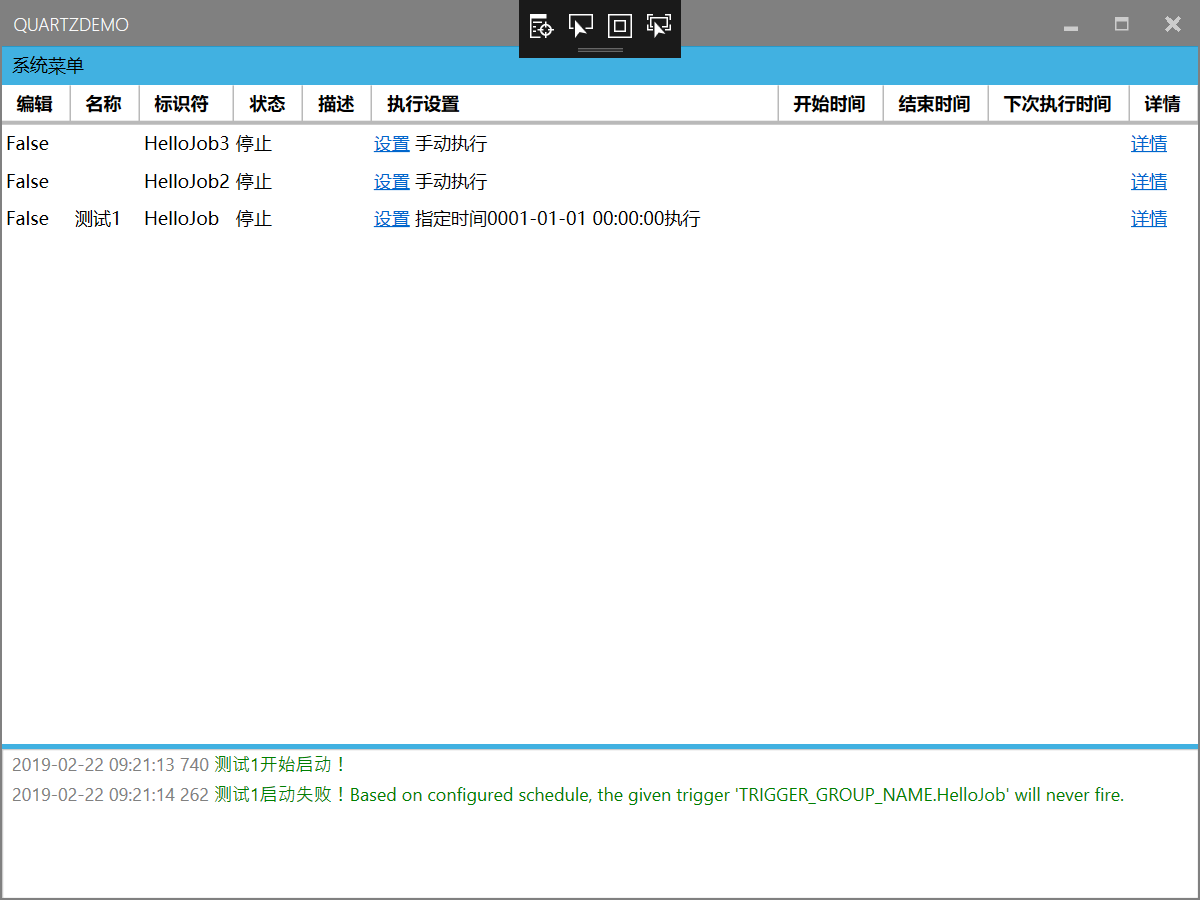
<Controls:MetroWindow x:Class="MyWpf.Quart.Demo.MainWindow"

        xmlns="http://schemas.microsoft.com/winfx/2006/xaml/presentation"

        xmlns:x="http://schemas.microsoft.com/winfx/2006/xaml"

        xmlns:d="http://schemas.microsoft.com/expression/blend/2008"

        xmlns:mc="http://schemas.openxmlformats.org/markup-compatibility/2006"

        xmlns:Controls="clr-namespace:MahApps.Metro.Controls;assembly=MahApps.Metro"

        xmlns:i="http://schemas.microsoft.com/expression/2010/interactivity"

        mc:Ignorable="d"

        Title="QuartzDemo" Height="" Width="" WindowStartupLocation="CenterScreen" >

    <Grid>

        <Grid.RowDefinitions>

            <RowDefinition Height="Auto"></RowDefinition>

            <RowDefinition Height="*"></RowDefinition>

            <RowDefinition Height="Auto"></RowDefinition>

            <RowDefinition Height=""></RowDefinition>

        </Grid.RowDefinitions>

        <Menu Background = "{DynamicResource AccentColorBrush}">

            <MenuItem Header="系统菜单" Background="Transparent">

                <MenuItem Header="全部开始" Command="{Binding MeunCommand}" CommandParameter="StartAll"/>

                <MenuItem Header="全部停止" Command="{Binding MeunCommand}" CommandParameter="StopAll"/>

            </MenuItem>

        </Menu>

        <DataGrid Grid.Row="" x:Name="table" AutoGenerateColumns="False" CanUserAddRows="False" ItemsSource="{Binding TaskRuns}" SelectedItem="{Binding SelectedRun}" ColumnWidth="Auto">

            <DataGrid.ContextMenu>

                <ContextMenu >

                    <MenuItem Header="启动" Command="{Binding JobStartCommand}"

                              CommandParameter="{Binding SelectedRun}"

                           />

                    <MenuItem Header="停止" Command="{Binding JobStopCommand}"

                              CommandParameter="{Binding SelectedRun}"

                             />

                    <MenuItem Header="重新启动" Command="{Binding JobReStartCommand}"

                              CommandParameter="{Binding SelectedRun}"

                             />

                    <MenuItem Header="暂停" Command="{Binding JobPauseCommand}"

                              CommandParameter="{Binding SelectedRun}"

                              />

                    <MenuItem Header="恢复" Command="{Binding JobResumeCommand}"

                              CommandParameter="{Binding SelectedRun}"

                             />

                    <MenuItem Header="手动执行一次" Command="{Binding JobRunCommand}"

                              CommandParameter="{Binding SelectedRun}"

                              />

                </ContextMenu>

            </DataGrid.ContextMenu>

            <DataGrid.Columns>

                <DataGridTextColumn Header="编辑" IsReadOnly="True" Binding="{Binding IsEdit}"></DataGridTextColumn>

                <DataGridTextColumn Header="名称" IsReadOnly="True" Binding="{Binding DisplayName}"></DataGridTextColumn>

                <DataGridTextColumn Header="标识符" IsReadOnly="True" Binding="{Binding Name}"></DataGridTextColumn>

                <DataGridTemplateColumn Header="状态">

                    <DataGridTemplateColumn.CellTemplate>

                        <DataTemplate>

                            <TextBlock   VerticalAlignment="Center"/>

                        </DataTemplate>

                    </DataGridTemplateColumn.CellTemplate>

                </DataGridTemplateColumn>

                <DataGridTextColumn Header="描述" IsReadOnly="True" Binding="{Binding Remark}"></DataGridTextColumn>

                <DataGridTemplateColumn Header="执行设置"  Width="*">

                    <DataGridTemplateColumn.CellTemplate>

                        <DataTemplate>

                            <StackPanel Orientation="Horizontal">

                                <TextBlock x:Name="txt" ToolTip="点击设置" VerticalAlignment="Center">

                                    <Hyperlink Command="{Binding DataContext.JobSetCommand, RelativeSource={RelativeSource Mode=FindAncestor,AncestorType=Window}}"

                                        CommandParameter="{Binding }">设置 </Hyperlink>

                                    <Run Text="{Binding SettingStr}"></Run>

                                </TextBlock>

                            </StackPanel>

                        </DataTemplate>

                    </DataGridTemplateColumn.CellTemplate>

                </DataGridTemplateColumn>

                <DataGridTextColumn Header="开始时间" IsReadOnly="True" Binding="{Binding StartTime,StringFormat=yyyy-MM-dd HH:mm:ss}"></DataGridTextColumn>

                <DataGridTextColumn Header="结束时间" IsReadOnly="True" Binding="{Binding EndTime,StringFormat=yyyy-MM-dd HH:mm:ss}"></DataGridTextColumn>

                <DataGridTextColumn Header="下次执行时间" IsReadOnly="True" Binding="{Binding NextRunTime,StringFormat=yyyy-MM-dd HH:mm:ss}"></DataGridTextColumn>

                <DataGridTemplateColumn Header="详情">

                    <DataGridTemplateColumn.CellTemplate>

                        <DataTemplate>

                            <StackPanel Orientation="Horizontal">

                                <TextBlock x:Name="txt" ToolTip="点击打开" VerticalAlignment="Center">

                                    <Hyperlink Command="{Binding DataContext.JobDetailCommand, RelativeSource={RelativeSource Mode=FindAncestor,AncestorType=Window}}"

                                        CommandParameter="{Binding }">详情</Hyperlink>

                                </TextBlock>

                            </StackPanel>

                        </DataTemplate>

                    </DataGridTemplateColumn.CellTemplate>

                </DataGridTemplateColumn>

            </DataGrid.Columns>

        </DataGrid>

        <GridSplitter x:Name="gsSplitterr" Grid.Row="" Height="" Background="{DynamicResource AccentColorBrush}" HorizontalAlignment="Stretch" VerticalAlignment="Center" />

        <RichTextBox x:Name="rtb" Grid.Row="" IsReadOnly="True" VerticalScrollBarVisibility="Auto">

            <RichTextBox.ContextMenu>

                <ContextMenu>

                    <MenuItem Header="剪贴" Command="ApplicationCommands.Cut"/>

                    <MenuItem Header="复制" Command="ApplicationCommands.Copy"/>

                    <MenuItem Header="粘贴" Command="ApplicationCommands.Paste"/>

                </ContextMenu>

            </RichTextBox.ContextMenu>

            <RichTextBox.Resources>

                <Style TargetType="{x:Type Paragraph}">

                    <Setter Property="Margin" Value=""/>

                    <Setter Property="LineHeight" Value=""/>

                </Style>

            </RichTextBox.Resources>

        </RichTextBox>

    </Grid>

</Controls:MetroWindow>
MainWindow
好的,至此准备工作已经完成。预计还有两节全部完成。
代码下载:https://pan.baidu.com/s/1Ri_yangO0N0sfC-KyZVwbw
定时任务 Wpf.Quartz.Demo.2的更多相关文章
- 定时任务 Wpf.Quartz.Demo.4
本文继续介绍定时任务 Wpf.Quartz.Demo.3的一些小细节, 代码也请前往第3节下载. 1.RichTextBox右键菜单 <RichTextBox.ContextMenu> ...
- 定时任务 Wpf.Quartz.Demo.1
Quartz 是个开源的作业调度框架. 安装:Install-Package Quartz 官网文档地址:https://www.quartz-scheduler.net/documentation/ ...
- 定时任务 Wpf.Quartz.Demo.5 (升级版)
老规矩:先把全部源码上传,见本文底部. 相对于Demo3的区别,就是能自动加载继承了IJob的任务,任务主体程序分离. 在exe执行文件的同级下建一个MyJobs的文件夹,每次会自动扫描该文件夹下的J ...
- 定时任务 Wpf.Quartz.Demo.3
先把全部源码上传,只是一个Demo,希望大家指点一下不足之处,见本文底部. 1.设置界面 2.详情页面 好了,现在慢慢叙述里面的一些方法. 3.实现拷贝的方法: (1) public static v ...
- [转][JAVA]定时任务之-Quartz使用篇
[BAT][JAVA]定时任务之-Quartz使用篇 定时任务之-Quartz使用篇 Quartz是OpenSymphony开源组织在Job scheduling领域又一个开源项目,它可以与J2EE与 ...
- Spring整合quartz2.2.3总结,quartz动态定时任务,Quartz定时任务集群配置
Spring整合quartz2.2.3总结,quartz动态定时任务,Quartz定时任务集群配置 >>>>>>>>>>>>&g ...
- 震惊!Windows Service服务和定时任务框架quartz之间原来是这种关系……
过场CG: 接到公司领导的文件指示,“小熊”需要在6月底去海外执行一个行动代号为[定时任务]的营救计划,这个计划关系到公司某个项目的生死(数据安全漏洞),作战部拟定两个作战方案: 方案一:使用务定 ...
- SpringBoot定时任务 - 集成quartz实现定时任务(单实例和分布式两种方式)
最为常用定时任务框架是Quartz,并且Spring也集成了Quartz的框架,Quartz不仅支持单实例方式还支持分布式方式.本文主要介绍Quartz,基础的Quartz的集成案例本,以及实现基于数 ...
- Spring 整合 Quartz 实现动态定时任务(附demo)
最近项目中需要用到定时任务的功能,虽然Spring 也自带了一个轻量级的定时任务实现,但感觉不够灵活,功能也不够强大.在考虑之后,决定整合更为专业的Quartz来实现定时任务功能. 普通定时任务 首先 ...
随机推荐
- gunicorn配置文件
最近使用gunicorn部署,感觉用命令参数方式启动比较繁琐,而且有时候就忘了以前怎么设置的了.一笑... 上stackoverflow查了查,找到了一个官方示例,在这里. 官方解释在这里. 记在这里 ...
- 求先序排列(NOIP2001&NOIP水题测试(2017082301))
题目链接:求先序排列 这道题讲白了,就是数的构造,然后遍历. 思路大致是这样: 我们先通过后序遍历,找到当前区间的根,然后在中序遍历中找到根对应的下标,然后就可以分出左右子树,建立当前根与左右子树根的 ...
- 使用unidac 在linux 上无驱动直接访问MS SQL SERVER
随着delphi 10.2 开始了对Linux 的重新支持.devart 也迅速的发布了unidac 7.0, 最大的特性就是支持linux和MongoDB. 并有了其他更新: In this rel ...
- php mongodb driver
yum install -y PHP-devel php-pear httpd-devel pecl install mongo 执行以上命令后,你需要修改php.ini文件,在php.ini文件中添 ...
- 2018.11.07 bzoj1965: [Ahoi2005]SHUFFLE 洗牌(快速幂+exgcd)
传送门 发现自己的程序跑得好慢啊233. 管他的反正AC了 先手玩样例找了一波规律发现题目要求的就是a∗2m≡l(modn+1)a*2^m\equiv l \pmod {n+1}a∗2m≡l(modn ...
- Java核心技术之基础知识
一.类型转换 数值类型之间的转换 强制类型转换 a) 将一个数值强制转换成另一种类型时,如果超出目标类型的便是范围,结果就会截断成一个完全不同的值.(如:(byte)300的实际值为44) ...
- Vbs脚本简单使用
之前在做项目时用到了一点vbs脚本,记录下. C++程序调用vbs脚本 System(vbs路径 参数); //空格隔开 Vbs脚本 '''''Vbs脚本解析参数 Set objArgs = Wscr ...
- Architecture
SMART Crossbar The SMART crossbar is the primary building block in a SMART NoC that enables straight ...
- vue中moudles的作用及使用方法
1.作用:vuex允许把store分割为模块,每一个模块都有自己的state,actions,getters,mutations甚至是嵌套一些子模块,从上到下进行同样方式的分割 在文件src中创建一个 ...
- 微信小程序之跨界面传参
微信小程序在两个之间传参类似js传递url拼接参数,举个例子来说吧 input自己设置参数 //index.wxml <form bindsubmit="formSubmit" ...