
002.Git日常基础使用
一 获取git仓库
1.1 初始化仓库
 [root@git ~]# cd /mystudy/

 [root@git mystudy]# git init

 [root@git mystudy]# git remote add origin https://gitee.com/imxhy/mystudy
1.2 克隆现有仓库
 [root@git mystudy]# git clone https://gitee.com/xiyouMc/pornhubbot

 [root@git mystudy]# git clone https://gitee.com/xiyouMc/pornhubbot mystudy    #clone项目,同时本地创建mystudy目录。
二 仓库相关
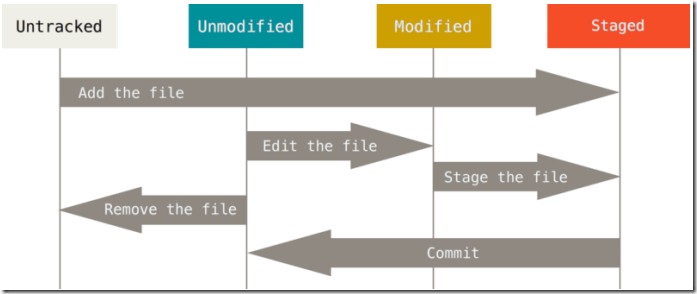
2.1 检查状态
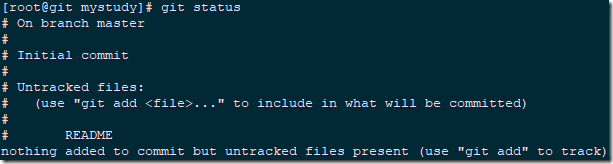
 [root@git mystudy]# echo 'My Project' > README

 [root@git mystudy]# git status
2.2 跟踪新文件
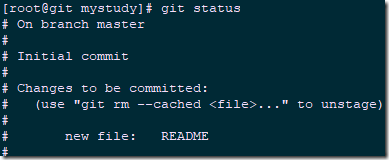
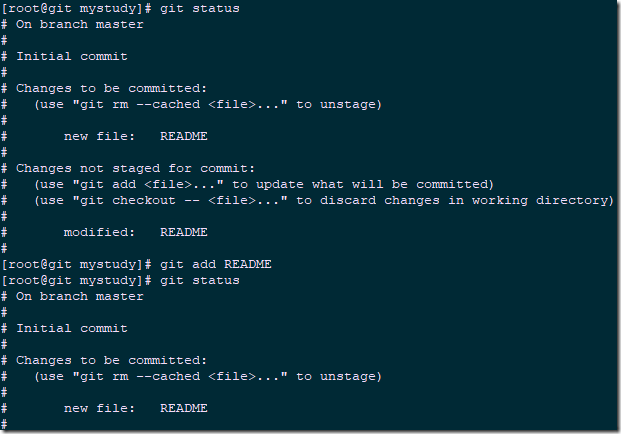
 [root@git mystudy]# git add README

 [root@git mystudy]# git status
2.3 暂存已修改文件
 [root@git mystudy]# echo "This is my test file">>README

 [root@git mystudy]# git status
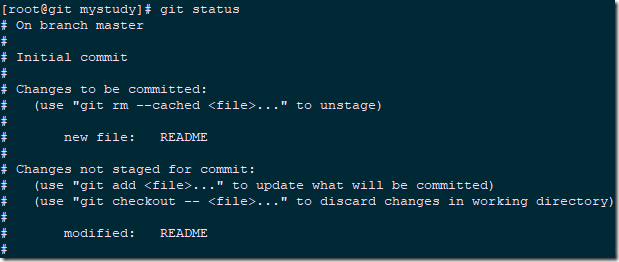
[root@git mystudy]# git add README #添加至暂存区
2.4 状态简览
[root@git mystudy]# git status -s

2.5 忽略文件
[root@git mystudy]# cat .gitignore
- 所有空行或者以 # 开头的行都会被 Git 忽略。
- 可以使用标准的 glob 模式匹配,即简化正则表达式。
- 匹配模式可以以(/)开头防止递归。
- 匹配模式可以以(/)结尾指定目录。
- 要忽略指定模式以外的文件或目录,可以在模式前加上惊叹号(!)取反。
- 星号(*):匹配零个或多个任意字符;
- [abc] :匹配任何一个列在方括号中的字符;
- 问号(?):只匹配一个任意字符;
- [0-9]:匹配0至9范围内的任意数字;
- **: 使用两个星号(*) 表示匹配任意中间目录,比如`a/**/z` 可以匹配 a/z, a/b/z 或 `a/b/c/z`等。
2.6 查看已暂存和未暂存修改
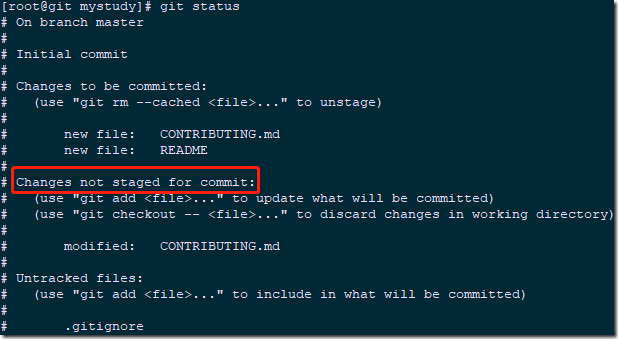
 [root@git mystudy]# echo "Hello" > README

 [root@git mystudy]# echo "Hello" > CONTRIBUTING.md

 [root@git mystudy]# git add README

 [root@git mystudy]# git status
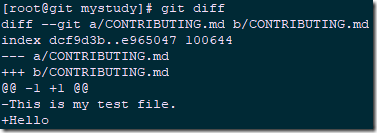
[root@git mystudy]# git diff #通过git diff查看具体做了哪些修改。
2.7 提交更新
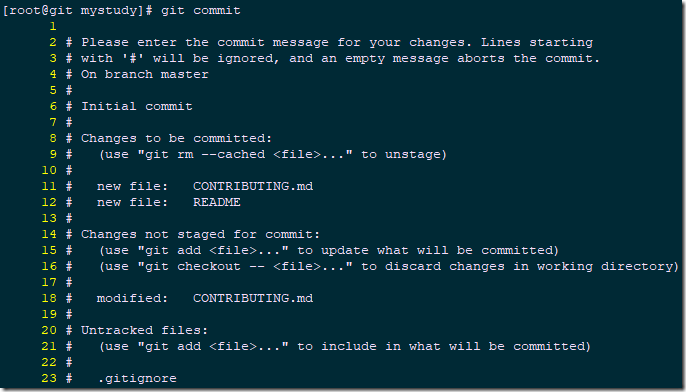
[root@git mystudy]# git status
[root@git mystudy]# git commit
2.8 跳过暂存区
2.9 移除文件
- 正常git删除操作:即从git移除同时从工作目录删除使用git rm。
- rm删除后的git移除:rm文件后,再使用git rm [文件]。
- 放入暂存区之后rm删除文件的git移除:git rm -f [文件]。
- 从git仓库删除但保留在本地目录:git rm --cached [文件]。
2.10 移动文件
[root@git mystudy]# git mv README README.md
 $ mv README README.md

 $ git rm README

 $ git add README.md
三 查看提交历史
[root@git mystudy]# git log
四 撤销操作
4.1 重新提交
 [root@git mystudy]# git commit -m 'first commit'

 [root@git mystudy]# echo "This is my test 3 file" > README3.md

 [root@git mystudy]# git add README3.md

 [root@git mystudy]# git commit --amend -m 'second commit'
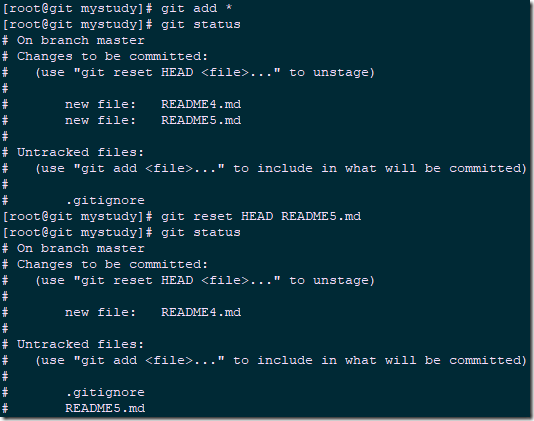
4.2 取消暂存区文件
 [root@git mystudy]# echo "This is my test 4 file" > README4.md

 [root@git mystudy]# echo "This is my test 5 file" > README5.md

 [root@git mystudy]# git add *

 [root@git mystudy]# git status

 [root@git mystudy]# git reset HEAD README5.md	#从暂存区取消特定文件
4.3 撤销对文件的修改
 [root@git mystudy]# echo "version 1.1" > version.md

 [root@git mystudy]# git add version.md

 [root@git mystudy]# git commit -m 'version commit'

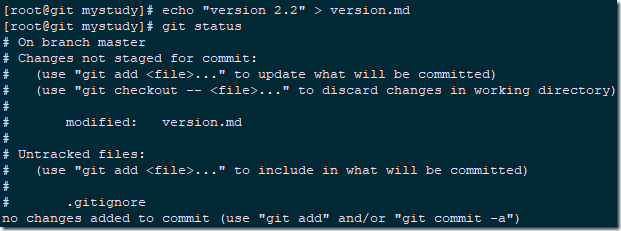
 [root@git mystudy]# echo "version 2.2" > version.md

 [root@git mystudy]# git status
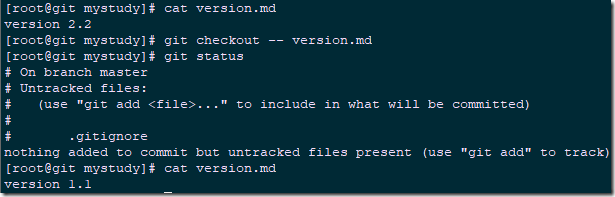
 [root@git mystudy]# cat version.md

 version 2.2

 [root@git mystudy]# git checkout -- version.md

 [root@git mystudy]# git status
五 远程仓库的使用
5.1 查看远程仓库
[root@git mystudy]# git remote -v

5.2 添加远程仓库
 [root@git mystudy]# mkdir /mystudy2

 [root@git mystudy]# cd /mystudy2

 [root@git mystudy2]# git init

 [root@git mystudy2]# git remote add mystudy2 https://gitee.com/imxhy/mystudy2

 [root@git mystudy2]# git fetch mystudy2		#使用别名拉取仓库存在但本地没有的文件
5.3 从仓库抓取与拉取
5.4 推送至远程仓库
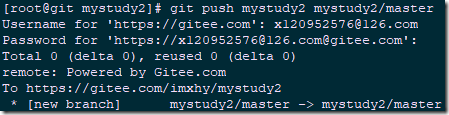
[root@git mystudy2]# git push mystudy2 mystudy2/master
5.5 查看远程仓库
[root@git mystudy2]# git remote show mystudy2
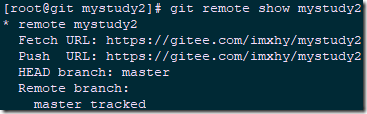
5.6 远程仓库移除与重命名
 [root@git mystudy2]# git remote rename mystudy2 study2

 [root@git mystudy2]# git remote

 study2
 [root@git mystudy2]# git remote rm study2

 [root@git mystudy2]# git remote
六 git别名
6.1 设置别名
 [root@git mystudy]# git config --global alias.co checkout

 [root@git mystudy]# git config --global alias.br branch

 [root@git mystudy]# git config --global alias.ci commit

 [root@git mystudy]# git config --global alias.st status
002.Git日常基础使用的更多相关文章
- 【GoLang】GO语言系列--002.GO语言基础
002.GO语言基础 1 参考资料 1.1 http://www.cnblogs.com/vimsk/archive/2012/11/03/2736179.html 1.2 https://githu ...
- git学习基础教程
分享一个git学习基础教程 http://pan.baidu.com/s/1o6ugkGE 具体在网盘里面的内容..需要的学习可以直接下.
- Git入门基础详情教程
前言 写了一篇文章<一篇文章了解Github和Git教程>还觉得不错,继续写了<为了Github默默付出,我想了解你>,那么继续写Git 基础知识. Git 官网:https: ...
- Git使用基础篇
Git使用基础篇 前言 Git是一个分布式的版本控制工具,本篇文章从介绍Git开始,重点在于介绍Git的基本命令和使用技巧,让你尝试使用Git的同时,体验到原来一个版 本控制工具可以对开发产生如此之多 ...
- Git使用基础篇(zz)
Git使用基础篇 您的评价: 收藏该经验 Git是一个分布式的版本控制工具,本篇文章从介绍Git开始,重点在于介绍Git的基本命令和使用技巧,让你尝试使用Git的同时,体 ...
- Mac下Git的基础操作
目前最火的版本控制软件是Git了吧,今天简单梳理一下Mac下Git的基础操作~~ 一.什么是Git Git是一个分布式代码管理工具,用于敏捷的处理或大或小的项目,类似的工具还有svn. 基于Git的快 ...
- git 日常使用从入门到真香
目录 git 日常使用从入门到真香 一.Git简介 二.Git常用命令 三.git操作流程 四.报错处理 git 日常使用从入门到真香 一.Git简介 Git是一个开源的分布式版本控制系统,可以有效. ...
- Mac 下 Git 的基础命令行操作
Mac 下 Git 的基础命令行操作 sudo apt-get install git-core //安装Git 用户配置 git config --global user.name "Yo ...
- Git及基础命令的介绍以及如何向本地仓库添加文件
在介绍Git的使用之前,我们得要先来了解一下Git.那么什么是Git? Git是一个版本管理工具(VCS),具有以下的特点: 分布式版本控制: 多个开发人员协调工作: 有效监听谁做的修改: 本地及远程 ...
随机推荐
- debian9部署ownCloud
ownCloud是一个开源的私有云存储,支持外接存储,具有良好的扩展性.ownCloud是传统的C/S架构,支持目前各大流行平台.服务端客户端实时同步,使用体验非常好. ownCloud is Wed ...
- CodeForces 450B Jzzhu and Sequences (矩阵优化)
CodeForces 450B Jzzhu and Sequences (矩阵优化) Description Jzzhu has invented a kind of sequences, they ...
- 未处理的异常 stack overflow
今天在编译程序时遇到“0x00e304f7 处有未经处理的异常: 0xC00000FD: Stack overflow”的错误,也就是栈溢出了,google了一下,原来是我申请的一个变量太大了,con ...
- java基础基础总结----- RunTime
- Java迭代器用法
public class Test01 { public static void main(String[] args) { List list = new ArrayList(); list.add ...
- asp.net C#母版页和内容页事件排版加载顺序生命周期
asp.net C#母版页和内容页事件排版加载顺序生命周期 关于ASP页面Page_Load发生在事件之前而导致的问题已经喜闻乐见,对于问题的解释也很全面,但是如何解决问题则较少有人说明,我就再 简单 ...
- export DataTable To Excel(C)
static DataTable GetTable() { DataTable table = new DataTable(); // New data table. table.Colu ...
- 对git简单的认识
了解git工作区.暂存区.版本库: 其中,使用 git add .就是将文件添加到了暂存区:而git commit -m ‘desc’:将暂存区的文件添加到版本库: 每次更新项目的步骤: 1)每次更新 ...
- mysql内连接、左连接、右连接
内连接(INNER JOIN)(典型的连接运算,使用像 = 或 <> 之类的比较运算符).包括相等连接和自然连接. 内连接使用比较运算符根据每个表共有的列的值匹配两个表中的 ...
- 经典sql-获取当前文章的上一篇和下一篇
我们在做资讯类的网站的时候,肯定会有这么一个需求,就是在资讯内容页的下方需要给出上一篇和下一篇资讯的链接.上次我一同事兼好友兼室友就遇到了这么一个需求,一开始我们都把问题想复杂了,先取的是符合条件的资 ...