
python文件操作及格式化输出
1 文件与IO
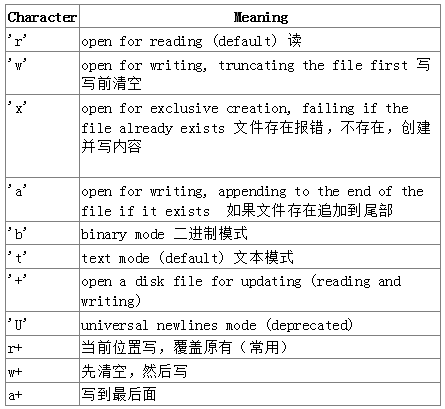

1.1读写文本数据
读写各种不同的文本数据,如ASCII,UTF-8,UTF-9编码等。
使用带有rt模式的open()函数读取文本文件。
例如:

with open('db', 'rt') as f:

    data = f.read()

    print(data)

with open('db', 'rt') as f:

    for line in f:

        print(line.strip('\n'))
使用带有wt的open()函数写入一个文本文件,如果之前文件内容存在则清除并覆盖掉。
例如:

with open('db', 'wt') as f:

    f.write('python|python235')
如果是已存在文件中添加内容,使用at的open()函数。
操作文件时指定默认编码
with open('somefile.txt', 'rt', encoding='latin-1') as f:

    ...
注意:
当使用with语句时,不需要手动关闭文件,当with控制块结束时,文件会自动关闭。不用with时,需要手动关闭。
1.2文件不存在时写入
在一个文件中写入数据,如果文件不存在写入,而不是直接覆盖原文件内容。
例如:

with open('db', 'xt') as f:

    f.write('hello')

db文件存在抛出FileExistsError异常

Traceback (most recent call last):

  File "C:/Users/hexm/Desktop/python/s13/day3/file01.py", line 9, in <module>

    with open('db', 'xt') as f:

FileExistsError: [Errno 17] File exists: 'db'

替代方案:

import os

if not os.path.exists('db'):

    with open('db', 'wt') as f:

        f.write('hello\n')

else:

    print('File already exists')
1.3读写二进制文件
例如:

f = open('db', 'rb')

res = f.read()

print(res, type(res)) #b'ssssssssss' <class 'bytes'>

text = res.decode('utf-8')

print(text)

f = open('db', 'ab')

text = 'hello,世界'

f.write(bytes(text, encoding='utf-8'))

f.write(text.encode('utf-8'))

f = open('db', 'ab')

f.write(b'Hello world.')
1.4 打印输出到文本文件
打印输出至文件中,将print()函数输出重定向到一个文件中。
例如:

with open('db', 'wt') as f:

    print('python1|python279', file=f)
1.5 使用其他分隔符或行终止符打印
可以在print()函数中使用sep和end关键字。
例如:

print('xiaoming', 2, 3, 5)

print('xiaoming', 2, 3, 5, sep=',', end='!!!\n')

for x in range(10):

    print(x, end=' ') #0 1 2 3 4 5 6 7 8 9
使用str.join()也可以做到,不过str.join()仅使用于字符串。
例如:

print(','.join(str(x)for x in name)) #xiaoming,2,3,5

print(*name, sep = ',') #xiaoming,2,3,5
1.6 format格式化输出
#format格式化输出

s1 = 'I am {0}, age {1}'.format('hexm', 18)

print(s1) #I am hexm, age 18

s2 = 'I am {0}, age {1}'.format(*['hexm', 18])

print(s2) #I am hexm, age 18

s3 = 'I am {name}, age {age}'.format(name='hexm', age=18)

print(s3) #I am hexm, age 18

s4 = 'I am {name}, age {age}'.format(**{'name': 'hexm', 'age': 18})

print(s4) #I am hexm, age 18
监控文件尾部,并打印
#!/usr/bin/env python

# coding=utf-8

import time

def follow(thefile):

    thefile.seek(0,2)

    while True:

        line = thefile.readline()

        if not line:

            time.sleep(0.1)

            continue

        yield line

if __name__ == '__main__':

    logfile = open('/tmp/access.log', 'r')

    loglines = follow(logfile)

    for line in loglines:

        print(line.strip())
监控文件尾部,并打印,退出后从退出位置监控
#!/usr/bin/env python

# coding=utf-8

import time

import os

def follow(seek_bytes, file):

    seek_bytes = int(seek_bytes)

    file.seek(seek_bytes)  # 跳到位置信息

    while True:

        line = file.readline()

        if not line:

            time.sleep(0.1)

            continue

        else:

            # 保存位置信息

            with open('/tmp/linenumber.log', 'w+') as f:

                f.write(str(file.tell()))

            yield line

if __name__ == '__main__':

    logfile = open('/tmp/access.log', 'r')

    # 如果位置文件存在,打开并读取

    if os.path.exists('/tmp/seek_bytes.log'):

        with open('/tmp/seek_bytes.log', 'r') as f:

            seek_bytes = f.readline().strip()

    # 位置设置为0

    else:

        seek_bytes = ''

    # 将位置信息和文件对象传给follow函数

    loglines = follow(seek_bytes, logfile)

    for line in loglines:

        print(line.strip())
python文件操作及格式化输出的更多相关文章
- Python基础篇【第2篇】: Python文件操作
Python文件操作 在Python中一个文件,就是一个操作对象,通过不同属性即可对文件进行各种操作.Python中提供了许多的内置函数和方法能够对文件进行基本操作. Python对文件的操作概括来说 ...
- 初学Python——文件操作第二篇
前言:为什么需要第二篇文件操作?因为第一篇的知识根本不足以支撑基本的需求.下面来一一分析. 一.Python文件操作的特点 首先来类比一下,作为高级编程语言的始祖,C语言如何对文件进行操作? 字符(串 ...
- Python之路Python文件操作
Python之路Python文件操作 一.文件的操作 文件句柄 = open('文件路径+文件名', '模式') 例子 f = open("test.txt","r&qu ...
- Python文件操作:文件的打开关闭读取写入
Python文件操作:文件的打开关闭读取写入 一.文件的打开关闭 Python能以文本和二进制两种方式处理文件,本文主要讨论在Python3中文本文件的操作. 文件操作都分为以下几个步骤: 1.打开文 ...
- [Python学习笔记][第七章Python文件操作]
2016/1/30学习内容 第七章 Python文件操作 文本文件 文本文件存储的是常规字符串,通常每行以换行符'\n'结尾. 二进制文件 二进制文件把对象内容以字节串(bytes)进行存储,无法用笔 ...
- Python小代码_2_格式化输出
Python小代码_2_格式化输出 name = input("name:") age = input("age:") job = input("jo ...
- Python文件操作与函数目录
文件操作 python文件操作 函数 Python函数学习——初步认识 Python函数学习——作用域与嵌套函数 Python函数学习——匿名函数 python内置函数 Python函数学习——递归 ...
- day8.python文件操作
打开和关闭文件 open函数 用Python内置的open()函数打开一个文件,创建一个file对象,相关的方法才可以调用它进行读写. file = open(file_name [, access_ ...
- 关于python 文件操作os.fdopen(), os.close(), tempfile.mkstemp()
嗯.最近在弄的东西也跟这个有关系,由于c基础渣渣.现在基本上都忘记得差不多的情况下,是需要花点功夫才能弄明白. 每个语言都有相关的文件操作. 今天在flask 的例子里看到这样一句话.拉开了文件操作折 ...
随机推荐
- php常用几种设计模式的应用场景
1.单例设计模式 所谓单例模式,即在应用程序中最多只有该类的一个实例存在,一旦创建,就会一直存在于内存中! 单例设计模式常应用于数据库类设计,采用单例模式,只连接一次数据库,防止打开多个数据库连接. ...
- java配置环境变量与常用技巧
一.java入门 --->java平台 •Java SE Java Platform,Standard Edition-Java平台标准版. •Java EE Java Platform,Ent ...
- oracle-表空间剩余空间大小占比查询
select tablespace_name, max_gb, used_gb, round(100 * used_gb / max_gb) pct_used from (select a.table ...
- 利用git从github上拉取项目
(一)准备工作 (1)安装git,下载地址是git官网:https://git-scm.com/点击打开链接 (二)拉取项目的步骤 1.新建文件夹,最好为英文名project 2.进入文件夹,空白处右 ...
- Tether USDT 节点钱包的安装与使用
当前,在进行数字资产交易的过程中,由于各国政府的政策因素,法币成为数字资产交易的一个重要问题.在法币接入数字资产交易的过程中,通常是用某种数字资产对法币进行锚定,例如bitshares上面的许多b ...
- 深入理解ajax系列第二篇——请求方式
前面的话 在上一篇中,概要地介绍了XHR对象的使用.本文将详细介绍使用XHR对象发送请求的两种方式——GET和POST.下面将以实例的形式来详细说明 GET GET是最常见的请求类型,最常用于向服务器 ...
- BZOJ 3170 松鼠聚会(切比雪夫距离转曼哈顿距离)
题意 有N个小松鼠,它们的家用一个点x,y表示,两个点的距离定义为:点(x,y)和它周围的8个点即上下左右四个点和对角的四个点,距离为1.现在N个松鼠要走到一个松鼠家去,求走过的最短距离. 思路 题目 ...
- 【bzoj5118】Fib数列2 费马小定理+矩阵乘法
题目描述 Fib定义为Fib(0)=0,Fib(1)=1,对于n≥2,Fib(n)=Fib(n-1)+Fib(n-2) 现给出N,求Fib(2^n). 输入 本题有多组数据.第一行一个整数T,表示数据 ...
- 阿里云ECS提示RHSA-2017:3263: curl security update
服务器配置: 原因阿里云安装的CentOS 7.3的curl和libcurl的源不是最新的,会导致安全漏洞出现 方法首先还是要在实例列表远程连接打开终端. 1.更新ca-bundle1.备份: cp ...
- Continuation-passing style
Continuation-passing style 参考书籍: EOPL ( Essentials of Programming Languages, 3rd Edition ) 作者:知乎用户链 ...