
C# WinForm DataGridView让DataPropertyName支持复杂属性
首先给Grid添加BindingSource,类型为BindingForForm2。或者设置Grid的DataSource为IEnumerable<BindingForForm2>。
BindingForForm2类型如下。
 public class BindingForForm2

    {

        public int Age { get; set; }

        public string Name { get; set; }

        public int Height { get; set; }

        public int Weight { get; set; }

        public ClassTest ClassTest { get; set; }

    }

    public class ClassTest

    {

        public string S1 { get; set; }

        public string S2 { get; set; }

    }
我们想在Grid上直接显示BindingForForm2中ClassTest属性的S1和S2属性。可以如下图设置DataPropertyName。直接设置用属性点的方式。

然后如下注册DataGridView的CellFormatting事件即可。代码大致意思是,先取到当前选中行的Object(此处为BindingForForm2),然后取到DataPropertyName的设置,再循环用反射读取想要的值。
  private void DataGridView1_CellFormatting(object sender, DataGridViewCellFormattingEventArgs e)

         {

             if (e.Value != null) return;

             try

             {

                 var dgv = (DataGridView)sender;

                 object obj = null;

                 var source = dgv.DataSource as BindingSource;

                 if (source != null)

                 {

                     obj = ((IEnumerable<object>)source.DataSource).ElementAt(e.RowIndex);

                 }

                 else if (dgv.DataSource is IEnumerable<object>)

                 {

                     obj = ((IEnumerable<object>)dgv.DataSource).ElementAt(e.RowIndex);

                 }

                 var col = dgv.Columns[e.ColumnIndex];

                 var props = col.DataPropertyName.Split('.');

                 foreach (var prop in props)

                 {

                     if (obj == null) return;

                     var p = obj.GetType().GetProperty(prop);

                     if (p == null) return;

                     obj = p.GetValue(obj, null);

                 }

                 e.Value = obj;

             }

             catch

             {

                 //ignore

             }

         }
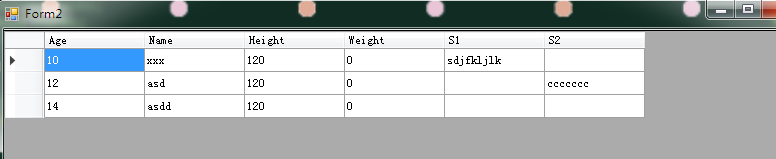
效果:
bindingSource填充数据
 bindingForForm2BindingSource.DataSource = new List<BindingForForm2>

            {

                new BindingForForm2 {Age = , Height = , Name = "xxx", ClassTest = new ClassTest {S1 = "sdjfkljlk"}},

                new BindingForForm2 {Age = , Height = , Name = "asd", ClassTest = new ClassTest {S2 = "ccccccc"}},

                new BindingForForm2 {Age = , Height = , Name = "asdd"}

            };
GridView显示
转载请注明出处。 http://www.cnblogs.com/JmlSaul/p/7726233.html
C# WinForm DataGridView让DataPropertyName支持复杂属性的更多相关文章
- C#实现WinForm DataGridView控件支持叠加数据绑定
我们都知道WinForm DataGridView控件支持数据绑定,使用方法很简单,只需将DataSource属性指定到相应的数据源即可,但需注意数据源必须支持IListSource类型,这里说的是支 ...
- C# winform DataGridView 常见属性
C# winform DataGridView 属性说明① 取得或者修改当前单元格的内容 ② 设定单元格只读 ③ 不显示最下面的新行 ④ 判断新增行 ⑤ 行的用户删除操作的自定义 ⑥ 行.列的隐藏和删 ...
- Winform Datagridview 单元格html格式化支持富文本
Winform Datagridview 单元格html格式化支持富文本 示例: 源码:https://github.com/OceanAirdrop/DataGridViewHTMLCell 参考: ...
- winform datagridview 绑定泛型集合变得不支持排序的解决方案
原文:winform datagridview 绑定泛型集合变得不支持排序的解决方案 案例: 环境:Winform程序 控件:Datagridview 现象:Datagridview控件绑定到List ...
- winform DataGridView的虚模式填充,CellValueNeeded事件的触发条件
虚模式填充常用来处理大量数据,某个字段的显示问题. DataGridView是.net 2.0新增的表格数据编辑和显示控件,简单的数据显示和编辑,只需直接和数据源绑定就可以了. 对于 一些特殊情况,我 ...
- WinForm DataGridView 绑定泛型List(List<T>)/ArrayList不显示的原因和解决
背景:无意间遇到了一个不大不小的问题,希望对一些遇到的人有所帮助! 一.问题 WinForm DataGridView 绑定泛型List (List<T>)/ArrayList不显示,UI ...
- [转]WinForm DataGridView 绑定泛型List(List<T>)/ArrayList不显示的原因和解决
背景:无意间遇到了一个不大不小的问题,希望对一些遇到的人有所帮助! 一.问题 WinForm DataGridView 绑定泛型List (List<T>)/ArrayList不显示,UI ...
- 让IE6/IE7/IE8浏览器支持CSS3属性
让IE6/IE7/IE8浏览器支持CSS3属性 一.下载 您可以狠狠地点击这里:ie-css3.htc,这个玩意儿是让IE浏览器支持CSS3表现的关键东东. 二.上面的是什么东西 首先说说.htc文件 ...
- 解决ie6下不支持fix属性,模拟固定定位
<!DOCTYPE HTML> <html> <head> <meta http-equiv="Content-Type" content ...
随机推荐
- 201521123070 《JAVA程序设计》第1周学习总结
本周学习总结 1.认识了三大平台Java SE.Java EE.Java ME. 2.认识了解了JDK,JVM与JRE,且熟悉JDK的操作并下载安装. 3.学会用博客写作业了. 书面作业 Q1.为什么 ...
- java课程设计(团队)-五子棋
单机五子棋小游戏 一:团队介绍 组长:网络1511,毛卓 组员:网络1511,朱潞潞 组员:网络1511,范阳斌 二:项目git提交记录截图 三:项目使用主要技术 netBeans,GUI 四:项目特 ...
- 201521123028 《Java程序设计》第10周学习总结
1. 本周学习总结 异常方面,主要是调试的相关内容,断点的使用,常用快捷键(F5(step into) F6(step over,跳过),F7 (step return,跳出)). 多线程: ①.进程 ...
- Hyperledger Fabric 1.0 从零开始(二)——环境构建(公网)
1:环境构建 在本文中用到的宿主机环境是Centos ,版本为Centos.x86_647.2,通过Docker 容器来运行Fabric的节点,版本为v1.0.因此,启动Fabric网络中的节点需要先 ...
- eclipse里index.jsp头部报错的原因和解决方法
index.jsp的头<%@这句报错的话,是因为没有引入Tomcat的原因.解决:A:Window---Preferences---server---RuntimeEnviroments--Ad ...
- Hibernate第五篇【inverse、cascade属性详解】
前言 上一篇博文已经讲解了一对多和多对一之间的关系了,一对多和多对一存在着关联关系(外键与主键的关系).本博文主要讲解Inverse属性.cascade属性.这两个属性对关联关系都有影响 Invers ...
- Oracle函数之chr
chr()函数将ASCII码转换为字符:字符 –> ASCII码:ascii()函数将字符转换为ASCII码:ASCII码 –> 字符: 在oracle中chr()函数和ascii()是一 ...
- OSGi-入门篇之生命周期层(03)
前言 生命周期层在OSGi框架中属于模块层上面的一层,它的运作是建立在模块层的功能之上的.生命周期层一个主要的功能就是让你能够从外部管理应用或者建立能够自我管理的应用(或者两者的结合),并且给了应用本 ...
- 翻译连载 | 第 9 章:递归(上)-《JavaScript轻量级函数式编程》 |《你不知道的JS》姊妹篇
原文地址:Functional-Light-JS 原文作者:Kyle Simpson-<You-Dont-Know-JS>作者 关于译者:这是一个流淌着沪江血液的纯粹工程:认真,是 HTM ...
- IOS SDWebImage实现基本原理详解(转载)
1)当我门需要获取网络图片的时候,我们首先需要的便是URl没有URl什么都没有,获得URL后我们SDWebImage实现的并不是直接去请求网路,而是检查图片缓存中有没有和URl相关的图片,如果有则直接 ...