
IE8及其以下浏览器关于圆角表框的问题
css部分
yuan {
border: 2px solid #C0C0C0;
-moz-border-radius: 50%;
-webkit-border-radius: 50%;
border-radius: 50%;
position: relative;
padding: 5px;
/* background: #FFF; */
z-index: 2;
overflow: hidden;
width: 100px;
height: 100px;
behavior: url(ie-css3.htc);
}
html部分
<body>
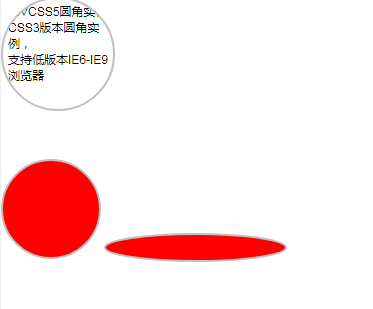
<div class="yuan">
DIVCSS5圆角实例<br> CSS3版本圆角实例,<br> 支持低版本IE6-IE9浏览器
</div>
<br />
<br />
<br />
<input type="button" class="yuan" style="background-color: red"
onclick="alert('111');" />
<input type="text" class="yuan1" style="background-color: red">
</body>
behavior: url(ie-css3.htc); ie-css3.htc复制如下代码取名ie-css3.htc
<public:attach event="ondocumentready" onevent="ondocumentready('v08vnSVo78t4JfjH')" />
<script type="text/javascript">
timer_length = 200; // Milliseconds
border_opacity = false; // Use opacity on borders of rounded-corner elements? Note: This causes antialiasing issues
function supportsVml() {
if (typeof supportsVml.supported == "undefined") {
var a = document.body.appendChild(document.createElement('div'));
a.innerHTML = '<v:shape id="vml_flag1" adj="1" />';
var b = a.firstChild;
b.style.behavior = "url(#default#VML)";
supportsVml.supported = b ? typeof b.adj == "object": true;
a.parentNode.removeChild(a);
}
return supportsVml.supported
}
// findPos() borrowed from http://www.quirksmode.org/js/findpos.html
function findPos(obj) {
var curleft = curtop = 0;
if (obj.offsetParent) {
do {
curleft += obj.offsetLeft;
curtop += obj.offsetTop;
} while (obj = obj.offsetParent);
}
return({
'x': curleft,
'y': curtop
});
}
function createBoxShadow(element, vml_parent) {
var style = element.currentStyle['iecss3-box-shadow'] || element.currentStyle['-moz-box-shadow'] || element.currentStyle['-webkit-box-shadow'] || element.currentStyle['box-shadow'] || '';
var match = style.match(/^(\d+)px (\d+)px (\d+)px/);
if (!match) { return(false); }
var shadow = document.createElement('v:roundrect');
shadow.userAttrs = {
'x': parseInt(RegExp.$1 || 0),
'y': parseInt(RegExp.$2 || 0),
'radius': parseInt(RegExp.$3 || 0) / 2
};
shadow.position_offset = {
'y': (0 - vml_parent.pos_ieCSS3.y - shadow.userAttrs.radius + shadow.userAttrs.y),
'x': (0 - vml_parent.pos_ieCSS3.x - shadow.userAttrs.radius + shadow.userAttrs.x)
};
shadow.size_offset = {
'width': 0,
'height': 0
};
shadow.arcsize = element.arcSize +'px';
shadow.style.display = 'block';
shadow.style.position = 'absolute';
shadow.style.top = (element.pos_ieCSS3.y + shadow.position_offset.y) +'px';
shadow.style.left = (element.pos_ieCSS3.x + shadow.position_offset.x) +'px';
shadow.style.width = element.offsetWidth +'px';
shadow.style.height = element.offsetHeight +'px';
shadow.style.antialias = true;
shadow.className = 'vml_box_shadow';
shadow.style.zIndex = element.zIndex - 1;
shadow.style.filter = 'progid:DXImageTransform.Microsoft.Blur(pixelRadius='+ shadow.userAttrs.radius +',makeShadow=true,shadowOpacity='+ element.opacity +')';
element.parentNode.appendChild(shadow);
//element.parentNode.insertBefore(shadow, element.element);
// For window resizing
element.vml.push(shadow);
return(true);
}
function createBorderRect(element, vml_parent) {
if (isNaN(element.borderRadius)) { return(false); }
element.style.background = 'transparent';
element.style.borderColor = 'transparent';
var rect = document.createElement('v:roundrect');
rect.position_offset = {
'y': (0.5 * element.strokeWeight) - vml_parent.pos_ieCSS3.y,
'x': (0.5 * element.strokeWeight) - vml_parent.pos_ieCSS3.x
};
rect.size_offset = {
'width': 0 - element.strokeWeight,
'height': 0 - element.strokeWeight
};
rect.arcsize = element.arcSize +'px';
//rect.arcsize = element.arcSize / (element.offsetWidth + rect.size_offset.width);
rect.strokeColor = element.strokeColor;
rect.strokeWeight = element.strokeWeight +'px';
rect.stroked = element.stroked;
rect.className = 'vml_border_radius';
rect.style.display = 'block';
rect.style.position = 'absolute';
rect.style.top = (element.pos_ieCSS3.y + rect.position_offset.y) +'px';
rect.style.left = (element.pos_ieCSS3.x + rect.position_offset.x) +'px';
rect.style.width = (element.offsetWidth + rect.size_offset.width) +'px';
rect.style.height = (element.offsetHeight + rect.size_offset.height) +'px';
rect.style.antialias = true;
rect.style.zIndex = element.zIndex - 1;
if (border_opacity && (element.opacity < 1)) {
rect.style.filter = 'progid:DXImageTransform.Microsoft.Alpha(Opacity='+ parseFloat(element.opacity * 100) +')';
}
var fill = document.createElement('v:fill');
fill.color = element.fillColor;
fill.src = element.fillSrc;
fill.className = 'vml_border_radius_fill';
fill.type = 'tile';
fill.opacity = element.opacity;
// Hack: IE6 doesn't support transparent borders, use padding to offset original element
isIE6 = /msie|MSIE 6/.test(navigator.userAgent);
if (isIE6 && (element.strokeWeight > 0)) {
element.style.borderStyle = 'none';
element.style.paddingTop = parseInt(element.currentStyle.paddingTop || 0) + element.strokeWeight;
element.style.paddingBottom = parseInt(element.currentStyle.paddingBottom || 0) + element.strokeWeight;
}
rect.appendChild(fill);
element.parentNode.appendChild(rect);
//element.parentNode.insertBefore(rect, element.element);
// For window resizing
element.vml.push(rect);
return(true);
}
function createTextShadow(element, vml_parent) {
if (!element.textShadow) { return(false); }
var match = element.textShadow.match(/^(\d+)px (\d+)px (\d+)px (#?\w+)/);
if (!match) { return(false); }
//var shadow = document.createElement('span');
var shadow = element.cloneNode(true);
var radius = parseInt(RegExp.$3 || 0);
shadow.userAttrs = {
'x': parseInt(RegExp.$1 || 0) - (radius),
'y': parseInt(RegExp.$2 || 0) - (radius),
'radius': radius / 2,
'color': (RegExp.$4 || '#000')
};
shadow.position_offset = {
'y': (0 - vml_parent.pos_ieCSS3.y + shadow.userAttrs.y),
'x': (0 - vml_parent.pos_ieCSS3.x + shadow.userAttrs.x)
};
shadow.size_offset = {
'width': 0,
'height': 0
};
shadow.style.color = shadow.userAttrs.color;
shadow.style.position = 'absolute';
shadow.style.top = (element.pos_ieCSS3.y + shadow.position_offset.y) +'px';
shadow.style.left = (element.pos_ieCSS3.x + shadow.position_offset.x) +'px';
shadow.style.antialias = true;
shadow.style.behavior = null;
shadow.className = 'ieCSS3_text_shadow';
shadow.innerHTML = element.innerHTML;
// For some reason it only looks right with opacity at 75%
shadow.style.filter = '\
progid:DXImageTransform.Microsoft.Alpha(Opacity=75)\
progid:DXImageTransform.Microsoft.Blur(pixelRadius='+ shadow.userAttrs.radius +',makeShadow=false,shadowOpacity=100)\
';
var clone = element.cloneNode(true);
clone.position_offset = {
'y': (0 - vml_parent.pos_ieCSS3.y),
'x': (0 - vml_parent.pos_ieCSS3.x)
};
clone.size_offset = {
'width': 0,
'height': 0
};
clone.style.behavior = null;
clone.style.position = 'absolute';
clone.style.top = (element.pos_ieCSS3.y + clone.position_offset.y) +'px';
clone.style.left = (element.pos_ieCSS3.x + clone.position_offset.x) +'px';
clone.className = 'ieCSS3_text_shadow';
element.parentNode.appendChild(shadow);
element.parentNode.appendChild(clone);
element.style.visibility = 'hidden';
// For window resizing
element.vml.push(clone);
element.vml.push(shadow);
return(true);
}
function ondocumentready(classID) {
if (!supportsVml()) { return(false); }
if (this.className.match(classID)) { return(false); }
this.className = this.className.concat(' ', classID);
// Add a namespace for VML (IE8 requires it)
if (!document.namespaces.v) { document.namespaces.add("v", "urn:schemas-microsoft-com:vml"); }
// Check to see if we've run once before on this page
if (typeof(window.ieCSS3) == 'undefined') {
// Create global ieCSS3 object
window.ieCSS3 = {
'vmlified_elements': new Array(),
'update_timer': setInterval(updatePositionAndSize, timer_length)
};
if (typeof(window.onresize) == 'function') { window.ieCSS3.previous_onresize = window.onresize; }
// Attach window resize event
window.onresize = updatePositionAndSize;
}
// These attrs are for the script and have no meaning to the browser:
this.borderRadius = parseInt(this.currentStyle['iecss3-border-radius'] ||
this.currentStyle['-moz-border-radius'] ||
this.currentStyle['-webkit-border-radius'] ||
this.currentStyle['border-radius'] ||
this.currentStyle['-khtml-border-radius']);
this.arcSize = Math.min(this.borderRadius / Math.min(this.offsetWidth, this.offsetHeight), 1);
this.fillColor = this.currentStyle.backgroundColor;
this.fillSrc = this.currentStyle.backgroundImage.replace(/^url\("(.+)"\)$/, '$1');
//add by emptyhua@gmail.com
if (this.fillSrc == 'none')
this.fillSrc = 'javascript:void(0);';
this.strokeColor = this.currentStyle.borderColor;
this.strokeWeight = parseInt(this.currentStyle.borderWidth);
this.stroked = 'true';
if (isNaN(this.strokeWeight) || (this.strokeWeight == 0)) {
this.strokeWeight = 0;
this.strokeColor = fillColor;
this.stroked = 'false';
}
this.opacity = parseFloat(this.currentStyle.opacity || 1);
this.textShadow = this.currentStyle['text-shadow'];
this.element.vml = new Array();
this.zIndex = parseInt(this.currentStyle.zIndex);
if (isNaN(this.zIndex)) { this.zIndex = 0; }
// Find which element provides position:relative for the target element (default to BODY)
vml_parent = this;
var limit = 100, i = 0;
do {
vml_parent = vml_parent.parentElement;
i++;
if (i >= limit) { return(false); }
} while ((typeof(vml_parent) != 'undefined') && (vml_parent.currentStyle.position != 'relative') && (vml_parent.tagName != 'BODY'));
vml_parent.pos_ieCSS3 = findPos(vml_parent);
this.pos_ieCSS3 = findPos(this);
var rv1 = createBoxShadow(this, vml_parent);
var rv2 = createBorderRect(this, vml_parent);
var rv3 = createTextShadow(this, vml_parent);
if (rv1 || rv2 || rv3) { window.ieCSS3.vmlified_elements.push(this.element); }
if (typeof(vml_parent.document.ieCSS3_stylesheet) == 'undefined') {
vml_parent.document.ieCSS3_stylesheet = vml_parent.document.createStyleSheet();
vml_parent.document.ieCSS3_stylesheet.addRule("v\\:roundrect", "behavior: url(#default#VML)");
vml_parent.document.ieCSS3_stylesheet.addRule("v\\:fill", "behavior: url(#default#VML)");
// Compatibility with IE7.js
vml_parent.document.ieCSS3_stylesheet.ie7 = true;
}
}
function updatePositionAndSize() {
if (typeof(window.ieCSS3.vmlified_elements) != 'object') { return(false); }
for (var i in window.ieCSS3.vmlified_elements) {
var el = window.ieCSS3.vmlified_elements[i];
if (typeof(el.vml) != 'object') { continue; }
for (var z in el.vml) {
//var parent_pos = findPos(el.vml[z].parentNode);
var new_pos = findPos(el);
new_pos.x = (new_pos.x + el.vml[z].position_offset.x) + 'px';
new_pos.y = (new_pos.y + el.vml[z].position_offset.y) + 'px';
if (el.vml[z].style.left != new_pos.x) { el.vml[z].style.left = new_pos.x; }
if (el.vml[z].style.top != new_pos.y) { el.vml[z].style.top = new_pos.y; }
var new_size = {
'width': parseInt(el.offsetWidth + el.vml[z].size_offset.width),
'height': parseInt(el.offsetHeight + el.vml[z].size_offset.height)
}
if (el.vml[z].offsetWidth != new_size.width) { el.vml[z].style.width = new_size.width +'px'; }
if (el.vml[z].offsetHeight != new_size.height) { el.vml[z].style.height = new_size.height +'px'; }
}
}
if (event && (event.type == 'resize') && typeof(window.ieCSS3.previous_onresize) == 'function') { window.ieCSS3.previous_onresize(); }
}
// added by emptyhua@gmail.com 2010 7-3
window.update_css3_fix_position = updatePositionAndSize;
window.update_css3_fix = function(el)
{
if (!el.vml) return;
el.arcSize = Math.min(el.borderRadius / Math.min(el.offsetWidth, el.offsetHeight), 1);
// Find which element provides position:relative for the target element (default to BODY)
var vml_parent = el;
var limit = 100, i = 0;
do {
vml_parent = vml_parent.parentElement;
i++;
if (i >= limit) { return(false); }
} while ((typeof(vml_parent) != 'undefined') && (vml_parent.currentStyle.position != 'relative') && (vml_parent.tagName != 'BODY'));
vml_parent.pos_ieCSS3 = findPos(vml_parent);
el.pos_ieCSS3 = findPos(el);
for (i in el.vml)
{
element.parentNode.removeChild(el.vml[i]);
}
el.vml = [];
var rv1 = createBoxShadow(el, vml_parent);
var rv2 = createBorderRect(el, vml_parent);
};
</script>
IE8及其以下浏览器关于圆角表框的问题的更多相关文章
- CSS3圆角气泡框,评论对话框
<title>CSS3圆角气泡框,评论对话框</title> <style> body { ; ; font:1em/1.4 Cambria, Georgia, s ...
- IE6、IE7、IE8及其他浏览器多个元素并排显示
IE6.IE7.IE8及其他浏览器多个元素并排显示 HTML代码 <div class="line"> <h1>全部input框</h1> &l ...
- IE8、IE9浏览器下报:JSON未定义 解决方法
IE8.IE9浏览器下报:JSON未定义的问题 解决方法: 在jsp中引入如下代码 <!-- 解决 IE8.IE9 下显示混乱的问题--><% String browserStrin ...
- document.getElementsByClassName在ie8及其以下浏览器的兼容性问题
原生js方法“document.getElementsByClassName”在ie8及其以下浏览器中,不能使用. 修改:加入兼容性判断,在需要用到该方法的位置修改为getClassNames方法. ...
- 让低版本的IE浏览器 强制渲染为IE8 或者 以上 浏览器模式
让低版本的IE浏览器 强制渲染为IE8 或者 以上 浏览器模式 那么就要用下面的方法:让网页兼容ie9 复制代码 代码如下: <!–[if lte IE 8]> <meta http ...
- IE8及以下浏览器伪数组slice方法兼容处理
前几天同事说数组的slice方法在IE8下有兼容问题,我查阅了MDN,文档里面有提到IE8及以下浏览器中,DOM对象组成的伪数组通过call调用slice方法没有遵循标准行为 我做了个demo在IE8 ...
- 使用Axure RP原型设计实践08,制作圆角文本框
本篇体验做一个简单圆角文本框,做到3个效果: 1.初始状态,圆角文本框有淡淡的背景色,边框的颜色为浅灰色2.点击圆角文本框,让其获取焦点,边框变成蓝色,背景色变成白色3.圆角文本框失去焦点,边框变成红 ...
- CSS圆角框,圆角提示框
<!DOCTYPE html PUBLIC "-//W3C//DTD XHTML 1.0 Transitional//EN" "http://www.w3.org/ ...
- 支持IE6、IE7、IE8等低端浏览器的简化版vue
最近研究Vue的底层原理,写了一个简化版的Vue,可以在支持IE6.IE7.IE8等低端浏览器运行.由于低端浏览器不支持对象属性定义,所以设置属性不支持直接赋值,需要调用虚拟机实例的set方法.目前只 ...
随机推荐
- Hadoop之SequenceFile
Hadoop序列化文件SequenceFile能够用于解决大量小文件(所谓小文件:泛指小于black大小的文件)问题,SequenceFile是Hadoop API提供的一种二进制文件支持.这样的二进 ...
- Deming管理系列(2)——怎样开发度量能力
watermark/2/text/aHR0cDovL2Jsb2cuY3Nkbi5uZXQvdTAxMTI1MDQ1NQ==/font/5a6L5L2T/fontsize/400/fill/I0JBQk ...
- 基于lucene.net 和ICTCLAS2014的站内搜索的实现1
Lucene.net是一个搜索引擎的框架,它自身并不能实现搜索.须要我们自己在当中实现索引的建立,索引的查找.全部这些都是依据它自身提供的API来实现.Lucene.net本身是基于java的,可是经 ...
- 【日常学习】【线性DP】codevs1044 拦截导弹题解
题目描写叙述 Description 某国为了防御敌国的导弹突击,发展出一种导弹拦截系统.可是这样的导弹拦截系统有一个缺陷:尽管它的第一发炮弹可以到达随意的高度,可是以后每一发炮弹都不能高于前一发的高 ...
- 一个简单的双向链表(C++实现)
直接上代码,亲测有用. #ifndef __DLINK_H__ #define __DLINK_H__ /* [phead] -> [index0] -> [index1] -> [ ...
- 自学Zabbix3.6.3-触发器triggers expression表达式
触发器中的表达式使用很灵活,我们可以创建一个复杂的逻辑测试监控,触发器表达式形式如下: 1 {<server>:<key>.<function>(<param ...
- Linux Centos安装及卸载Apache
一.卸载 1.查看有没有安装apache,出现下面信息则安装过 [root@localhost ~]# rpm -qa|grep httpd httpd-2.2.15-53.el6.centos.x8 ...
- 《程序员的职业素养》【PDF】下载
<程序员的职业素养>[PDF]下载链接: https://u253469.pipipan.com/fs/253469-230382243 内容介绍 <程序员的职业素养>是编程大 ...
- Ubuntu系统怎么切换多用户命令界面
ctrl+alt+F2~F6 切换窗口 返回桌面 Ctrl+Alt+F7
- 【adb】连接BlueStacks
1.在任务管理器中找到