
C#winform自定义控件模拟设计时界面鼠标移动和调节大小、选中效果
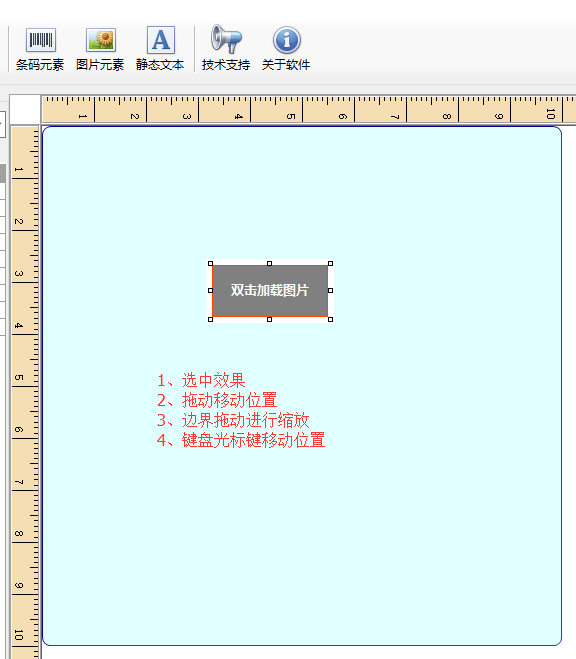
要想玩转Winform自定义控件需要对GDI+非常熟悉,对常用的控件有一些了解,好选择合适的基类控件来简化。
要点说明及代码
1)定义接口:
using System;

using System.Windows.Forms;

namespace GDIPrinterDriver

{

    /// <summary>

    /// 模板元素接口

    /// </summary>

    public interface ILabelDesignElement

    {

        /// <summary>

        /// PrintData/codeContext里的字段,{} []

        /// </summary>

        string 动态内容 { get; set; }

        /// <summary>

        /// 是否被选中

        /// </summary>

        bool DesignSelected { get; set; }

        /// <summary>

        /// 选择状态发生改变

        /// </summary>

        event Action<object, bool> SelectedStatusChange;

        /// <summary>

        /// 本控件被选中时键盘方向键被按下

        /// </summary>

        /// <param name="keyData"></param>

        void KeysChangedLocation(Keys keyData);

    }

}
2)控件基类实现:
using GDIPrinterDriver;
using System;
using System.ComponentModel;
using System.Drawing;
using System.Drawing.Drawing2D;
using System.Drawing.Imaging;
using System.Windows.Forms; namespace GDILabelDesigner
{
/// <summary>
/// 设计时控件基类
/// </summary>
public abstract class DesignCellControl : PictureBox, ILabelDesignElement
{
#region 鼠标移动和缩放
private enum EnumMousePointPosition
{
MouseSizeNone = , //'无
MouseSizeRight = , //'拉伸右边框
MouseSizeLeft = , //'拉伸左边框
MouseSizeBottom = , //'拉伸下边框
MouseSizeTop = , //'拉伸上边框
MouseSizeTopLeft = , //'拉伸左上角
MouseSizeTopRight = , //'拉伸右上角
MouseSizeBottomLeft = , //'拉伸左下角
MouseSizeBottomRight = , //'拉伸右下角
MouseDrag = // '鼠标拖动
}
const int Band = ;
const int MinWidth = ;
const int MinHeight = ;
private EnumMousePointPosition m_MousePointPosition;
private Point p, p1;
private EnumMousePointPosition MousePointPosition(Size size, System.Windows.Forms.MouseEventArgs e)
{ if ((e.X >= - * Band) | (e.X <= size.Width) | (e.Y >= - * Band) | (e.Y <= size.Height))
{
if (e.X < Band)
{
if (e.Y < Band) { return EnumMousePointPosition.MouseSizeTopLeft; }
else
{
if (e.Y > - * Band + size.Height)
{ return EnumMousePointPosition.MouseSizeBottomLeft; }
else
{ return EnumMousePointPosition.MouseSizeLeft; }
}
}
else
{
if (e.X > - * Band + size.Width)
{
if (e.Y < Band)
{ return EnumMousePointPosition.MouseSizeTopRight; }
else
{
if (e.Y > - * Band + size.Height)
{ return EnumMousePointPosition.MouseSizeBottomRight; }
else
{ return EnumMousePointPosition.MouseSizeRight; }
}
}
else
{
if (e.Y < Band)
{ return EnumMousePointPosition.MouseSizeTop; }
else
{
if (e.Y > - * Band + size.Height)
{ return EnumMousePointPosition.MouseSizeBottom; }
else
{ return EnumMousePointPosition.MouseDrag; }
}
}
}
}
else
{ return EnumMousePointPosition.MouseSizeNone; }
}
#endregion
public bool DesignSelected
{
get
{
return designSelected;
}
set
{
designSelected = value;
Invalidate();
}
}
private bool designSelected = false;
public DynamicMapProperty DynamicMapProperty { get; set; }
public StaticMapProperty StaticMapProperty { get; set; }
public string 动态内容 { get; set; }
public RoteDescription RoteDescription { get; set; }
/// <summary>
/// 被选中,获取到焦点的事件
/// </summary>
public event Action<object, bool> SelectedStatusChange;
protected override void OnClick(EventArgs e)
{
DesignSelected = true;
SelectedStatusChange?.Invoke(this, DesignSelected);
}
protected override void OnMouseWheel(MouseEventArgs e)
{
base.OnMouseWheel(e);
double d = 1.068D;
if (e.Delta > && DesignSelected)
{
this.Size = new Size((int)(this.Size.Width * d), (int)(this.Size.Height * d));
}
else
{
this.Size = new Size((int)(this.Size.Width / d), (int)(this.Size.Height / d));
}
}
protected override void OnMouseDown(MouseEventArgs e)
{
p.X = e.X;
p.Y = e.Y;
p1.X = e.X;
p1.Y = e.Y;
}
protected override void OnMouseUp(MouseEventArgs e)
{
m_MousePointPosition = EnumMousePointPosition.MouseSizeNone;
this.Cursor = Cursors.Arrow;
}
protected override void OnMouseMove(MouseEventArgs e)
{
if (e.Button == MouseButtons.Left)
{
switch (m_MousePointPosition)
{
#region 位置计算
case EnumMousePointPosition.MouseDrag:
Left = Left + e.X - p.X;
Top = Top + e.Y - p.Y;
break;
case EnumMousePointPosition.MouseSizeBottom:
Height = Height + e.Y - p1.Y;
p1.X = e.X;
p1.Y = e.Y; //'记录光标拖动的当前点
break;
case EnumMousePointPosition.MouseSizeBottomRight:
Width = Width + e.X - p1.X;
Height = Height + e.Y - p1.Y;
p1.X = e.X;
p1.Y = e.Y; //'记录光标拖动的当前点
break;
case EnumMousePointPosition.MouseSizeRight:
Width = Width + e.X - p1.X;
Height = Height + e.Y - p1.Y;
p1.X = e.X;
p1.Y = e.Y; //'记录光标拖动的当前点
break;
case EnumMousePointPosition.MouseSizeTop:
Top = Top + (e.Y - p.Y);
Height = Height - (e.Y - p.Y);
break;
case EnumMousePointPosition.MouseSizeLeft:
Left = Left + e.X - p.X;
Width = Width - (e.X - p.X);
break;
case EnumMousePointPosition.MouseSizeBottomLeft:
Left = Left + e.X - p.X;
Width = Width - (e.X - p.X);
Height = Height + e.Y - p1.Y;
p1.X = e.X;
p1.Y = e.Y; //'记录光标拖动的当前点
break;
case EnumMousePointPosition.MouseSizeTopRight:
Top = Top + (e.Y - p.Y);
Width = Width + (e.X - p1.X);
Height = Height - (e.Y - p.Y);
p1.X = e.X;
p1.Y = e.Y; //'记录光标拖动的当前点
break;
case EnumMousePointPosition.MouseSizeTopLeft:
Left = Left + e.X - p.X;
Top = Top + (e.Y - p.Y);
Width = Width - (e.X - p.X);
Height = Height - (e.Y - p.Y);
break;
default:
break;
#endregion
}
if (Width < MinWidth) Width = MinWidth;
if (Height < MinHeight) Height = MinHeight;
if (Tag != null)
{
if (Tag is ImageElementNode)
{
var tag = Tag as ImageElementNode;
tag.Location = Location;
}
else if (Tag is BarcodeElementNode)
{
var tag = Tag as BarcodeElementNode;
tag.Location = Location;
}
else if (Tag is TextBoxElementNode)
{
var tag = Tag as TextBoxElementNode;
tag.Location = Location;
}
}
}
else
{
m_MousePointPosition = MousePointPosition(Size, e);
switch (m_MousePointPosition)
{
#region 改变光标
case EnumMousePointPosition.MouseSizeNone:
this.Cursor = Cursors.Arrow; //'箭头
break;
case EnumMousePointPosition.MouseDrag:
this.Cursor = Cursors.SizeAll; //'四方向
break;
case EnumMousePointPosition.MouseSizeBottom:
this.Cursor = Cursors.SizeNS; //'南北
break;
case EnumMousePointPosition.MouseSizeTop:
this.Cursor = Cursors.SizeNS; //'南北
break;
case EnumMousePointPosition.MouseSizeLeft:
this.Cursor = Cursors.SizeWE; //'东西
break;
case EnumMousePointPosition.MouseSizeRight:
this.Cursor = Cursors.SizeWE; //'东西
break;
case EnumMousePointPosition.MouseSizeBottomLeft:
this.Cursor = Cursors.SizeNESW; //'东北到南西
break;
case EnumMousePointPosition.MouseSizeBottomRight:
this.Cursor = Cursors.SizeNWSE; //'东南到西北
break;
case EnumMousePointPosition.MouseSizeTopLeft:
this.Cursor = Cursors.SizeNWSE; //'东南到西北
break;
case EnumMousePointPosition.MouseSizeTopRight:
this.Cursor = Cursors.SizeNESW; //'东北到南西
break;
default:
break;
#endregion
}
}
} /// <summary>
/// 绘制方框
/// </summary>
/// <param name="g"></param>
protected void DrawSelectedStatus(Graphics g)
{
Rectangle rect = ClientRectangle;
rect.Inflate(-, -);
using (Pen p = new Pen(Brushes.Black, ))
{
p.DashStyle = DashStyle.Dot;
p.DashStyle = DashStyle.Solid;
//8个方块
g.FillRectangle(Brushes.White, new Rectangle(rect.Left - , rect.Top - , , ));
g.FillRectangle(Brushes.White, new Rectangle(rect.Left + rect.Width / - , rect.Top - , , ));
g.FillRectangle(Brushes.White, new Rectangle(rect.Left + rect.Width, rect.Top - , , ));
g.FillRectangle(Brushes.White, new Rectangle(rect.Left - , rect.Top + rect.Height / - , , ));
g.FillRectangle(Brushes.White, new Rectangle(rect.Left - , rect.Top + rect.Height, , ));
g.FillRectangle(Brushes.White, new Rectangle(rect.Left + rect.Width, rect.Top + rect.Height / - , , ));
g.FillRectangle(Brushes.White, new Rectangle(rect.Left + rect.Width / - , rect.Top + rect.Height, , ));
g.FillRectangle(Brushes.White, new Rectangle(rect.Left + rect.Width, rect.Top + rect.Height, , ));
g.DrawRectangle(p, new Rectangle(rect.Left - , rect.Top - , , ));
g.DrawRectangle(p, new Rectangle(rect.Left + rect.Width / - , rect.Top - , , ));
g.DrawRectangle(p, new Rectangle(rect.Left + rect.Width, rect.Top - , , ));
g.DrawRectangle(p, new Rectangle(rect.Left - , rect.Top + rect.Height / - , , ));
g.DrawRectangle(p, new Rectangle(rect.Left - , rect.Top + rect.Height, , ));
g.DrawRectangle(p, new Rectangle(rect.Left + rect.Width, rect.Top + rect.Height / - , , ));
g.DrawRectangle(p, new Rectangle(rect.Left + rect.Width / - , rect.Top + rect.Height, , ));
g.DrawRectangle(p, new Rectangle(rect.Left + rect.Width, rect.Top + rect.Height, , ));
}
}
/// <summary>
/// 旋转图片
/// </summary>
/// <param name="bmp">源图</param>
/// <param name="angle">角度</param>
/// <param name="bkColor">背景色</param>
/// <returns></returns>
protected Bitmap ImageRotate(Bitmap bmp, float angle, Color bkColor)
{
int w = bmp.Width + ;
int h = bmp.Height + ;
PixelFormat pf;
if (bkColor == Color.Transparent)
{
pf = PixelFormat.Format32bppArgb;
}
else
{
pf = bmp.PixelFormat;
}
Bitmap tmp = new Bitmap(w, h, pf);
Graphics g = Graphics.FromImage(tmp);
g.Clear(bkColor);
g.DrawImageUnscaled(bmp, , );
g.Dispose();
GraphicsPath path = new GraphicsPath();
path.AddRectangle(new RectangleF(0f, 0f, w, h));
Matrix mtrx = new Matrix();
mtrx.Rotate(angle);
RectangleF rct = path.GetBounds(mtrx);
Bitmap dst = new Bitmap((int)rct.Width, (int)rct.Height, pf);
g = Graphics.FromImage(dst);
g.Clear(bkColor);
g.TranslateTransform(-rct.X, -rct.Y);
g.RotateTransform(angle);
g.InterpolationMode = InterpolationMode.HighQualityBilinear;
g.DrawImageUnscaled(tmp, , );
g.Dispose();
tmp.Dispose();
return dst;
}
/// <summary>
/// 响应键盘光标键
/// </summary>
/// <param name="keyData"></param>
public virtual void KeysChangedLocation(Keys keyData)
{
if (keyData == Keys.Up)
{
Top -= ;
}
if (keyData == Keys.Down)
{
Top += ;
}
if (keyData == Keys.Left)
{
Left -= ;
}
if (keyData == Keys.Right)
{
Left += ;
}
if (Tag != null)
{
if (Tag is ImageElementNode)
{
var tag = Tag as ImageElementNode;
tag.Location = Location;
}
else if (Tag is BarcodeElementNode)
{
var tag = Tag as BarcodeElementNode;
tag.Location = Location;
}
else if (Tag is TextBoxElementNode)
{
var tag = Tag as TextBoxElementNode;
tag.Location = Location;
}
}
}
}
}
C#winform自定义控件模拟设计时界面鼠标移动和调节大小、选中效果的更多相关文章
- winform窗体运行时的大小和设计时不一致
窗体设置的尺寸为1946*850,而电脑分辨率是1920*1280 按说宽度已经超过屏幕大小很多了,应该显示占满屏幕宽度才对,但是运行时宽度只有设计时的一半 高度最多只能是1946像素,再拉大也不管用 ...
- C# 自定义控件容器,设计时可添加控件
本分步指南介绍在将 UserControl 放在 Windows 窗体上之后,如何将 UserControl 对象用作设计时控件容器.可能会有这样的情况:您想将一个控件拖到 UserControl 中 ...
- Winform自定义控件实例
本文转自http://www.cnblogs.com/hahacjh/archive/2010/04/29/1724125.html 写在前面: .Net已经成为许多软件公司的选择,而.Net自定义W ...
- WPF案例(二)模拟Apple OS 界面前后180度反转
原文:WPF案例(二)模拟Apple OS 界面前后180度反转 我们在设计应用程序界面的时候,为了充分利用界面空间,住住需要灵活的界面布局方式,比如可以在界面正面空间上定义一个Chart,背面空间上 ...
- (三十)c#Winform自定义控件-文本框(三)
前提 入行已经7,8年了,一直想做一套漂亮点的自定义控件,于是就有了本系列文章. 开源地址:https://gitee.com/kwwwvagaa/net_winform_custom_control ...
- (六十九)c#Winform自定义控件-垂直滚动条
前提 入行已经7,8年了,一直想做一套漂亮点的自定义控件,于是就有了本系列文章. GitHub:https://github.com/kwwwvagaa/NetWinformControl 码云:ht ...
- (七十三)c#Winform自定义控件-资源加载窗体
前提 入行已经7,8年了,一直想做一套漂亮点的自定义控件,于是就有了本系列文章. GitHub:https://github.com/kwwwvagaa/NetWinformControl 码云:ht ...
- (七十九)c#Winform自定义控件-导航菜单
前提 入行已经7,8年了,一直想做一套漂亮点的自定义控件,于是就有了本系列文章. GitHub:https://github.com/kwwwvagaa/NetWinformControl 码云:ht ...
- (原创)[C#] 一步一步自定义拖拽(Drag&Drop)时的鼠标效果:(一)基本原理及基本实现
一.前言 拖拽(Drag&Drop),属于是极其常用的基础功能. 无论是在系统上.应用上.还是在网页上,拖拽随处可见.同时拖拽时的鼠标效果也很漂亮,像这样: 这样: 还有这样: 等等等等. 这 ...
随机推荐
- Linux入门命令解释(1)
第一章Linux安装及服务控制 1. uname -r //查看linux版本号 2.cat /proc/cupinfo //查看CPU信息 3.cat /p ...
- vue init失败解决方案-终极版
//由于windows系统的某方面问题,vue脚手架安装可能会出现第一证书丢失 // 报错:vue-cli · Failed to download repo vuejs-templates/webp ...
- Java爬虫_资源网站爬取实战
对 http://bestcbooks.com/ 这个网站的书籍进行爬取 (爬取资源分享在结尾) 下面是通过一个URL获得其对应网页源码的方法 传入一个 url 返回其源码 (获得源码后,对源码进 ...
- java文本编辑器v2.0 图形用户界面
package 文本编辑器; import java.awt.BorderLayout; import java.awt.Color; import java.awt.Dimension; impor ...
- 自学Zabbix3.10.1.4-事件通知Notifications upon events-媒介类型Ez Texting
自学Zabbix3.10.1.4-事件通知Notifications upon events-媒介类型Ez Texting Ez Texting是zabbix的技术合作伙伴,主要提供短信服务,用手机注 ...
- Android开发——Toast知识
Toast.makeText(this, "内容", Toast.LENGTH_SHORT).show(); 直接显示一个Toast,第三个参数是时间的长短,还有一个Toast.L ...
- MySQL 加锁处理分析-转载
来自何登成的技术博客 1.1 MVCC:Snapshot Read vs Current Read 2 1.2 Cluster Index:聚簇索引 3 1.3 ...
- 01.阿里云SDK调用,获取ESC主机详细信息
一:通过python SDK获取云主机的详细信息 1.创建Accessky码(不做展示) 2.通过pip安装SDK模块,这个阿里云帮助里面有,也不做详细展示. 3.详细使用方法看代码 我下面展示的返回 ...
- SpringMVC配置双数据源,一个java项目同时连接两个数据库
数据源在配置文件中的配置 请点击---> java架构师项目实战,高并发集群分布式,大数据高可用,视频教程 <pre name="code" class=" ...
- python 嵌套字典比较值,取值
#取值import types allGuests = {'Alice': {'apples': 5, 'pretzels': {'12':{'beijing':456}}}, 'Bob': {'ha ...