
ExtJS+SpringMVC文件上传与下载
说到文件上传、下载功能,网络上大多介绍的是采用JSP、SpringMVC或者Struts等开源框架的功能,通过配置达到文件上传、下载的目地。可是最近项目要用到文件上传与下载的功能,因为本项目框架采用开源框架SpringMVC、ExtJS、Hibernate写成的,当然借助SpringMVC框架本身的文件上传与下载也可以,但是同样需要和以前一样,编写一些配置文件,所以最近自己搞了一下关于ExtJS、SpringMVC的免配置文件上传与下载的功能研究。
提起文件上传,免不了客户端(提交文件)和服务器端(接收文件)的结合。
首先定义全局相关变量:
- /**
- * @author:limingzhong
- * @desc:定义相关全局静态变量
- * @Date:2012-02-28
- */
- private final static String UPLOAD_SUCCESS = "{success:true,mess:'文件上传成功!'}";
- private final static String UPLOAD_FAILURE = "{success:false,mess:'文件上传失败!'}";
- private final static String FILE_NO = "{success:false,mess:'文件不存在!'}";
- private final static String FILE_YES = "{success:true,mess:'文件存在!'}";
- private final static String CONTENT_TYPE = "text/html;charset=gb2312";
- private final static String APPLICATION = "application/octet-stream";
客户端:采用ExtJS的formPanel提交功能
- var excelUpload = new Ext.form.TextField({
- id:'excelUpload',
- anchor:'90%',
- height:30,
- width:350,
- name:'file',
- inputType:'file',
- fieldLabel:'文件选择'
- });
- var formPanel = new Ext.form.FormPanel({
- labelWidth:80,
- bodyStyle:'padding:5 5 5 5',
- height:515,
- width:200,
- frame:true,
- fileUpload:true,
- items:[excelUpload]
- });
- // 定义按钮
- var upLoadFile = new Ext.Toolbar.Button({
- text:'上传'
- });
- // 下载数据功能
- var up = function(bt) {
- var excelName = Ext.getCmp('excelUpload').getRawValue();// 上传文件名称的路径
- if (excelName == ""){
- Ext.Msg.show({title:'提示',msg:'请选择文件!',buttons:Ext.Msg.OK,icon:Ext.MessageBox.INFOR});
- return;
- }else {
- var array = new Array();
- array = excelName.split("\\");
- var length = array.length;
- var fileName = "";
- var index = 0;
- for (index = 0; index < length; index++) {
- if (fileName == "") {
- fileName = array[index];
- } else {
- fileName = fileName + "/" + array[index];
- }
- }
- formPanel.getForm().submit({
- url:'http://localhost:8080/pro/upload.json',
- method:'POST',
- waitMsg:'数据上传中, 请稍等...',
- success:function(form, action, o) {
- Ext.MessageBox.alert("提示信息",action.result.mess);
- },
- failure : function(form, action) {
- Ext.MessageBox.alert("提示信息","请求失败,文件上传失败");
- }
- });
- }
- }
- // 添加按钮的响应事件
- upLoadFile.addListener('click', up, false);
- var window = new Ext.Window({
- title:'上传文件',
- width:500,
- height:200,
- minWidth:500,
- minHeight:200,
- layout:'fit',
- plain:true,
- modal:true,
- //closeAction:'hide',
- bodyStyle:'padding:5px;',
- buttonAlign:'center',
- items:formPanel,
- buttons:[upLoadFile]
- });
- window.show();
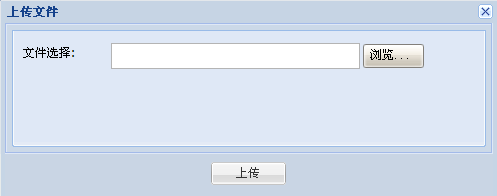
服务器端:根据SpringMVC注解直接调用对应方法,采用流的形式上传文件,这样直接避免配置xml等文件的麻烦。
- /**
- * @author:limingzhong
- * @throws:IOException
- * @desc:上传文件
- * @params:自带参数,客户端不传入实参
- * @Date:2012-02-28
- */
- @RequestMapping(value = "/upload.json")
- public void upLoad(HttpServletRequest request,HttpServletResponse response) throws IOException {
- response.setContentType(CONTENT_TYPE);
- PrintWriter out = response.getWriter();
- if (!ServletFileUpload.isMultipartContent(request)){
- out.println(UPLOAD_FAILURE);
- }
- String name = null;
- try {
- DiskFileItemFactory factory = new DiskFileItemFactory();
- factory.setSizeThreshold(4096);
- ServletFileUpload upload = new ServletFileUpload(factory);
- upload.setSizeMax(4 * 1024 * 1024);
- Iterator<?> iter = upload.parseRequest(request).iterator();
- while (iter.hasNext()) {
- FileItem item = (FileItem) iter.next();
- if (item.isFormField()) {
- name = item.getFieldName();
- out.println(UPLOAD_FAILURE);
- } else {
- name = item.getName();
- String path = getPath();
- if(path==null || path==""){
- out.println(UPLOAD_FAILURE);
- }else{
- item.write(new File(path+name.substring(name.lastIndexOf(File.separator)+1,name.length()))); //保存上传文件
- out.println(UPLOAD_SUCCESS);
- }
- }
- }
- out.close();
- } catch (Exception e) {
- out.println(UPLOAD_FAILURE);
- out.close();
- }
- }
至此,文件上传的功能已结束。
下面把下载功能的客户端和服务器端的代码贴出来,以供大家拍砖:
客户端:
- window.location.href = 'http://127.0.0.1:8080/pro/down.json?fileName='+encodeURI(encodeURI(fileName));
服务器端:
- /**
- * @author:limingzhong
- * @throws:IOException
- * @desc:下载文件
- * @params:fileName-文件名称
- * @Date:2012-02-28
- */
- @RequestMapping(value = "/down.json")
- public void down(@RequestParam("fileName") String fileName,HttpServletRequest request,HttpServletResponse response) throws IOException {
- response.setContentType(APPLICATION);
- fileName = URLDecoder.decode(fileName, "utf-8");
- String path = getPath()+fileName;
- path = path.replace("%20", " ");
- File file = new File(path);
- // 清空response
- response.reset();
- // 设置response的Header
- response.addHeader("Content-Disposition", "attachment;filename=" + new String(fileName.getBytes("gbk"),"iso8859-1"));
- response.addHeader("Content-Length", "" + file.length());
- try{
- //以流的形式下载文件
- InputStream fis = new BufferedInputStream(new FileInputStream(path));
- byte[] buffer = new byte[fis.available()];
- fis.read(buffer);
- fis.close();
- OutputStream toClient = new BufferedOutputStream(response.getOutputStream());
- toClient.write(buffer);
- toClient.flush();
- toClient.close();
- }catch(Exception e){
- e.printStackTrace();
- }
- }
至此,文件下载的功能已结束。
来自:http://blog.csdn.net/limingzhong198/article/details/7324570
ExtJS+SpringMVC文件上传与下载的更多相关文章
- SpringMVC文件上传和下载的实现
SpringMVC通过MultipartResolver(多部件解析器)对象实现对文件上传的支持. MultipartResolver是一个接口对象,需要通过它的实现类CommonsMultipart ...
- SpringMVC文件上传和下载
上传与下载 1文件上传 1.1加入jar包 文件上传需要依赖的jar包 1.2配置部件解析器 解析二进制流数据. <?xml version="1.0" encoding=& ...
- SpringMVC文件上传与下载
一.关键步骤 ①引入核心JAR文件 SpringMVC实现文件上传,需要再添加两个jar包.一个是文件上传的jar包,一个是其所依赖的IO包.这两个jar包,均在Spring支持库的org.apach ...
- springMVC文件上传与下载(六)
1..文件上传 在springmvc.xml中配置文件上传解析器 <!-- 上传图片配置实现类,id必须为这个 --> <bean id="multipartResolve ...
- SpringMVC 文件上传及下载
首先需要导入jar包 创建一个jsp页面 package cn.happy.Controller; import java.io.File; import javax.servlet.http.Htt ...
- SpringMVC文件上传下载
在Spring MVC的基础框架搭建起来后,我们测试了spring mvc中的返回值类型,如果你还没有搭建好springmvc的架构请参考博文->http://www.cnblogs.com/q ...
- 使用SpringMVC框架实现文件上传和下载功能
使用SpringMVC框架实现文件上传和下载功能 (一)单个文件上传 ①配置文件上传解释器 <!—配置文件上传解释器 --> <mvc:annotation-driven>&l ...
- springmvc文件上传下载简单实现案例(ssm框架使用)
springmvc文件上传下载实现起来非常简单,此springmvc上传下载案例适合已经搭建好的ssm框架(spring+springmvc+mybatis)使用,ssm框架项目的搭建我相信你们已经搭 ...
- springmvc之文件上传、下载
1.接收到的是图片的流时 //上传头像 @RequestMapping(value = "/uploadHeadSculpture", method = RequestMethod ...
随机推荐
- UI5-文档-4.6-Modules
在SAPUI5中,资源通常被称为模块.在这一步中,我们将上次练习中的警报替换为sap.m库中的适当消息Toast.所需的模块可以异步加载. Preview A message toast displa ...
- eclipse使用ctrl+shift+F格式化代码失效
通常情况出现这种问题是组合快捷键和别的软件快捷键冲突了, 最常见的是和搜狗输入法冲突, 在设置中找到搜狗输入法然后把冲突的快捷键取消掉就可以了.
- numpy linspace arange函数
linspace(start, end, num_of_points), 区间 [start, end],产生一个等差数列,差为:(end-start)/(num_of_point-1). arang ...
- kafka 修改partition,删除topic,查询offset
修改分区个数: ./kafka-topics./kafka/<id_of_kafka> --alter --partitions 10 --topic test_topic 上面命令将te ...
- C#实现支持单点登录的一个存储用户信息的类
网上有很多介绍单点登录的文章,但多为架构设计以及概念性文章,而本文将介绍单点登录的具体具体实现 利用哈希表,作为保存登录用户的队列 private static Hashtable m_ ...
- ComputeSignature 中行支付签名报错(win7 64位系统)
在做中行加密验签的时候出现的问题.原本在XP系统下可以正常运行的,现在换了win7 64位系统就出现了这个问题,没头绪 所以发上来求各位大大支招 有什么好的解决方案.. 我的解决办法: 1.C:\Do ...
- 梯度下降法】三:学习率衰减因子(decay)的原理与Python
http://www.41443.com/HTML/Python/20161027/512492.html
- Mysql 中json 相关函数的使用
1.JSON_LENGTH: select content from test1 ["1","2","3","4",&q ...
- wireshark使用相关问题
问题1: 打开wireshark,没有出现过滤器 解决1: 使用管理员方式登录 过滤: http and ip.src == 192.168.0.10 and ip.dst == 192.168.0. ...
- Access to the path 'C:\inetpub\wwwroot\mysite\images\savehere' is denied.
访问路径被拒绝 我解决了这个设置: IIS>应用程序池> [您的站点]>高级设置...>标识>内置帐户> LocalSystem