
IQKeyboardManager 问题锦集
Keep UINavigationBar at the top (Don't scroll with keyboard)
If you don't want to hide the default UINavigationBar of UINavigationController when keyboardManager slides up the view, then just change the UIView class to UIScrollView from the storyboard or xib. If you are using Autoresizing then you must set correct contentSize of scrollView or if you are using Autolayout then make sure scrollView is able to get it's contentSize from constraints.
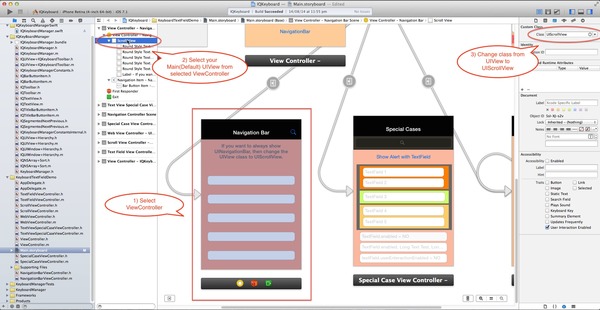
If you are not using storyboard or xib and creating your view programmatically. Then you need to override '-(void)loadView' method of UIViewController, and need to set an UIScrollView instance to self.view.
    -(void)loadView

    {

        UIScrollView *scrollView = [[UIScrollView alloc] initWithFrame:[[UIScreen mainScreen] bounds]];

        scrollView.contentSize = CGSizeMake(CONTENT_WIDTH, CONTENT_HEIGHT); //You may not need this code if you are working with Autolayout and scrollView is able to get it's contentSize from constraints.

        self.view = scrollView;

    }
Working with TopLayoutGuide and BottomLayoutGuide
Technically IQKeyboardManager moves upwards/downwards of currently presentedViewController's view. So if you're pinning your UITextfield/UITextView with TopLayoutGuide/BottomLayoutGuide then you're saying Keep x distance from screen top(I don't care about where is self.view)'. In this case your view is moved upwards but textField remains at same position and keeping x distance from screen top.
To fix it, just let IQKeyboardManager know the constraint which is pinned with TopLayoutGuide/BottomLayoutGuide, just map TopLayoutGuide/BottomLayoutGuide constraint with IQLayoutGuideConstraint. Here is the screenshot:- 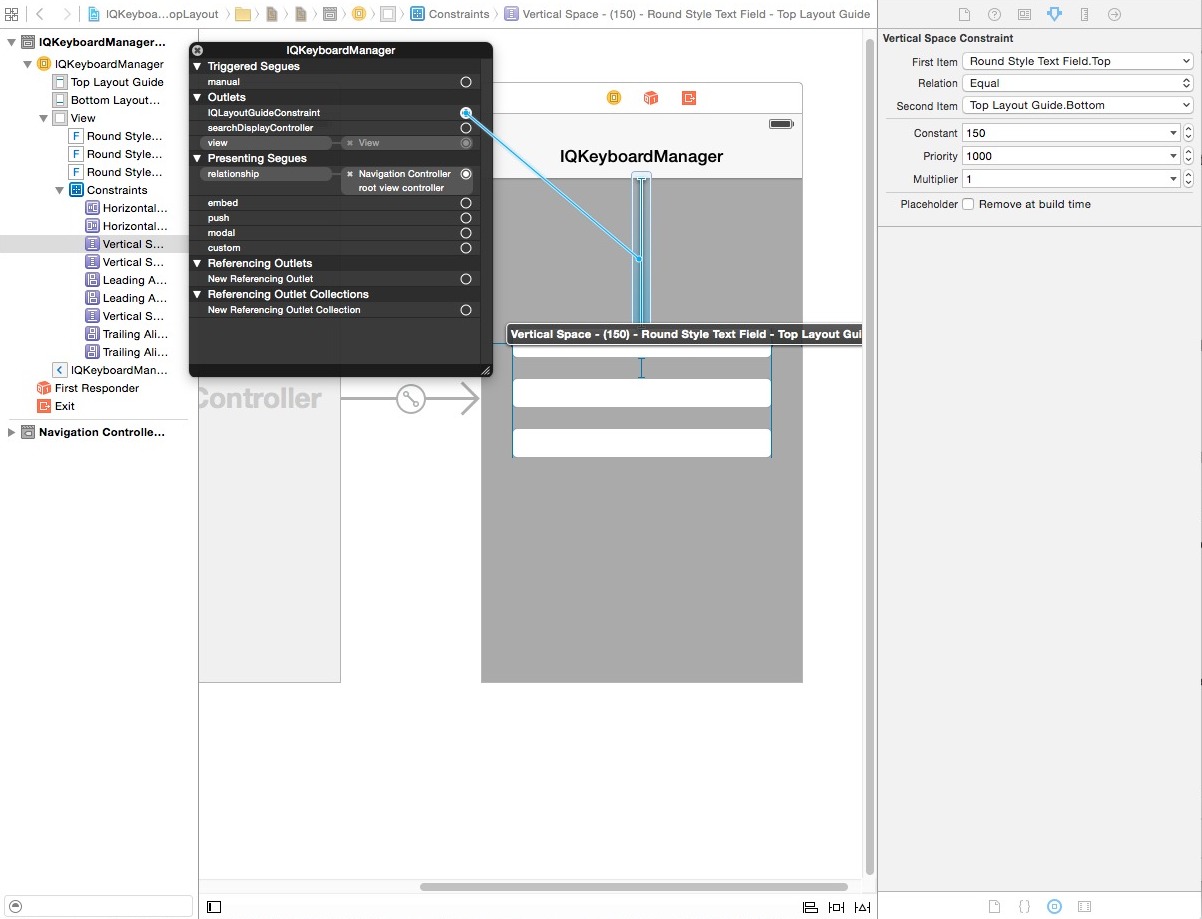
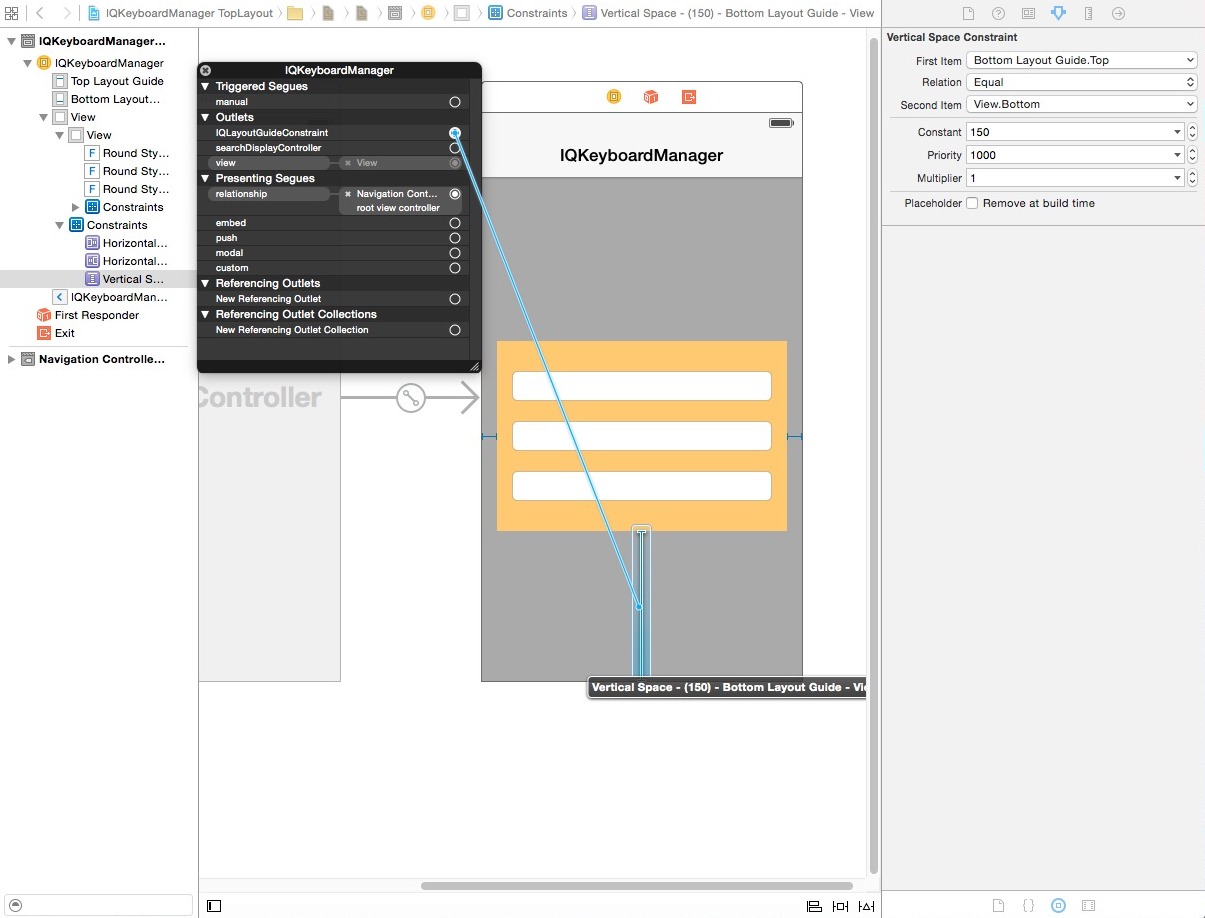
If your textFields are inside any UIView and your UIView is pinned with TopLayoutGuide/BotomLayoutGuide then also you can map TopLayoutGuide/BottomLayoutGuide constraint with IQLayoutGuideConstraint. here are the screenshots:- 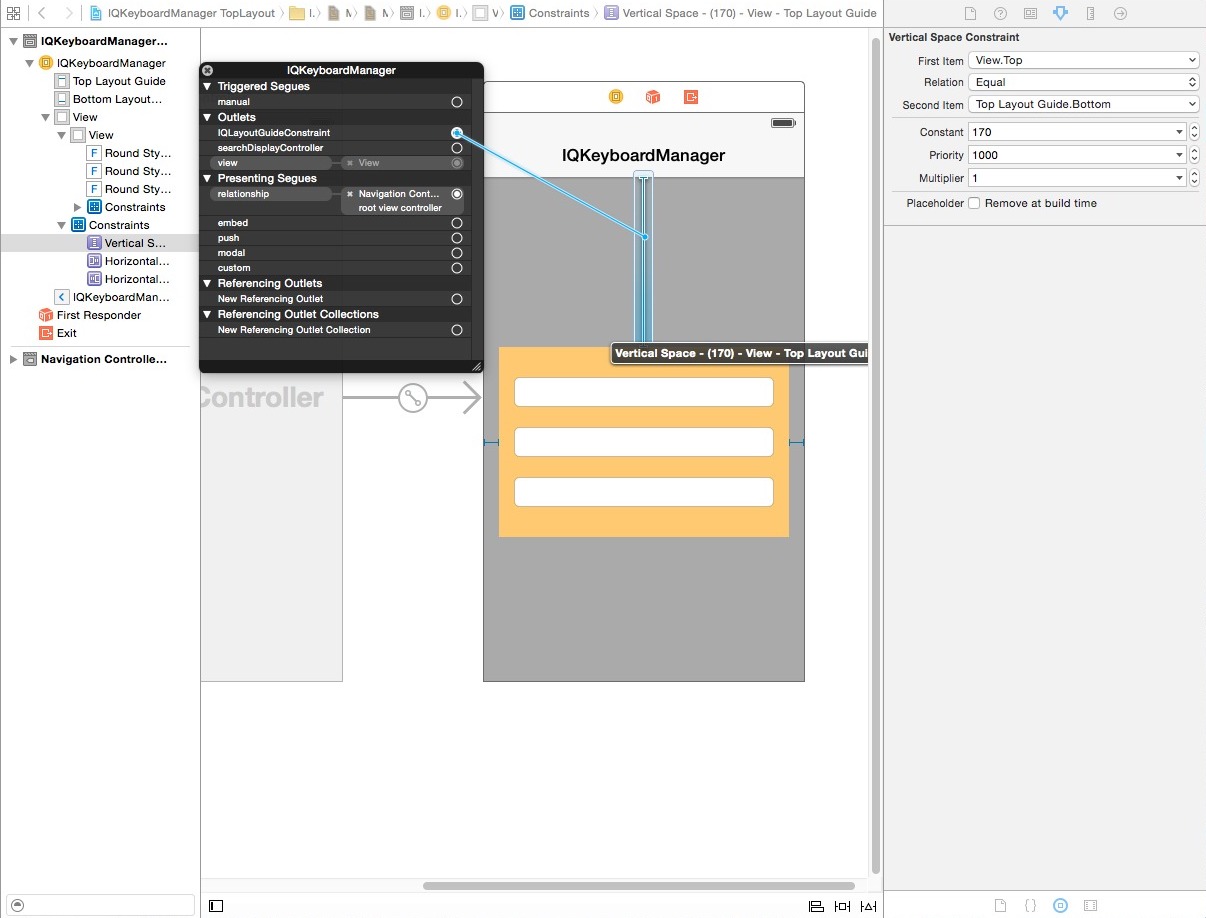
Working with Full Screen UITextView
Often we have a situation where a full screen UITextView need to show in full screen mode with keyboard handling. To deal with this kind of situation, here is an easy workaround.
Assuming that UITextView needs to be displayed in full screen within a ViewController View and default UINavigationBar of UINavigationController is displaying at at the top of ViewController. Assuming that Adjust Sroll View Insetscheckmark is ticked. Add these constraint to UITextView:-

- Top Space to SuperView
- Leading Space to SuperView
- Trailing Space to SuperView
- Bottom Space to Bottom Layout Guide (Important)
Connect bottom layout guide constraint with IQLayoutGuideConstraint and that's all. You have a full working UITextViewController.

Working with Chat Screen UITableView
Often we have another situation where we have to implement our own Chat Style Screen with keyboard handling. To deal with this kind of situation, here is an easy workaround.
Assuming that ChatViewController is subclass of UIViewController not UITableViewController. Assuming that ChatViewController has UITableView at top and UIView at bottom. Bottom UIView contains a UITextField/UITextViewwith a Send button. Assuming that default UINavigationBar of UINavigationController is displaying at at the top of ChatViewController. Assuming that Adjust Sroll View Insets checkmark is ticked. Add these constraint to UITableView:-

- Top Space to SuperView
- Leading Space to SuperView
- Trailing Space to SuperView
- Bottom Space to bottom UIView
Add thse constraint to bottom UIView
- Leading Space to SuperView
- Trailing Space to SuperView
- Bottom Space to Bottom Layout Guide (Important)
Connect bottom layout guide constraint with IQLayoutGuideConstraint.
Map UITextField/UITextView Outlet with a textField object in ChatViewController.
Add this two line in viewDidLoad
    self.textField.inputAccessoryView = [[UIView alloc] init];  //This will remove toolbar which have done button.

    self.textField.keyboardDistanceFromTextField = 8; //This will modify default distance between textField and keyboard. For exact value, please manually check how far your textField from the bottom of the page. Mine was 8pt.
That's all. You have a working keyboard handling with ChatViewController.
Enable/Disable distance handling between different ViewController's
(#117, #139, #516, #541, #572)
If you would like to ignore IQKeyboardManager.enabled property for some ViewController and would like to enable/disable IQKeyboardManager between different ViewController's then add ViewController class to disabledDistanceHandlingClassesor enabledDistanceHandlingClasses NSMutableSet property.
Objective-C
- (BOOL)application:(UIApplication *)application didFinishLaunchingWithOptions:(NSDictionary *)launchOptions

{

    [[IQKeyboardManager sharedManager].enabledDistanceHandlingClasses addObject:[EnabledViewController class]];

    [[IQKeyboardManager sharedManager].disabledDistanceHandlingClasses addObject:[DisabledViewController class]];

    return YES;

}
Swift
    func application(application: UIApplication, didFinishLaunchingWithOptions launchOptions: [NSObject: AnyObject]?) -> Bool {

        IQKeyboardManager.sharedManager().enable = true

        IQKeyboardManager.sharedManager().enabledDistanceHandlingClasses.append(EnabledViewController.self)

        IQKeyboardManager.sharedManager().disabledDistanceHandlingClasses.append(DisabledViewController.self)

        return true

    }
Enable/Disable UIToolbar between different ViewController's
If you would like to ignore IQKeyboardManger.enableAutoToolbar property for some ViewController and would like to enable/disable Auto Toolbar between different ViewController's then add ViewController class to disabledToolbarClasses or enabledToolbarClasses NSMutableSet property.
Objective-C
- (BOOL)application:(UIApplication *)application didFinishLaunchingWithOptions:(NSDictionary *)launchOptions

{

    [[IQKeyboardManager sharedManager].enabledToolbarClasses addObject:[ToolbarEnabledViewController class]];

    [[IQKeyboardManager sharedManager].disabledToolbarClasses addObject:[ToolbarDisabledViewController class]];

    return YES;

}
Swift
    func application(application: UIApplication, didFinishLaunchingWithOptions launchOptions: [NSObject: AnyObject]?) -> Bool {

        IQKeyboardManager.sharedManager().enable = true

        IQKeyboardManager.sharedManager().enabledToolbarClasses.append(ToolbarEnabledViewController.self)

        IQKeyboardManager.sharedManager().disabledToolbarClasses.append(ToolbarDisabledViewController.self)

        return true

    }
Show Previous/Next arrow buttons for textField which are not direct disblings
(#154, #179, #380, #406, #503, #517, #524, #537, #540, #549)
If your textFields are on different View and Previous/Next arrow are not visible to navigate between textField. Then you should put those all Views inside IQPreviousNextView like this:-

If you would like to use your own SpecialView (subclass of UIView) instead of default IQPreviousNextView then you can add your own SpecialView class to toolbarPreviousNextAllowedClasses NSMutableSet property.
Objective-C
- (BOOL)application:(UIApplication *)application didFinishLaunchingWithOptions:(NSDictionary *)launchOptions

{

    [[IQKeyboardManager sharedManager].toolbarPreviousNextAllowedClasses addObject:[SpecialView class]];

    return YES;

}
Swift
    func application(application: UIApplication, didFinishLaunchingWithOptions launchOptions: [NSObject: AnyObject]?) -> Bool {

        IQKeyboardManager.sharedManager().enable = true

        IQKeyboardManager.sharedManager().toolbarPreviousNextAllowedClasses.append(SpecialView.self)

        return true

    }
Hide UIToolbar for specific UITextField/UITextView
If you don't want to add automatic toolbar over keyboard for specific textField then you should add a new UIView as it's toolbar like this
textField.inputAccessoryView = [[UIView alloc] init];
Change UIToolbar Done button text or replace it with some other icon
If you would like to change toolbar Done button text then you can use toolbarDoneBarButtonItemText property to do the same
[IQKeyboardManager sharedManager].toolbarDoneBarButtonItemText = @"Save";
or if you would like to replace this with an image then you should could do like this:-
[IQKeyboardManager sharedManager].toolbarDoneBarButtonItemImage = [UIImage imageNamed:@"save"];
Full customise control over previous/next/done button for specific UITextField/UITextView
(#40)
If you need full control over the previous/next/done button then you should use the UIView category methods to add toolbar over your textField. The UIView category methods are defined in IQUIView+IQKeyboardToolbar.h file.
You may need to import IQUIView+Hierarchy category
#import "IQUIView+Hierarchy.h"
Then add custom toolbar like this.
-(void)viewDidLoad

{

    [super viewDidLoad];

    //Adding done button for textField1

    [textField1 addDoneOnKeyboardWithTarget:self action:@selector(doneAction:)];

    //Adding previous/next/done button for textField2

    [textField2 addPreviousNextDoneOnKeyboardWithTarget:self previousAction:@selector(previousAction:) nextAction:@selector(nextAction:) doneAction:@selector(doneAction:)];

    //Adding cancel/done button for textField3

    [textField3 addCancelDoneOnKeyboardWithTarget:self cancelAction:@selector(cancelAction:) doneAction:@selector(doneAction:)];

}

/*!	previousAction. */

-(void)previousAction:(UIBarButtonItem*)button

{

    //previousAction

}

/*!	nextAction. */

-(void)nextAction:(UIBarButtonItem*)button

{

    //nextAction

}

/*!	doneAction. */

-(void)doneAction:(UIBarButtonItem*)barButton

{

    //doneAction

}

/*!	cancelAction. */

-(void)cancelAction:(UIBarButtonItem*)barButton

{

    //cancelAction

}
Use keyboard toolbar placeholder as action button
If you would like to use keyboard toolbar placeholder text as action buttons to do something special.


This is now very easy with just 2 lines of code like this:-
- (void)viewDidLoad

{

    [super viewDidLoad];

    [textField4 setTitleTarget:self action:@selector(savedUsersAction:)];  //This will convert toolbar placeholder to button

    textField4.placeholderText = @"Saved Users";  //This is optional (If you would like to override default placeholder text)

}

-(void)savedUsersAction:(UIButton*)sender

{

    //Do your custom work here

    ...

}
Get notified when tapping on previous/next/done button for specific UITextField/UITextView
If you only would like to get notified when user taps on previous/next/done button then register customised target. Note that this will not override default behaviour of prevous/next/done button but this will notify you when user taps on those buttons.
You may need to import IQUIView+Hierarchy category
#import "IQUIView+Hierarchy.h"
Then register custom selector.
- (void)viewDidLoad

{

    [super viewDidLoad];

    [textField setCustomPreviousTarget:self action:@selector(previousAction:)];

    [textField setCustomNextTarget:self action:@selector(nextAction:)];

    [textField setCustomDoneTarget:self action:@selector(doneAction:)];

}

/*!	previousAction. */

-(void)previousAction:(UIBarButtonItem*)button

{

    //previousAction

}

/*!	nextAction. */

-(void)nextAction:(UIBarButtonItem*)button

{

    //nextAction

}

/*!	doneAction. */

-(void)doneAction:(UIBarButtonItem*)barButton

{

    //doneAction

}
Hide Previous/Next arrow of UIToolbar
If you don't want to show Previous/Next arrow with toolbar and only want to show *Done button only, then set shouldHidePreviousNext to NO.
- (BOOL)application:(UIApplication *)application didFinishLaunchingWithOptions:(NSDictionary *)launchOptions

{

    [IQKeyboardManager sharedManager].shouldHidePreviousNext = YES;

    return YES;

}
Keyboard Return Key Handling
If you would like to use keyboard Return Key as Next/Done button, then you can use IQKeyboardReturnKeyHandler.
Create an instance variable of IQKeyboardReturnKeyHandler and instantiate it in viewDidLoad with ViewController object like this
@implementation ViewController

{

    IQKeyboardReturnKeyHandler *returnKeyHandler;

}

- (void)viewDidLoad

{

    [super viewDidLoad];

    returnKeyHandler = [[IQKeyboardReturnKeyHandler alloc] initWithViewController:self];

}

-(void)dealloc

{

    returnKeyHandler = nil;

}
It assign all the responderView delegates to self, and change keybord Return Key to Next key. If you would like to get callback of textField delegate methods then you should make returnKeyHandler.delegate = self.
原文链接:
https://github.com/hackiftekhar/IQKeyboardManager/blob/master/MANUAL%20MANAGEMENT.md
IQKeyboardManager 问题锦集的更多相关文章
- iOS--碎片知识锦集
知识锦集day01 1.UIView的两个方法: sizeThatFits和 sizeToFit 官方文档上说: - (CGSize)sizeThatFits:(CGSize)size; // ...
- CMD命令锦集
虽然随着计算机产业的发展,Windows 操作系统的应用越来越广泛,DOS 面临着被淘汰的命运,但是因为它运行安全.稳定,有的用户还在使用,所以一般Windows 的各种版本都与其兼容,用户可以在Wi ...
- ubuntu16.04安装cuda8.0试错锦集
ubuntu16.04安装cuda8.0试错锦集 参考文献: [http://www.jianshu.com/p/35c7fde85968] [http://blog.csdn.net/sinat_1 ...
- C#笔试题面试题锦集(全)总20篇
前些时候找过一次工作,收集了很多不错的笔试题目.共享一下:) C#笔试题面试题锦集(20) 微软应试题目 (2010-01-15 21:32) C#笔试题面试题锦集(19) 雅虎C#题目 (2010- ...
- C/C++中一些不太注意到的小知识点--[锦集]
C/C++中一些不太注意到的小知识点--[锦集] C/C++小知识点--[锦集] "="和"<=" 的优先级 1.( (file_got_len = re ...
- PTA|团体程序设计天梯赛-练习题目题解锦集(C/C++)(持续更新中……)
PTA|团体程序设计天梯赛-练习题目题解锦集(持续更新中) 实现语言:C/C++: 欢迎各位看官交流讨论.指导题解错误:或者分享更快的方法!! 题目链接:https://pintia.cn/ ...
- Ngrinder脚本开发各细节锦集(groovy)
Ngrinder脚本开发各细节锦集(groovy) 1.生成随机字符串(import org.apache.commons.lang.RandomStringUtils) 数字:RandomStrin ...
- redis 锦集
redis 锦集url:http://blog.csdn.net/lqadam/article/category/7479450 1. redis 排序 2.redis 慢查询.位数组和事务 3.re ...
- css文字实例锦集
在画布上创建向上的3D拉影文字 <canvas id="myCanvas" width="410" height="130">& ...
随机推荐
- chrome,opera..通过file协议浏览html代码时,发送的ajax请求本地文件,会报跨域错误
XMLHttpRequest cannot loadfile:///E:/webs/extJS/ext-3.3.0/examples/csdn/combobox.txt?_dc=14147389739 ...
- Linux应用开发入门(转)
今天偶然看到这篇文章,做个入门了解还是不错的. 前一阵子在QQ上和朋友聊天的时候,总会看到有人说Linux上的应用程序开发是高手才可以完成的,而且这种“迷信”在目前似乎还很普遍.然而,情况并不是这样的 ...
- 二进制搭建kubernetes多master集群【开篇、集群环境和功能介绍】
本文主要说明kubernetes集群使用组建的版本和功能介绍.. 一.组件版本 Kubernetes 1.12.3 Docker 18.06.1-ce Etcd 3.3.10 Flanneld 0.1 ...
- 2018.09.27 codeforces1045A. Last chance(线段树优化建图+最大流)
传送门 看完题应该都知道是网络流了吧. 但是第二种武器直接建图会gg. 因此我们用线段树优化建图. 具体操作就是,对于这m个人先建一棵线段树,父亲向儿子连容量为inf的边,最后叶子结点向对应的人连容量 ...
- 多块盘制作成一个lvm
1.创建pv[root@autodeploy nfs]# pvcreate /dev/vdd1WARNING: xfs signature detected on /dev/vdd1 at offse ...
- Linux服务器部署系列之三—DNS篇
网上介绍DNS的知识很多,在这里我就不再讲述DNS原理及做名词解释了.本篇我们将以一个实例为例来讲述DNS的配置,实验环境如下: 域名:guoxuemin.cn, 子域:shenzhen.guoxue ...
- 使用async-http-client实现异步批量http请求
最近项目中需要在微服务中调用rest接口,而且需要调用得次数很多,所以同步得http客户端已经不满足要求,在网上查阅资料后发现了async-http-client这个包得性能不错,所以写了个demo测 ...
- 对C++里面 的知识积累:
unique()[去重函数] unique()是C++标准库函数里面的函数,其功能是去除相邻的重复元素(只保留一个),所以使用前需要对数组进行排序 上面的一个使用中已经给出该函数的一个使用方法,对于长 ...
- numpy.sort()学习记录
python的功能真的是只有我想不到,没有它做不到 在学系np.sort中学到了一些 print(array2) [14 13 12 11] [10 9 8 7] [ 6 5 4 3] print(n ...
- EBS R12 探索之路【EBS 经典SQL分享】
http://bbs.erp100.com/thread-251217-1-1.html 1. 查询EBS 系统在线人数 SELECT U.USER_NAME ,APP.APPLICATION_SHO ...