
mongodb启动与运用
在操作前需要启动mongodb数据库服务
1.首先打开dos窗口,然后选择路径到你的安装路径下的bin目录(我的路径是的D:mongo\mongodb\bin)
2.然后输入启动命令(D:mongo\data\db 是我的数据库文件的目录前边两个 – 不能少) mongod --dbpath D:mongo\data\db
3.回车dos界面出现 12701 的字样说明服务启动成功了如图所示

服务启动成功后 就需要操作了。这时候我们需要再打开一个dos窗口(服务启动的窗口不要关闭)找到安装路径(我的安装路径 为 D:mongo\mongodb\bin) 执行 mongo 此时第一个dos窗口(也就是启动服务的窗口会显示)
#1 <1 connectionnow open> 字样说明此时链接数据库成功

操作数据库的dos 窗口就可以继续进行操作 ,例如查看所有数据库结果如图

也可以创建一个bat文件,不用每次都要敲击这些命令。创建***.bat,在里面输入
start mongod --dppath="F:\MongoDB\Server\3.2\db"
就可以了,双击它就相当于在DOS下输入命令。
我们在启动MySQL的时候是通过net start mysql和net stop mysql来开启和关闭的,那么是否能使用net start MongoDB和net stop MongoDB来启动和关闭呢?是可以的
首先,目录logs和mongod.cfg,如
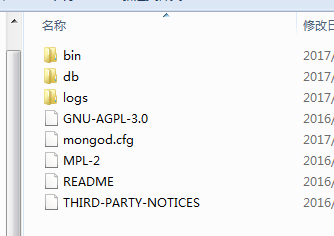
mongod.cfg里面为:
logpath=F:\MongoDB\Server\3.2\logs\mongod.log
dbpath=F:\MongoDB\Server\3.2\db
然后在DOS命令里输入:
sc.exe create MongoDB binPath= "\"F:\MongoDB\Server\3.2\bin\mongod.exe\" --service --config= \"F:\MongoDB\Server\3.2\mongod.cfg\"" DisplayName= "MongoDB" start= "auto"
回车就会看到
[sc] Create Service 成功
这个时候就可以使用net start MongoDB和net stop MongoDB来启动跟关闭mongo服务了。
下边是
基本操作:显示所有数据库:show dbs 用数据库:use xxx
创建集合 db.createCollection("集合名称",{capped:true,size:100000})
基本步骤:
新建数据库(db) :use student
新建集合(Collection) db.createCollection("集合名称");
可以新建文档:(document) document={"1":"2","3":"4"}
查看所有数据库:show dbs;
查看当前数据库下的所有集合:db.printCollectionStats();
三.插入操作
可以先定义一个文档document ,后将文档插入到集合中。或者直接将输入插入到集合中。
db.集合名称.insert(已定义的文档);
db.集合名称.insert(数据);
四.查询:
db.集合名称.find();显示文档
db.集合名称.find(where);
查询姓名为字符类型的数据记录
:$type操作符是基于BSON类型来检索集合中匹配的结果。
db.集合名称.find({"name":{$type:2}});
Double 1
String 2
Object 3
Array 4
Binary data 5
Object id 7
Boolean 8
Date 9
Null 10
Regular expression 11
JavaScript code 13
Symbol 14
JavaScript code with scope 15
32-bit integer 16
Timestamp 17
64-bit integer 18
Min key 255
Max key 127
db.集合名称.find({条件}).limit(10); // 满足条件的,取10条
五.更新操作
db.集合名称.update(where,set,未找到插入新的为true,更新多条为true);
db.集合名称.update({"id":"1"},{"$set":{"name":"yuan","sex":"男"}},false,true);
更新添加字段:$push
---db.student.update({"sno":2},{$push:{"classes":"san"}})
六.删除
db.集合名称.remove(where);
db.集合名称.remove();删除全部记录
db.集合名称.drop();删除全部文档(document)
七.操作符
(>) 大于 - $gt ---db.student.find({"sno":{"$gt":2}})
(<) 小于 - $lt---db.student.find({"sno":{"$lt":2}})
(>=) 大于等于 - $gte --示例:db.student.find({"sno":{"$gte":2}});
(<= ) 小于等于 - $lte --
八.一些操作
db.集合名称.Count(where); ---显示满足条件的条数---db.student.count({"sno":{$type:1}});
db.集合名称.distinct("key"); ---得到所有key的value(去掉重复的)---db.student.distinct("sno");
九.管理
查看collection数据的大小
db.集合名称.dataSize()
#查看colleciont状态
db.集合名称.stats()
#查询所有索引的大小
db.集合名称.totalIndexSize()
.与SQL对照
|
MongoDB |
||
|
查询全部 |
movies.find(new Document()) |
SELECT * FROM movies |
|
条件查询 |
movies.Find(new Document { { "title", "Hello Esr" } }); |
SELECT * FROM movies WHERE title= 'foobar' |
|
查询数量 |
movies.Find(new Document { { "title", "测试2" } }).Documents.Count(); |
SELECT COUNT(*) FROM movies WHERE `title` = 'foobar' |
|
数量范围查询 |
1, movies.Find(new Document().Add("$where", new Code("this.num > 50"))); 2, movies.Find(new Document().Add("num", new Document().Add("$gt",50))); 3,movies.Find("this.num > 50"); 4,movies.Find(new Document().Add("$where",new Code("function(x){ return this.num > 50};"))); |
select * from movies where num > 50 |
|
分页查询 |
movies.Find(new Document()).Skip(10).Limit(20); |
SELECT * FROM movies limit 10,20 |
|
查询排序语句 |
movies.Find(new Document()).Sort(new Document() { { "num", -1 } }); |
SELECT * FROM movies ORDER BY num DESC |
|
查询指定字段 |
movies.Find(new Document().Add("num", new Document().Add("$gt", 50)), 10, 0, new Document() { { "title", 1 } }); |
select title from movies where num > 50 |
|
插入语句 |
movies.Insert(new Document() { { "title", "测试" }, { "resuleData", DateTime.Now } }); |
INSERT INOT movies (`title`, `reauleDate`) values ('foobar',25) |
|
删除语句 |
movies.Remove(new Document() { { "title", "Hello Esr" } }); |
DELETE * FROM movies |
|
更新语句 |
movies.Update(new Document() { { "title", "测试2" } } |
UPDATE movies SET `title` = ‘测试1111’ WHERE `title` = '测试1111' |
|
Linq查询 |
(from item in db.GetCollection("movies").Linq() |
select * from movies where title like ‘%Esr’ |
mongodb启动与运用的更多相关文章
- Mongodb启动命令mongod参数说明
Mongodb启动命令mongod参数说明 mongod的主要参数有: 基本配置 ----------------------------------------------------------- ...
- MongoDB启动配置等
目录: 一.mongoDB 启动配置 二.导出,导入,运行时备份 三.Fsync锁,数据修复 四.用户管理,安全认证 一.启动项 mongod --help C:\Windows\system32&g ...
- mongoDB启动参数备忘
本文转载 Mongodb启动命令mongod参数说明 mongod的主要参数有: 基本配置 ----------------------------------------------- ...
- 安装MongoDB启动时报错‘发生系统错误2’的解决办法
安装数据库mongodb启动时报"发生系统错误2". 这个问题是如果你之前已经装过一次,并且两次安装目录不同,就绝对会碰到的,因为你之前安装的路径已经在注册表中生成了,并没有随着你 ...
- 【mongodb系统学习之五】mongodb启动最常用参数
五.mongodb启动时其他常用参数的使用(都是选用): 1).--logappend,指定日志的写入方式为追加,强烈建议使用: 2).--port,指定mongodb的端口号,当不使用这个参数的时候 ...
- MongoDB启动报错 32-bit servers don't have journaling enabled by default. Please use --journal if you want durability. 【转】
之前MongoDB启动的时候是蛮正常的,不知道后来启动报错了,就把粘贴出来查询了.最后才知道是由于自己不正常的关闭导致的这个情况. --摘录:MongoDB非正常关闭后修复记录 mongod没有后台执 ...
- MongoDB启动及用户名密码设置
1.服务启动 下载后的安装步骤,请参见mongoDB安装详细教程 启动服务NET START MongoDB 关闭服务NET STOP MongoDB 启动客户端mongo MongoDB shell ...
- mongodb启动命令与端口设置
一.mongodb安装和配置 1.创建tools目录,用于存放安装包 cd /usr/local mkdir -p tools cd tools 2.下载mongodb包(其它版本请自行下载) wge ...
- mongodb启动后台服务
将MongoDB部署在服务器机子上时mongodb的实例应为后台服务进行的方式运行,而非前台进程,否则远程会话一关闭mongodb也跟着关闭了.本文介绍mongodb后台服务进程开启和关闭的操作. 开 ...
- 【笔记】mongodb启动不了:child process failed, exited with error number 100
今天在启动mongodb的时候,发现起不来,报错:child process failed, exited with error number 100然后先去/var/log/mongo/mongod ...
随机推荐
- git相关的简单命令
初次使用建议看这个ppt:http://www.bootcss.com/p/git-guide/ 从现有仓库克隆 这需要用到 git clone 命令.如果你熟悉其他的 VCS 比如 Subve ...
- [合集]解决Python报错:local variable 'xxx' referenced before assignment
a = 1 def use(): print(a) #输出1 引用不会报错 a = 1 def use(): a = 3 print(a) #输出 3 重新赋值也不会报错. 局部变量会优先在函数内部去 ...
- sublime text插件推荐
time: 2016-05-23 13:00 --- 用了Sublime Text有一段时间了,之前被周围的几个前端小伙伴灌输的思想就是,牛b的前端程序员都是手写代码的,用代码提示啥的都low,然而上 ...
- 在已配置成功的opencv3.2.0下配置opencv_contrib模块
简介: 之前在Ubuntu下配置OpenCV时,因为对opencv3..0不是特别了解,没有把opencv_contrib进行安装,这里提醒大家尽量要一次性安装完毕,减少不必要的麻烦. .0文件夹 ( ...
- $.extend 的相关用法
1.1 $.extend(result,item1,item2…..) 将所有的参数项都合并result中,返回result,会破坏result的结构. 1.2 $.extend({},item1,i ...
- Pwn With longjmp
前言 这个是 seccon-ctf-quals-2016 的一个题,利用方式还是挺特殊的记录一下. 题目链接 http://t.cn/RnfeHLv 正文 首先看看程序的安全措施 haclh@ubun ...
- mysql 运行 sql 脚本
方式一: 打开脚本,复制里面的全部内容,登陆数据库后运行. 方式二: window cmd 运行如下命令: mysql -u root -proot --port 3306 <D:\simple ...
- git bash 出现vim弹框的时候怎么退出
如果是输出状态,首先按Esc键退出输入状态,然后按Shift+“;”,再输入q!或wq!(不保存改动,wq!是保存文件的写入修改)退出. so easy!!
- ES6-let & const
let和const命令 let 它的用法类似于var,但是所声明的变量,只在let命令所在的代码块内有效. for(let i = 0; i < arr.length; i++){} 用let命 ...
- python queue和生产者和消费者模型
queue队列 当必须安全地在多个线程之间交换信息时,队列在线程编程中特别有用. class queue.Queue(maxsize=0) #先入先出 class queue.LifoQueue(ma ...