
Abp中SwaggerUI的多个接口文档配置说明


 public class SwaggerVersionHelper

    {

        public static bool ResolveVersionSupportByRouteConstraint(ApiDescription apiDesc, string targetApiVersion)

        {

            var attr = apiDesc.ActionDescriptor.ControllerDescriptor.GetCustomAttributes<VersionedRoute>().FirstOrDefault();

            if (attr == null)

            {

                if (targetApiVersion == "manage")

                {

                    return true;

                }

                else

                {

                    return false;

                }

            }

                int targetVersion;

                targetApiVersion = targetApiVersion.TrimStart('v');

                if (attr.Version !=  && int.TryParse(targetApiVersion, out targetVersion))

                {

                    return attr.Version == targetVersion;

                };

                return false;

         }

    }
[AttributeUsage(AttributeTargets.All)]

public class VersionedRoute : Attribute

{

public VersionedRoute(string name, int version)

{

Name = name;

Version = version;

}

public string Name { get; set; }

public int Version { get; set; }

}


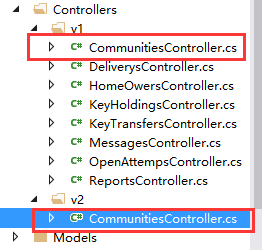
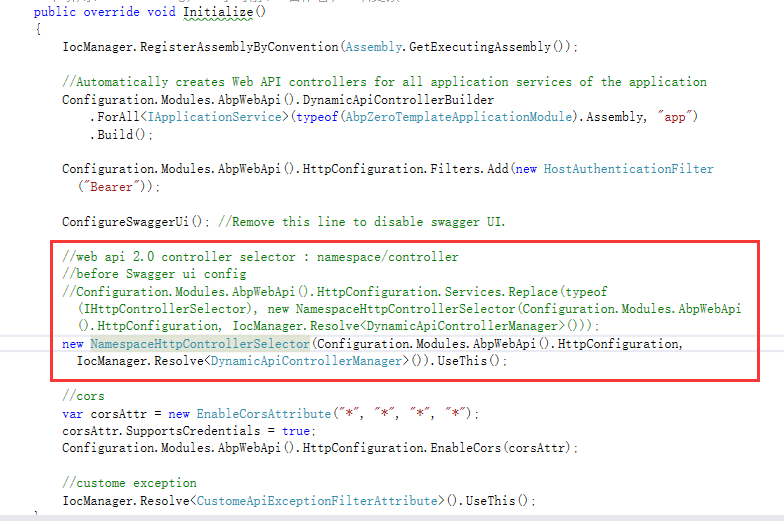
public class NamespaceHttpControllerSelector : AbpHttpControllerSelector, ISingletonDependency

{

private const string NamespaceKey = "namespace";

private const string ControllerKey = "controller";

private readonly HttpConfiguration _configuration;

private readonly Lazy<Dictionary<string, HttpControllerDescriptor>> _controllers;

private readonly HashSet<string> _duplicates;

public NamespaceHttpControllerSelector(HttpConfiguration config, DynamicApiControllerManager dynamicApiControllerManager)

: base(config, dynamicApiControllerManager)

{

_configuration = config;

_duplicates = new HashSet<string>(StringComparer.OrdinalIgnoreCase);

_controllers = new Lazy<Dictionary<string, HttpControllerDescriptor>>(InitializeControllerDictionary);

}

private Dictionary<string, HttpControllerDescriptor> InitializeControllerDictionary()

{

var dictionary = new Dictionary<string, HttpControllerDescriptor>(StringComparer.OrdinalIgnoreCase);

// Create a lookup table where key is "namespace.controller". The value of "namespace" is the last

// segment of the full namespace. For example:

// MyApplication.Controllers.V1.ProductsController => "V1.Products"

IAssembliesResolver assembliesResolver = _configuration.Services.GetAssembliesResolver();

IHttpControllerTypeResolver controllersResolver = _configuration.Services.GetHttpControllerTypeResolver();

ICollection<Type> controllerTypes = controllersResolver.GetControllerTypes(assembliesResolver);

foreach (Type t in controllerTypes)

{

var segments = t.Namespace.Split(Type.Delimiter);

// For the dictionary key, strip "Controller" from the end of the type name.

// This matches the behavior of DefaultHttpControllerSelector.

var controllerName = t.Name.Remove(t.Name.Length - DefaultHttpControllerSelector.ControllerSuffix.Length);

var spacename = segments[segments.Length - ];

if (new Regex("v\\d+").IsMatch(spacename))

{

var key = String.Format(CultureInfo.InvariantCulture, "{0}.{1}", segments[segments.Length - ], controllerName);

// Check for duplicate keys.

if (dictionary.Keys.Contains(key))

{

_duplicates.Add(key);

}

else

{

dictionary[key] = new HttpControllerDescriptor(_configuration, t.Name, t);

}

}

else

{

dictionary[controllerName] = new HttpControllerDescriptor(_configuration, t.Name, t);

}

}

// Remove any duplicates from the dictionary, because these create ambiguous matches.

// For example, "Foo.V1.ProductsController" and "Bar.V1.ProductsController" both map to "v1.products".

foreach (string s in _duplicates)

{

dictionary.Remove(s);

}

return dictionary;

}

// Get a value from the route data, if present.

private static T GetRouteVariable<T>(IHttpRouteData routeData, string name)

{

object result = null;

if (routeData.Values.TryGetValue(name, out result))

{

return (T)result;

}

return default(T);

}

public override HttpControllerDescriptor SelectController(HttpRequestMessage request)

{

IHttpRouteData routeData = request.GetRouteData();

if (routeData == null)

{

throw new HttpResponseException(HttpStatusCode.NotFound);

}

// Get the namespace and controller variables from the route data.

string namespaceName = GetRouteVariable<string>(routeData, NamespaceKey);

if (namespaceName == null)

{

return base.SelectController(request);

}

string controllerName = GetRouteVariable<string>(routeData, ControllerKey);

if (controllerName == null)

{

return base.SelectController(request);

}

if (!new Regex("v\\d+").IsMatch(namespaceName))

{

return base.SelectController(request);

}

// Find a matching controller.

string key = String.Format(CultureInfo.InvariantCulture, "{0}.{1}", namespaceName, controllerName);

HttpControllerDescriptor controllerDescriptor;

if (_controllers.Value.TryGetValue(key, out controllerDescriptor))

{

return controllerDescriptor;

}

else if (_duplicates.Contains(key))

{

throw new HttpResponseException(

request.CreateErrorResponse(HttpStatusCode.InternalServerError,

"Multiple controllers were found that match this request."));

}

else

{

throw new HttpResponseException(HttpStatusCode.NotFound);

}

}

public override IDictionary<string, HttpControllerDescriptor> GetControllerMapping()

{

return _controllers.Value;

}

public void UseThis()

{

_configuration.Services.Replace(typeof(IHttpControllerSelector), this);

}

}
Abp中SwaggerUI的多个接口文档配置说明的更多相关文章
- ABP给WebApi添加SwaggerUI,生成可交互接口文档
在ABP模板项目中,通过SwaggerUI可以为我们的WebApi生成动态的可交互接口文档页面,从而可以很方便的测试调用我们的WebApi接口. 一.集成Swagger 右键项目YoYo.Web,打开 ...
- 在sublime3中docblockr插件配置apidoc接口文档注释模板
写在前面: 将进行3个步骤配置 1.在sublime3中安装插件docblockr,可以参考http://www.cnblogs.com/jiangxiaobo/p/8327709.html 2.安装 ...
- Swagger+Spring mvc生成Restful接口文档
简介 Swagger 是一个规范和完整的框架,用于生成.描述.调用和可视化 RESTful 风格的 Web 服务.总体目标是使客户端和文件系统作为服务器以同样的速度来更新.文件的方法,参数和模型紧密集 ...
- asp.net core使用Swashbuckle.AspNetCore(swagger)生成接口文档
asp.net core中使用Swashbuckle.AspNetCore(swagger)生成接口文档 Swashbuckle.AspNetCore:swagger的asp.net core实现 项 ...
- 几款常用的在线API管理工具(是时候抛弃office编写接口文档了)
在项目开发过程中,总会涉及到接口文档的设计编写,之前使用的都是ms office工具,不够漂亮也不直观,变更频繁的话维护成本也更高,及时性也是大问题.基于这个背景,下面介绍几个常用的API管理工具,方 ...
- springboot+swagger接口文档企业实践(上)
目录 1.引言 2.swagger简介 2.1 swagger 介绍 2.2 springfox.swagger与springboot 3. 使用springboot+swagger构建接口文档 3. ...
- SpringBoot集成Swagger(Swagger的使用),生成接口文档,方便前后端分离开发
首先上一张成果图. 1.Maven依赖 <dependency> <groupId>io.springfox</groupId> <artifactId&g ...
- .net core的Swagger接口文档使用教程(二):NSwag
上一篇介绍了Swashbuckle ,地址:.net core的Swagger接口文档使用教程(一):Swashbuckle 讲的东西还挺多,怎奈微软还推荐了一个NSwag,那就继续写吧! 但是和Sw ...
- PCB WebAPI 接口测试工具与接口文档生成
我们自己写WebAPI或调用对方系统提供的WebAPI时,测试WebAPI接口工具用哪些工具呢. 这里将3种WebAPI常用到的工具使用说明.主要是讲对第3种WebApiTestClientWebAp ...
随机推荐
- UE4随笔(一)准备过程
19号,也就是中国时间20日凌晨,虚幻4放出了"订阅制"这个重磅炸弹,估计出乎大多数人的想象,已经不止一个同事表示"自己的引擎这下没用了". 笔者前天搞定了付款 ...
- 第五章 HashMap源码解析
5.1.对于HashMap需要掌握以下几点 Map的创建:HashMap() 往Map中添加键值对:即put(Object key, Object value)方法 获取Map中的单个对象:即get( ...
- OVS 内核KEY值提取及匹配流表代码分析
原文链接:http://ry0117.com/2016/12/24/OVS内核KEY值提取及匹配流表代码分析/ 当开启OVS后,创建datapath类型为system的网桥并他添加相关接口,OVS网桥 ...
- OSX - 可以安装任何程序!
在shell里面执行命令: sudo spctl --master-disable 参考: https://www.jianshu.com/p/010cc30228f3
- jzoj5923
我們可以記f[i]表示i個點的連通圖的個數 則我們可以考慮將i個點不必聯通的圖個數(記為g)減去i個點的不連通圖個數 那麼f[i]=g[i]-c(j-1,i-1)f[j]gi-j 枚舉一個j,強制將j ...
- js面试题-数组去重
今天,在聊天群里看到数组去重的话题,面试者的答案如下: 参考答案如下: 程序员思维,做出如下测试: 未考虑到:1,‘1’是不同的,应该不去重 未考虑到对象 所以,参考答案只能去重基础类型 根据以往看过 ...
- 【GDKOI2016】 魔卡少女 线段树
题目大意:给你一个长度为n的序列${a_1....a_n}$,有$m$次操作 每次操作有两种情况:修改$a_i$的值,询问$[l,r]$中所有子区间的异或和. 数据范围:$n,m≤10^5$,$a_i ...
- Java虚拟机的内存组成
查了诸多的地方看到的都是这样一句话,我也Copy过来. 按照官方的说法:"Java 虚拟机具有一个堆,堆是运行时数据区域,所有类实例和数组的内存均从此处分配.堆是在 Java 虚拟机启动时创 ...
- Vue-Router路由Vue-CLI脚手架和模块化开发 之 使用props替代路由对象的方式获取参数
在上一章博文中使用路由对象$route获取参数时,组件和路由对象耦合,在这篇博文中就可以使用props来进行解耦: 1.在组件中使用props选项定义数据,接收参数: 2.在路由中,使用props选项 ...
- sublime text3 --前端工程师必备
sublime text3 --前端工程师必备神器 导读目录: 下载与Emmet插件安装 sublime text3 中cssrem安装与使用 sublime Text 3的中文文件名显示为方框的问题 ...