
Abp中SwaggerUI的多个接口文档配置说明


 public class SwaggerVersionHelper

    {

        public static bool ResolveVersionSupportByRouteConstraint(ApiDescription apiDesc, string targetApiVersion)

        {

            var attr = apiDesc.ActionDescriptor.ControllerDescriptor.GetCustomAttributes<VersionedRoute>().FirstOrDefault();

            if (attr == null)

            {

                if (targetApiVersion == "manage")

                {

                    return true;

                }

                else

                {

                    return false;

                }

            }

                int targetVersion;

                targetApiVersion = targetApiVersion.TrimStart('v');

                if (attr.Version !=  && int.TryParse(targetApiVersion, out targetVersion))

                {

                    return attr.Version == targetVersion;

                };

                return false;

         }

    }
[AttributeUsage(AttributeTargets.All)]

public class VersionedRoute : Attribute

{

public VersionedRoute(string name, int version)

{

Name = name;

Version = version;

}

public string Name { get; set; }

public int Version { get; set; }

}


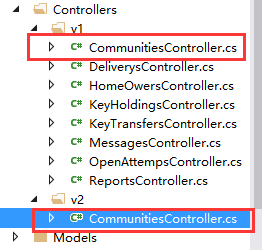
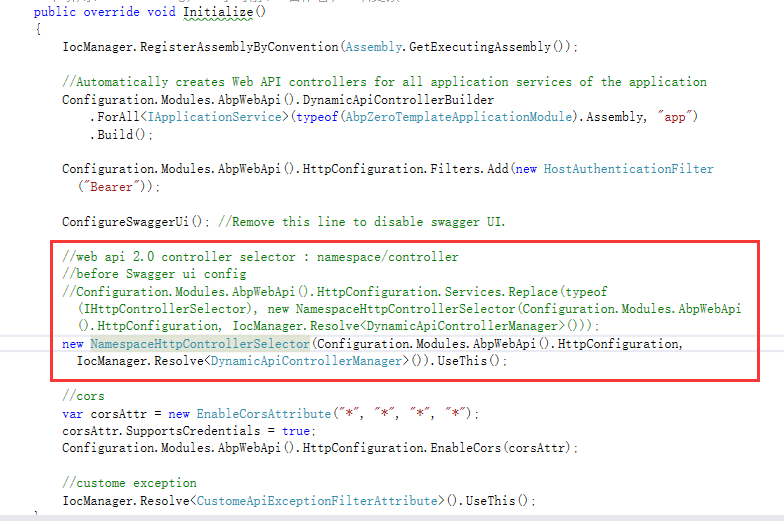
public class NamespaceHttpControllerSelector : AbpHttpControllerSelector, ISingletonDependency

{

private const string NamespaceKey = "namespace";

private const string ControllerKey = "controller";

private readonly HttpConfiguration _configuration;

private readonly Lazy<Dictionary<string, HttpControllerDescriptor>> _controllers;

private readonly HashSet<string> _duplicates;

public NamespaceHttpControllerSelector(HttpConfiguration config, DynamicApiControllerManager dynamicApiControllerManager)

: base(config, dynamicApiControllerManager)

{

_configuration = config;

_duplicates = new HashSet<string>(StringComparer.OrdinalIgnoreCase);

_controllers = new Lazy<Dictionary<string, HttpControllerDescriptor>>(InitializeControllerDictionary);

}

private Dictionary<string, HttpControllerDescriptor> InitializeControllerDictionary()

{

var dictionary = new Dictionary<string, HttpControllerDescriptor>(StringComparer.OrdinalIgnoreCase);

// Create a lookup table where key is "namespace.controller". The value of "namespace" is the last

// segment of the full namespace. For example:

// MyApplication.Controllers.V1.ProductsController => "V1.Products"

IAssembliesResolver assembliesResolver = _configuration.Services.GetAssembliesResolver();

IHttpControllerTypeResolver controllersResolver = _configuration.Services.GetHttpControllerTypeResolver();

ICollection<Type> controllerTypes = controllersResolver.GetControllerTypes(assembliesResolver);

foreach (Type t in controllerTypes)

{

var segments = t.Namespace.Split(Type.Delimiter);

// For the dictionary key, strip "Controller" from the end of the type name.

// This matches the behavior of DefaultHttpControllerSelector.

var controllerName = t.Name.Remove(t.Name.Length - DefaultHttpControllerSelector.ControllerSuffix.Length);

var spacename = segments[segments.Length - ];

if (new Regex("v\\d+").IsMatch(spacename))

{

var key = String.Format(CultureInfo.InvariantCulture, "{0}.{1}", segments[segments.Length - ], controllerName);

// Check for duplicate keys.

if (dictionary.Keys.Contains(key))

{

_duplicates.Add(key);

}

else

{

dictionary[key] = new HttpControllerDescriptor(_configuration, t.Name, t);

}

}

else

{

dictionary[controllerName] = new HttpControllerDescriptor(_configuration, t.Name, t);

}

}

// Remove any duplicates from the dictionary, because these create ambiguous matches.

// For example, "Foo.V1.ProductsController" and "Bar.V1.ProductsController" both map to "v1.products".

foreach (string s in _duplicates)

{

dictionary.Remove(s);

}

return dictionary;

}

// Get a value from the route data, if present.

private static T GetRouteVariable<T>(IHttpRouteData routeData, string name)

{

object result = null;

if (routeData.Values.TryGetValue(name, out result))

{

return (T)result;

}

return default(T);

}

public override HttpControllerDescriptor SelectController(HttpRequestMessage request)

{

IHttpRouteData routeData = request.GetRouteData();

if (routeData == null)

{

throw new HttpResponseException(HttpStatusCode.NotFound);

}

// Get the namespace and controller variables from the route data.

string namespaceName = GetRouteVariable<string>(routeData, NamespaceKey);

if (namespaceName == null)

{

return base.SelectController(request);

}

string controllerName = GetRouteVariable<string>(routeData, ControllerKey);

if (controllerName == null)

{

return base.SelectController(request);

}

if (!new Regex("v\\d+").IsMatch(namespaceName))

{

return base.SelectController(request);

}

// Find a matching controller.

string key = String.Format(CultureInfo.InvariantCulture, "{0}.{1}", namespaceName, controllerName);

HttpControllerDescriptor controllerDescriptor;

if (_controllers.Value.TryGetValue(key, out controllerDescriptor))

{

return controllerDescriptor;

}

else if (_duplicates.Contains(key))

{

throw new HttpResponseException(

request.CreateErrorResponse(HttpStatusCode.InternalServerError,

"Multiple controllers were found that match this request."));

}

else

{

throw new HttpResponseException(HttpStatusCode.NotFound);

}

}

public override IDictionary<string, HttpControllerDescriptor> GetControllerMapping()

{

return _controllers.Value;

}

public void UseThis()

{

_configuration.Services.Replace(typeof(IHttpControllerSelector), this);

}

}
Abp中SwaggerUI的多个接口文档配置说明的更多相关文章
- ABP给WebApi添加SwaggerUI,生成可交互接口文档
在ABP模板项目中,通过SwaggerUI可以为我们的WebApi生成动态的可交互接口文档页面,从而可以很方便的测试调用我们的WebApi接口. 一.集成Swagger 右键项目YoYo.Web,打开 ...
- 在sublime3中docblockr插件配置apidoc接口文档注释模板
写在前面: 将进行3个步骤配置 1.在sublime3中安装插件docblockr,可以参考http://www.cnblogs.com/jiangxiaobo/p/8327709.html 2.安装 ...
- Swagger+Spring mvc生成Restful接口文档
简介 Swagger 是一个规范和完整的框架,用于生成.描述.调用和可视化 RESTful 风格的 Web 服务.总体目标是使客户端和文件系统作为服务器以同样的速度来更新.文件的方法,参数和模型紧密集 ...
- asp.net core使用Swashbuckle.AspNetCore(swagger)生成接口文档
asp.net core中使用Swashbuckle.AspNetCore(swagger)生成接口文档 Swashbuckle.AspNetCore:swagger的asp.net core实现 项 ...
- 几款常用的在线API管理工具(是时候抛弃office编写接口文档了)
在项目开发过程中,总会涉及到接口文档的设计编写,之前使用的都是ms office工具,不够漂亮也不直观,变更频繁的话维护成本也更高,及时性也是大问题.基于这个背景,下面介绍几个常用的API管理工具,方 ...
- springboot+swagger接口文档企业实践(上)
目录 1.引言 2.swagger简介 2.1 swagger 介绍 2.2 springfox.swagger与springboot 3. 使用springboot+swagger构建接口文档 3. ...
- SpringBoot集成Swagger(Swagger的使用),生成接口文档,方便前后端分离开发
首先上一张成果图. 1.Maven依赖 <dependency> <groupId>io.springfox</groupId> <artifactId&g ...
- .net core的Swagger接口文档使用教程(二):NSwag
上一篇介绍了Swashbuckle ,地址:.net core的Swagger接口文档使用教程(一):Swashbuckle 讲的东西还挺多,怎奈微软还推荐了一个NSwag,那就继续写吧! 但是和Sw ...
- PCB WebAPI 接口测试工具与接口文档生成
我们自己写WebAPI或调用对方系统提供的WebAPI时,测试WebAPI接口工具用哪些工具呢. 这里将3种WebAPI常用到的工具使用说明.主要是讲对第3种WebApiTestClientWebAp ...
随机推荐
- CC2530学习路线-基础实验-GPIO 按键控制LED灯亮灭(2)
目录 1.前期预备知识 1.1 新大陆Zigbee模块按键电路图 1.2 CC2530相关寄存器 1.3 CC2530中断走向图 1.4 使用C语言为51单片机编写中断程序 1.5 *函数指针 2. ...
- iOS 卡顿
1 使用 dispatch_async,也可能会出现卡顿. 由于mac系统允许overcommit,而iOS系统不允许overcommit 故要控制GCD队列的数量并且最好设置target queue ...
- LoadLinked/StoreConditional (LL/SC)
MIPS中LL/SC指令介绍 MIPS32中的LL.SC指令说明 理解MIPS指令集中的ll (load linked) 和 sc 你用ll指令读取一个内存中的数据并存到一个寄存器,然后在寄存器修改( ...
- 8.在XamarinAndroid上进一步控制包的大小
在Android上链接 Xamarin.Android应用程序使用链接器来减小应用程序的大小.链接器使用应用程序的静态分析来确定哪些程序集.类型.成员被实际使用.链接器的行为就像一个GC,不断寻找被引 ...
- RHCE 学习结构
本文内容为本站的 blog 链接 第一章 安装初体验 第二章 访问系统 2.1 基于图形化界面访问 2.2 基于文本访问 2.3 用户管理 第三章 文件系统 3.1 Linux 文件系统 ...
- Java学习之路(十一):IO流<前戏>
File类的概述和构造方法 构造方法: File(String pathname):根据一个路径得到File对象 File(String parent,String child):根据一个目录和一个子 ...
- jython实现java运行python代码
Jython是一种完整的语言,而不是一个Java翻译器或仅仅是一个Python编译器,它是一个Python语言在Java中的完全实现.最近的一个项目需要将python代码转换成java实现,所以用了一 ...
- [webrtc] 强制使用tcp传输
以前笔记,整理 webrtc默认使用UDP传输,但是也可以通过TCP传输. 使用tcp传输,需要服务器中转,turnserver,licode,janus之类的服务器. 1. 如果使用turnserv ...
- [转载]7款开源ERP系统比较
现在有许多企业将ERP项目,在企 业中没有实施好,都归咎于软件产品不好.其实,这只是你们的借口.若想要将ERP软件真正与企业融合一体,首先得考虑企业的自身情况,再去选择适合的 ERP软件. 如果你的企 ...
- android的几种“通知”方式简单实现(Notification&NotificationManager)
关于通知Notification相信大家都不陌生了,平时上QQ的时候有消息来了或者有收到了短信,手机顶部就会显示有新消息什么的,就类似这种.今天就稍微记录下几种Notification的用法.3.0以 ...