
Vue 实现countDown倒计时
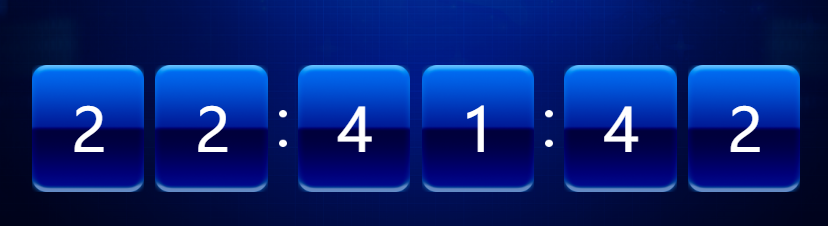
项目中要用到倒计时,用Vue 实现了一个
 <template>

   <transition name="bkcd">

     <div class="bkCountDown" v-show="bkCountDownShow">

     <div class="kbCountDownTitle">

       <img src="http://static.crecgec.com/Kaipiao/countDownTitle.png">

     </div>

     <div id="kbCountDownContent" class="kbCountDownContent" ref="kbCountDownContent">

     </div>

     <!--倒计时结束后提示的信息-->

     <div class="cdEndCon" v-show="cdEndConShow">{{cdEndContent}}</div>

   </div>

   </transition>

 </template>

 <script>

 import $ from 'jquery'

 export default {

   props: {

     // 控制倒计时页面显示、隐藏

     bkCountDownShow: {

       type: Boolean,

       default: true

     },

     // 这个参数:为了实现中途倒计时暂停功能

     // 控制倒计时暂停/开始

     cdStartOrEnd: {

       type: Boolean,

       default: true

     },

     // 倒计时的时间,有父组件传递

     countDownTime: {

       type: String,

       default: '2017/11/9 15:03:01'

     },

     // 倒计时结束后显示的内容

     cdEndContent: {

       type: String,

       default: '倒计时已经结束'

     }

   },

   data () {

     return {

       // 倒计时结束后显示cdEndCon

       cdEndConShow: false,

       timestamp: '', // 倒计时的时间戳

       cdTimer: '', // setTimeOut值

       timeInterval: '', // 倒计时结束时间与当前时间的之间的间隔

       timeIntervalVal: '', // 保存时间间隔的参数

       d: '',

       h: '',

       m: '',

       s: '',

       days:  *  * ,

       hours:  * ,

       minutes:

     }

   },

   mounted () {

     this.countdown()

   },

   watch: {

     // 监控cdStartOrEnd值

     cdStartOrEnd () {

       if (this.cdStartOrEnd) {

         this.tick()

       } else {

         clearTimeout(this.cdTimer)

       }

     }

   },

   methods: {

     countdown () {

       this.timestamp = new Date(this.countDownTime).getTime()

       this.init('kbCountDownContent')

     },

     // 初始化

     init (ele) {

       $.each(['Hours', 'Minutes', 'Seconds'], function (i) {

         $('<div class="count' + this + '">').html(

           `<div class = "countPos">\

              <span class="digit static"></span>\

         </div>\

         <div class="countPos">\

           <span class="digit static"></span>\

         </div>`

         ).appendTo($('#' + ele))

         if (this !== 'Seconds') {

           $('#' + ele).append('<div class="countDiv countDiv' + i + '"></div>')

         }

       })

       this.tick()

     },

     tick () {

 //      每次进入这个方法,就重新计算和当前时间的间隔,然后赋值给timeInterval

       this.timeInterval = Math.floor((this.timestamp - (new Date())) / )

       if (this.timeInterval < ) {

         this.timeInterval =

       }

       this.timeIntervalVal = this.timeInterval

 //       Number of days left

 //      现在是只有时分秒,可以通过调整下面的代码,来确定显示什么

 //      this.d = Math.floor(this.timeInterval / this.days)

 //      this.updateDuo(0, 1, this.d)

 //      this.timeInterval -= this.d * this.days

       // Number of hours left

       this.h = Math.floor(this.timeInterval / this.hours)

       this.updateDuo(, , this.h)

       this.timeInterval -= this.h * this.hours

       // Number of minutes timeInterval

       this.m = Math.floor(this.timeInterval / this.minutes)

       this.updateDuo(, , this.m)

       this.timeInterval -= this.m * this.minutes

       // Number of seconds timeInterval

       this.s = this.timeInterval

       this.updateDuo(, , this.s)

       // timeIntervalVal大于0,就执行setTimeout方法

       if (this.timeIntervalVal > ) {

         this.cdTimer = setTimeout(this.tick, )

       } else {

         // 倒计时结束

         this.cdEndConShow = true

         // 这块可以添加emit,给父组件传参

         // 通过emit给父组件传参数来操作bkCountDownShow

         //  bkCountDownShow = false

       }

     },

     updateDuo (minor, major, value) {

       this.switchDigit($('#kbCountDownContent').find('.countPos').eq(minor), Math.floor(value / ) % )

       this.switchDigit($('#kbCountDownContent').find('.countPos').eq(major), value % )

     },

     switchDigit (position, number) {

       let digit = position.find('.digit')

       if (digit.is(':animated')) {

         return false

       }

       if (position.data('digit') === number) {

         return false

       }

       position.data('digit', number)

       var replacement = $('<span>', {

         'class': 'digit',

         css: {

           top: '-170px',

           opacity:

         },

         html: number

       })

       digit

         .before(replacement)

         .removeClass('static')

         .animate({top: '170px', opacity: }, 'slow', function () {

           digit.remove()

         })

       replacement

         .delay()

         .animate({top: , opacity: }, 'slow', function () {

           replacement.addClass('static')

         })

     }

   }

 }

 </script>

 <!-- Add "scoped" attribute to limit CSS to this component only -->

 <style>

   *{

     margin:;

     padding:;

     font-family: 'Microsoft Yahei',Tahoma,'Simsun','宋体' !important;

   }

   .bkCountDown{

     width: %;

     height: 980px;

     background:url('http://static.crecgec.com/Kaipiao/background.png') #b0b0b0;

     position: absolute;

     background-size: cover;

     overflow: hidden;

   }

   .kbCountDownTitle{

     width: 1070px;

     height: 120px;

     line-height: 120px;

     font-size: 120px;

     margin: 190px auto ;

     text-align: center;

     color: #fff;

   }

   .kbCountDownContent{

     width:1070px;

     margin:160px auto ;

     text-align:center;

     letter-spacing:-3px;

     overflow: hidden;

   }

   .countPos{

     display: inline-block;

     width: 150px;

     height: 170px;

     overflow: hidden;

     position: relative;

     margin-left: 15px;

   }

   .digit{

     position:absolute;

     display:block;

     width:150px;

     height: 170px;

     line-height: 170px;

     text-align:center;

     color:#fff;

     font-size: 80px;

     background: url('http://static.crecgec.com/Kaipiao/countDown.png')   no-repeat;

   }

   .digit.static{

     background: url('http://static.crecgec.com/Kaipiao/countDown.png')   no-repeat;

   }

   .countDays,.countHours,.countMinutes,.countSeconds{

     float: left;

     font-size: ;

   }

   .countDiv{

     display:inline-block;

     width:10px;

     height:50px;

     float: left;

     margin-top: 60px;

     margin-left: 15px;

     background: url('http://static.crecgec.com/Kaipiao/countDown1.png')   no-repeat;

   }

   .cdEndCon{

     width:1070px;

     margin:20px auto ;

     text-align: center;

     color: #fff;

     font-size: 20px;

   }

   .bkcd-enter-active, .bkcd-leave-active{

     transition: opacity .5s

   }

   .bkcd-enter, .bkcd-leave-to{

     opacity:

   }

 </style>
Vue 实现countDown倒计时的更多相关文章
- VUE组件 之 倒计时(防刷新)
思路: 一.效果图: 二.CSS代码 .box{ width: 300px; height: 100px; line-height: 100px; margin: 100px auto; backgr ...
- vue列表数据倒计时存在的一些坑
vue 列表数据倒计时,在页面销毁前需要清除定时器,否着会报错. export default { data() { return { list: [] } }, mounted() { for (l ...
- vue实现验证码倒计时60秒的具体代码
vue实现验证码倒计时60秒的具体代码 <span v-show="show" @click="getCode">获取验证码</span> ...
- jquery.countdown 倒计时插件的学习
1.第一种简单的使用 第一个时间是你的倒计时截止时间,finalDate格式可以是YYYY/MM/DD MM/DD/YYYY YYYY/MM/DD hh:mm:ss MM/DD/YYYY hh:mm: ...
- vue 设计一个倒计时秒杀的组件
简介: 倒计时秒杀组件在电商网站中层出不穷 不过思路万变不离其踪,我自己根据其他资料设计了一个vue版的 核心思路:1.时间不能是本地客户端的时间 必须是服务器的时间这里用一个settimeout ...
- Vue 获取验证码倒计时组件
子组件 <template> <a class="getvalidate":class="{gray: (!stop)}"@click='cl ...
- zepto插件 countdown 倒计时插件 从jquery 改成 zepto
插件特色:支持zepto库 支持时间戳格式 支持年月日时分秒格式 countdown 由jquery依赖库改成zepto zepto的event机制与jquery不同,所以更换之后代码不能正常运行 ...
- vue 15分钟倒计时
HTML: <span>{{minute}}:{{second}}</span> script: 一 二 // 倒计时 num(n) { return n & ...
- jQuery.countdown倒计时插件
https://github.com/hilios/jQuery.countdown 文档:http://hilios.github.io/jQuery.countdown/documentation ...
随机推荐
- 《Linux内核设计与实现》第7章读书笔记
第七章 链接 一. 链接的概念 链接是将各种代码和数据部分收集起来并组合成为一个单一文件的过程.可以执行于编译.加载和运行时,由叫做链接器(可实现分离编译)的程序自动执行. 二.静态链接 为了创建静态 ...
- 用Python实现的数据结构与算法:链表
一.概述 链表(linked list)是一组数据项的集合,其中每个数据项都是一个节点的一部分,每个节点还包含指向下一个节点的链接(参考 <算法:C语言实现>). 根据结构的不同,链表可以 ...
- 【最大流/二分图匹配】【网络流24题】【P3254】 圆桌问题
Description 假设有来自m 个不同单位的代表参加一次国际会议.每个单位的代表数分别为ri (i =1,2,--,m). 会议餐厅共有n 张餐桌,每张餐桌可容纳ci (i =1,2,--,n) ...
- python之旅:面向对象之继承与派生
一 初识继承 编写类时,并非总要从空白开始.如果你要编写的类正好是另一个现成类的特殊版本,可使用继承来减少代码冗余,子类会“遗传”父类的属性,从而解决代码重用问题 什么是继承 继承是一种创建新类的方式 ...
- golang package log
package main import ( "log" "os" ) var logger *log.Logger func main() { file, er ...
- lightoj 1205 数位dp
1205 - Palindromic Numbers PDF (English) Statistics Forum Time Limit: 2 second(s) Memory Limit: 3 ...
- tp5.1 高级查询之 表里2字段比较大小
$map = [ 'status' => 1, 'is_show' => 1,]; $result = Db::name('coupon') ->where($map) ->w ...
- python map对象
工作中遇到需要将List对象中的元素(list类型)转化为集合(set)类型,转化完成之后需要需要访问其中的元素. 第一步,使用map方法进行转换 data = [[1, 3, 4], [2, 3, ...
- java.lang.AutoCloseable
java.lang.AutoCloseable和java.io.Closeable public interface AutoCloseable { void close() throws Excep ...
- socket利用多线程实现一对多通信
1.服务器端:socket()建立套接字,绑定(bind)并监听(listen),用accept()等待客户端连接.将accept()写入死循环,每次连接一个客户端,开一个线程. 2.一般情况下建立s ...