
Android中UI设计的一些技巧!!!
出处:http://blog.csdn.net/android_tutor/article/details/5995759
大家好,今天给大家分享的是Android中UI设计的一些技巧,本节内容主要有两点:一是Android按钮(Button)的UI设计,二是:ListView以及GridView的UI设计。
按钮的状态:
我们一般搞UI设计,按钮通常有三个状态:normal(正常状态);focus(焦点状态),pressed(按下状态)。如下图所示:



我们会在res/drawable目录下定义一个资源文件,比如我们本例中要用到的handle.xml,在里面定义三种状态,每种状态对应一张图片:
代码如下:
- <?xml version="1.0" encoding="utf-8"?>
- <selector xmlns:android="http://schemas.android.com/apk/res/android">
- <item android:state_window_focused="false" android:drawable="@drawable/handle_normal" />
- <item android:state_focused="true" android:drawable="@drawable/handle_focused" />
- <item android:state_pressed="true" android:drawable="@drawable/handle_pressed" />
- </selector>
而我们使用这个资源文件的用法只需要引用drawable里的资源文件(android:background="@drawable/handle")代码如下:
- <Button
- android:id="@+id/handle"
- android:layout_width="wrap_content"
- android:layout_height="fill_parent"
- android:background="@drawable/handle"
- />
Android中的层:
看过《盗梦空间》的人都知道,梦境有多少层,而Android中也有层次之分,在Android中第一层"梦境",我们可以认为是壁纸。第二层就是应用的Activity,第三层就是放在Activity上的容器(ViewGroup以及它的子类FrameLayout,LinearLayout等布局对象),当然容器中还可以放容器,你也可以放到N层(最多放多少我还没验证过),总之最后一层就是那些继承于View的控件了(诸如,Button,TextView等.)
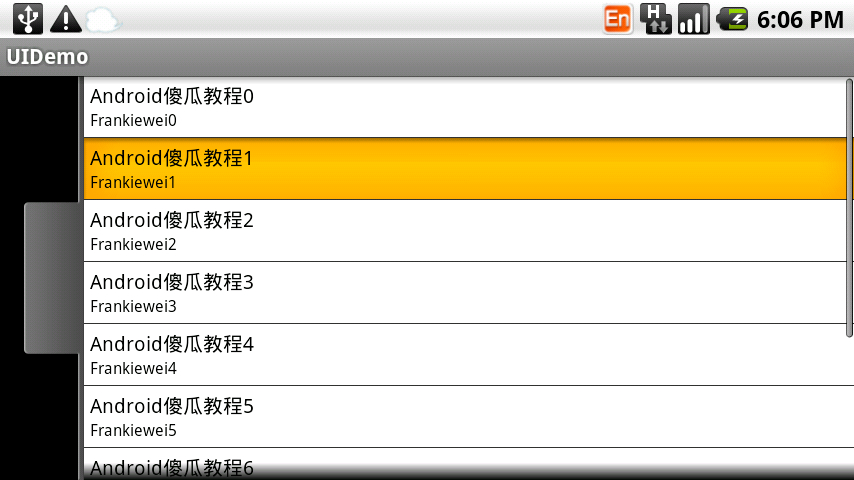
而ListView以及GridView中UI是怎么设计的呢,下面我们看一下效果图:
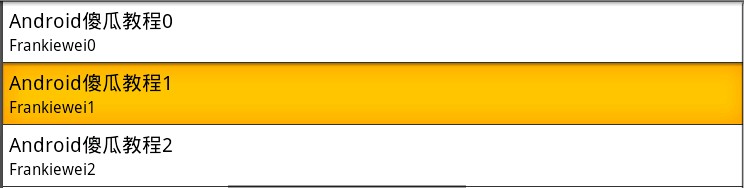
上图是一个ListView的效果图,正常状态下是白色背景黑色字体,当我们点击一列时会出现黄色背景。这一效果是如何做到的呢?
ListView单元格显示的内容其实是我们事先定义在Layout目录下的一个布局文件,从这个效果来看,我们可以看出它一共有三个“层”
第一层容器(LinearLayout) 背景色为白色:
第二层也是容器(LinearLayout)当按下时,背景色为黄色,把第一层挡住(具体做法可以参照按钮):
第三层是控件(TextView)。
实例 :
上面说了一些,有些人肯定会云里雾里,所以我们直接来个实例,实例做完后,再看一下,效果会更好,大家按照步骤跟我来:
第一步:首先准备素材,准备三个按钮,以及ListView的背景图(上面三个按钮已经有了,下面我只贴一个ListView背景图片):

第二步:新建一个Android工程,命名为UIDemo.目录结构如下图所示:
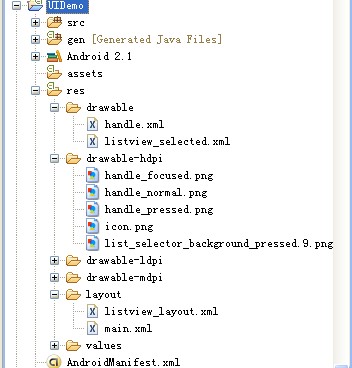
第三步:在res目录下新建一个drawable文件夹,定义两个资源文件一个是handle.xml另一个为listview_selected.xml,其中handle.xml代码已经在上面贴出,listview_selected.xml代码如下:
- <?xml version="1.0" encoding="utf-8"?>
- <selector xmlns:android="http://schemas.android.com/apk/res/android">
- <item android:state_pressed="true" android:drawable="@drawable/list_selector_background_pressed" />
- </selector>
第四步:修改main.xml布局文件,这里我用到了SliddingDrawer控件,代码如下:
- <?xml version="1.0" encoding="utf-8"?>
- <LinearLayout xmlns:android="http://schemas.android.com/apk/res/android"
- android:orientation="vertical"
- android:layout_width="fill_parent"
- android:layout_height="fill_parent"
- >
- <SlidingDrawer
- android:id="@+id/slidingdrawer"
- android:layout_width="fill_parent"
- android:layout_height="fill_parent"
- android:orientation="horizontal"
- android:handle="@+id/handle"
- android:content="@+id/content">
- <Button
- android:id="@+id/handle"
- android:layout_width="wrap_content"
- android:layout_height="fill_parent"
- android:background="@drawable/handle"
- />
- <ListView
- android:id="@+id/content"
- android:layout_width="fill_parent"
- android:layout_height="wrap_content"
- />
- </SlidingDrawer>
- </LinearLayout>
我们这里用到了ListView控件,而我们ListView控件显示的内容我事先在layout目录下定义两个TextView,命名为listview_layout.xml,代码如下(这里有三层哦!):
- <?xml version="1.0" encoding="utf-8"?>
- <LinearLayout xmlns:android="http://schemas.android.com/apk/res/android"
- android:orientation="vertical"
- android:layout_width="fill_parent"
- android:layout_height="fill_parent"
- android:background="#ffffff"
- >
- <LinearLayout
- android:orientation="vertical"
- android:layout_width="fill_parent"
- android:layout_height="fill_parent"
- android:background="@drawable/listview_selected"
- android:padding="6px"
- >
- <TextView
- android:id="@+id/bookname"
- android:layout_width="fill_parent"
- android:layout_height="wrap_content"
- android:textSize="20px"
- android:textColor="#000000"
- />
- <TextView
- android:id="@+id/author"
- android:layout_width="fill_parent"
- android:layout_height="wrap_content"
- android:textSize="16px"
- android:textColor="#000000"
- />
- </LinearLayout>
- </LinearLayout>
第五步:修改主核心程序UIDemo.java,代码如下:
- package com.tutor.uidemo;
- import android.app.Activity;
- import android.os.Bundle;
- import android.view.LayoutInflater;
- import android.view.View;
- import android.view.ViewGroup;
- import android.widget.BaseAdapter;
- import android.widget.ListView;
- import android.widget.TextView;
- public class UIDemo extends Activity {
- private ListView mListView;
- @Override
- public void onCreate(Bundle savedInstanceState) {
- super.onCreate(savedInstanceState);
- setContentView(R.layout.main);
- setupViews();
- }
- private void setupViews(){
- mListView = (ListView)findViewById(R.id.content);
- mListView.setAdapter(new ListViewAdapter());
- }
- private class ListViewAdapter extends BaseAdapter{
- //这里返回10行,ListView有多少行取决于getCount()方法
- public int getCount() {
- return 10;
- }
- public Object getItem(int arg0) {
- return null;
- }
- public long getItemId(int arg0) {
- return 0;
- }
- public View getView(int position, View v, ViewGroup parent) {
- final LayoutInflater inflater = LayoutInflater.from(getApplicationContext());
- if(v == null){
- v = inflater.inflate(R.layout.listview_layout, null);
- }
- TextView mBookName = (TextView)v.findViewById(R.id.bookname);
- TextView mBookAuthor = (TextView)v.findViewById(R.id.author);
- mBookName.setText("Android傻瓜教程" + position);
- mBookAuthor.setText("Frankiewei" + position);
- return v;
- }
- }
- }
第六步:运行上述工程,查看效果:
运行效果1:

点击按钮效果2:
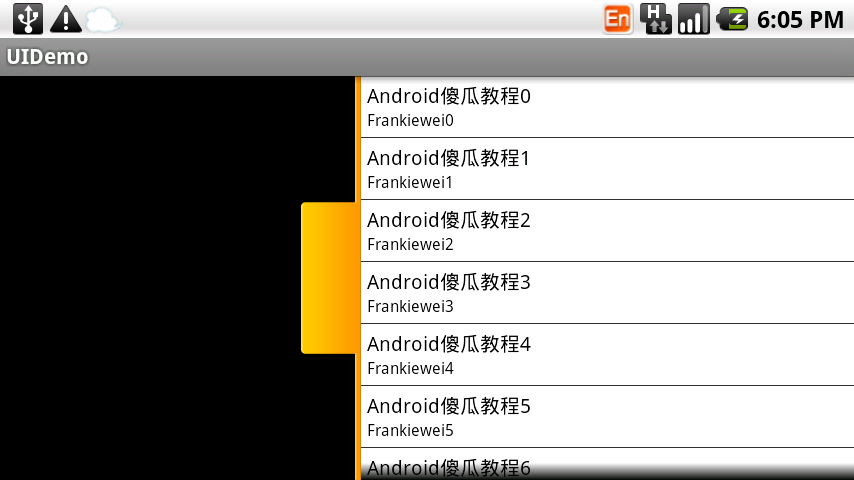
ListView正常效果3:
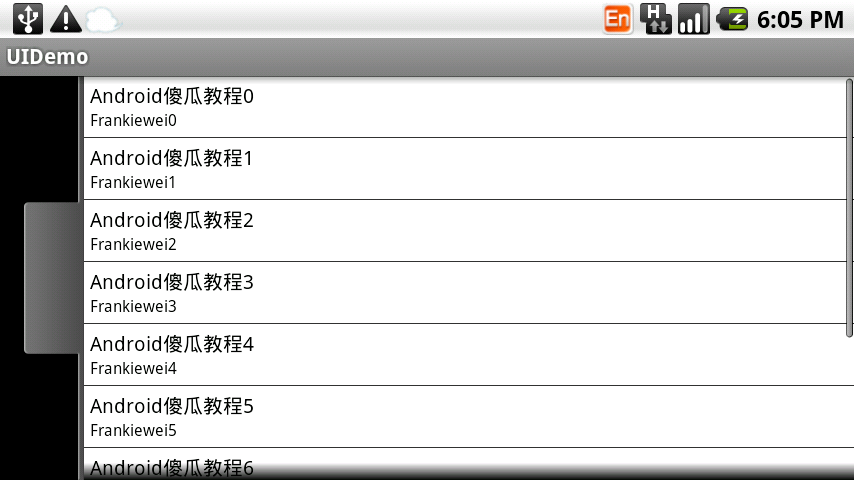
ListView点击效果4:
Android中UI设计的一些技巧!!!的更多相关文章
- Android 高级UI设计笔记07:RecyclerView 的详解
1. 使用RecyclerView 在 Android 应用程序中列表是一个非常重要的控件,适用场合非常多,如新闻列表.应用列表.消息列表等等,但是从Android 一出生到现在并没有非常 ...
- Android应用UI设计流程
Android应用UI设计流程 设计原理 1.在移动设计中,使用环境是最关键的因素.原型设计方法必须考虑尺寸因素 2.用户测试必须涵盖运动.声音和多点触控等方面: 进行移动设计和测试时,请将你知道的有 ...
- Android中的对话框AlertDialog使用技巧合集-转载
Android中的对话框AlertDialog使用技巧合集 文章来自:http://blog.csdn.net/blue6626/article/details/6641105 今天我用自 ...
- Android中UI线程与后台线程交互设计的5种方法
我想关于这个话题已经有很多前辈讨论过了.今天算是一次学习总结吧. 在android的设计思想中,为了确保用户顺滑的操作体验.一 些耗时的任务不能够在UI线程中运行,像访问网络就属于这类任务.因此我们必 ...
- Android中UI线程与后台线程交互设计的6种方法
在android的设计思想中,为了确保用户顺滑的操作体验.一些耗时的任务不能够在UI线程中运行,像访问网络就属于这类任务.因此我们必须要重新开启 一个后台线程运行这些任务.然而,往往这些任务最终又会直 ...
- 【Android开发经验】Android举UI设计经验
转载请注明出处:http://blog.csdn.net/zhaokaiqiang1992 1.Android眼下的主流设备分辨率为480×800.720×1280.1080×1920,单位是像素.在 ...
- Android 高级UI设计笔记09:Android如何实现无限滚动列表
ListView和GridView已经成为原生的Android应用实现中两个最流行的设计模式.目前,这些模式被大量的开发者使用,主要是因为他们是简单而直接的实现,同时他们提供了一个良好,整洁的用户体验 ...
- Android 高级UI设计笔记08:Android开发者常用的7款Android UI组件(转载)
Android开发是目前最热门的移动开发技术之一,随着开发者的不断努力和Android社区的进步,Android开发技术已经日趋成熟,当然,在Android开源社区中也涌现了很多不错的开源UI项目,它 ...
- Android 高级UI设计笔记09:Android实现无限滚动列表
1. 无限滚动列表应用场景: ListView和GridView已经成为原生的Android应用实现中两个最流行的设计模式.目前,这些模式被大量的开发者使用,主要是因为他们是简单而直接的实现,同时他们 ...
随机推荐
- 20155225 2006-2007-2 《Java程序设计》第四周学习总结
20155225 2006-2007-2 <Java程序设计>第四周学习总结 教材学习内容总结 对"是一种"语法测试几次之后,总结一句:满足"是一种" ...
- 【LOJ】#2674. 「NOI2012」美食节
题解 这道题的费用流如果朴素一点怎么建边呢 建出\(\sum_{i = 1}^{n} p^{i} M\)个点,第\(i\)个厨师的第\(j\)个点表示这个厨师倒数第\(j\)个做的是某道菜 这个点向汇 ...
- 【51nod】1655 染色问题
题解 首先每个颜色出现的次数应该是一样的 \(\frac{C_{n}^{2}}{n} = \frac{n - 1}{2}\) 所以n如果是偶数那么就无解了 然后我们需要让每个点连颜色不同的四条边 只要 ...
- doc元素select 取值
- Just a Hook (线段树)
给你n个数(初始时每个数的值为1),m个操作,每个操作把区间[l,r]里的数更新为c,问最后这n个数的和是多少. 区域更新用懒惰标记 #include<bits/stdc++.h> usi ...
- 8-10 Coping Books uva714
题意:把一个包含m个正整数的序列划分为k个 1<=k<=m<=500的非空连续子序列 使得每个正整数恰好属于一个序列 设第i个序列的各个数之和为 Si 你的任务是让所有的 ...
- ubuntu 安装 eslint
1. 安装 npm install -g eslint 安装结束后记住 /usr/local/bin/eslint -> /usr/local/lib/node_modules/eslint/b ...
- JQuery重定向
window.location.href = "这里写页面的路径"; 如:window.location.href ="www.baidu.com";
- centos 安装php7、pecl 、swoole、redis拓展
一.更新yum源,安装php7 CentOS/RHEL 7.x: rpm -Uvh https://dl.fedoraproject.org/pub/epel/epel-release-latest- ...
- Tkinter制作简单的python编辑器
想要制作简单的python脚本编辑器,其中文字输入代码部分使用Tkinter中的Text控件即可实现. 但是问题是,如何实现高亮呢?参考python自带的编辑器:python27/vidle文件夹中的 ...