
Spring boot集成Mybatis-Plus,通用Mapper
Mybatis-Plus(简称MP)是一个 Mybatis 的增强工具,在 Mybatis 的基础上只做增强不做改变,为简化开发、提高效率而生。(摘自mybatis-plus官网)Mybatis虽然已经给我们提供了很大的方便,但它还是有不足之处,MP的存在就是为了稍稍弥补Mybatis的不足。在我们使用Mybatis时会发现,每当要写一个业务逻辑的时候都要在DAO层写一个方法,再对应一个SQL,即使是简单的条件查询、即使仅仅改变了一个条件都要在DAO层新增一个方法,针对这个问题,MP这样一个框架,一种集Mybatis与Hibernate的优点一起的框架。它提供了Hibernate的单表CURD操作的方便同时,又保留了Mybatis的特性。
创建项目,
引入依赖:
<?xml version="1.0" encoding="UTF-8"?>

<project xmlns="http://maven.apache.org/POM/4.0.0" xmlns:xsi="http://www.w3.org/2001/XMLSchema-instance"

         xsi:schemaLocation="http://maven.apache.org/POM/4.0.0 http://maven.apache.org/xsd/maven-4.0.0.xsd">

    <modelVersion>4.0.0</modelVersion>

    <groupId>com.chaoqi</groupId>

    <artifactId>springboot_mybatisplus</artifactId>

    <version>0.0.1-SNAPSHOT</version>

    <packaging>jar</packaging>

    <name>springboot_mybatisplus</name>

    <description>Demo project for Spring Boot</description>

    <parent>

        <groupId>org.springframework.boot</groupId>

        <artifactId>spring-boot-starter-parent</artifactId>

        <version>2.0.0.RELEASE</version>

        <relativePath/>

    </parent>

    <properties>

        <project.build.sourceEncoding>UTF-8</project.build.sourceEncoding>

        <project.reporting.outputEncoding>UTF-8</project.reporting.outputEncoding>

        <java.version>1.8</java.version>

    </properties>

    <dependencies>

        <dependency>

            <groupId>org.springframework.boot</groupId>

            <artifactId>spring-boot-starter-jdbc</artifactId>

        </dependency>

        <dependency>

            <groupId>org.springframework.boot</groupId>

            <artifactId>spring-boot-starter-web</artifactId>

        </dependency>

        <dependency>

            <groupId>org.mybatis.spring.boot</groupId>

            <artifactId>mybatis-spring-boot-starter</artifactId>

            <version>1.3.2</version>

        </dependency>

        <dependency>

            <groupId>mysql</groupId>

            <artifactId>mysql-connector-java</artifactId>

            <scope>runtime</scope>

        </dependency>

        <dependency>

            <groupId>org.springframework.boot</groupId>

            <artifactId>spring-boot-starter-test</artifactId>

            <scope>test</scope>

        </dependency>

        <!--添加jsp依赖 -->

        <dependency>

            <groupId>org.springframework.boot</groupId>

            <artifactId>spring-boot-starter-tomcat</artifactId>

        </dependency>

        <dependency>

            <groupId>org.apache.tomcat.embed</groupId>

            <artifactId>tomcat-embed-jasper</artifactId>

        </dependency>

        <!-- SpringBoot - MyBatis 逆向工程 -->

        <dependency>

            <groupId>org.mybatis.generator</groupId>

            <artifactId>mybatis-generator-core</artifactId>

            <version>1.3.2</version>

        </dependency>

        <!-- MyBatis 通用 Mapper -->

        <dependency>

            <groupId>tk.mybatis</groupId>

            <artifactId>mapper-spring-boot-starter</artifactId>

            <version>1.1.4</version>

        </dependency>

    </dependencies>

    <build>

        <plugins>

            <plugin>

                <groupId>org.springframework.boot</groupId>

                <artifactId>spring-boot-maven-plugin</artifactId>

            </plugin>

            <plugin>

                <groupId>org.mybatis.generator</groupId>

                <artifactId>mybatis-generator-maven-plugin</artifactId>

                <version>1.3.2</version>

                <configuration>

                    <configurationFile>src/main/resources/generatorConfig.xml</configurationFile>

                    <verbose>true</verbose>

                    <overwrite>true</overwrite>

                </configuration>

                <executions>

                    <execution>

                        <id>Generate MyBatis Artifacts</id>

                        <goals>

                            <goal>generate</goal>

                        </goals>

                    </execution>

                </executions>

                <dependencies>

                    <dependency>

                        <groupId>org.mybatis.generator</groupId>

                        <artifactId>mybatis-generator-core</artifactId>

                        <version>1.3.2</version>

                    </dependency>

                    <dependency>

                        <groupId>tk.mybatis</groupId>

                        <artifactId>mapper</artifactId>

                        <version>3.5.0</version>

                    </dependency>

                </dependencies>

            </plugin>

        </plugins>

    </build>

</project>
配置配置文件:
server:

  port: 8080

spring:

  mvc:

    view:

      prefix: /WEB-INF/jsp/

      suffix: .jsp

  datasource:

    url: jdbc:mysql://localhost:3306/test?characterEncoding=UTF-8&useUnicode=true&useSSL=false

    username: root

    password: root

    driver-class-name: com.mysql.jdbc.Driver

mybatis:

  mapper-locations: classpath:mapper/*.xml

  type-aliases-package: com.chaoqi.springboot_mybatisplus.domain
逆向生成文件:
创建generatorConfig.xml
<?xml version="1.0" encoding="UTF-8"?>

<!DOCTYPE generatorConfiguration

        PUBLIC "-//mybatis.org//DTD MyBatis Generator Configuration 1.0//EN"

        "http://mybatis.org/dtd/mybatis-generator-config_1_0.dtd">

<generatorConfiguration>

    <properties resource="application.yml"/>

    <classPathEntry location="C:/Users/Administrator/.m2/repository/mysql/mysql-connector-java/5.1.6/mysql-connector-java-5.1.6.jar"/>

    <context id="Mysql" targetRuntime="MyBatis3Simple" defaultModelType="flat">

        <property name="beginningDelimiter" value="`"/>

        <property name="endingDelimiter" value="`"/>

        <property name="javaFileEncoding" value="UTF-8"/>

        <plugin type="tk.mybatis.mapper.generator.MapperPlugin">

            <property name="mappers" value="tk.mybatis.mapper.common.Mapper"/>

        </plugin>

        <!-- 注释 -->

        <commentGenerator>

            <!-- 是否生成注释代时间戳 -->

            <property name="suppressDate" value="true"/>

            <!-- 是否去除自动生成的注释 true:是 : false:否 -->

            <property name="suppressAllComments" value="false"/>

        </commentGenerator>

        <!-- JDBC连接 -->

        <jdbcConnection

                driverClass="com.mysql.jdbc.Driver"

                connectionURL="jdbc:mysql://localhost:3306/test?characterEncoding=UTF-8"

                userId="root"

                password="root">

        </jdbcConnection>

        <!-- 生成实体类地址 -->

        <javaModelGenerator targetPackage="com.mybatisplus.mybatisplustest.dao.domain" targetProject="src/main/java"/>

        <!-- 生成mapper xml文件 -->

        <sqlMapGenerator targetPackage="mapper" targetProject="src/main/resources"/>

        <!-- 生成mapper xml对应Client-->

        <javaClientGenerator targetPackage="com.mybatisplus.mybatisplustest.dao.mapper" targetProject="src/main/java"

                             type="XMLMAPPER"/>

        <!-- 配置表信息 -->

        <table tableName="%">

            <!--mysql 配置-->

            <generatedKey column="id" sqlStatement="Mysql"/>

            <!--oracle 配置-->

            <!--<generatedKey column="id" sqlStatement="select SEQ_{1}.nextval from dual" identity="false" type="pre"/>-->

        </table>

    </context>

</generatorConfiguration>
需要修改其中的<classPathEntry>中的路径,<jdbcConnection>中的数据库配置,以及下面三个生成路径
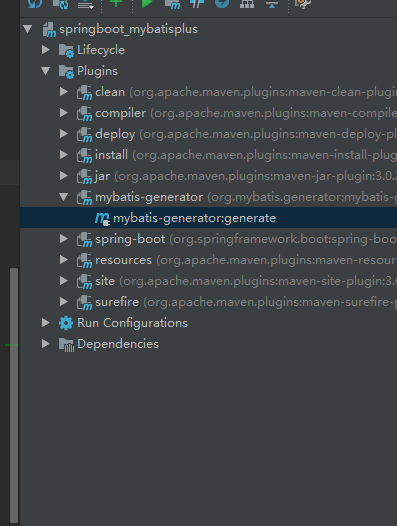
然后找到该文件并运行,根据表生成文件
如果这里报错,根据报错信息查看是否配置文件有错误
生成的结构:

接下来整合MybatisPlus:
创建Service和Controller,不需要手写SQL语句
public interface UserInfoService {

    public List<UserInfo> getMusicInfo();

}
@Service

public class UserInfoServiceImpl implements UserInfoService {

    @Autowired

    private UserInfoMapper userInfoMapper;

    @Override

    public List<UserInfo> getMusicInfo() {

        List<UserInfo> userInfos = userInfoMapper.selectAll();

        return userInfos;

    }

}
@RestController

public class UserinfoController {

    @Autowired

    private UserInfoService userInfoService;

    @RequestMapping("/alluser")

    public List<UserInfo> getUserInfo() {

        List<UserInfo> musicInfo1 = userInfoService.getMusicInfo();

        return musicInfo1;

    }

}
在启动类上配置mapper
@SpringBootApplication

@MapperScan("com.mybatisplus.mybatisplustest.dao.mapper")

public class MybatisplustestApplication {

    public static void main(String[] args) {

        SpringApplication.run(MybatisplustestApplication.class, args);

    }

}
然后启动测试
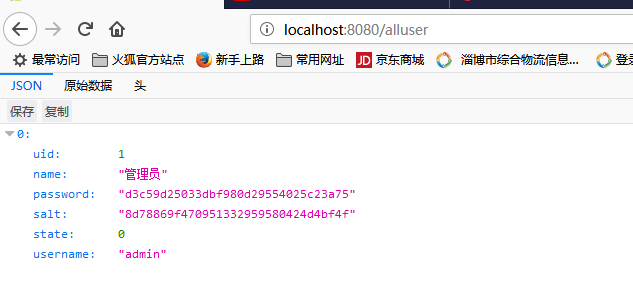
注意:
//    Caused by: tk.mybatis.mapper.MapperException: id - 该字段@GeneratedValue配置只允许以下几种形式:

//            1.全部数据库通用的@GeneratedValue(generator="UUID")

//            2.useGeneratedKeys的@GeneratedValue(generator=\"JDBC\")

//            3.类似mysql数据库的@GeneratedValue(strategy=GenerationType.IDENTITY[,generator="Mysql"])
Spring boot集成Mybatis-Plus,通用Mapper的更多相关文章
- Spring Boot集成Mybatis及通用Mapper
集成Mybatis可以通过 mybatis-spring-boot-starter 实现. <!-- https://mvnrepository.com/artifact/org.mybatis ...
- spring boot集成MyBatis 通用Mapper 使用总结
spring boot集成MyBatis 通用Mapper 使用总结 2019年 参考资料: Spring boot集成 MyBatis 通用Mapper SpringBoot框架之通用mapper插 ...
- Spring Boot集成MyBatis开发Web项目
1.Maven构建Spring Boot 创建Maven Web工程,引入spring-boot-starter-parent依赖 <project xmlns="http://mav ...
- 详解Spring Boot集成MyBatis的开发流程
MyBatis是支持定制化SQL.存储过程以及高级映射的优秀的持久层框架,避免了几乎所有的JDBC代码和手动设置参数以及获取结果集. spring Boot是能支持快速创建Spring应用的Java框 ...
- 【spring boot】14.spring boot集成mybatis,注解方式OR映射文件方式AND pagehelper分页插件【Mybatis】pagehelper分页插件分页查询无效解决方法
spring boot集成mybatis,集成使用mybatis拖沓了好久,今天终于可以补起来了. 本篇源码中,同时使用了Spring data JPA 和 Mybatis两种方式. 在使用的过程中一 ...
- spring boot集成mybatis(1)
Spring Boot 集成教程 Spring Boot 介绍 Spring Boot 开发环境搭建(Eclipse) Spring Boot Hello World (restful接口)例子 sp ...
- spring boot集成mybatis(2) - 使用pagehelper实现分页
Spring Boot 集成教程 Spring Boot 介绍 Spring Boot 开发环境搭建(Eclipse) Spring Boot Hello World (restful接口)例子 sp ...
- spring boot集成mybatis(3) - mybatis generator 配置
Spring Boot 集成教程 Spring Boot 介绍 Spring Boot 开发环境搭建(Eclipse) Spring Boot Hello World (restful接口)例子 sp ...
- spring boot集成mybatis只剩两个sql 并提示 Cannot obtain primary key information from the database, generated objects may be incomplete
前言 spring boot集成mybatis时只生成两个sql, 搞了一个早上,终于找到原因了 找了很多办法都没有解决, 最后注意到生成sql的时候打印了一句话: Cannot obtain pri ...
随机推荐
- soj1564. HOUSING
1564. HOUSING Constraints Time Limit: 1 secs, Memory Limit: 32 MB Description For the Youth Olympic ...
- input限制
转载,暂未使用,可以借鉴. 出处:http://blog.csdn.net/a13590394462/article/details/73943785
- Django rest framwork-CMDB API实战
一.序列化 serializers.py from rest_framework import serializers from web_manage import models class Asse ...
- ROS多线程订阅消息
对于一些只订阅一个话题的简单节点来说,我们使用ros::spin()进入接收循环,每当有订阅的话题发布时,进入回调函数接收和处理消息数据.但是更多的时候,一个节点往往要接收和处理不同来源的数据,并且这 ...
- JSON数据填充表格——(三)
1.定义页面请求JSON的按钮与定义一个带表头的表格 请求数据的按钮 <button class="btn btn-primary search_bar_button floatR& ...
- input 标签禁止输入
1.鼠标可以点击输入框,但是不能输入 readonly 例如: <input class="layui-input" readonly > 2.鼠标点击输入框出现禁用图 ...
- C#基础学习之StreamReader和StreamWriter
StreamReader和StreamWriter操作字符的 FileStream操作字节的 //使用StreamReader读取文件 using (StreamReader sr=new Strea ...
- Java Web 1-开发环境搭建(未完待续)
Java Web包含什么?前台.后台,前台的HTML.JSP,后台的Servlet.(目前所知) 开发环境: JDK,MySQL,Tomcat,Eclipse @ Windows 10 说明:本文总结 ...
- WebApi Owin SelfHost OAuth2 - client_credentials
参考:http://neverc.cnblogs.com/p/4970996.html
- SQL-如果指定值存在返回1,如果不存在返回0的SQL语句
想实现简单的判断一个表中是否有一条记录,可以用这个方式.如以下,table_name是表名,column1是列名. 这条语句会在此条记录存在的时候返回1,不存在时返回0. FROM table_nam ...