
解决 There are no resources that can be added or removed from the server
网上下载了一个项目,在eclipse中部署时,加载项目到tomcat中项目名称无法显示,报出There are no resources that can be added or removed from the server
这个是因为下载下来的项目没有eclipse的相关配置文件,eclipse不知道这是一个什么项目。
解决方法:
1、进入configure Build Path

1、进入Project Facets 选中Dynamic Web Module和java
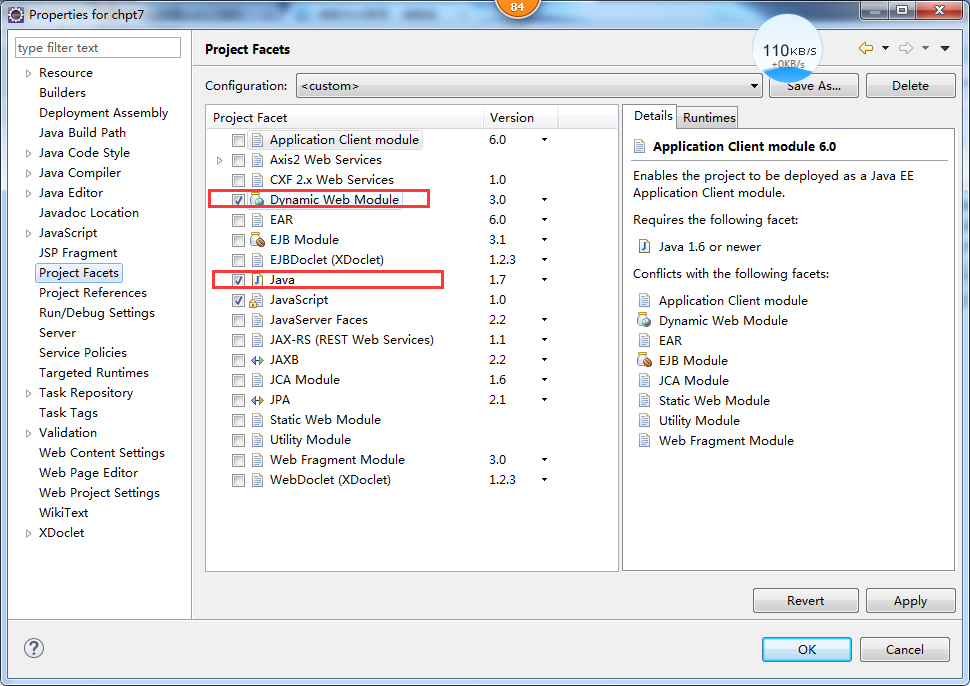
然后就可以正常部署项目了
解决 There are no resources that can be added or removed from the server的更多相关文章
- eclipse服务器add and remove 工程时出现there are no resources that can be added or removed from the server
网上的解决方法: 解决方法: 第1步.新建一个“Dynamic Web Project” 第2步.把新建项目里面的.project文件和.settings文件夹复制到导入的那个项目里面. 可是我发现: ...
- eclise 部署web工程报 There are no resources that can be added or removed from the server.
该文章转自: http://blog.csdn.net/dw_java08/article/details/7789601 eclise 部署web工程报 There are no resources ...
- eclipse导入git项目出现There are no resources that can be added or removed from the server错误
上传到git上的项目因为配置了过滤文件,将.settings文件和.project文件都过滤掉了,settings文件中主要存放的是各种插件配置,约束你可以更好的利用IDE进行编码 因为将这两个文件过 ...
- Eclipse Tomcat部署web项目时出现There are no resources that can be added or removed from the server解决办法
问题原因是:tomcat版本和java版本不匹配.
- tomcat启动时出现There are no resources that can be added or removed from the server
对要部署的项目右键---Properties---Myeclipse---选中Dynamic Web Module 和 Java 应该是项目自己的setting文件夹下的描述信息和.project文件 ...
- eclipse tomcat 无法加载导入的web项目,There are no resources that can be added or removed from the server. .
应该是项目自己的setting文件夹下的描述信息和.project文件的描述信息,不能适用于这个eclipse和tomcat. 解决方法: 1,找相同类型的工程(tomcat能引用的)2,把新建项目里 ...
- <<< Tomcat 部署项目There are no resources that can be added or removed from the server
错误信息:没有资源可以添加或删除的服务器 解决方式: 方式1.选中项目右键——找到Project Facets——勾选Dynamic Web Project和java 方式2.新建一个同名web项目, ...
- There are no resources that can be added or removed from the server
第1步.新建一个“Dynamic Web Project” 第2步.把新建项目里面的.project文件和.settings文件夹复制到导入的那个项目里面. 第3步.把web projiect set ...
- Myeclipse2016 部署webapp 至 tomcat 上出现 “There are no resources that can be added or removed from the server”
对要部署的项目右键---Properties---Myeclipse---选中Dynamic Web Module 和 Java
随机推荐
- Android 开发工具类 09_SPUtils
SharedPreferences 辅助类: 1.保存在手机里面的文件名: 2.保存数据的方法,我们需要拿到保存数据的具体类型,然后根据类型调用不同的保存方法: 3.得到保存数据的方法,我们根据默认值 ...
- Android 开发工具类 02_DensityUtils
常用单位转换的辅助类: 1.dp 转 px: 2.sp 转 px: 3.px 转 dp: 4.px 转 sp. import android.content.Context; import andro ...
- python开发环境安装配置
需要安装的软件: Python2.7.14和Python3.6.4 要在电脑上同时安装两个版本 开发工具:PyCharm 是一个jetbrains的python开发工具 idea系列之一 Pyt ...
- Linux用户信息查询
1 查询目前已登录的用户信息w 或者 who [@bjzw_11_210 ~]# w :: up days, :, users, load average: 0.03, 0.04, 0.00 USER ...
- CentOS7.2配置Hadoop2.6.5
Hadoop配置文件 /etc/profile 配置Java和Hadoop环境 export JAVA_HOME=/usr/lib/jvm/java-1.8.0-openjdk export CLAS ...
- Node.js处理I/O数据之Buffer模块缓冲数据
一.前传 在之前做web时也经常用到js对象转json和json转js对象.既然是Node.js处理I/O数据,也把这个记下来. Json转Js对象:JSON.parse(jsonstr); //可以 ...
- 深复制与浅复制&&strong,copy修饰符总结
又是一个老生常谈的话题,可是貌似这个问题,好多ios开发工程师并不能理解透彻,所以简单记录分析一下深复制与浅复制的原理以及strong,copy修饰符的原理和使用. 一.深复制与浅复制 ...
- 招新系统(jsp+servlet,实现简略前端网页注册登录+后台增删改查,分学生和管理员,Java语言,mysql数据库连接,tomcat服务器)
生活不只是眼前的苟且,还有诗和远方. 架构说明: 要求是采用MVC模式,所以分了下面的几个包,但是由于是第一次写,可能分的也不是很清楚: 这个是后台部分的架构: 这个是前端的的展示: (那个StuLo ...
- 【转】Apache服务器的下载与安装
PHP的运行必然少不了服务器的支持,何为服务器?通俗讲就是在一台计算机上,安装个服务器软件,这台计算机便可以称之为服务器,服务器软件和计算机本身的操作系统是两码事,计算机自身的操作系统可以为linux ...
- JAVA虚拟机的生命周期
一个运行时的Java虚拟机实例的天职是:负责运行一个java程序.当启动一个Java程序时,一个虚拟机实例也就诞生了.当该程序关闭退出,这个虚拟机实例也就随之消亡.如果同一台计算机上同时运行三个Jav ...