
jQuery基础--创建节点和 添加节点
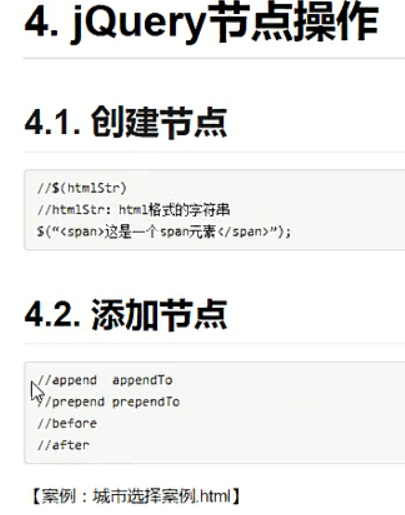
创建节点
 $(function () {

//    var box = document.getElementById("box");

//

//    var a = document.createElement("a");

//    box.appendChild(a);

//    a.setAttribute("href", "http://web.itcast.cn");

//    a.setAttribute("target", "_blank");

//    a.innerHTML = "传智大前端";

    $("#box").append('<a href="http://web.itcast.cn" target="_blank">传智大前端</a>');

  });
添加节点
<!DOCTYPE html>

<html lang="zh-CN">

<head>

  <meta charset="UTF-8">

  <title>Title</title>

  <style>

    div {

      width: 400px;

      height: 400px;

      background-color: pink;

    }

  </style>

</head>

<body>

<div id="box">

  我是内容

</div>

<p>我是外面的p元素</p>

<script src="jquery-1.12.4.js"></script>

<script>

  $(function () {

//    //创建jq对象

//    var $li = $('<a href="http://web.itcast.cn" target="_blank">传智大前端</a>');

//    console.log($li);

//

//

//    $("div").append('<a href="http://web.itcast.cn" target="_blank">传智大前端</a>');

    //添加到子元素的最后面

    //$("div").append($("p"));

    //$("p").appendTo($("div"));

    //$("div").prepend($("p"));

    //$("p").prependTo($("div"));

//    $('div').after($("p"));

//    $('div').before($("p"));

  });

</script>

</body>

</html>
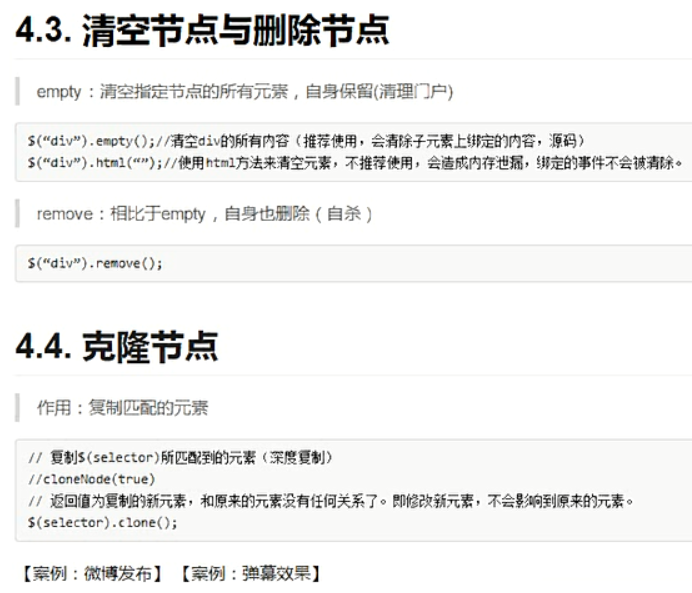
删除节点
<!DOCTYPE html>

<html lang="zh-CN">

<head>

  <meta charset="UTF-8">

  <title>Title</title>

  <style>

    div {

      width: 400px;

      height: 400px;

      background-color: pink;

    }

  </style>

</head>

<body>

<div>

  <p>1111</p>

  <p>2222</p>

</div>

<p class='des'>我是外面的p元素</p>

<script src="jquery-1.12.4.js"></script>

<script>

  $(function () {

    $(".des").click(function () {

      alert("hehe");

    })

    //可以清空一个元素的内容

    //内存泄露:

    //$("div").html("");

    //清理门户()

    //$("div").empty();

    //

    //$("div").remove();

    //false:不传参数也是深度复制,不会复制事件

    //true:也是深复制,会复制事件

    $(".des").clone(true).appendTo("div");

  });

</script>

</body>

</html>
微博发布
<!DOCTYPE html>

<html>

<head lang="en">

  <meta charset="UTF-8">

  <title></title>

  <style>

    * {

      margin: 0;

      padding: 0;

    }

    ul {

      list-style: none;

    }

    .box {

      width: 600px;

      margin: 100px auto;

      border: 1px solid #000;

      padding: 20px;

    }

    textarea {

      width: 450px;

      height: 160px;

      outline: none;

      resize: none;

    }

    ul {

      width: 450px;

      padding-left: 80px;

    }

    ul li {

      line-height: 25px;

      border-bottom: 1px dashed #cccccc;

    }

    input {

      float: right;

    }

  </style>

</head>

<body>

<div class="box" id="weibo">

  <span>微博发布</span>

  <textarea name="" id="txt" cols="30" rows="10"></textarea>

  <button id="btn">发布</button>

  <ul id="ul">

  </ul>

</div>

<script src="jquery-1.12.4.js"></script>

<script>

  $(function () {

    $("#btn").click(function () {

      if($("#txt").val().trim().length == 0) {

        return;

      }

      //就是文本框的值

      $("<li></li>").text($("#txt").val()).prependTo("#ul");

      $("#txt").val("");

    })

  });

</script>

</body>

</html>
弹幕效果
<!doctype html>

<html>

<head>

  <meta charset="utf-8">

  <title></title>

  <style type="text/css">

    html, body {

      margin: 0px;

      padding: 0px;

      width: 100%;

      height: 100%;

      font-family: "微软雅黑";

      font-size: 62.5%;

    }

    .boxDom {

      width: 100%;

      height: 100%;

      position: relative;

      overflow: hidden;

    }

    .idDom {

      width: 100%;

      height: 100px;

      background: #666;

      position: fixed;

      bottom: 0px;

    }

    .content {

      display: inline-block;

      width: 430px;

      height: 40px;

      position: absolute;

      left: 0px;

      right: 0px;

      top: 0px;

      bottom: 0px;

      margin: auto;

    }

    .title {

      display: inline;

      font-size: 4em;

      vertical-align: bottom;

      color: #fff;

    }

    .text {

      border: none;

      width: 300px;

      height: 30px;

      border-radius: 5px;

      font-size: 2.4em;

    }

    .btn {

      width: 60px;

      height: 30px;

      background: #f90000;

      border: none;

      color: #fff;

      font-size: 2.4em;

    }

    span {

      width: 300px;

      height: 40px;

      position: absolute;

      overflow: hidden;

      color: #000;

      font-size: 4em;

      line-height: 1.5em;

      cursor: pointer;

      white-space: nowrap;

    }

  </style>

</head>

<body>

<div class="boxDom" id="boxDom">

  <div class="idDom" id="idDom">

    <div class="content">

      <p class="title">吐槽:</p>

      <input type="text" class="text" id="text"/>

      <button type="button" class="btn" id="btn">发射</button>

    </div>

  </div>

</div>

</body>

<script src="jquery-1.12.4.js"></script>

<script>

  $(function () {

    //注册事件

    var colors = ["red", "green", "hotpink", "pink", "cyan", "yellowgreen", "purple", "deepskyblue"];

    $("#btn").click(function () {

      var randomColor = parseInt(Math.random() * colors.length);

      var randomY = parseInt(Math.random() * 400);

      $("<span></span>")//创建span

        .text($("#text").val())//设置内容

        .css("color", colors[randomColor])//设置字体颜色

        .css("left", "1400px")//设置left值

        .css("top", randomY)//设置top值

        .animate({left: -500}, 10000, "linear", function () {

          //到了终点,需要删除

          $(this).remove();

        })//添加动画

        .appendTo("#boxDom");

      $("#text").val("");

    });

    $("#text").keyup(function (e) {

      if (e.keyCode == 13) {

        $("#btn").click();

      }

    });

  });

</script>

</html>
jQuery基础--创建节点和 添加节点的更多相关文章
- 实验:Oracle单节点RAC添加节点
环境:RHEL 6.5 + Oracle 11.2.0.4 单节点RAC 需求:单节点RAC添加新节点 1.添加节点前的准备工作 2.正式添加节点 3.其他配置工作 1.添加节点前的准备工作 参考Or ...
- JavaScript基础1——在末尾添加节点
<!DOCTYPE html> <html> <head> <meta charset="UTF-8"> <title> ...
- hadoop删除节点和添加节点
从hadoop移除机器把需要移除的机器增加到exclueds文件中,强制刷新datanode列表,等待decommission 状态正常后,即可停机下架,如有必要在namenode执行balancer ...
- EasyUI Tree添加节点
创建foods tree首先,我们创建foods tree,代码像这样: <div style="width:200px;height:auto;border:1px solid #c ...
- jQuery操作DOM基础 - 创建节点
案例:创建两个<li>元素节点,并且作为<ul>元素节点的子节点,添加到DOM树中 <!DOCTYPE html> <html lang="en&q ...
- JQuery 添加节点
Mark一段自己写的添加节点的代码 function reply2(){ $( "<div class=sec1-div5>"+"<div class= ...
- Javascript及Jquery获取元素节点以及添加和删除操作
用了javascript和jquery很久,把所有元素节点的操作总结了下,放在博客上作为记录. Javascript获取元素的主要方式有三种 1.document.getElementById('ma ...
- 雷林鹏分享:jQuery EasyUI 树形菜单 - 树形菜单添加节点
jQuery EasyUI 树形菜单 - 树形菜单添加节点 本教程向您展示如何附加节点到树形菜单(Tree).我们将创建一个包含水果和蔬菜节点的食品树,然后添加一些其他水果到已存在的水果节点. 创建食 ...
- javascript基础(六): 获取节点实例 jquery获取当前节点的前一个节点
jquery获取当前节点的前一个节点步骤如下: 1.打开html开发工具,新建一来个html代码页面. 2.在html页面创建三个p标签,然后给这三个p标签设置不同的2113内容. 3.引入jquer ...
随机推荐
- docker相关知识
DevOps 是一个完整的面向IT运维的工作流,以 IT 自动化以及持续集成(CI).持续部署(CD)为基础,来优化程式开发.测试.系统运维等所有环节.突出重视软件开发人员和运维人员的沟通合作,通过自 ...
- maven 打包Scala代码到jar包
idea的pom.xml文件配置 <dependencies> <dependency> <groupId>org.scala-lang</groupId&g ...
- JavaScript中准确的判断数据类型
在 ECMAScript 规范中,共定义了 7 种数据类型,分为基本类型和引用类型两大类. 其中: 基本类型:String.Number.Boolean.Symbol.Undefined.Null ...
- 2019-8-31-dotnet-core-集成到-Mattermost-聊天工具
title author date CreateTime categories dotnet core 集成到 Mattermost 聊天工具 lindexi 2019-08-31 16:55:58 ...
- SQL语句分类
SQL Structured Query Language SQL是结构化查询语言,是一种用来操作RDBMS的数据库语言,当前关系型数据库都支持使用SQL语言进行操作,也就是说可以通过 SQL 操作 ...
- Linux性能优化从入门到实战:15 文件系统篇:磁盘 I/O
磁盘 磁盘是可以持久化存储的设备,按照存储介质来分类: (1)机械磁盘(硬盘驱动器,Hard Disk Driver,HDD),主要由盘片和读写磁头组成,数据就存储在盘片的环状磁道中.在读写数 ...
- Linux性能优化从入门到实战:10 内存篇:如何利用Buffer和Cache优化程序的运行效率?
缓存命中率 缓存命中率,是指直接通过缓存获取数据的请求次数,占所有数据请求次数的百分比,可以衡量缓存使用的好坏.命中率越高,表示使用缓存带来的收益越高,应用程序的性能也就越好. 实际上,缓存是 ...
- Shell脚本的fork炸弹
#!bin/bash#功能:快速消耗计算机资源,致使计算机死机#作者:liusingbon#定义函数名为.(点), 函数中递归调用自己并放入后台执行function . { .|.& };.
- 1146. Topological Order (25)
This is a problem given in the Graduate Entrance Exam in 2018: Which of the following is NOT a topol ...
- Ubuntu apt-get install E: 无法定位软件包Ubuntu apt-get install E: 无法定位软件包
sudo cp /etc/apt/sources.list /etc/apt/sources.list-bak #先将之前的source-list备份 sudo vi /etc/apt/sources ...