
scrollWidth、clientWidth、offsetWidth、width的区别
scrollWidth:对象的实际内容的宽度,不包边线宽度,会随对象中内容超过可视区后而变大。
clientWidth:对象内容的可视区的宽度,不包滚动条等边线,会随对象显示大小的变化而改变。
offsetWidth:对象整体的实际宽度,包滚动条等边线,会随对象显示大小的变化而改变。
innerWidth:
window.innerHeight=浏览器窗口的内部高度
window.innerWidth=浏览器窗口的内部宽度
例子 textarea
1、元素内无内容或者内容不超过可视区,滚动不出现或不可用的情况下。
scrollWidth=clientWidth,两者皆为内容可视区的宽度。
offsetWidth为元素的实际宽度。
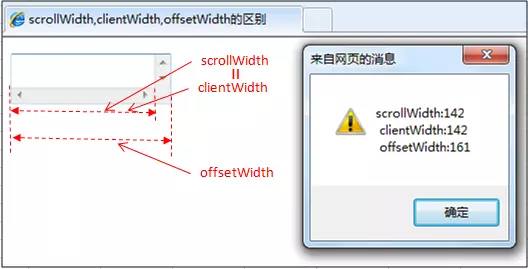
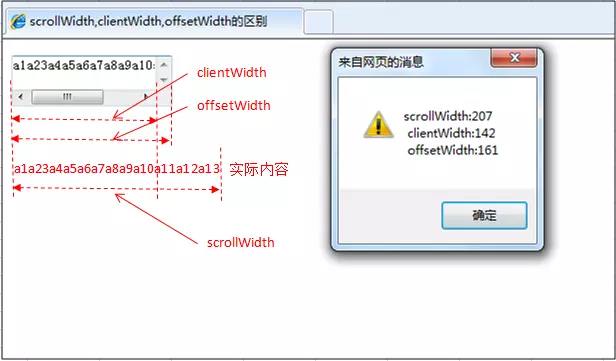
2、元素的内容超过可视区,滚动条出现和可用的情况下。
scrollWidth>clientWidth。
scrollWidth为实际内容的宽度。
clientWidth是内容可视区的宽度。
offsetWidth是元素的实际宽度。
offsetWidth属性可以返回对象的padding+border+元素width属性值之和,style.width返回值就是定义的width属性值。
offsetWidth属性仅是可读属性,而style.width是可读写的。
offsetWidth属性返回值是整数,而style.width的返回值是字符串,并且带有单位。
4.style.width仅能返回以style方式定义的内部样式表的width属性值。
scrollWidth、clientWidth、offsetWidth、width的区别的更多相关文章
- scrollwidth ,clientwidth ,offsetwidth 三者的区别
clientwidth:内容可视区域的宽度 offsetwidth:元素整体宽度 scrollwidth:实际内容的宽度
- HTML精确定位:scrollLeft,scrollWidth,clientWidth,offsetWidth
HTML精确定位:scrollLeft,scrollWidth,clientWidth,offsetWidth scrollHeight: 获取对象的滚动高度. scrollLeft:设置或获取位于对 ...
- HTML精确定位:scrollLeft,scrollWidth,clientWidth,offsetWidth之完全详解
HTML:scrollLeft,scrollWidth,clientWidth,offsetWidth到底指的哪到哪的距离之完全详解 scrollHeight: 获取对象的滚动高度. scrollLe ...
- HTML精确定位:scrollLeft,scrollWidth,clientWidth,offsetWidth之全然具体解释
HTML:scrollLeft,scrollWidth,clientWidth,offsetWidth究竟指的哪到哪的距离之全然具体解释scrollHeight: 获取对象的滚动高度. scrol ...
- H5,PC网页屏幕尺寸相关整理(scrollLeft,scrollWidth,clientWidth,offsetWidth)
HTML:scrollLeft,scrollWidth,clientWidth,offsetWidth到底指的哪到哪的距离之完全详解scrollHeight: 获取对象的滚动高度. scrollLef ...
- HTML精确定位:scrollLeft,scrollWidth,clientWidth,offsetWidth完全详细的说明
HTML:scrollLeft,scrollWidth,clientWidth,offsetWidth具体指完全解释究竟哪里的距离scrollHeight: 获取对象的高度滚动. scrollLe ...
- 转 HTML精确定位:scrollLeft,scrollWidth,clientWidth,offsetWidth之完全详解
HTML:scrollLeft,scrollWidth,clientWidth,offsetWidth到底指的哪到哪的距离之完全详解 scrollHeight: 获取对象的滚动高度. scrollLe ...
- scrollLeft,scrollWidth,clientWidth,offsetWidth 可实现导航栏固定不动(冻结)的效果
HTML精确定位:scrollLeft,scrollWidth,clientWidth,offsetWidth scrollHeight: 获取对象的滚动高度. scrollLeft:设置或获取位 ...
- Javascript:scrollWidth,clientWidth,offsetWidth的区别(转)
网页可见区域宽:document.body.clientWidth; 网页可见区域高:document.body.clientHeight; 网页可见区域高:document.body.offsetW ...
- 转:scrollWidth,clientWidth,offsetWidth的区别
scrollWidth:对象的实际内容的宽度,不包边线宽度,会随对象中内容超过可视区后而变大. clientWidth:对象内容的可视区的宽度,不包滚动条等边线,会随对象显示大小的变化而改变. off ...
随机推荐
- gunicorn 介绍与性能分析
阅读此文前建议先阅读 我的博客 gunicorn 是一个 python wsgi http server,只支持在 unix 系统上运行 安装 gunicorn 其实是 python 的一个包,安装方 ...
- 用data的方法获取值的时候,要注意的问题一定要在先封装好
var art=$(".add-more").prev().find(".content").data("list1"); 我们一定要在aj ...
- 基于C# Socket实现多人网络聊天室
首先不多说,最终实现界面如下,可以通过点击启动服务,开启TCP服务器: 开启TCP服务器之后,可以通过点击客户端,打开一个独立的TCP客户端,打开客户端之后,输入正确的IP地址和端口号,可以进行连接服 ...
- Vue中全局过滤器期与局部过滤器期的使用
<!DOCTYPE html> <html lang="en"> <head> <meta charset="UTF-8&quo ...
- javascript原型与原型链个人理解
想了解原型和原型链,我觉得首先我们得知道javascript里有一个Object 与 Function,它俩都是构造函数,当然函数也是一个对象.我们打印Object 与 Function看一下, co ...
- 转载Google TPU论文
选自 Google Drive 作者:Norman P. Jouppi 等 痴笑@矽说 编译 该论文将正式发表于 ISCA 2017 从去年七月起,Google就号称了其面向深度学习的专用集成电路(A ...
- mybatis的if
<select id="findList" resultType="BndExport"> SELECT <include refid=&qu ...
- Spring Boot热部署插件
在实际开发中,我们修改某些代码逻辑功能或页面都需要重启应用,这无形中降低了开发效率,热部署是指当我们修改代码后,服务能自动重启加载新修改的内容,而不需要重启应用,这样大大提高了我们开发的效率. Spr ...
- cmd完成拷贝文件,并生成两个快捷脚本
@echo off@echo ------------------------------ @echo 正在创建目录 color 03if exist y:\00程序数据备份 ( md y:\00程序 ...
- Java8使用lambda遍历List、Set、map
public static void main(String[] args){ Map<String,String> map= new HashMap<>(); map.for ...