
scrollWidth、clientWidth、offsetWidth、width的区别
scrollWidth:对象的实际内容的宽度,不包边线宽度,会随对象中内容超过可视区后而变大。
clientWidth:对象内容的可视区的宽度,不包滚动条等边线,会随对象显示大小的变化而改变。
offsetWidth:对象整体的实际宽度,包滚动条等边线,会随对象显示大小的变化而改变。
innerWidth:
window.innerHeight=浏览器窗口的内部高度
window.innerWidth=浏览器窗口的内部宽度
例子 textarea
1、元素内无内容或者内容不超过可视区,滚动不出现或不可用的情况下。
scrollWidth=clientWidth,两者皆为内容可视区的宽度。
offsetWidth为元素的实际宽度。
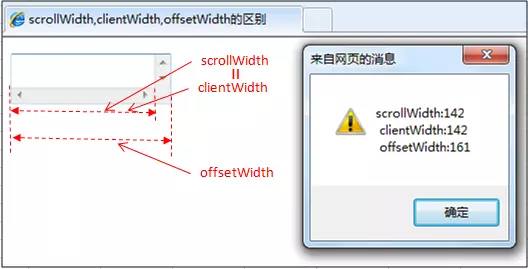
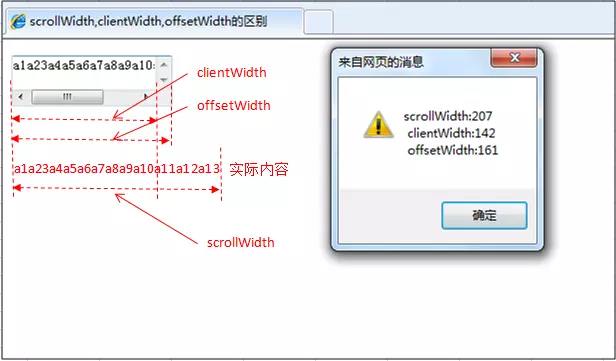
2、元素的内容超过可视区,滚动条出现和可用的情况下。
scrollWidth>clientWidth。
scrollWidth为实际内容的宽度。
clientWidth是内容可视区的宽度。
offsetWidth是元素的实际宽度。
offsetWidth属性可以返回对象的padding+border+元素width属性值之和,style.width返回值就是定义的width属性值。
offsetWidth属性仅是可读属性,而style.width是可读写的。
offsetWidth属性返回值是整数,而style.width的返回值是字符串,并且带有单位。
4.style.width仅能返回以style方式定义的内部样式表的width属性值。
scrollWidth、clientWidth、offsetWidth、width的区别的更多相关文章
- scrollwidth ,clientwidth ,offsetwidth 三者的区别
clientwidth:内容可视区域的宽度 offsetwidth:元素整体宽度 scrollwidth:实际内容的宽度
- HTML精确定位:scrollLeft,scrollWidth,clientWidth,offsetWidth
HTML精确定位:scrollLeft,scrollWidth,clientWidth,offsetWidth scrollHeight: 获取对象的滚动高度. scrollLeft:设置或获取位于对 ...
- HTML精确定位:scrollLeft,scrollWidth,clientWidth,offsetWidth之完全详解
HTML:scrollLeft,scrollWidth,clientWidth,offsetWidth到底指的哪到哪的距离之完全详解 scrollHeight: 获取对象的滚动高度. scrollLe ...
- HTML精确定位:scrollLeft,scrollWidth,clientWidth,offsetWidth之全然具体解释
HTML:scrollLeft,scrollWidth,clientWidth,offsetWidth究竟指的哪到哪的距离之全然具体解释scrollHeight: 获取对象的滚动高度. scrol ...
- H5,PC网页屏幕尺寸相关整理(scrollLeft,scrollWidth,clientWidth,offsetWidth)
HTML:scrollLeft,scrollWidth,clientWidth,offsetWidth到底指的哪到哪的距离之完全详解scrollHeight: 获取对象的滚动高度. scrollLef ...
- HTML精确定位:scrollLeft,scrollWidth,clientWidth,offsetWidth完全详细的说明
HTML:scrollLeft,scrollWidth,clientWidth,offsetWidth具体指完全解释究竟哪里的距离scrollHeight: 获取对象的高度滚动. scrollLe ...
- 转 HTML精确定位:scrollLeft,scrollWidth,clientWidth,offsetWidth之完全详解
HTML:scrollLeft,scrollWidth,clientWidth,offsetWidth到底指的哪到哪的距离之完全详解 scrollHeight: 获取对象的滚动高度. scrollLe ...
- scrollLeft,scrollWidth,clientWidth,offsetWidth 可实现导航栏固定不动(冻结)的效果
HTML精确定位:scrollLeft,scrollWidth,clientWidth,offsetWidth scrollHeight: 获取对象的滚动高度. scrollLeft:设置或获取位 ...
- Javascript:scrollWidth,clientWidth,offsetWidth的区别(转)
网页可见区域宽:document.body.clientWidth; 网页可见区域高:document.body.clientHeight; 网页可见区域高:document.body.offsetW ...
- 转:scrollWidth,clientWidth,offsetWidth的区别
scrollWidth:对象的实际内容的宽度,不包边线宽度,会随对象中内容超过可视区后而变大. clientWidth:对象内容的可视区的宽度,不包滚动条等边线,会随对象显示大小的变化而改变. off ...
随机推荐
- js设计模式--发布订阅模式
前言 本系列文章主要根据<JavaScript设计模式与开发实践>整理而来,其中会加入了一些自己的思考.希望对大家有所帮助. 概念 发布-订阅模式又叫观察者模式,它定义对象间的一种一对多的 ...
- leetcode hard
# Title Solution Acceptance Difficulty Frequency 4 Median of Two Sorted Arrays 27.2% Hard ...
- java.util.MissingFormatArgumentException: Format specifier '%s'
java.util.MissingFormatArgumentException: Format specifier '%s' at java.util.Formatter.format(Format ...
- 使用JavaScript实现字符串格式化
使用JavaScript实现字符串格式化 String.prototype.format = function (kwargs) { /* hello-{n}-{m} {'n':'word','m': ...
- JS基础_数据类型-Boolean类型
<!DOCTYPE html> <html> <head> <meta charset="UTF-8"> <title> ...
- 本人亲测-C#常用工具类
/* * HTTP接口工具类 */ public class HttpUitls { /* * get请求 */ public static string Get(string Url) { //Sy ...
- SDRAM介绍
一. 介绍 存储器的最初结构为线性,它在任何时刻,地址线中都只能有一位有效.设容量为N×M的存储器有S0-Sn-1条地址线:当容量增大时,地址选择线的条数也要线性增多,利用地址 ...
- zabbix 性能优化
Zabbix 安装好就放在那不管了,以为不需要调优.直到最近出现了如下一堆告警. 描述下我们的环境 硬件:8核 32G 软件:Centos7.6 Zabbix4.0.Httpd2.4.PHP7.3.M ...
- 修改linux系统TCP连接数
修改linux系统TCP连接数 centOS 6.x (1)vi /etc/sysctl.conf (2)添加参数 net.nf_conntrack_max = 655360 (3)sysctl -p ...
- hdu 4747 线段树/DP
先是线段树 可以知道mex(i,i),mex(i,i+1)到mex(i,n)是递增的. 首先很容易求得mex(1,1),mex(1,2)......mex(1,n) 因为上述n个数是递增的. 然后使用 ...