
二十九、pycharm中报错“too many blank lines (3) ”等类似错误
报错如下图:

解决方法一:
鼠标移至报错处,按住Alt+enter键,选择ignore errors like this

方法二:找到设置File - Settings…… - Editor - Inspections中找到PEP8 coding style violation,在右下角ignore error中添加报错id
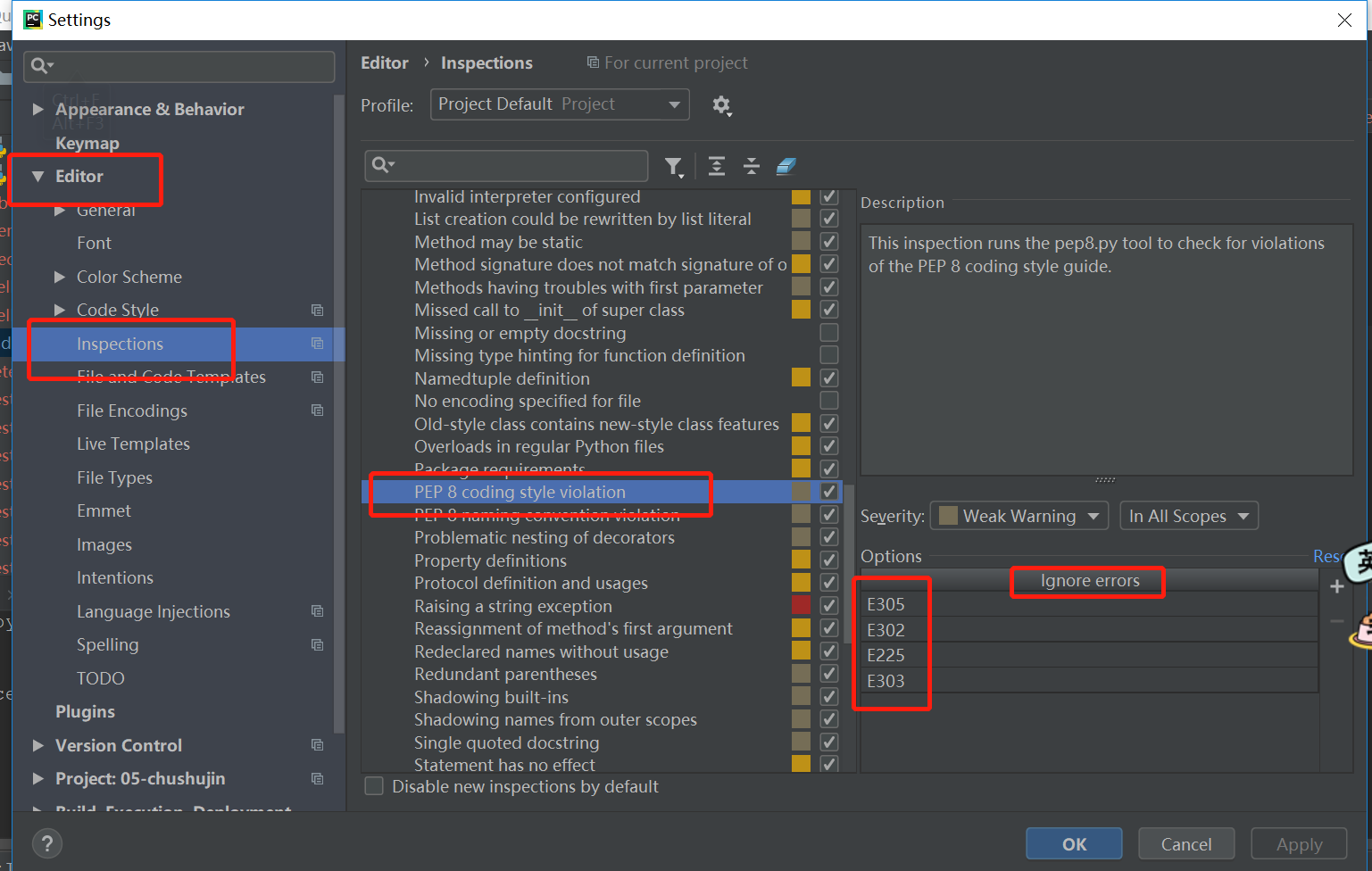
附件:
或者警告id地址:http://pep8.readthedocs.io/en/latest/intro.html#configuration
| code | sample message |
|---|---|
| E1 | Indentation |
| E101 | indentation contains mixed spaces and tabs |
| E111 | indentation is not a multiple of four |
| E112 | expected an indented block |
| E113 | unexpected indentation |
| E114 | indentation is not a multiple of four (comment) |
| E115 | expected an indented block (comment) |
| E116 | unexpected indentation (comment) |
| E121 (*^) | continuation line under-indented for hanging indent |
| E122 (^) | continuation line missing indentation or outdented |
| E123 (*) | closing bracket does not match indentation of opening bracket’s line |
| E124 (^) | closing bracket does not match visual indentation |
| E125 (^) | continuation line with same indent as next logical line |
| E126 (*^) | continuation line over-indented for hanging indent |
| E127 (^) | continuation line over-indented for visual indent |
| E128 (^) | continuation line under-indented for visual indent |
| E129 (^) | visually indented line with same indent as next logical line |
| E131 (^) | continuation line unaligned for hanging indent |
| E133 (*) | closing bracket is missing indentation |
| E2 | Whitespace |
| E201 | whitespace after ‘(‘ |
| E202 | whitespace before ‘)’ |
| E203 | whitespace before ‘:’ |
| E211 | whitespace before ‘(‘ |
| E221 | multiple spaces before operator |
| E222 | multiple spaces after operator |
| E223 | tab before operator |
| E224 | tab after operator |
| E225 | missing whitespace around operator |
| E226 (*) | missing whitespace around arithmetic operator |
| E227 | missing whitespace around bitwise or shift operator |
| E228 | missing whitespace around modulo operator |
| E231 | missing whitespace after ‘,’, ‘;’, or ‘:’ |
| E241 (*) | multiple spaces after ‘,’ |
| E242 (*) | tab after ‘,’ |
| E251 | unexpected spaces around keyword / parameter equals |
| E261 | at least two spaces before inline comment |
| E262 | inline comment should start with ‘# ‘ |
| E265 | block comment should start with ‘# ‘ |
| E266 | too many leading ‘#’ for block comment |
| E271 | multiple spaces after keyword |
| E272 | multiple spaces before keyword |
| E273 | tab after keyword |
| E274 | tab before keyword |
| E275 | missing whitespace after keyword |
| E3 | Blank line |
| E301 | expected 1 blank line, found 0 |
| E302 | expected 2 blank lines, found 0 |
| E303 | too many blank lines (3) |
| E304 | blank lines found after function decorator |
| E305 | expected 2 blank lines after end of function or class |
| E306 | expected 1 blank line before a nested definition |
| E4 | Import |
| E401 | multiple imports on one line |
| E402 | module level import not at top of file |
| E5 | Line length |
| E501 (^) | line too long (82 > 79 characters) |
| E502 | the backslash is redundant between brackets |
| E7 | Statement |
| E701 | multiple statements on one line (colon) |
| E702 | multiple statements on one line (semicolon) |
| E703 | statement ends with a semicolon |
| E704 (*) | multiple statements on one line (def) |
| E711 (^) | comparison to None should be ‘if cond is None:’ |
| E712 (^) | comparison to True should be ‘if cond is True:’ or ‘if cond:’ |
| E713 | test for membership should be ‘not in’ |
| E714 | test for object identity should be ‘is not’ |
| E721 (^) | do not compare types, use ‘isinstance()’ |
| E722 | do not use bare except, specify exception instead |
| E731 | do not assign a lambda expression, use a def |
| E741 | do not use variables named ‘l’, ‘O’, or ‘I’ |
| E742 | do not define classes named ‘l’, ‘O’, or ‘I’ |
| E743 | do not define functions named ‘l’, ‘O’, or ‘I’ |
| E9 | Runtime |
| E901 | SyntaxError or IndentationError |
| E902 | IOError |
| W1 | Indentation warning |
| W191 | indentation contains tabs |
| W2 | Whitespace warning |
| W291 | trailing whitespace |
| W292 | no newline at end of file |
| W293 | blank line contains whitespace |
| W3 | Blank line warning |
| W391 | blank line at end of file |
| W5 | Line break warning |
| W503 (*) | line break before binary operator |
| W504 (*) | line break after binary operator |
| W505 (*^) | doc line too long (82 > 79 characters) |
| W6 | Deprecation warning |
| W601 | .has_key() is deprecated, use ‘in’ |
| W602 | deprecated form of raising exception |
| W603 | ‘<>’ is deprecated, use ‘!=’ |
| W604 | backticks are deprecated, use ‘repr()’ |
| W605 | invalid escape sequence ‘x’ |
| W606 | ‘async’ and ‘await’ are reserved keywords starting with Python 3.7 |
二十九、pycharm中报错“too many blank lines (3) ”等类似错误的更多相关文章
- Bootstrap <基础二十九>面板(Panels)
Bootstrap 面板(Panels).面板组件用于把 DOM 组件插入到一个盒子中.创建一个基本的面板,只需要向 <div> 元素添加 class .panel 和 class .pa ...
- Web 开发人员和设计师必读文章推荐【系列二十九】
<Web 前端开发精华文章推荐>2014年第8期(总第29期)和大家见面了.梦想天空博客关注 前端开发 技术,分享各类能够提升网站用户体验的优秀 jQuery 插件,展示前沿的 HTML5 ...
- WCF技术剖析之二十九:换种不同的方式调用WCF服务[提供源代码下载]
原文:WCF技术剖析之二十九:换种不同的方式调用WCF服务[提供源代码下载] 我们有两种典型的WCF调用方式:通过SvcUtil.exe(或者添加Web引用)导入发布的服务元数据生成服务代理相关的代码 ...
- VMwarevSphere 服务器虚拟化之二十九 桌面虚拟化之安装View副本服务器
VMwarevSphere 服务器虚拟化之二十九 桌面虚拟化之安装View副本服务器 VMware View中高可用性可是一个必须要考虑的问题.在整个虚拟桌面环境中View Connection S ...
- Bootstrap入门(二十九)JS插件6:弹出框
Bootstrap入门(二十九)JS插件6:弹出框 加入小覆盖的内容,像在iPad上,用于存放非主要信息 弹出框是依赖于工具提示插件的,那它也和工具提示是一样的,是需要初始化才能够使用的 首先我们引入 ...
- mysql进阶(二十九)常用函数
mysql进阶(二十九)常用函数 一.数学函数 ABS(x) 返回x的绝对值 BIN(x) 返回x的二进制(OCT返回八进制,HEX返回十六进制) CEILING(x) 返回大于x的最小整数值 EXP ...
- JAVA之旅(二十九)——文件递归,File结束练习,Properties,Properties存取配置文件,load,Properties的小练习
JAVA之旅(二十九)--文件递归,File结束练习,Properties,Properties存取配置文件,load,Properties的小练习 我们继续学习File 一.文件递归 我们可以来实现 ...
- 【黑金原创教程】【FPGA那些事儿-驱动篇I 】原创教程连载导读【连载完成,共二十九章】
前言: 无数昼夜的来回轮替以后,这本<驱动篇I>终于编辑完毕了,笔者真的感动到连鼻涕也流下来.所谓驱动就是认识硬件,还有前期建模.虽然<驱动篇I>的硬件都是我们熟悉的老友记,例 ...
- 第三百二十九节,web爬虫讲解2—urllib库爬虫—ip代理—用户代理和ip代理结合应用
第三百二十九节,web爬虫讲解2—urllib库爬虫—ip代理 使用IP代理 ProxyHandler()格式化IP,第一个参数,请求目标可能是http或者https,对应设置build_opener ...
随机推荐
- http协议中常见的状态码以及请求方式,http协议的组成
请求状态码: 2xxx:表示请求成功,例如200. 3xxx:表示请求被重定向,表示完成请求,需要进一步操作,例如 302. 4xxx:表示请求错误,例如:404,资源没有找到. 5xxx:表示服务器 ...
- CSS行内框(内联元素)
行内框在一行中水平布置.可以使用水平内边距.边框和外边距调整它们的间距.但是,垂直内边距.边框和外边距不影响行内框的高度.由一行形成的水平框称为行框(Line Box),行框的高度总是足以容纳它包含的 ...
- java封装小实例
封装是java语言的一个重要的特性,通过把对象的属性和操作方法封装在同一个类中,对外只提供公共方法对这些数据进行set和get,同时封装也能对方法进行封装.总之封装能够有效地隐藏内部的代码细节,从而使 ...
- Array.prototype
Array.prototype 属性表示 Array 构造函数的原型,并允许您向所有Array对象添加新的属性和方法. /* 如果JavaScript本身不提供 first() 方法, 添加一个返回 ...
- Myabtis中批量更新update多字段
在mybatis中批量更新多个字段 推荐使用如下操作: 方式1:在Dao层接口中: void updateBatch(@Param("list")List<Student&g ...
- Java并发——原子变量和原子操作
很多情况下我们只是需要一个简单的.高效的.线程安全的递增递减方案.注意,这里有三个条件:简单,意味着程序员尽可能少的操作底层或者实现起来要比较容易:高效意味着耗用资源要少,程序处理速度要快:线程安全也 ...
- 仿scikit-learn模式写的kNN算法
一.什么是kNN算法 k邻近是指每个样本都可以用它最接近的k个邻居来代表. 核心思想:如果一个样本在特征空间中的k个最相邻的样本中大多数属于一个某类别,则该样本也属于这个类别. 二.将kNN封装成kN ...
- 03python面向对象编程3
案例学习 # notebook.pyimport datetime # Store the next available id for all new notes last_id = 0 class ...
- vim 修改复制过来的代码缩进
命令模式下 :1,9< //1至9行回退一个tab :1,9> //1至9行缩进一个tab 让不可打印字符心事出来::set list
- 缓存promise技术不错哦
1. pageManager.js const promiseList = {}; module.exports = { putData: function(pageName,data){ promi ...