
Elasticsearch 安装head插件
一、简介
elasticsearch-head是一个界面化的集群操作和管理工具,可以对集群进行傻瓜式操作。你可以通过插件把它集成到es(首选方式),也可以安装成一个独立webapp。
Elasticsearch 5 以上版本已经不支持 site plugins 的方式安装head插件了,所以 head 需要作为一个单独的服务进行安装。
官方的文档:https://github.com/mobz/elasticsearch-head
- for Elasticsearch 5.x: site plugins are not supported. Run as a standalone server
- for Elasticsearch 2.x: sudo elasticsearch/bin/plugin install mobz/elasticsearch-head
- for Elasticsearch 1.x: sudo elasticsearch/bin/plugin -install mobz/elasticsearch-head/1.x
- for Elasticsearch 0.x: sudo elasticsearch/bin/plugin -install mobz/elasticsearch-head/0.9
二、安装环境
head下载:wget https://github.com/mobz/elasticsearch-head/archive/master.zip 或者github下载:https://github.com/mobz/elasticsearch-head
head插件是一个nodejs的项目,因此需要安装node环境,使用npm来安装依赖的包。地址:http://nodejs.org/dist/v8.1.4/node-v8.1.4-linux-x64.tar.gz
三、安装过程
1. 安装node
  # yum -y install gcc make gcc-c++ openssl-devel
  # tar -zxvf node-v8.1.4-linux-x64.tar.gz
  # vim /etc/profile
     export NODE_HOME=/opt/es/node/node-v8.1.4-linux-x64
     export PATH=$NODE_HOME/bin:$PATH
  # source /etc/profile
     验证是否安装成功
  # node -v && npm -v
    v8.1.4
    5.0.3
  也可以通过yum快捷安装node
  # yum install nodejs -y
2. 安装grunt
grunt 是一个很方便的构建工具,可以进行打包压缩、测试、执行等工作,es5里的head插件就是通过grunt启动的,因此需要安装 grunt。
  # unzip elasticsearch-head-master.zip
  # cd elasticsearch-head-master
  # npm install(此过程有可能nmp报错,需要取消ssl验证:npm config set strict-ssl false)
  # npm install grunt-cli(windows:npm install grunt-cli -g)
    安装完验证一下:
  # ./node_modules/grunt/bin/grunt -version
    grunt-cli v1.2.0
    grunt v1.0.1
3. 修改配置文件
# vim elasticsearch-head-master/Gruntfile.js(增加增加hostname属性,设置为*:hostname: '*',)
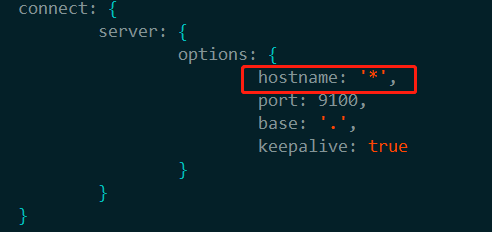
修改连接 Elasticsearch 的地址,elasticsearch-head-master/_site/app.js,修改 localhost:9200 为实际 Elasticsearch 的地址
# vim elasticsearch-head-master/_site/app.js(搜关键字9200找到位置)
this.base_uri = this.config.base_uri || this.prefs.get("app-base_uri") || "http://es真实地址:9200";
修改 Elasticsearch 配置文件elasticsearch.yml,增加下面两个配置:
http.cors.enabled: true
http.cors.allow-origin: "*"
四、启动head
启动 head 插件之前,需要先启动 Elasticsearch 服务
前台启动:./elasticsearch-head-master/node_modules/grunt/bin/grunt server
后台启动: nohup ./elasticsearch-head-master/node_modules/grunt/bin/grunt server &
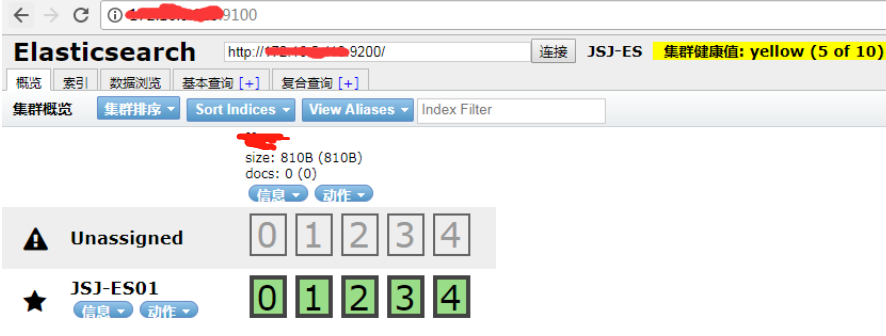
然后在浏览器输入地址 ip:9100 即可测试结果
Elasticsearch 安装head插件的更多相关文章
- ElasticSearch安装SQL插件
ElasticSearch安装SQL插件下载地址(中国大佬开发的,膜拜ing):https://github.com/NLPchina/elasticsearch-sql 1.记得选择和自己Elast ...
- Elasticsearch安装X-Pack插件
Elasticsearch安装X-Pack插件, 基于已经安装好的6.2.2版本的Elasticsearch, 安装6.2.2版本的X-Pack插件. 1.下载x-pack的zip包到本地 https ...
- elasticsearch安装head插件
安装Head插件 由于head插件本质上还是一个nodejs的工程,因此需要安装node,使用npm来安装依赖的包. <1>安装Node.js 下载解压 wget https://node ...
- ElasticSearch安装拼音插件 elasticsearch-analysis-pinyin
elasticsearch-analysis-pinyin 是 ElasticSearch的拼音插件.强大的功能支持拼音等的搜索 1.下载源代码 源码地址https://github.com/medc ...
- elasticsearch 安装 head插件
head插件 切换到Elasticsearch的安装目录 cd ~/demo/elasticsearch/es1 执行安装命令 [root@localhost es1]# bin/plugin ins ...
- Elasticsearch安装 + Head插件安装 + Bigdesk插件安装
一.Elasticsearch安装 1.官网下载zip包:https://www.elastic.co/downloads/elasticsearch 2.解压到自己指定的文件夹 3.运行\bin\e ...
- Elasticsearch 安装 Head 插件
引子:在上一篇文章Elasticsearch入门(一):CentOS 7.6 安装ES 7.0.0中,我们讲了如何在CentOS 7.6环境下安装 Elasticsearch 7.0.下面,我将讲一讲 ...
- elasticsearch安装marvel插件
Marvel插件要在Elasticsearch和Kibana中同时安装.Step 1: Install Marvel into Elasticsearch: bin/plugin install li ...
- ElasticSearch安装拼音插件(pinyin)
环境介绍 集群环境如下: Ubuntu14.04 ElasticSearch 2.3.1(3节点) JDK1.8.0_60 开发环境: Windows10 JDK 1.8.0_66 Maven 3.3 ...
随机推荐
- linux ssh连接超时断连设置
以下均针对redhat6.5系统进行说明. 一.设置ssh超时断连 使用root用户,编辑/etc/profile文件,在 HOSTNAME='/bin/hostname' HISTIZE=30 后增 ...
- java面试题全集(中)
这部分主要是与Java Web和Web Service相关的面试题. 96.阐述Servlet和CGI的区别? 答:Servlet与CGI的区别在于Servlet处于服务器进程中,它通过多线程方式运行 ...
- initlocation - 创建一个从属的 PostgreSQL数据库存储区
SYNOPSIS initlocation directory DESCRIPTION 描述 initlocation 创建一个新的PostgreSQL从属数据库存储区.参阅 CREATE DATAB ...
- js node 节点 原生遍历 createNodeIterator
1.createIterator msn: https://developer.mozilla.org/en-US/docs/Web/API/Document/createNodeIterator v ...
- Nginx优化_访问并发量(进程可以打开的最大文件数量)
如果客户端访问服务器提示“Too many open files”如何解决? [root@proxy ~]# ab -n 2000 -c 2000 http://192.168.1.100/ # ...
- 如果该虚拟机未在使用,请按“获取所有权(T)”按钮获取它的所有权。否则,请按“取消(C)”按钮以防损坏
---恢复内容开始--- 解决办法:打开放此台Vmware虚拟机虚拟磁盘文件及配置文件存放的位置(也就是弹出提示窗口上的路径),删除后缀为.lck的文件夹 ---恢复内容结束---
- 深入理解JAVA虚拟机 自动内存管理机制
运行时数据区域 其中右侧三个一起的部分是每个线程一份,左侧两个是所有线程共享的. 程序计数器(Program Counter Register) 英文名称叫Program Counter Regist ...
- Quartz(二)
1 SchedulerFactory 1.1 概述 Quartz是以模块的方式构建的,因为,要使它运行,几个组件必须很好的组合在一起.非常幸运的是,已经有了一些现存的助手可以完成这些工作. 所有Sch ...
- sourceTree 添加 ssh key 方法
1.使用 git 客户的生成公私钥:id_rsa.id_rsa.pub 1.1设置Git的user name和email: $ git config --global user.name " ...
- python selenium 相关操作
selenium : 是一个用于Web应用程序测试的工具.Selenium测试直接运行在浏览器中,就像真正的用户在操作一样.支持的浏览器包括IE(7, 8, 9, 10, 11),Mozilla Fi ...