
定制Eclipse IDE之功能篇(二)
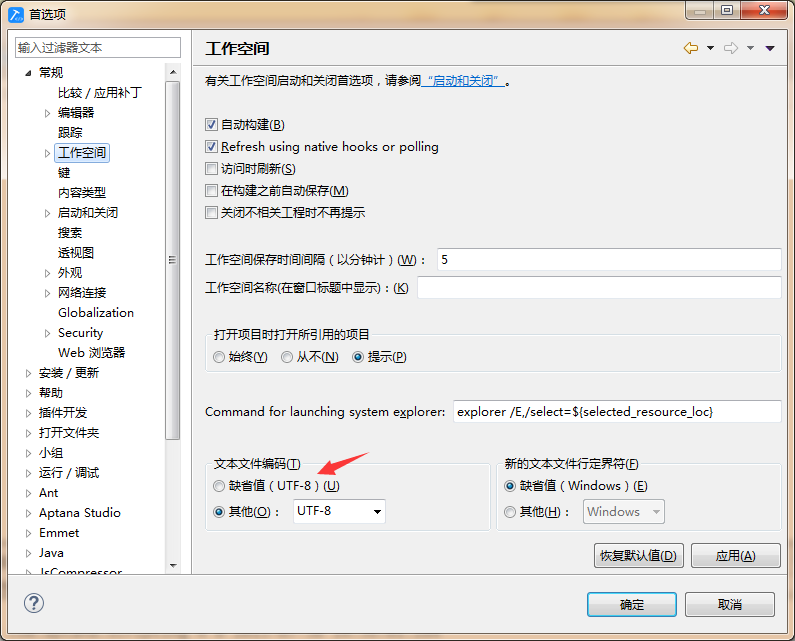
ResourcesPlugin.getPlugin().getPluginPreferences().setValue("encoding", "UTF-8");
二、默认显示行号
.png)
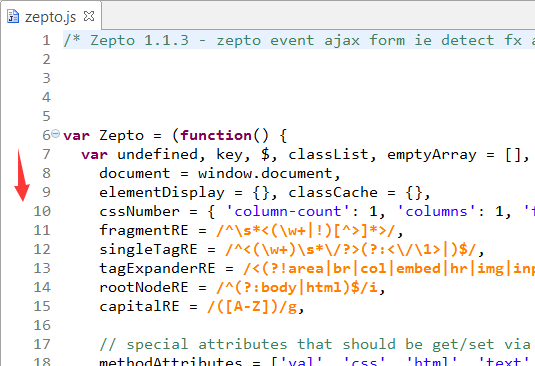
EditorsPlugin.getDefault().getPreferenceStore().setValue("lineNumberRuler", "true");
.png)
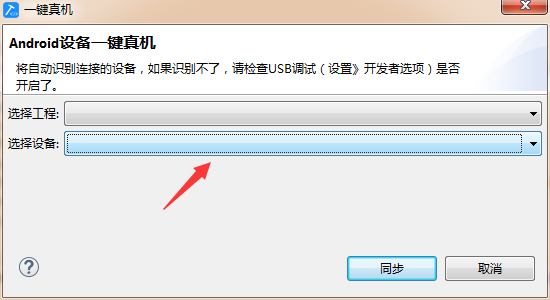
Combo combo = (Combo)control;

combo.removeAll();

for (int i = 0; i < list.size(); i++) {

     DeviceInfo obj=list.get(i);

     combo.add(obj.getName());  //label

     combo.setData(i +"", obj.getSerialNumber());  //value

}
String key = "" + comboDevice.getSelectionIndex();

String value= String.valueOf(comboDevice.getData(key));
 PrintWriter pw = new PrintWriter(new FileWriter(filePath));

 pw.print(content);

 pw.close();
OutputStreamWriter outputStream = new OutputStreamWriter(new FileOutputStream(filePath), "UTF-8");

outputStream.write(content);

outputStream.close();
import java.io.PrintStream;

import org.eclipse.ui.console.ConsolePlugin;

import org.eclipse.ui.console.IConsole;

import org.eclipse.ui.console.IConsoleFactory;

import org.eclipse.ui.console.IConsoleManager;

import org.eclipse.ui.console.MessageConsole;

import org.eclipse.ui.console.MessageConsoleStream;

public class ConsoleFactory implements IConsoleFactory {

     static MessageConsole console = new MessageConsole("console log",null);

     public void openConsole() {

          showConsole();

     }

     public static void showConsole() {

          if (console != null) {

               IConsoleManager manager = ConsolePlugin.getDefault().getConsoleManager();

               IConsole[] existing = manager.getConsoles();

               boolean exists = false;

               for (int i = 0; i < existing.length; i++) {

                    if (console == existing[i])

                         exists = true;

               }

               if (!exists) {

                    manager.addConsoles(new IConsole[] { console });

               }

               manager.showConsoleView(console);

               MessageConsoleStream stream = console.newMessageStream();

               System.setOut(new PrintStream(stream));

          }

     }

     public static void closeConsole() {

          IConsoleManager manager = ConsolePlugin.getDefault().getConsoleManager();

          if (console != null) {

               manager.removeConsoles(new IConsole[] { console });

          }

     }

     public static MessageConsole getConsole() {

          return console;

     }

}
.png)
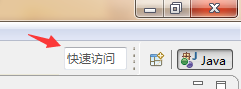
UIJob jobH = new UIJob("hide quick access") {

     @Override

     public IStatus runInUIThread(IProgressMonitor monitor) {

          IWorkbenchWindow window = PlatformUI.getWorkbench()

                    .getActiveWorkbenchWindow();

          if (window == null)

               return Status.CANCEL_STATUS;

          if (window instanceof WorkbenchWindow) {

               MTrimBar topTrim = ((WorkbenchWindow) window).getTopTrim();

               for (MTrimElement element : topTrim.getChildren()) {

                    if ("SearchField".equals(element.getElementId())) {

                         Control contorl = (Control) element.getWidget();

                         contorl.setVisible(false);

                         break;

                    }

               }

          }

          return Status.OK_STATUS;

     }

};

jobH.schedule(0L);
.png)
.png)
本文地址 :http://www.cnblogs.com/lovesong/p/4694522.html
定制Eclipse IDE之功能篇(二)的更多相关文章
- 定制Eclipse IDE之功能篇(一)
上文回顾:定制Eclipse IDE之界面篇 这一篇文章将记录一些Eclipse插件拓展(extension),简单讲述常用拓展的用法,但可能不会那么详细. 我的主要插件的拓展如下: 一.or ...
- 定制Eclipse IDE之插件篇(一)
上文回顾:定制Eclipse IDE之功能篇(二) 在这篇文章中,我会将我定制eclipse用到的其他插件罗列出来. 一.汉化插件 Eclipse本身是英文显示的,我们能够通过插件汉化. 1. 选择 ...
- 定制Eclipse IDE之插件篇(二)
上文回顾:定制Eclipse IDE之插件篇(一) 延续上一篇的插件篇,这一篇将会讲到一个最关键的插件aptana. 一.aptana插件 官方的解释我就不说了,从下面图可以看到插件提供了什么功能,列 ...
- 定制Eclipse IDE之杂症篇
上文回顾:定制Eclipse IDE之插件篇(二) 该篇将讲述在开发Eclipse 插件过程发生的疑难杂症.不谈功能,只说病症. 前言.拿哪个Eclipse作为定制的基础? 我建议是你用哪个Eclip ...
- 定制Eclipse IDE之界面篇
为什么要定制IDE? 在工作时候,当公司有了自己的框架,给自己开放人员用,甚至是可以卖的时候,我们可以做成一个产品,而这个产品将包括框架本身.文档.工具.教程等等.工具之中最重要的莫过于开发 ...
- 使用Eclipse Memory Analyzer Tool(MAT)分析线上故障(一) - 视图&功能篇
Eclipse Memory Analyzer Tool(MAT)相关文章目录: 使用Eclipse Memory Analyzer Tool(MAT)分析线上故障(一) - 视图&功能篇 使 ...
- Maven、gradle、Ant、Eclipse IDE
Maven.gradle.Ant.Eclipse IDE之间的关系 http://wenku.baidu.com/view/d33208810912a21615792910.html?from=sea ...
- Eclipse IDE for C/C++ Developers安装配置详解
Eclipse IDE for C/C++ Developers安装配置详解(转) 转自:http://hi.baidu.com/ltb6w/item/986532efd712460f570f1ddc ...
- eclipse ide for java ee developers 开发环境搭建(j2ee)
转载自:http://www.iteye.com/topic/982182 真的是一片很不错的文章啊! 使用eclipse真的有年头了,相信java程序员没有不知道它的,最近在给团队中新来的应届生做指 ...
随机推荐
- Visual Studio 选择相同变量高亮
前段时间一直在使用matlab,今天需要使用vs2008,而用惯了matlab,习惯了其中一项选中变量高亮的设置,突然回来使用VS,感到各种不适应,顿时想到了一个词:矫情 呵呵,于是在网上找各种插件, ...
- 解决MVC EF Code First错误:Model compatibility cannot be checked because the EdmMetadata type was not included in the model.
Model compatibility cannot be checked because the EdmMetadata type was not included in the model. En ...
- 数论 - Funny scales(SPOJ - SCALE)
Funny scales Problem's Link ------------------------------------------------------------------------ ...
- Microsoft Orleans 之 入门指南
Microsoft Orleans 在.net用简单方法构建高并发.分布式的大型应用程序框架. 原文:http://dotnet.github.io/orleans/ 在线文档:http://dotn ...
- 基于cookie实现zTree树刷新后,展开状态不变
1.除了引用jQuery和zTree的JS外,引用cookie的JS: <script type="text/javascript" src="~/Scripts/ ...
- C# 6.0的属性(Property)的语法与初始值
昨晚有学点新知识,是有关C# 6.0的. 在数据库创建有一张表: CREATE TABLE [dbo].[ToolLocation] ( ,) NOT NULL PRIMARY KEY, ) NOT ...
- 如何在Web项目中给没有添加API核心组件添加APIController的帮助页HelpPage
前言: ASP.NET中的Web项目可以通过APIController控制器来为其他项目提供接口. 而我们在调试这些接口时,可以选择单元测试,网页测试(Get接口),自己写测试代码或者第三方测试工具 ...
- Nancy Scripts,CSS文件夹配置
public class Bootstrapper : DefaultNancyBootstrapper { protected override void ConfigureConventions( ...
- SSH服务器与Android通信(3)--Android客户端发送数据
Android客户端向SSH服务器发送数据主要有三种情况:通过客户端删除数据.添加数据和修改数据. 1.删除数据 先看看jsp文件里面是怎样删除数据的: <td align="cent ...
- GUID全局唯一标识符
全局唯一标识符(GUID,Globally Unique Identifier)是一种由算法生成的二进制长度为128位的数字标识符.GUID主要用于在拥有多个节点.多台计算机的网络或系统中. ...