
iOS UIPickerView 显示全国省市
效果图
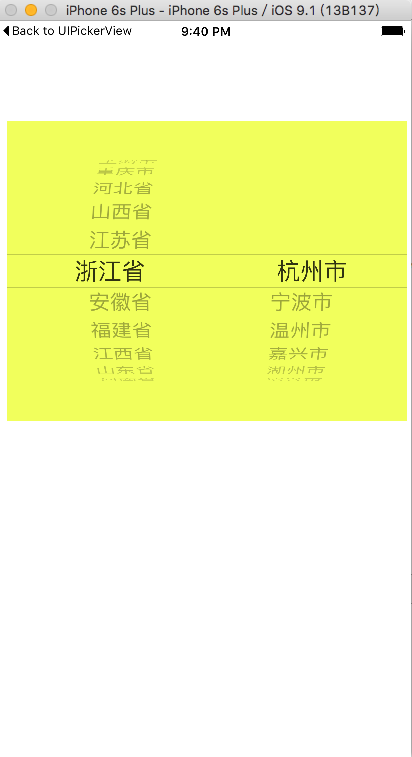
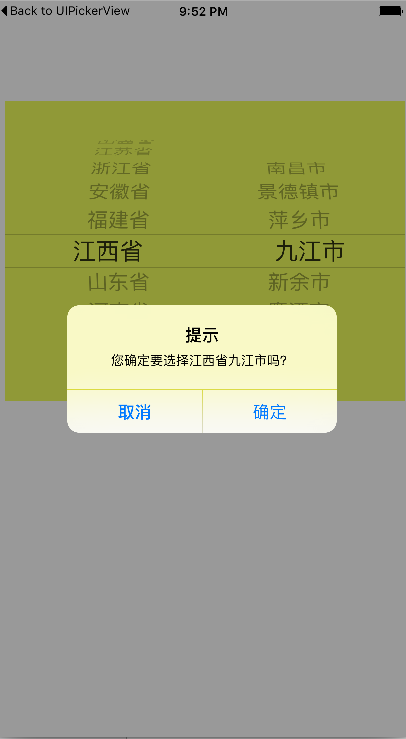

#import "ViewController.h"

@interface ViewController ()

@property(strong,nonatomic)UIPickerView *myPickView1;

@property(strong,nonatomic)NSArray *guo;

@property(strong,nonatomic)NSMutableArray *sheng;

@property(strong,nonatomic)NSMutableArray *shixian;

@property(strong,nonatomic)NSDictionary *shi;

@property(strong,nonatomic)UIButton *btn;

@end

@implementation ViewController

- (void)viewDidLoad {

    [super viewDidLoad];

    self.sheng=[NSMutableArray array];

    self.shixian=[NSMutableArray array];

//    self.guo=[NSArray array];

    //添加UIPickerView

    self.myPickView1=[[UIPickerView alloc]initWithFrame:CGRectMake(10, 100, 400, 300)];

    self.myPickView1.backgroundColor=[UIColor colorWithRed:0.945 green:1.000 blue:0.359 alpha:1.000];

    self.myPickView1.delegate=self;

    self.myPickView1.dataSource=self;

    //读取plist文件

    NSBundle *bundle=[NSBundle mainBundle];

    NSString *path=[bundle pathForResource:@"area.plist" ofType:nil];

   self.guo=[NSArray arrayWithContentsOfFile:path];

    //遍历  省

    for (NSDictionary *arr in self.guo) {

      [self.sheng addObject:arr[@"State"]];

    }

    [self.view addSubview:self.myPickView1];

}

#pragma mark - 数据源

-(NSInteger)numberOfComponentsInPickerView:(UIPickerView *)pickerView{

    return 2;

}

#pragma mark - 数据源,返回长度

-(NSInteger)pickerView:(UIPickerView *)pickerView numberOfRowsInComponent:(NSInteger)component{

    if (component==FIRST) {

         return self.sheng.count;

    }

    return self.shixian.count;

}

#pragma mark - 显示信息

-(NSString *)pickerView:(UIPickerView *)pickerView titleForRow:(NSInteger)row forComponent:(NSInteger)component{

    if (component==FIRST) {

        return [self.sheng objectAtIndex:row];

    }

        return [self.shixian objectAtIndex:row];

}

#pragma mark - 选中选的信息

-(void)pickerView:(UIPickerView *)pickerView didSelectRow:(NSInteger)row inComponent:(NSInteger)component{

    if (component==FIRST) {

        //清除上次选择的城市

        [self.shixian removeAllObjects];

        //更具城市的索引,遍历串城市

        NSDictionary *a=[self.guo objectAtIndex:row];

        //遍历城市信息

        NSArray *array=a[@"Cities"];

        NSMutableArray *s=[NSMutableArray array];

        for (NSDictionary *a in array) {

            [s addObject:a[@"city"]];

        }

        //把值传给 self.shixian

        self.shixian=s;

        //把第一个加到第二个中

        [self.myPickView1 selectRow:row inComponent:FIRST animated:YES];

        //刷新组件

        [self.myPickView1 reloadComponent:SECOND];

    }

    //如果选中第二个,弹出信息

    if (component==SECOND) {

        NSInteger firstRow=[self.myPickView1 selectedRowInComponent:FIRST];

        NSInteger secondRow=[self.myPickView1 selectedRowInComponent:SECOND];

        NSString *firstString=[self.sheng objectAtIndex:firstRow];

        NSString *secondString=[self.shixian objectAtIndex:secondRow];

        NSString *message=[NSString stringWithFormat:@"您确定要选择%@%@吗?",firstString,secondString];

        UIAlertController *alertMessage=[UIAlertController alertControllerWithTitle:@"提示" message:message preferredStyle:UIAlertControllerStyleAlert];

        UIAlertAction *cancle=[UIAlertAction actionWithTitle:@"取消" style:UIAlertActionStyleCancel handler:nil];

        UIAlertAction *ok=[UIAlertAction actionWithTitle:@"确定" style:UIAlertActionStyleDefault handler:nil];

        [alertMessage addAction:cancle];

        [alertMessage addAction:ok];

        [self presentViewController:alertMessage animated:YES completion:nil];

    }

}

#pragma  mark - 行高

-(CGFloat)pickerView:(UIPickerView *)pickerView rowHeightForComponent:(NSInteger)component{

    return 30;

}

- (void)didReceiveMemoryWarning {

    [super didReceiveMemoryWarning];

    // Dispose of any resources that can be recreated.

}

@end
ViewController.h文件
#import <UIKit/UIKit.h>

#define FIRST 0

#define SECOND 1

 @interface ViewController : UIViewController<UIPickerViewDelegate,UIPickerViewDataSource>

@end
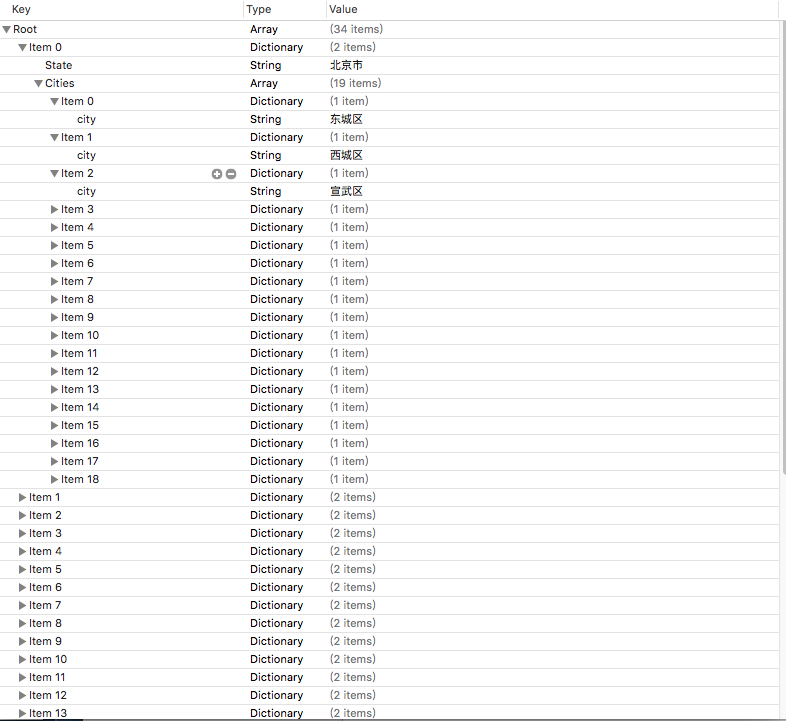
注:plist文件结构
iOS UIPickerView 显示全国省市的更多相关文章
- 全国省市级联数据sql语句 mysql版
全国省市级联数据sql语句 mysql版 --省级 provincial create table provincial ( provincialID int, provincialName ), p ...
- IOS 状态栏 显示与隐藏网络活动状态
IOS中显示和隐藏状态栏的网络活动标志 //在向服务端发送请求状态栏显示网络活动标志: [[UIApplication sharedApplication] setNetworkActivityInd ...
- vue中解决时间在ios上显示NAN的问题
最近在用vue,遇到倒计时在ios上显示为NAN的问题. 因为做的是倒计时支付,思路是获取服务器时间和下单时间,再转成秒级时间戳做差值. 在网上找到说是ios 不支持例如2018-09-01 10:0 ...
- iOS - UIPickerView
前言 NS_CLASS_AVAILABLE_IOS(2_0) __TVOS_PROHIBITED @interface UIPickerView : UIView <NSCoding, UITa ...
- ios日期显示NaN
ios中js通过getMonth()获取到的日期显示NaN,而在其他地方如pc.安卓都是ok的,这是为什么呢,原来这里有个ios的兼容问题,需要将日期中的“-”替换为“/” var time = ne ...
- iOS:UIPickerView选择器的使用
通过UIPickerView选择器做的一个类似于密码锁的日期时间表 源码如下: #import <UIKit/UIKit.h> @interface ViewController : UI ...
- ios上传图片显示方向错误问题
IOS 上传图片方向显示错误问题 问题描述 在使用苹果手机上传图片的时候,发现传完的图片显示出来方向是错误的,竖着的图片会变成横着显示(少部分安卓手机也存在这个问题) 产生原因 ios 相机加入了方向 ...
- iOS 状态栏显示/隐藏
iOS 10为止,将在plist文件中将 View controller-based status bar appearance 设置为NO,就可以用UIApplication设置状态栏. 注意,要在 ...
- 全国省市区县和乡镇街道行政区划矢量边界坐标经纬度地图最新数据免费下载 支持shp geojson json sql格式
关键词: 省市区三级, 乡镇四级, 全国, 行政区划, 坐标边界, 矢量数据, 地理围栏, 免费下载, 2018 2019 2020 2021 2022年份, 最新数据, 长期更新, 开源维护, 支持 ...
随机推荐
- ecshop后台新功能及权限的添加
1.在后台"推荐管理"里添加"推荐人分成"."会员分成"两个操作功能以及权限 index.php?act=menu incluedes/in ...
- ubuntu下各种压缩包的解压命令
.tar解包:tar xvf FileName.tar打包:tar cvf FileName.tar DirName(注:tar是打包,不是压缩!)-------------------------- ...
- ElasticSearch集群配置
因机器有限,本文只做单机3个节点的集群测试. 1.集群测试信息 elasticsearch版本:elasticsearch-2.4.1 windowns版本:win10 2.解压elasticsear ...
- CentOS vsftpd搭建快速流程
1.yum install vsftpd 2.chkconfig vsftpd on 3.service vsftpd start 4.adduser -d /home/bp -g ftp -s /s ...
- php简写表达式,&& or || 缩写条件语句
有时候学的多了, 好多小细节 都忘了 ,比如 简单的表达式, 三元表达式 ?:; $aa or $bb 表达式 等等! 写一些简单的表达式,备忘! php用&&和||缩写条件语句 ...
- Docker私服仓库push 错误
docker push 提交时错误提示: docker push 192.168.1.110:5000/redis Error response from daemon: invalid regist ...
- C++学习进度0
昨天,又把<C++ primer> 刷了一遍,这一次看的是陈硕大大的评注版,重点看了陈硕的注释,<Accelerated C++>去年就把代码巧了一遍,<C++ prim ...
- SQLserver 备份和还原 失败
错误一: 备份对于服务器“xxxxxx”失败. System.Data.SqlClient.SqlError: 无法使用备份文件 'C:\Program Files\Microsoft SQL Ser ...
- Work around by " Due to heavy load, the latest workflow operation has been queued. " 分类: Sharepoint 2015-07-08 00:19 3人阅读 评论(0) 收藏
I hope most of the users and developers might have come across above note and worried about it. Ther ...
- android开发-小技巧篇(集合)
1.对于过多的控件,功能类似,数量又多的,可以用include方法.在实现应用中,可以把控件放入List集合中. private void initView() { // TODO Auto-gene ...