
Linux下如何查看系统启动时间和运行时间
1.uptime命令
输出:16:11:40 up 59 days, 4:21, 2 users, load average: 0.00, 0.01, 0.00
2.查看/proc/uptime文件计算系统启动时间
cat /proc/uptime
输出: 5113396.94 575949.85
第一数字即是系统已运行的时间5113396.94 秒,运用系统工具date即可算出系统启动时间
- 代码: 全选
date -d "$(awk -F. '{print $1}' /proc/uptime) second ago" +"%Y-%m-%d %H:%M:%S"
输出: 2008-11-09 11:50:31
3.查看/proc/uptime文件计算系统运行时间
- 代码: 全选
cat /proc/uptime| awk -F. '{run_days=$1 / 86400;run_hour=($1 % 86400)/3600;run_minute=($1 % 3600)/60;run_second=$1 % 60;printf("系统已运行:%d天%d时%d分%d秒",run_days,run_hour,run_minute,run_second)}'
输出:系统已运行:59天4时13分9秒
下面的摘自 http://www.cnblogs.com/kerrycode/p/3759395.html
1: who 命令查看
who -b 查看最后一次系统启动的时间。
who -r 查看当前系统运行时间
[root@DB-Server ~]# who -b
system boot May 11 09:27


2: last reboot
如下所示last reboot可以看到Linux系统历史启动的时间。 重启一下操作系统后,然后
[root@DB-Server ~]# last reboot
reboot
system boot 2.6.9-42.ELsmp Thu May 29 15:25 (00:07)
reboot system boot 2.6.9-42.ELsmp Sun May 11 09:27 (18+05:55)
wtmp begins Mon May 5 16:18:57 2014

如果只需要查看最后一次Linux系统启动的时间
[root@DB-Server ~]# last reboot | head -1
reboot
system boot 2.6.9-42.ELsmp Thu May 29 15:25 (00:08)
3:TOP命令查看
如下截图所示,up后表示系统到目前运行了多久时间。反过来推算系统重启时间
 4:w 命令查看
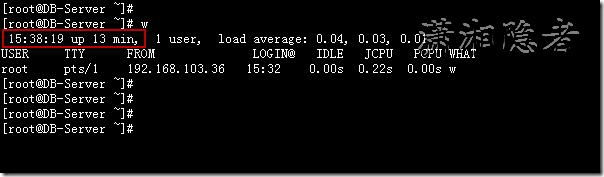
4: w命令查看
如下截图所示,up后表示系统到目前运行了多久时间。反过来推算系统重启时间
5:uptime 命令查看

6: 查看/proc/uptime
[root@DB-Server ~]# cat /proc/uptime
1415.59 1401.42
[root@DB-Server ~]# date -d "`cut -f1 -d. /proc/uptime` seconds ago"
Thu May 29 15:24:57 CST 2014
[root@DB-Server ~]# date -d "$(awk -F. '{print $1}' /proc/uptime) second ago" +"%Y-%m-%d %H:%M:%S"
2014-05-29 15:24:57

下面的是程序的方式 ,在程序开发的时候会比较有用。摘自http://www.cnblogs.com/Anker/p/3527609.html
1、前言
时间对操作系统来说非常重要,从内核级到应用层,时间的表达方式及精度各部相同。linux内核里面用一个名为jiffes的常量来计算时间戳。应用层有time、getdaytime等函数。今天需要在应用程序获取系统的启动时间,百度了一下,通过sysinfo中的uptime可以计算出系统的启动时间。
2、sysinfo结构
sysinfo结构保持了系统启动后的信息,主要包括启动到现在的时间,可用内存空间、共享内存空间、进程的数目等。man sysinfo得到结果如下所示:

 1 struct sysinfo {

 2                long uptime;             /* Seconds since boot */

 3                unsigned long loads[3];  /* 1, 5, and 15 minute load averages */

 4                unsigned long totalram;  /* Total usable main memory size */

 5                unsigned long freeram;   /* Available memory size */

 6                unsigned long sharedram; /* Amount of shared memory */

 7                unsigned long bufferram; /* Memory used by buffers */

 8                unsigned long totalswap; /* Total swap space size */

 9                unsigned long freeswap;  /* swap space still available */

10                unsigned short procs;    /* Number of current processes */

11                char _f[22];             /* Pads structure to 64 bytes */

12            };
3、获取系统启动时间
通过sysinfo获取系统启动到现在的秒数,用当前时间减去这个秒数即系统的启动时间。程序如下所示:
 1 #include <stdio.h>

 2 #include <sys/sysinfo.h>

 3 #include <time.h>

 4 #include <errno.h>

 5

 6 static int print_system_boot_time()

 7 {

 8     struct sysinfo info;

 9     time_t cur_time = 0;

10     time_t boot_time = 0;

11     struct tm *ptm = NULL;

12     if (sysinfo(&info)) {

13     fprintf(stderr, "Failed to get sysinfo, errno:%u, reason:%s\n",

14         errno, strerror(errno));

15     return -1;

16     }

17     time(&cur_time);

18     if (cur_time > info.uptime) {

19     boot_time = cur_time - info.uptime;

20     }

21     else {

22     boot_time = info.uptime - cur_time;

23     }

24     ptm = gmtime(&boot_time);

25     printf("System boot time: %d-%-d-%d %d:%d:%d\n", ptm->tm_year + 1900,

26         ptm->tm_mon + 1, ptm->tm_mday, ptm->tm_hour, ptm->tm_min, ptm->tm_sec);

27    return 0;

28 }

29

30 int main()

31 {

32     if (print_system_boot_time() != 0) {

33     return -1;

34     }

35     return 0;

36 }
测试结果如下所:

Linux下如何查看系统启动时间和运行时间的更多相关文章
- Linux下如何查看系统启动时间和运行时间以及安装时间
1.uptime命令输出:16:11:40 up 59 days, 4:21, 2 users, load average: 0.00, 0.01, 0.00 2.查看/proc/uptime文件计算 ...
- Linux下如何查看系统启动时间和运行时间(转)
1.uptime命令输出:16:11:40 up 59 days, 4:21, 2 users, load average: 0.00, 0.01, 0.00 2.查看/proc/uptime文件计算 ...
- [转载]linux下如何查看系统和内核版本
原文地址:linux下如何查看系统和内核版本作者:vleage 1. 查看内核版本命令: 1) [root@q1test01 ~]# cat /proc/version Linux version 2 ...
- uptime命令查看系统启动时间和运行时间、查看linux系统负载
1.uptime命令输出:16:11:40 up 59 days, 4:21, 2 users, load average: 0.00, 0.01, 0.00 2.查看/proc/uptime文件计算 ...
- linux 下如何查看和踢除正在登陆的其它用户 ==>Linux下用于查看系统当前登录用户信息的4种方法
在linux系统中用pkill命令踢出在线登录用户 由于linux服务器允许多用户登录,公司很多人知道密码,工作造成一定的障碍 所以需要有时踢出指定的用户 1/#who 查出当前有那些终端登录(用 ...
- Linux下用于查看系统当前登录用户信息 w命令
作为系统管理员,你可能经常会(在某个时候)需要查看系统中有哪些用户正在活动.有些时候,你甚至需要知道他(她)们正在做什么.本文为我们总结了4种查看系统用户信息(通过编号(ID))的方法. 1. 使用w ...
- Linux下用于查看系统当前登录用户信息的4种方法
1. 使用w命令查看登录用户正在使用的进程信息 w命令用于显示已经登录系统的用户的名称,以及他们正在做的事.该命令所使用的信息来源于/var/run/utmp文件.w命令输出的信息包括: 用户名称 用 ...
- linux下如何查看系统和内核版本
1. 查看内核版本命令: 1) [root@q1test01 ~]# cat /proc/version Linux version 2.6.9-22.ELsmp (bhcompile@cro ...
- Linux下如何查看系统是多少位的
在Linux命令行下输入 getconf LONG_BIT 命令
随机推荐
- mount不是很熟悉 转载文章了解下 转自http://forum.ubuntu.org.cn/viewtopic.php?f=120&t=257333
纯粹针对刚刚解封开包的新新手,老鸟们请自觉绕行,否则浪费你的时间你非要逼我做谋杀犯可不光我的事你还没地方说理去.如果你正好是个崭新的新手,就耐心的花点时间看看吧,至少大概看看,不要在一个陌生又黑暗的到 ...
- 安装lua和openresty
#### ubuntu 16.04 64bit 安装Lua luajit 及openresty 1 安装lua ,因为luajit 支持lua5.1较好.貌似不支持5.2和5.3作为学习,我就安装5. ...
- Android zxing 解析二维码,生成二维码极简demo
zxing 官方的代码很多,看起来很费劲,此demo只抽取了有用的部分,实现了相机预览解码,解析本地二维码,生成二维码三个功能. 简化后的结构如下: 废话少说直接上代码: BaseDecodeHand ...
- 【javascript 面试笔试】1、几道笔试题
今天想起来几道javascript的面试题,大家做做看看,有别的思路可以在下面写出来,大家交流一下 (1) 将多维数组转化成一个一位数组,例如[1,[2,3],[4,5,[6,7]]]转化成[1,2, ...
- sql server 常见问题笔记
1.关于复制类型 快照发布:发布服务器按预定的时间间隔向订阅服务器发送已发布数据的快照. 事务发布:在订阅服务器收到已发布数据的初始快照后,发布服务器将事务流式传输到订阅服务器. 对等发布:对等发布支 ...
- java中abstract详解
Abstract(抽象)可以修饰类.方法 如果将一个类设置为abstract,则此类必须被继承使用.此类不可生成对象,必须被继承使用. Abstract可以将子类的共性最大限度的抽取出来,放在父类中, ...
- Maven基础笔记,原理
1.什么是Maven ①Maven是一款实现自动化构建的工具软件. ②构建:从源程序→程序的执行 清理→编译→测试→报告→打包→部署→执行 ③构建工具:Make→Ant→Maven→Gradle... ...
- Windows动态库学习心得
最近在工作中需要给项目组其他成员提供调用函数,决心抛弃以前“拷贝头文件/源文件”的简陋方法,采用动态库的方式对自己开发的接口进行模块化管理.因之前一直没有机会从事Windows动态库的开发,现借助这个 ...
- Latex感想
看人家,一个小女生,被导师逼着,首先对电脑方面理解不多,3天时间,latex已经把Paper框架建立起来,我可以说我自愧不如吗?德鲁克<卓有成效的管理者>说的一次干一件事情,<冬吴相 ...
- JavaScript能干什么?
真的是长见识了,JavaScript居然能做除了WEB界面外运行于任何平台的APP,而且可以做服务器端,还有天理和王法吗?JavaScript到底有多神奇,要不要重新上路,老程序员何去何从,自然要先网 ...