
Linux下如何查看系统启动时间和运行时间
1.uptime命令
输出:16:11:40 up 59 days, 4:21, 2 users, load average: 0.00, 0.01, 0.00
2.查看/proc/uptime文件计算系统启动时间
cat /proc/uptime
输出: 5113396.94 575949.85
第一数字即是系统已运行的时间5113396.94 秒,运用系统工具date即可算出系统启动时间
- 代码: 全选
date -d "$(awk -F. '{print $1}' /proc/uptime) second ago" +"%Y-%m-%d %H:%M:%S"
输出: 2008-11-09 11:50:31
3.查看/proc/uptime文件计算系统运行时间
- 代码: 全选
cat /proc/uptime| awk -F. '{run_days=$1 / 86400;run_hour=($1 % 86400)/3600;run_minute=($1 % 3600)/60;run_second=$1 % 60;printf("系统已运行:%d天%d时%d分%d秒",run_days,run_hour,run_minute,run_second)}'
输出:系统已运行:59天4时13分9秒
下面的摘自 http://www.cnblogs.com/kerrycode/p/3759395.html
1: who 命令查看
who -b 查看最后一次系统启动的时间。
who -r 查看当前系统运行时间
[root@DB-Server ~]# who -b
system boot May 11 09:27


2: last reboot
如下所示last reboot可以看到Linux系统历史启动的时间。 重启一下操作系统后,然后
[root@DB-Server ~]# last reboot
reboot
system boot 2.6.9-42.ELsmp Thu May 29 15:25 (00:07)
reboot system boot 2.6.9-42.ELsmp Sun May 11 09:27 (18+05:55)
wtmp begins Mon May 5 16:18:57 2014

如果只需要查看最后一次Linux系统启动的时间
[root@DB-Server ~]# last reboot | head -1
reboot
system boot 2.6.9-42.ELsmp Thu May 29 15:25 (00:08)
3:TOP命令查看
如下截图所示,up后表示系统到目前运行了多久时间。反过来推算系统重启时间
 4:w 命令查看
4: w命令查看
如下截图所示,up后表示系统到目前运行了多久时间。反过来推算系统重启时间
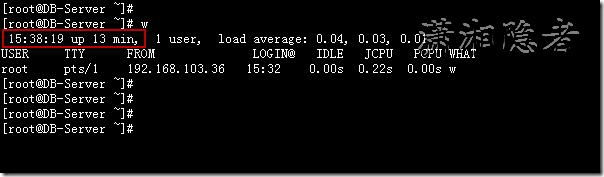
5:uptime 命令查看

6: 查看/proc/uptime
[root@DB-Server ~]# cat /proc/uptime
1415.59 1401.42
[root@DB-Server ~]# date -d "`cut -f1 -d. /proc/uptime` seconds ago"
Thu May 29 15:24:57 CST 2014
[root@DB-Server ~]# date -d "$(awk -F. '{print $1}' /proc/uptime) second ago" +"%Y-%m-%d %H:%M:%S"
2014-05-29 15:24:57

下面的是程序的方式 ,在程序开发的时候会比较有用。摘自http://www.cnblogs.com/Anker/p/3527609.html
1、前言
时间对操作系统来说非常重要,从内核级到应用层,时间的表达方式及精度各部相同。linux内核里面用一个名为jiffes的常量来计算时间戳。应用层有time、getdaytime等函数。今天需要在应用程序获取系统的启动时间,百度了一下,通过sysinfo中的uptime可以计算出系统的启动时间。
2、sysinfo结构
sysinfo结构保持了系统启动后的信息,主要包括启动到现在的时间,可用内存空间、共享内存空间、进程的数目等。man sysinfo得到结果如下所示:

 1 struct sysinfo {

 2                long uptime;             /* Seconds since boot */

 3                unsigned long loads[3];  /* 1, 5, and 15 minute load averages */

 4                unsigned long totalram;  /* Total usable main memory size */

 5                unsigned long freeram;   /* Available memory size */

 6                unsigned long sharedram; /* Amount of shared memory */

 7                unsigned long bufferram; /* Memory used by buffers */

 8                unsigned long totalswap; /* Total swap space size */

 9                unsigned long freeswap;  /* swap space still available */

10                unsigned short procs;    /* Number of current processes */

11                char _f[22];             /* Pads structure to 64 bytes */

12            };
3、获取系统启动时间
通过sysinfo获取系统启动到现在的秒数,用当前时间减去这个秒数即系统的启动时间。程序如下所示:
 1 #include <stdio.h>

 2 #include <sys/sysinfo.h>

 3 #include <time.h>

 4 #include <errno.h>

 5

 6 static int print_system_boot_time()

 7 {

 8     struct sysinfo info;

 9     time_t cur_time = 0;

10     time_t boot_time = 0;

11     struct tm *ptm = NULL;

12     if (sysinfo(&info)) {

13     fprintf(stderr, "Failed to get sysinfo, errno:%u, reason:%s\n",

14         errno, strerror(errno));

15     return -1;

16     }

17     time(&cur_time);

18     if (cur_time > info.uptime) {

19     boot_time = cur_time - info.uptime;

20     }

21     else {

22     boot_time = info.uptime - cur_time;

23     }

24     ptm = gmtime(&boot_time);

25     printf("System boot time: %d-%-d-%d %d:%d:%d\n", ptm->tm_year + 1900,

26         ptm->tm_mon + 1, ptm->tm_mday, ptm->tm_hour, ptm->tm_min, ptm->tm_sec);

27    return 0;

28 }

29

30 int main()

31 {

32     if (print_system_boot_time() != 0) {

33     return -1;

34     }

35     return 0;

36 }
测试结果如下所:

Linux下如何查看系统启动时间和运行时间的更多相关文章
- Linux下如何查看系统启动时间和运行时间以及安装时间
1.uptime命令输出:16:11:40 up 59 days, 4:21, 2 users, load average: 0.00, 0.01, 0.00 2.查看/proc/uptime文件计算 ...
- Linux下如何查看系统启动时间和运行时间(转)
1.uptime命令输出:16:11:40 up 59 days, 4:21, 2 users, load average: 0.00, 0.01, 0.00 2.查看/proc/uptime文件计算 ...
- [转载]linux下如何查看系统和内核版本
原文地址:linux下如何查看系统和内核版本作者:vleage 1. 查看内核版本命令: 1) [root@q1test01 ~]# cat /proc/version Linux version 2 ...
- uptime命令查看系统启动时间和运行时间、查看linux系统负载
1.uptime命令输出:16:11:40 up 59 days, 4:21, 2 users, load average: 0.00, 0.01, 0.00 2.查看/proc/uptime文件计算 ...
- linux 下如何查看和踢除正在登陆的其它用户 ==>Linux下用于查看系统当前登录用户信息的4种方法
在linux系统中用pkill命令踢出在线登录用户 由于linux服务器允许多用户登录,公司很多人知道密码,工作造成一定的障碍 所以需要有时踢出指定的用户 1/#who 查出当前有那些终端登录(用 ...
- Linux下用于查看系统当前登录用户信息 w命令
作为系统管理员,你可能经常会(在某个时候)需要查看系统中有哪些用户正在活动.有些时候,你甚至需要知道他(她)们正在做什么.本文为我们总结了4种查看系统用户信息(通过编号(ID))的方法. 1. 使用w ...
- Linux下用于查看系统当前登录用户信息的4种方法
1. 使用w命令查看登录用户正在使用的进程信息 w命令用于显示已经登录系统的用户的名称,以及他们正在做的事.该命令所使用的信息来源于/var/run/utmp文件.w命令输出的信息包括: 用户名称 用 ...
- linux下如何查看系统和内核版本
1. 查看内核版本命令: 1) [root@q1test01 ~]# cat /proc/version Linux version 2.6.9-22.ELsmp (bhcompile@cro ...
- Linux下如何查看系统是多少位的
在Linux命令行下输入 getconf LONG_BIT 命令
随机推荐
- Dimmer: 通过移动鼠标来改变 LED 的亮度
原文地址 - https://www.arduino.cc/en/Tutorial/Dimmer 调光器 本例展示了如何通过个人电脑发送数据到 Arduino / Genuino 开发板来控制一个LE ...
- Oracle定时查询结果输出到指定的log文件
最近有个监控项目需要采集数据库信息,原来方案是写个sql脚本,每个脚本放一个查询语句然后通过操作系统层su到oracle用户通过sqlpus执行这个.sql,然后加到crontab定时执行.但是这个问 ...
- 如何在Mac系统里面更新 Ansible 的 Extra Modules
最近遇到一个问题 seport is not a legal parameter in an Ansible task or handler 原因是我本地 Ansible 的 Extra Module ...
- Python基础篇【第6篇】: Python模块subprocess
subprocess Python中可以执行shell命令的相关模块和函数有: os.system os.spawn* os.popen* --废弃 popen2.* ...
- Business Unit Lookup in Form
Just add the below code in lookup() of StringEdit control in Form to get the Business Unit Lookup: p ...
- iPhone与iPad在开发上的区别
*:first-child { margin-top: 0 !important; } body > *:last-child { margin-bottom: 0 !important; } ...
- session management
The session does not created until the HttpServletRequest.getSession() method is called.
- workplace background
class:SysSetupFormRun public void run() { super(); this.design().colorScheme(FormColorScheme::RGB); ...
- Entity Framework学习笔记——错误汇总
之前的小项目做完了,到了总结经验和更新学习笔记的时间了.开始正题之前先啰嗦一下,对之前的学习目标进行一个调整:“根据代码生成表”与“生成数据库脚本和变更脚本”合并为“Code First模式日常使用篇 ...
- struts2原理理解
1. 由容器创建HttpServletRequest请求,这个请求经过一系列的过滤器,最终到struts2的核心过滤器(FilterDispatch), 2. 核心过滤器会根据url请求获得Act ...