
HTML5的Server-Sent Events介绍
body{
font: 16px/1.5em 微软雅黑,arial,verdana,helvetica,sans-serif;
}
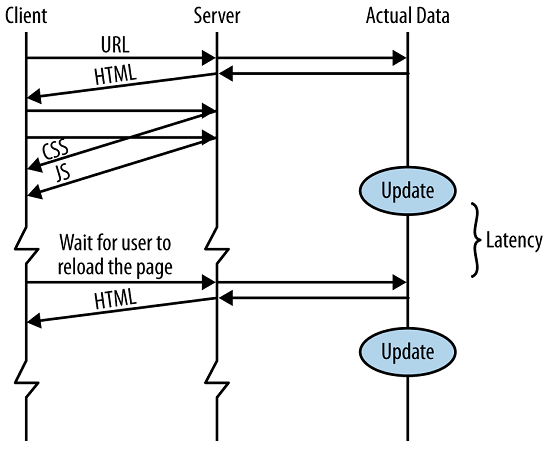
HTML5有一个Server-Sent Events(SSE)功能,允许服务端推送数据到客户端。(通常叫数据推送)。我们来看下,传统的WEB应用程序通信时的简单时序图:
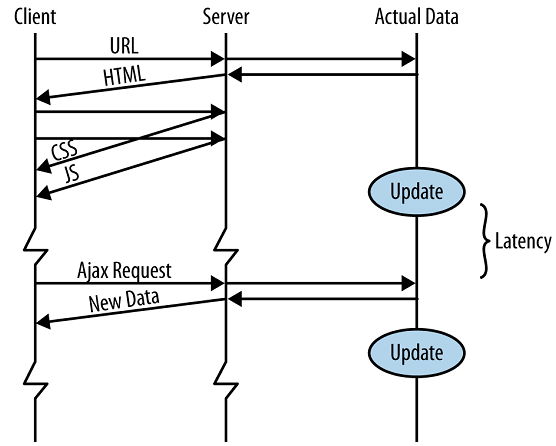
现在Web App中,大都有Ajax,是这样子:
基于数据推送是这样的,当数据源有新数据,它马上发送到客户端,不需要等待客户端请求。这些新数据可能是最新闻,最新股票行情,来自朋友的聊天信息,天气预报等。
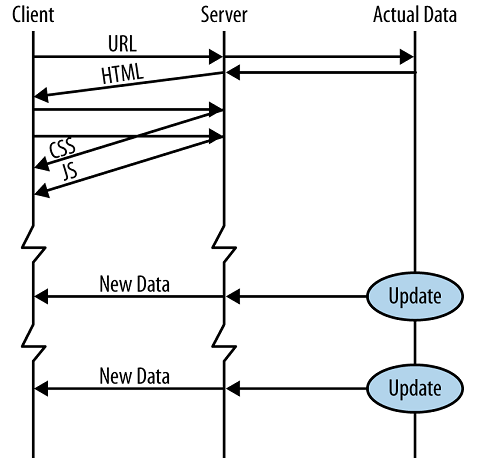
数据拉与推的功能是一样的,用户拿到新数据。但数据推送有一些优势。 你可能听说过Comet, Ajax推送, 反向Ajax, HTTP流,WebSockets与SSE是不同的技术。可能最大的优势是低延迟。SSE用于web应用程序刷新数据,不需要用户做任何动作。
你可能听说过HTML5的WebSockets,也能推送数据到客户端。WebSockets是实现服务端更加复杂的技术,但它是真的全双工socket, 服务端能推送数据到客户端,客户端也能推送数据回服务端。SSE工作于存在HTTP/HTTPS协议,支持代理服务器与认证技术。SSE是文本协议你能轻易的调试它。如果你需要发送大部二进制数据从服务端到客户端,WebSocket是更好的选择。
让我们来看一下很简单示例,先是前端basic_sse.html:
<!doctype html>
<html>
<head>
<meta charset="UTF-8">
<title>Basic SSE Example</title>
</head>
<body>
<pre id="x">Initializing...</pre>
<script>
var es = new EventSource("basic_sse.php");
es.addEventListener("message", function(e){
document.getElementById("x").innerHTML += "\n" + e.data;
},false);
</script>
</body>
</html>
.csharpcode, .csharpcode pre
{
font-size: small;
color: black;
font-family: consolas, "Courier New", courier, monospace;
background-color: #ffffff;
/*white-space: pre;*/
}
.csharpcode pre { margin: 0em; }
.csharpcode .rem { color: #008000; }
.csharpcode .kwrd { color: #0000ff; }
.csharpcode .str { color: #006080; }
.csharpcode .op { color: #0000c0; }
.csharpcode .preproc { color: #cc6633; }
.csharpcode .asp { background-color: #ffff00; }
.csharpcode .html { color: #800000; }
.csharpcode .attr { color: #ff0000; }
.csharpcode .alt
{
background-color: #f4f4f4;
width: 100%;
margin: 0em;
}
.csharpcode .lnum { color: #606060; }
后端先是一个basic_sse.php页面:
<?php
header("Content-Type: text/event-stream");
while(true){
echo "data:".date("Y-m-d H:i:s")."\n\n";
@ob_flush();@flush();
sleep(1);
}
?>
您可以使用Apache Server 这里我们把它们放在SinaAppEngine上,浏览器FireFox访问basic_see.html时,将继续返回当前时间:
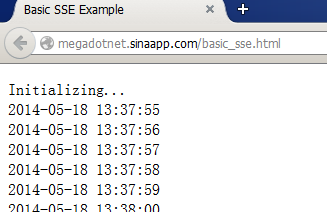
代码中数据格式是data: datetime. 在这儿,我们还可以使用Node.js来做服务端,datepush.js代码是这样的:
var http = require("http");
http.createServer(function(request, response){
response.writeHead(200, { "Content-Type": "text/event-stream" });
setInterval(function(){
var content = "data:" +
new Date().toISOString() + "\n\n";
response.write(content);
}, 1000);
}).listen(1234);
.csharpcode, .csharpcode pre
{
font-size: small;
color: black;
font-family: consolas, "Courier New", courier, monospace;
background-color: #ffffff;
/*white-space: pre;*/
}
.csharpcode pre { margin: 0em; }
.csharpcode .rem { color: #008000; }
.csharpcode .kwrd { color: #0000ff; }
.csharpcode .str { color: #006080; }
.csharpcode .op { color: #0000c0; }
.csharpcode .preproc { color: #cc6633; }
.csharpcode .asp { background-color: #ffff00; }
.csharpcode .html { color: #800000; }
.csharpcode .attr { color: #ff0000; }
.csharpcode .alt
{
background-color: #f4f4f4;
width: 100%;
margin: 0em;
}
.csharpcode .lnum { color: #606060; }
完善一下功能,如果我们用Node.js来返回HTML,代码是这样的datepush.js:
var http = require("http"), fs = require("fs");
var port = parseInt( process.argv[2] || 1234 );
http.createServer(function(request, response){
console.log("Client connected:" + request.url);
if(request.url!="/sse"){
fs.readFile("basic_sse.html", function(err,file){
response.writeHead(200, { 'Content-Type': 'text/html' });
var s = file.toString(); //file is a buffer
s = s.replace("basic_sse.php","sse");
response.end(s);
});
return;
}
//Below is to handle SSE request. It never returns.
response.writeHead(200, { "Content-Type": "text/event-stream" });
var timer = setInterval(function(){
var content = "data:" + new Date().toISOString() + "\n\n";
var b = response.write(content);
if(!b)console.log("Data got queued in memory (content=" + content + ")");
else console.log("Flushed! (content=" + content + ")");
},1000);
request.connection.on("close", function(){
response.end();
clearInterval(timer);
console.log("Client closed connection. Aborting.");
});
}).listen(port);
console.log("Server running at http://localhost:" + port);
.csharpcode, .csharpcode pre
{
font-size: small;
color: black;
font-family: consolas, "Courier New", courier, monospace;
background-color: #ffffff;
/*white-space: pre;*/
}
.csharpcode pre { margin: 0em; }
.csharpcode .rem { color: #008000; }
.csharpcode .kwrd { color: #0000ff; }
.csharpcode .str { color: #006080; }
.csharpcode .op { color: #0000c0; }
.csharpcode .preproc { color: #cc6633; }
.csharpcode .asp { background-color: #ffff00; }
.csharpcode .html { color: #800000; }
.csharpcode .attr { color: #ff0000; }
.csharpcode .alt
{
background-color: #f4f4f4;
width: 100%;
margin: 0em;
}
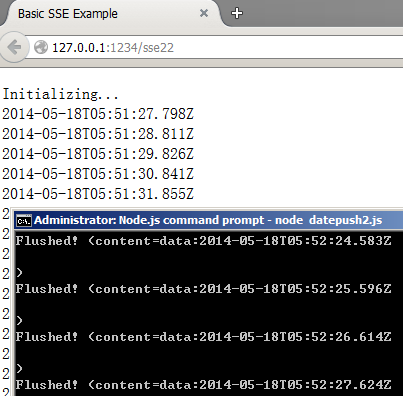
.csharpcode .lnum { color: #606060; }在控制台,运行 node datepush2.js,在浏览器中访问 http://127.0.0.1:1234/sse2 ,效果如下截图:
假设您曾经有javascript编程经验,代码并不难看懂。前端是HTML5,后端可以是PHP, JSP, Node.js, Asp.net等应用。
Tips: 不所有浏览器都支持SSE,可以使用以下Javascript来判断:
if(typeof(EventSource)!=="undefined"){
// Yes! Server-sent events support!
}
else{
// Sorry! No server-sent events support in our system
}
.csharpcode, .csharpcode pre
{
font-size: small;
color: black;
font-family: consolas, "Courier New", courier, monospace;
background-color: #ffffff;
/*white-space: pre;*/
}
.csharpcode pre { margin: 0em; }
.csharpcode .rem { color: #008000; }
.csharpcode .kwrd { color: #0000ff; }
.csharpcode .str { color: #006080; }
.csharpcode .op { color: #0000c0; }
.csharpcode .preproc { color: #cc6633; }
.csharpcode .asp { background-color: #ffff00; }
.csharpcode .html { color: #800000; }
.csharpcode .attr { color: #ff0000; }
.csharpcode .alt
{
background-color: #f4f4f4;
width: 100%;
margin: 0em;
}
.csharpcode .lnum { color: #606060; }
目前浏览器支持情况:
|
Browser |
Supported |
Notes |
|
Internet Explorer |
No |
IE is not supported |
|
Mozilla Firefox |
Yes |
Version 6.0 |
|
Google Chrome |
Yes |
GC is Supported |
|
Opera |
Yes |
Version 11 |
|
Safari |
Yes |
Version 5.0 |
希望对您WEB应用程序开发有帮助。
您可能感兴趣的文章:
作者:Petter Liu
出处:http://www.cnblogs.com/wintersun/
本文版权归作者和博客园共有,欢迎转载,但未经作者同意必须保留此段声明,且在文章页面明显位置给出原文连接,否则保留追究法律责任的权利。
该文章也同时发布在我的独立博客中-Petter Liu Blog。
HTML5的Server-Sent Events介绍的更多相关文章
- HTML5的Server-Sent Events介绍////////////////zzz
HTML5有一个Server-Sent Events(SSE)功能,允许服务端推送数据到客户端.(通常叫数据推送).我们来看下,传统的WEB应用程序通信时的简单时序图: 现在Web App中,大都有A ...
- html5/css3响应式布局介绍及设计流程
html5/css3响应式布局介绍 html5/css3响应式布局介绍及设计流程,利用css3的media query媒体查询功能.移动终端一般都是对css3支持比较好的高级浏览器不需要考虑响应式布局 ...
- Play Framework, Server Sent Events and Internet Explorer
http://www.tuicool.com/articles/7jmE7r Next week I will be presenting at Scala Days . In my talk I w ...
- 翻译1-在SQL Server 2016中介绍微软R服务
在SQL Server 2016中介绍微软R服务 源自:http://www.sqlservercentral.com/articles/Microsoft/145393/ 作者:tomakatrun ...
- server sent events
server sent events server push https://html5doctor.com/server-sent-events/ https://developer.mozilla ...
- HTML5 服务器发送事件(Server-Sent Events)介绍
w3cschool菜鸟教程 Server-Sent 事件 - 单向消息传递 Server-Sent 事件指的是网页自动获取来自服务器的更新. 以前也可能做到这一点,前提是网页不得不询问是否有可用的更新 ...
- HTML5分析实战WebSockets基本介绍
HTML5 WebSockets规范定义了API,同意web使用页面WebSockets与远程主机协议的双向交流. 介绍WebSocket接口,并限定了全双工通信信道,通过套接字网络.HTML5 We ...
- SQL Server Extended Events 进阶 2:使用UI创建基本的事件会话
第一阶中我们描述了如何在Profiler中自定义一个Trace,并且让它运行在服务器端来创建一个Trace文件.然后我们通过Jonathan Kehayias的 sp_SQLskills_Conver ...
- SQL Server Extended Events 进阶 1:从SQL Trace 到Extended Events
http://www.sqlservercentral.com/articles/Stairway+Series/134869/ SQL server 2008 中引入了Extended Events ...
随机推荐
- Jenkins的插件管理(安装和更新插件)
使用Jenkins的编译部署项目需要依赖各种插件 下面安装Jenkins的各种插件: 1.登录Jenkins进入以下界面: 2.点击 系统管理 : 3.点击 管理插件 : 4.点击 可选插件 选择你需 ...
- Workflow中InArgument与OutArgument区别
序号 InArgument[In参数] OutArgument[Out参数] 1 可以用VS设计器在xaml中定义[In参数] 可以用VS设计器在xaml中定义[Out参数] 2 在xaml中定义的 ...
- [ASP.net MVC] 将HTML转成PDF档案,使用iTextSharp套件的XMLWorkerHelper (附上解决显示中文问题)
原文:[ASP.net MVC] 将HTML转成PDF档案,使用iTextSharp套件的XMLWorkerHelper (附上解决显示中文问题) [ASP.net MVC] 将HTML转成PDF档案 ...
- jsoup简单的爬取网页数据
/** * Project Name:JavaTest * File Name:BankOfChinaExchangeRate.java * Package Name:com.lee.javatest ...
- HTML的音频和视频
目录 [1]媒体格式 音频格式 视频格式 [2]元素 插件元素 HTML5元素 [3]HTML音频 [4]HTML视频 前面的话 多媒体元素(比如视频和音频)存储于媒体文件中,确定媒体类型的最常用的方 ...
- 在ssh中利用Solr服务建立的界面化站内搜索---solr2
继上次匆匆搭建起结合solr和nutch的所谓站内搜索引擎之后,虽当时心中兴奋不已,可是看了看百度,再只能看看我的控制台的打印出每个索引项的几行文字,哦,好像差距还是有点大…… ...
- sublime 插件总结
sublime的强大之处在于其丰富的插件,记录一下常用的插件. 1.Color Highlighter(识别代码中的颜色) 默认如下显示 做如下修改,打开插件默认设置,并复制到用户设置,将 " ...
- Kettle实现MapReduce之WordCount
作者:Syn良子 出处:http://www.cnblogs.com/cssdongl 欢迎转载 抽空用kettle配置了一个Mapreduce的Word count,发现还是很方便快捷的,废话不多说 ...
- 实现在GET请求下调用WCF服务时传递对象(复合类型)参数
WCF实现RESETFUL架构很容易,说白了,就是使WCF能够响应HTTP请求并返回所需的资源,如果有人不知道如何实现WCF支持HTTP请求的,可参见我之前的文章<实现jquery.ajax及原 ...
- helper实现隐藏前台特效
想实现下面的功能:如下图所示 点击已结束按钮,使上面的红色跳转到已结束活动按钮上面,本来前台代码里面是使用了一个action来实现的,但是我改了点东西,使跳转不了. 前台代码 <ul class ...