
MRPT图形界面
mrpt-gui模块中提供了三个类以实现显示GUI窗口,每个都有特定的用途:
- mrpt::gui::CDisplayWindow : Displays 2D bitmap images, and optionally sets of points over them, etc.
- mrpt::gui::CDisplayWindow3D : A powerful 3D rendering window capable of displaying a mrpt::opengl::COpenGLScene. It features mouse navigation, Alt+Enter fullscreen switching, multiple viewports, etc. See this tutorial.
- mrpt::gui::CDisplayWindowPlots : Displays one or more 2D vectorial graphs, in a manner very similar to MATLAB "plot" commands.
All these window classes inherits from mrpt::gui::CBaseGUIWindow, which provides a set of methods and variables common to all the classes. It allow moving/resizing the windows, polling for key strokes, etc. All the classes in this library are in the namespace mrpt::gui
在Ubuntu中使用如下命令安装mrpt的APP和lib:
sudo apt-get install mrpt-apps libmrpt-dev
下面的代码绘制一幅正态分布概率密度函数图,自变量范围为0~5。
#include <mrpt/gui/CDisplayWindowPlots.h>

#include <mrpt/math/CVectorTemplate.h>

#include <mrpt/math/distributions.h>

#include <mrpt/system/os.h>

#include <mrpt/system/threads.h>

using namespace std;

using namespace mrpt;

using namespace mrpt::math;

using namespace mrpt::gui;

// ------------------------------------------------------

//                TestDisplayPlots

// ------------------------------------------------------

int main()

{

    CDisplayWindowPlots     win("Example of function plot",,); //width:500, height:400

    // Generate data for a 2D plot:

    CVectorDouble  X,Y;

    for (double x=;x<;x+=0.01f)

    {

        //Evaluates the multivariate normal (Gaussian) distribution at a given point "x".

        double y = normalPDF(x, ,0.3);

        X.push_back(x);

        Y.push_back(y);

    }

    //Adds a new layer with a 2D plot based on two vectors of X and Y points, using a MATLAB-like syntax.

    /*********************************************************************

    The lineFormat string is a combination of the following characters:

    Line styles:

    '.': One point for each data point

    '-': A continuous line

    ':': A dashed line

    Colors:

    k: black

    r: red

    g: green

    b: blue

    m: magenta

    c: cyan

    Line width:

    '1' to '9': The line width (default=1)

    Examples:

    'r.' -> red points.

    'k3' or 'k-3' -> A black line with a line width of 3 pixels.

    ********************************************************************/

    win.plot(X,Y,"b-2");

    //Enable/disable the feature of pan/zoom with the mouse (default=enabled)

    win.enableMousePanZoom(true);

    //Enable/disable the fixed X/Y aspect ratio fix feature

    win.axis_equal(false);

    //Fix automatically the view area according to existing graphs

    win.axis_fit();

    //Changes the position of the window on the screen.

    win.setPos(,);

    cout << "Press any key to exit..." << endl;

    win.waitForKey();

    //while (!mrpt::system::os::kbhit() &&win.isOpen())

        //mrpt::system::sleep(50);

    return ;

}
使用CMake来生成makefile:
SET(sampleName displayPlots)

SET(PRJ_NAME "EXAMPLE_${sampleName}")

# ---------------------------------------

# Declare a new CMake Project:

# ---------------------------------------

PROJECT(${PRJ_NAME})

# These commands are needed by modern versions of CMake:

CMAKE_MINIMUM_REQUIRED(VERSION 2.6)

FIND_PACKAGE(MRPT REQUIRED base;gui)

# ---------------------------------------------

# TARGET:

# ---------------------------------------------

# Define the executable target:

ADD_EXECUTABLE(${sampleName} test.cpp  )

# Add the required libraries for linking:

TARGET_LINK_LIBRARIES(${sampleName}

    ${MRPT_LIBS}  # This is filled by FIND_PACKAGE(MRPT ...)

    ""  # Optional extra libs...

    )
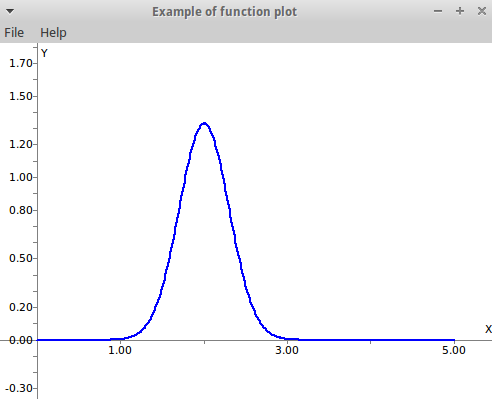
其中,enableMousePanZoom函数参数为true时可以进行如下操作:滚动鼠标中键,可以上下平移函数图象;按住鼠标右键可以对图像进行拖动;鼠标左键可以进行框选将函数图象放大。当设为false时这些操作被禁用。axis_equal函数参数为true时,X、Y坐标轴的单位长度将相等,即以相同的比例显示函数图象。axis_fit()函数可以用来自动调整函数图象以适应窗口。
参考:
http://www.mrpt.org/MRPT_in_GNU/Linux_repositories
https://github.com/MRPT/mrpt/tree/master/samples/displayPlots
MRPT图形界面的更多相关文章
- Ubuntu设置root用户登录图形界面
Ubuntu默认的是root用户不能登录图形界面的,只能以其他用户登录图形界面.这样就很麻烦,因为权限的问题,不能随意复制删除文件,用gedit编辑文件时经常不能保存,只能用vim去编辑. 解决的办法 ...
- VMware安装CentOS时,无法以图形界面安装解决办法
有的同学问: 用虚拟机软件(vmware.VirtualBox)安装CentOS系统时, 安装过程中没有中文,也没有出现图形界面,都是以命令行方式去安装, 有时候又会出现图形界面,不知道哪里配置的问题 ...
- Linux安装xwindow图形界面(转载)
http://jingyan.baidu.com/article/7f766daf42ce984100e1d045.html 1.检查Linux系统是否能够联网. 2.执行命令 yum -y grou ...
- 修改/etc/profile和/etc/environment导致图形界面无法登陆的问题
在使用ubuntu开发时,往往要修改PATH变量,有时会通过修改/etc/profile和/etc/environment来修改默认的PATH变量,但是一旦出错,很容易造成无法登陆进入图形界面的问题. ...
- Linux启动界面切换:图形界面-字符界面(转)
Linux字符界面切换到图形界面 由字符界面切换到图形界面可用两种简单方法实现: 1.在字符界面输入startx或init 5 . 2.通过编辑/etc/inittab文件实现默认进入图形界面. 把其 ...
- 设置CentOS不启用图形界面
由于linux服务器放在机房长时间运行,或者只是在后台运行,一般通过secureCRT连接服务器: 所以在虚拟机上都不需要图形界面,而且图形界面占用内存. 所以,我们可以通过简单的设置,让linux只 ...
- [.net 面向对象程序设计进阶] (25) 团队开发利器(四)分布式版本控制系统Git——使用GitStack+TortoiseGit 图形界面搭建Git环境
[.net 面向对象程序设计进阶] (25) 团队开发利器(四)分布式版本控制系统Git——使用GitStack+TortoiseGit 图形界面搭建Git环境 本篇导读: 前面介绍了两款代码管理工具 ...
- 为CentOS7(文字界面操作)系统安装gnome图形界面程序
1.安装gnome sudo yum groupinstall "GNOME Desktop" "Graphical Administration Tools" ...
- no screens found! ubuntu进不了图形界面了
no screens found! ubuntu进不了图形界面了 结果是没装显卡 startx error. reinstall xorg, x server doesn't work. driver ...
随机推荐
- SQL性能优化
引言: 以前在面试的过程中,总有面试官问道:你做过sql性能优化吗?对此,我的答复是没有.一次没有不是自己的错误,两次也不是,但如果是多次呢?今天痛下决心,把有关sql性能优化的相关知识总结一下,以便 ...
- 微服务之Swagger
Swagger使用 1. Swagger UI 按以下步骤配置,项目启动后访问:http://localhost:8080/swagger-ui.html 1.1 添加依赖 <dependenc ...
- leetcode 419
题目说明: Given an 2D board, count how many different battleships are in it. The battleships are represe ...
- MWeb 1.7.1 版发布!支持导出为 RTF 和 Docx、发布到 Evernote 带样式、文档库备份和新网站主题等大量改进!
编辑器及发布服务改进 增加设置图片宽度和居左.居右.居中的语法. 如: 这样表示设置图片宽度为 450.其中 -w450 为设置语法,生成 HTML 时会自动 ...
- MWeb 1.6 发布!Dark Mode、全文搜寻、发布到Wordpress、Evernote 等支持更新、编辑/预览视图模式等
Dark Mode 使用 View - Dark Mode 或快捷键 CMD + Option + L 开启或关闭 Dark Mode.可以在设置中设置 Dark Mode 状态下编辑器所使用的样式, ...
- poj 2376 Cleaning Shifts
http://poj.org/problem?id=2376 Cleaning Shifts Time Limit: 1000MS Memory Limit: 65536K Total Submi ...
- JSP以及JSP解析原理
什么是JSP? JSP全称是Java Server Pages,它和servle技术一样,都是SUN公司定义的一种用于开发动态web资源的技术. JSP这门技术的最大的特点在于,写jsp就像在写htm ...
- linux 配置 ftp
1.检测是否安装ftp 2.apt-get install 安装 (如果安装失败 执行apt-get install update<如果update失败 配置dns让自己的服务器 可以ping ...
- android 命令编译
引用:http://jojol-zhou.iteye.com/blog/729254 Android 命令行手动编译打包过程图 [详细步骤]: 1使用aapt生成R.java类文件: 例: F:\e ...
- java第三次作业
import java.util.Scanner; public class Practice { public static void main(String[] args) { int nextV ...