
ORACLE 10升级到10.2.0.5 Patch Set遇到的内核参数检测失败问题
在测试ORACLE 10.2.0.4升级到10.2.0.5 Patch Set的过程中,遇到一个内核参数检查失败的问题,具体错误信息如下所示
实验环境:
操作系统:Oracle Linux Server release 5.7
内存:4G
数据库版本:10.2.0.4.0

Checking operating system requirements ...
Expected result: One of redhat-6,redhat-5,redhat-4,redhat-3,SuSE-11,SuSE-10,SuSE-9,asianux-3,asianux-2,asianux-1
Actual Result: redhat-5
Check complete. The overall result of this check is: Passed
=======================================================================
Checking operating system package requirements ...
Checking for make-3.81; found make-1:3.81-3.el5. Passed
Checking for binutils-2.17.50.0.6; found binutils-2.17.50.0.6-14.el5. Passed
Checking for gcc-4.1.1; found gcc-4.1.2-51.el5. Passed
Checking for libaio-0.3.106; found libaio-0.3.106-5. Passed
Checking for libstdc++-4.1.1; found libstdc++-4.1.2-51.el5. Passed
Check complete. The overall result of this check is: Passed
=======================================================================
Checking kernel parameters
Checking for semmsl=250; found semmsl=250. Passed
Checking for semmns=32000; found semmns=32000. Passed
Checking for semopm=100; found semopm=100. Passed
Checking for semmni=128; found semmni=128. Passed
Checking for shmmax=1073741824; found shmmax=68719476736. Passed
Checking for shmmni=4096; found shmmni=4096. Passed
Checking for shmall=2097152; found shmall=4294967296. Passed
Checking for file-max=101365; found file-max=65536. Failed <<<<
Checking for VERSION=2.6.18; found VERSION=2.6.32-200.13.1.el5uek. Passed
Checking for ip_local_port_range=9000 - 65500; found ip_local_port_range=1024 - 65000. Failed <<<<
Checking for rmem_default=1048576; found rmem_default=262144. Failed <<<<
Checking for rmem_max=1048576; found rmem_max=262144. Failed <<<<
Checking for wmem_default=262144; found wmem_default=262144. Passed
Checking for wmem_max=262144; found wmem_max=1048576. Passed
Check complete. The overall result of this check is: Failed <<<<
Problem: The kernel parameters do not meet the minimum requirements (see above).
Recommendation: Perform operating system specific instructions to update the kernel parameters.
=======================================================================
Checking Recommended glibc version
Expected result: ATLEAST=2.5-12 NOT_EQUALS=2.5-18
Actual Result: 2.5-65
Check complete. The overall result of this check is: Passed
=======================================================================
Checking physical memory requirements ...
Expected result: 922MB
Actual Result: 3956MB
Check complete. The overall result of this check is: Passed
=======================================================================
Checking available swap space requirements ...
Expected result: 3956MB
Actual Result: 13987MB
Check complete. The overall result of this check is: Passed
有点纳闷,为什么这些参数在10.2.0.1安装和升级到10.2.0.4的时候都通过检测,但是在应用补丁10.2.0.5时反而不能通过了呢?我们先看看原先的值

1:Checking for file-max=101365; found file-max=65536. Failed <<<<
这个失败,很好理解,因为processes为 150,而参数65536 = 512*128 , 我们的进程数为150,大于128(fs.file-max = 512 x processes (for example 65536 for 128 processes) ,所以系统给了一个推荐值(具体怎么计算,还没弄清楚)
SQL> show parameter processes;
NAME TYPE VALUE
------------------------------------ ----------- ------------------------------
aq_tm_processes integer 0
db_writer_processes integer 1
gcs_server_processes integer 0
job_queue_processes integer 0
log_archive_max_processes integer 2
processes integer 150
2:Checking for ip_local_port_range=9000 - 65500; found ip_local_port_range=1024 - 65000. Failed <<<<
这个参数,官方文档推荐就是net.ipv4.ip_local_port_range = 9000 65500 ,也没啥好说的。 The runInstaller (OUI) checks may expect this to be the old guidance of "1024 65000". The new guidance from Oracle development is "9000 65500". Please allow the runInstaller (OUI) to proceed with the new guidance from Oracle development.
3:关键是下面这几个参数为啥会失败,有点纳闷?
Checking for rmem_default=1048576; found rmem_default=262144. Failed <<<<
Checking for rmem_max=1048576; found rmem_max=262144. Failed <<<<
Check complete. The overall result of this check is: Failed <<<<
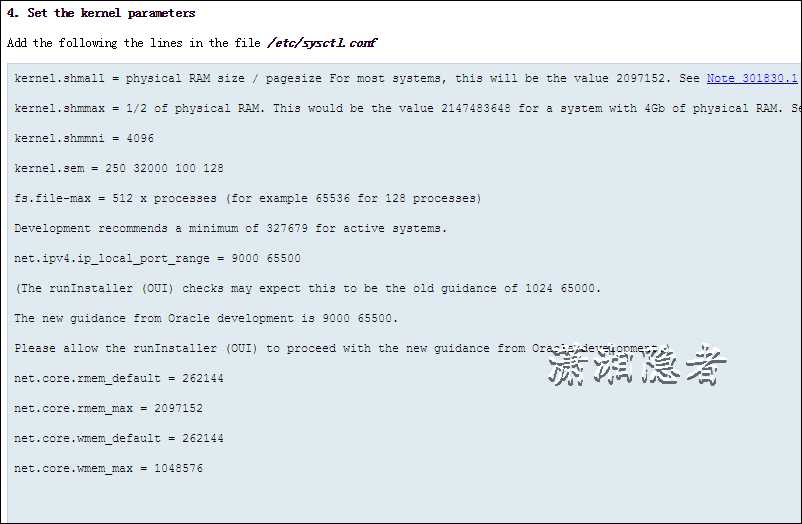
在官方文档Requirements For Installing Oracle10gR2 On RHEL 5/OEL 5 (x86_64) (文档 ID 421308.1)里面有下面介绍,也是上面的配置值
4. Set the kernel parameters
Add the following the lines in the file /etc/sysctl.conf
kernel.shmall = physical RAM size / pagesize For most systems, this will be the value 2097152. See Note 301830.1 for more information.
kernel.shmmax = 1/2 of physical RAM. This would be the value 2147483648 for a system with 4Gb of physical RAM. See Note 567506.1 for more information.
kernel.shmmni = 4096
kernel.sem = 250 32000 100 128
fs.file-max = 512 x processes (for example 65536 for 128 processes)
Development recommends a minimum of 327679 for active systems.
net.ipv4.ip_local_port_range = 9000 65500
(The runInstaller (OUI) checks may expect this to be the old guidance of 1024 65000.
The new guidance from Oracle development is 9000 65500.
Please allow the runInstaller (OUI) to proceed with the new guidance from Oracle development.)
net.core.rmem_default = 262144
net.core.rmem_max = 2097152
net.core.wmem_default = 262144
net.core.wmem_max = 1048576
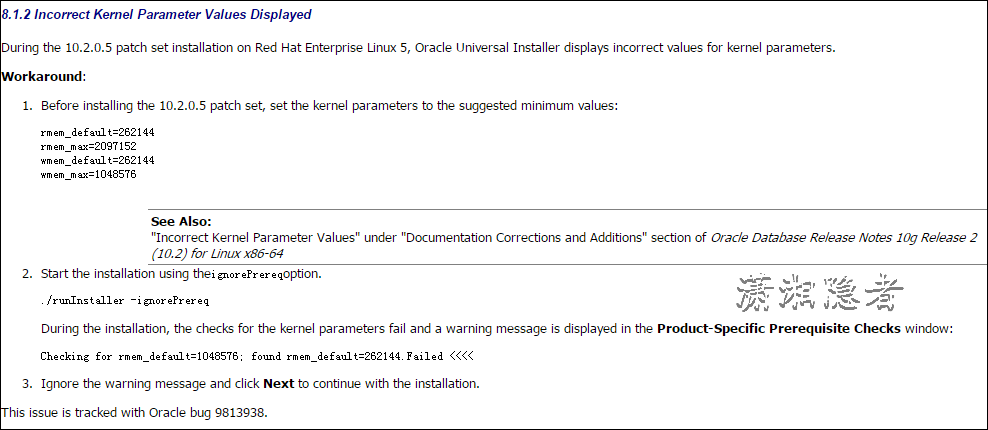
后面在官方文档 Requirements For Installing Oracle10gR2 On RHEL 5/OEL 5 (x86_64) (文档 ID 421308.1) 里面看到,这个是ORACLE的一个bug来的,可以忽略这个错误,具体见截图
参考资料:
https://support.oracle.com/epmos/faces/DocumentDisplay?_afrLoop=344982606646540&parent=DOCUMENT&sourceId=851598.1&id=421308.1&_afrWindowMode=0&_adf.ctrl-state=1cop5qqt49_151
https://support.oracle.com/epmos/faces/DocumentDisplay?_afrLoop=438495963667013&id=1280606.1&displayIndex=1&_afrWindowMode=0&_adf.ctrl-state=820qp5uyz_4
ORACLE 10升级到10.2.0.5 Patch Set遇到的内核参数检测失败问题的更多相关文章
- 探索Oracle数据库升级6 11.2.0.4.3 Upgrade12c(12.1.0.1)
探索Oracle数据库升级6 11.2.0.4.3 Upgrade12c(12.1.0.1) 一.前言: Oracle 12c公布距今已经一年有余了,其最大亮点是一个能够插拔的数据库(PD ...
- 突破10万高并发的nginx性能优化经验(含内核参数优化)
写的很好,推荐阅读. 转载:http://www.cnblogs.com/kevingrace/p/6094007.html 在日常的运维工作中,经常会用到nginx服务,也时常会碰到nginx因高并 ...
- Oracle 内核参数
安装Oracle的时候,可以参考Oracle 的安装文档,来设置相关内核参数的值,但是有些参数的值还是需要根据我们自己的情况来进行调整.注:不同系统的参数不同,本篇针对linux. 一.Linux 系 ...
- oracle内核参数详解
一.前言 在生产中,我们安装oracle数据库时,为达到最优我们需要对操作系统的内核参数进行一定的调整.主要从内存.cpu.io以及网络等方面,根据实际情况进行调整.以下参数可供大家参考,如有不当之处 ...
- Oracle数据库升级(10.2.0.4->11.2.0.4)
环境: RHEL5.4 + Oracle 10.2.0.4 目的: 在本机将数据库升级到11.2.0.4 之前总结的Oracle数据库异机升级:http://www.cnblogs.com/jyzha ...
- Linux下Oracle 10.2.0.1升级到10.2.0.4总结
最近部署测试环境时,将测试环境ORACLE数据库从10.2.0.1升级到了10.2.0.4,顺便整理记录一下升级过程. 实验环境: 操作系统:Oracle Linux Server release 5 ...
- 示例Oracle 10.2.0.1.0升级到10.2.0.4.0一例
1.查看当前系统版本 [oracle@std Disk1]$ sqlplus '/as sysdba' SQL*Plus: Release - Production on Thu Jan :: Cop ...
- CENTOS 6.4 安装oracle 10g,手工建库及升级到10.2.0.5
一. 数据库软件安装 参照官方手册 1.安装rpm包 注这里的yum直接用163的yum yum -y install binutils compat-libstdc++-33 compat-libs ...
- 升级_宽视野Oracle图形升级(升级后dbca建库)—10.2.0.1.0提拔10.2.0.5.0
***********************************************声明********************************************** 原创作 ...
随机推荐
- 基于TCP和多线程实现无线鼠标键盘-Robot
Windows端收到Android端传递来的键盘或鼠标操作信息以后,需要根据这些信息操作鼠标或键盘,这就需要用到java.awt.Robot类,该类用于控制鼠标或键盘. 在Java主窗体中定义: pu ...
- 深度技术32位Win7系统Ghost版2014年
深度技术32位Win7系统Ghost版,GhostWin7是指使用Ghost软件做成压缩包的Windows7,俗称克隆版Win7.用克隆版的目的是节省安装时间.本作品在采用微软封装部署技术的基础上,结 ...
- 根据商品名称、价格区间检索商品的SQL语句
如果名称和价格为空会检索出所有的数据 select * from TblProduct where (@proName='' or chvProName like '%'+@proName+'%') ...
- Scalaz(3)- 基础篇:函数概括化-Generalizing Functions
Scalaz是个通用的函数式编程组件库.它提供的类型.函数组件都必须具有高度的概括性才能同时支持不同数据类型的操作.可以说,scalaz提供了一整套所有编程人员都需要的具有高度概括性的通用函数,它是通 ...
- java多线程-线程创建
Java 线程类也是一个 object 类,它的实例都继承自 java.lang.Thread 或其子类. 可以用如下方式用 java 中创建一个线程,执行该线程可以调用该线程的 start()方法: ...
- mvc和iis工作原理
学习IIS & MVC的运行原理 我一直疑惑于以下问题,从客户端发出一个请求,请求到达服务器端是怎样跟iis衔接起来的,而iis又是怎样读取我发布的代码的,并返回服务器上的文件.这其中是怎样的 ...
- Strip JS – 低侵入,响应式的 Lightbox 效果
Strip 是一个灯箱效果插件,显示的时候只会覆盖部分的页面,这使得侵扰程度较低,并留出了空间与页面上的大屏幕,同时给予小型移动设备上的经典灯箱体验.Strp JS 基于 jQuery 库实现,支持 ...
- 高性能javascript学习笔记系列(3) -DOM编程
参考 高性能javascript 文档对象模型(DOM)是独立于语言的,用于操作XML和HTML文档的程序接口API,在浏览器中主要通过DOM提供的API与HTML进行交互,浏览器通常会把DOM和ja ...
- window7安装git详解
1.Git详细介绍 一.Git的诞生 Linus虽然创建了Linux,但Linux的壮大是靠全世界热心的志愿者参与的,这么多人在世界各地为Linux编写代码,那Linux的代码是如何管理的呢? 事实是 ...
- Node.js的基础学习1
nodejs windows下的调用方法: C:\Users\owen>node helloworld.jsHello WorldHello: 25 C:\Users\owen>nod ...