
如果使用EntityFramework6链接Mysql
web.config文件中加入这些:

<entityFramework codeConfigurationType="MySql.Data.Entity.MySqlEFConfiguration, MySql.Data.Entity.EF6">

    <defaultConnectionFactory type="System.Data.Entity.Infrastructure.SqlConnectionFactory, EntityFramework" />

    <providers>

      <provider invariantName="MySql.Data.MySqlClient" type="MySql.Data.MySqlClient.MySqlProviderServices, MySql.Data.Entity.EF6" />

      <provider invariantName="System.Data.SqlClient" type="System.Data.Entity.SqlServer.SqlProviderServices, EntityFramework.SqlServer" />

    </providers>

  </entityFramework>

  <connectionStrings>

    <add name="MyContext" connectionString="Data Source=localhost;port=3306;Initial Catalog=MyBook;user id=root;password=123456;" providerName="MySql.Data.MySqlClient" />

  </connectionStrings>
新建User类
using System;

using System.Collections.Generic;

using System.ComponentModel.DataAnnotations;

using System.Linq;

using System.Web;

namespace CodeFirstMysql

{

    public class User

    {

        public int Id { get; set; }

        public string UserName { get; set; }

        //默认string映射到mysql里是longtext类型的,加长度之后就变成varchar了
     [MaxLength(30)]

        public string PassWord { get; set; }

    }

}
新建MyContext类,此类继承DbContext
using System;

using System.Collections.Generic;

using System.Data.Entity;

using System.Linq;

using System.Text;

namespace CodeFirstMysql

{

    public class MyContext : DbContext

    {

        public MyContext()

            : base("name=MyContext")//web.config中connectionstring的名字

        {

        }

        public DbSet<User> Users { get; set; }

    }

}
Default.aspx.cs文件内容:
using System;

using System.Collections.Generic;

using System.Data.Entity;

using System.Linq;

using System.Web;

using System.Web.UI;

using System.Web.UI.WebControls;

namespace CodeFirstMysql

{

    public partial class Default : System.Web.UI.Page

    {

        protected void Page_Load(object sender, EventArgs e)

        {

            InitData();

        }

        private void InitData()

        {

            Database.SetInitializer(new DropCreateDatabaseIfModelChanges<MyContext>());

            var context = new MyContext();
       //插入一行值

            context.Users.Add(new User {UserName = "EF6-MySQL-Code-First"});

            context.SaveChanges();

        }

    }

}
运行之后看效果:
show tables:

desc table:
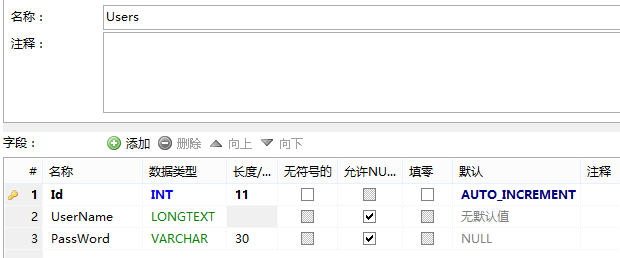
表中数据:

如果使用EntityFramework6链接Mysql的更多相关文章
- PDO链接mysql学习笔记
<?php //PDO链接mysql//dsn三种写法: //dsn01 $dsn = 'mysql:host=localhost;dbname=mysql'; //$dsn = 'mysql: ...
- Mssql链接mysql数据库
最近在做mysql数据库实时同步到mssql数据库的方案,花了一周时间,测试通过了,在实际机器上测试出现了若干问题.第一个问题就是在mssql上链接mysql的问题. 第一步,安装 Mysql ODB ...
- 如何用DOS 链接mysql
1.Ctrl+R 打开DOS窗口 2.键入 cd\ 回车进入C盘根目录 3.进入mysql bin目录下 操作mysql命令 4.输入连接数据库命令 mysql -hlocalhost -uroot ...
- SQL Server链接MySQL实践
最近在访问多数据库的时候进行了SQLServer链接MySQL数据的实践,现总结如下: 一. 安装mysql-connector-odbc驱动: 1. 在SQL Server服务器的机器上安装mys ...
- Python学习笔记9-Python 链接MySql数据库
Python 链接MySql数据库,方法很简单: 首先需要先 安装一个MySql链接插件:MySQL-python-1.2.3.win-amd64-py2.7.exe 下载地址:http://dev. ...
- Tomcat通过JNDI方式链接MySql数据库
原文:Tomcat通过JNDI方式链接MySql数据库 拷贝MySQL的JDBC驱动到Tomcat的lib路径下 配置全局数据源或者单个Web应用的局部数据源 局部数据源 在Tomcat的conf/C ...
- visual studio 2012 链接Mysql 5.1
首先在nuGet 下载MySql.Data.Entity 安装 mysql for visual studio http://www.mysql.com/why-mysql/windows/visua ...
- C# 链接MySql数据库
C# 链接MySql数据库只得注意的几点: 1.C#链接MySql数据库要在网上下载一个mysql-connector-net-6.0.4-noinstall.rar 这里面放的都是一堆dll .将 ...
- python链接mysql
1.安装MySQLdb MySQLdb 是用于Python链接Mysql数据库的接口,它实现了 Python 数据库 API 规范 V2.0,基于 MySQL C API 上建立的. 下载地址: ht ...
随机推荐
- hadoop-处理小文件
一个Hadoop程序的优化过程 – 根据文件实际大小实现CombineFileInputFormat http://www.rigongyizu.com/hadoop-job-optimize-com ...
- 基于Android的百度地图实现输入地址返回经纬度信息
1 解决方案一 此处解决办法参照自网友文章,对于输入的地址信息要求:城市名+具体地址名. 如果输入的地址信息只有具体地址名,而没有城市名,可能解析不出经纬度信息.还有就是解析出的经纬度再反向解析显示再 ...
- sell 项目 订单表 设计 及 创建
1.数据库设计 2.订单表 创建 /** * 订单表 */ create table `order_master` ( `order_id` varchar(32) not null, `buyer_ ...
- Java反射机制的使用(全)
转载请注明原文地址:http://www.cnblogs.com/ygj0930/p/6566957.html 一:反射是什么 JAVA反射机制是在运行状态中,对于任意一个类,都能够知道这个类的所有 ...
- 腾讯云ubuntu搭建tomcat
转载请注明原文地址:http://www.cnblogs.com/ygj0930/p/6377945.html 一:工具准备 Putty+Xftp5,见上一篇博文:http://www.cnblogs ...
- sqlserver 日志查看
sqlserve的ErrorLog文件有时候会碰到文件很大的情况,可能通过命令xp_readerrorlog 或 sp_readerrorlog 执行,可以加搜索文本或起止时间 -- 日志查看 --e ...
- Spring Cloud Edgware SR3 让Zuul支持形如 /xxx和/xxx/yyy 格式的路径配置
在包路径:org.springframework.cloud.netflix.zuul.filters 下,新建类SimpleRouteLocator,取代jar包中的类.内容如下: /* * Cop ...
- 解决input 有多少个radio绑定change事件,手动触发就会执行多少次问题
如题,相信大家都会遇到这个问题,那么为什么会触发多次呢?其实当你用jquery绑定onchange事件的时候你就无形中给每个radio绑定了事件,所以才会出现执行多少次的问题了,那么如何解决呢,其实这 ...
- [Spring学习笔记 1 ] Spring 简介,初步知识--Ioc容器详解 基本原理。
一.Spring Ioc容器详解(1) 20131105 1.一切都是Bean Bean可是一个字符串或者是数字,一般是一些业务组件. 粒度一般比较粗. 2.Bean的名称 xml配置文件中,id属性 ...
- Ubuntu 12.04嵌入式交叉编译环境arm-linux-gcc搭建过程图解
Linux版本:Ubuntu 12.04 内核版本:Linux 3.5.0 交叉编译器版本:arm-linux-gcc-4.4.3 交叉编译器下载 见这篇文章http://www.linuxidc.c ...