
[PowerShell Utils] Remotely install Hyper-V and Failover Cluster feature on a list of windows 2012 servers
Hello everyone, this is the second post of the series. .
Background
===============
In my environment, I have 15 Windows hosts. I need to configure them from the OS installation to configure fail over cluster and then create and run VMs on them. Without scripting, manually complete related tasks would be very bored and easy to make mistakes. I started using PowerShell and it really helped ease the pain.
Now, let's take a look at the second script that you will love to use.
What can this one do
===============
I have 15 hosts recently joined domain, and I want all of them to join a fail over cluster. The first thing I am facing is to install hyper-v and fail over cluster feature on all these 15 hosts.
Installing Hyper-V feature requires to restart the host.
This script will help you install these two features on all the hosts remotely, avoiding constantly check if the server is back online. Everything in one click!
Logic Intro
===============
First, the script will turn off the windows firewall on target host.
Second, you will see whether hyper-v feature is already installed. If did, continue. If not, hyper-v feature will be installed.
Hyper-V feature installation requires server restart. The script will restart the host and keep trying to contact the target server until it gets back online.
Third, check if fail over cluster feature needs to be installed.
Finally, list these two features status on this server.
All above steps will be repeated for another server.
Script is here
===============
PowerShell
#

#Functions defined here

#

function autoinstall-hypervfailoverfeatures ($ComputerName)

{

    #Turnoff windows firewall, or Test-Connection will fail

    Get-NetFirewallProfile -CimSession $ComputerName | Set-NetFirewallProfile -Enabled False

    Get-WindowsFeature -Name Failover-Clustering -ComputerName $ComputerName

    Get-WindowsFeature -Name hyper-v -ComputerName $ComputerName

    #Verify features and install them

    $hypervFeature = Get-WindowsFeature -Name Hyper-V -ComputerName $ComputerName

    if($hypervFeature.Installed)

    {

        Write-Host "Hyper-V installed already on $ComputerName."

    }

    else

    {

        Write-Host "Installing Hyper-V feature on $ComputerName."

        Install-WindowsFeature –Name Hyper-V -ComputerName $ComputerName -IncludeManagementTools -Restart

    }

    #Wait for restart command to take effect, or fail over cluster feature will start installing, failing the whole thing.

    Start-Sleep -s 10

    $count = 1

    While (!(Test-Connection -Cn $ComputerName -BufferSize 16 -Count 1 -Quiet))

    {

        $count++

        $totalseconds = $count * 5

        Write-Host "$ComputerName did not response to ping command."

        Write-Host "Waited $totalseconds seconds. Wait for another 5 seconds, will try again."

        Start-Sleep -s 5

    }

    Write-host "Server is now alive. Proceed......"

    $failoverclusterFeature = Get-WindowsFeature -Name Failover-Clustering -ComputerName $ComputerName

    if($failoverclusterFeature.Installed)

    {

        Write-Host "Failover cluster installed already on $ComputerName."

    }

    else

    {

        Write-Host "Installing Failover cluster feature on $ComputerName"

        Install-WindowsFeature –Name Failover-Clustering -ComputerName $ComputerName -IncludeManagementTools -Restart

    }

    Write-Host "Features status shown below:"

    Get-WindowsFeature -Name Failover-Clustering -ComputerName $ComputerName

    Get-WindowsFeature -Name hyper-v -ComputerName $ComputerName

}

function AutoInstall-HypverVFailoverFeatures-Exec

{

     param ([string[]]$computernames)

     foreach  ($computer in $computernames)

     {

        autoinstall-hypervfailoverfeatures($computer)

     }

}

#

#List all the server you want to install Hyper-V and Failover cluster

#

AutoInstall-HypverVFailoverFeatures-Exec host9,host10
At last
===============
Wensheng and I worked together on this script.
Thank you, Wensheng.
24th Nov Update
===============
Wensheng wrote a shorter version, here it is.
Note this is a workflow of PowerShell, and it is parallel, meaning all the hosts operates at the same time! And he used Restart-Computer cmdlet as an alternative to keep pinging target computer. A lot better.
Usage:
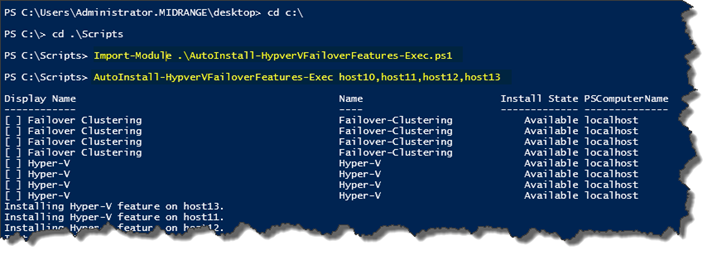
PowerShell
 workflow AutoInstall-HypverVFailoverFeatures-Exec

{

    param ([string[]]$computernames)

    foreach ($computer in $computernames)

    {

        #Turnoff windows firewall

        "Turning off windows firewall on $computer."

        Get-NetFirewallProfile -CimSession $computer | Set-NetFirewallProfile -Enabled False

        #show cluster and hyper-v feature status

        "Showing features status on $computer."

        Get-WindowsFeature -Name Failover-Clustering,hyper-v -ComputerName $computer

    }

    foreach -parallel ($computer in $computernames)

    {

        #Verify features and install them

        $hypervFeature = Get-WindowsFeature -Name Hyper-V -ComputerName $computer

        if($hypervFeature.Installed)

        {

            "Hyper-V installed already on $computer."

        }

        else

        {

            "Installing Hyper-V feature on $computer."

            Install-WindowsFeature –Name Hyper-V -ComputerName $computer -IncludeManagementTools

            Restart-Computer -Wait -PSComputerName $computer -Force

        }

        $failoverclusterFeature = Get-WindowsFeature -Name Failover-Clustering -ComputerName $computer

        if($failoverclusterFeature.Installed)

        {

            "Failover cluster installed already on $computer."

        }

        else

        {

            "Installing Failover cluster feature on $computer"

            Install-WindowsFeature –Name Failover-Clustering -ComputerName $computer -IncludeManagementTools

        }

    }

    foreach  ($computer in $computernames)

    {

        "$computer Current features status shown below:"

        Get-WindowsFeature -Name Failover-Clustering,hyper-v -ComputerName $computer

    }

}
Happy Powershelling, everybody.
[PowerShell Utils] Remotely install Hyper-V and Failover Cluster feature on a list of windows 2012 servers的更多相关文章
- What is a Microsoft Failover Cluster Virtual Adapter
What is a Microsoft Failover Cluster Virtual Adapter anyway? A question often asked is, "What i ...
- Hyper V NAT 网络设置 固定IP / DHCP
Hyper V 默认的Default Switch同时支持了NAT网络以及DHCP,虚拟机能够访问外网. 但使用过程中发现这个IP网段经常变化,而且Hyper V没有提供管理其NAT网络与DHCP的图 ...
- windows server 2008 r2 企业版 hyper v做虚拟化的相关问题处理
windows server 2008 r2 企业版 hyper v做虚拟化的相关问题处理 今天在dell r710 上用windows server 2008 r2企业版hyper v 做虚拟化,添 ...
- 设置Hyper V
1.打开服务器管理器 2.添加角色和功能 3.安装类型 -> 基于角色或基于功能的安装 4.服务器选择 -> 下一步 5.服务器角色 勾选"Hyper V"
- bundle install 出现 'gem install mysql2 -v '0.3.15' succeeds before bunding '
bundle install 出现 'gem install mysql2 -v '0.3.15' succeeds before bunding ' 解决:sudo apt-get install ...
- HYPER -V 独立安装的 2016版本 中文版 下载好慢啊
HYPER -V 独立安装的 2016版本 中文版 下载好慢啊
- Powershell script to install Windows Updates (msu) from folder
######################################################### # # Name: InstallWindowsUpdates.ps1 # Auth ...
- [PowerShell Utils] Create a list of virtual machines based on configuration read from a CSV file in Hyper-V
Hello everyone, this is the third post of the series. . Background =============== In my solution, ...
- windows rails new demo时候出错Make sure that `gem install mysql2 -v '0.3.15'` succeeds before bundling.
rails new demo --database=mysql最后报错Gem files will remain installed in D:/BillFiles/rails_dev/Ruby193 ...
随机推荐
- Java日期和时间
目录 Java 日期和时间 Java 日期和时间 学习自 http://blog.csdn.net/zjf280441589/article/details/50447533 Date类 Date 类 ...
- Dalvik和ART的区别(转)
什么是Dalvik: Dalvik是Google公司自己设计用于Android平台的Java虚拟机.Dalvik虚拟机是Google等厂商合作开发的Android移动设备平台的核心组成部分之一. ...
- svn简单记录
记录一下工作中常用到的svn命令 一.文件的提交流程 1.svn up // 先更新本地文件 2.svn st // svn status 查看要提交的文件 3.#svn ci -m &quo ...
- 群晖NAS百度云Docker客户端下载目录没有权限的问题解决
针对这篇文章:https://zhuanlan.zhihu.com/p/42267779的问题,需要ssh进去群晖,然后把目录设置成777权限.命令如下: sudo chmod -R 777 /vol ...
- 使用chrome控制台作为日志查看器
很多时候,我们需要查看日志的实时输出,这个时候往往只能选择控制台.我这里的日志框架是serilog,它有一个好处是控制台输出时可以高亮的形式显示其参数结构信息,如下图所示 但也存在许多不方便的地方: ...
- 使用Edge模式通知Internet Explorer以最高级别的可用模式显示内容
一.EasyUI$的window('open')在IE8下兼容性问题 今天在公司使用EasyUI的$('#win').window('open');方法打开一个window窗体时发现EaysUI的脚本 ...
- tms mqtt
tms mqtt 功能概述 MQTT客户端组件 可用于VCL,FMX和LCL应用 支持Windows,iOS,Android,macOS,Linux,Raspberry Pi 实现完整的MQTT规范, ...
- JSTL标签用法:<c:choose><c:forEach><c:if><c:when><c:set>
JSP 标准标记库( Standard Tag Library , JSTL) 是一组以标准化格式实现许多通用的 Web 站点功能的定制标记. JSP 技术的优势之一在于其定制标记库工具.除了核心 J ...
- Android SDK Download List
from://http://sofire.iteye.com/blog/1961552 Android SDK Download List! 通过分析SDK Manager里要用到的repositor ...
- WordPress主题开发:设置和获取浏览次数
将以下代码放在functions.php,一个是获取阅读量,一个是设置阅读量 <?php /** * getPostViews()函数 * 功能:获取阅读数量 * 在需要显示浏览次数的位置,调用 ...