
axis2开发webservice总结
需求环境:对接方公司提供wsdl文件,我方按照该wsdl文件开发服务端。
- 配置axis2开发环境,网上教程很多,不再啰嗦。环境搭好后执行wsdl2java -uri file:///C:/Users/lenovo/Desktop/ws/jc/UtcsService.wsdl -s -ss -ap -sd -ssi -d adb -o build\server1
命令行格式为:wsdl2java [options] -uri <url or path> : A url or path to a WSDL
其中常用的options具体如下:
| -o <path> | 指定生成代码的输出路径 |
| -a | 生成异步模式的代码 |
| -s | 生成同步模式的代码 |
| -p <pkg> | 指定代码的package名称 |
| -l <languange> | 使用的语言(Java/C) 默认是java |
| -t | 为代码生成测试用例 |
| -ss | 生成服务端代码默认不生成 |
| -sd | 生成服务描述文件 services.xml,仅与-ss一同使用 |
| -d <databinding> | 指定databingding,例如,adb,xmlbean,jibx,jaxme and jaxbri |
| -g | 生成服务端和客户端的代码 |
| -pn <port_name> | 当WSDL中有多个port时,指定其中一个port |
| -sn <serv_name> | 选择WSDL中的一个service |
| -u | 展开data-binding的类 |
| -r <path> | 为代码生成指定一个repository |
| -ssi | 为服务端实现代码生成接口类 |
| -S | 为生成的源码指定存储路径 |
| -R | 为生成的resources指定存储路径 |
| --noBuildXML | 输出中不生成build.xml文件 |
| --noWSDL | 在resources目录中不生成WSDL文件 |
| --noMessageReceiver | 不生成MessageReceiver类 |
| -o <path> | 为生成的代码指定一个保存路径.Specify a directory path for the generated code. | ||||||||||||
| -a | 生成异步代码 (默认关闭).Generate async style code only (Default: off) | ||||||||||||
| -s | 生成同步代码 (默认关闭). 优先权高于选项 -a. Generate sync style code only (Default: off). Takes precedence over -a. | ||||||||||||
| -p <pkg1> | 为生成的代码指定一个包名称.Specify a custom package name for the generated code. | ||||||||||||
| -l <language> | 生成的代码的语言类型,目前只支持java和c (默认java) .Valid languages are java and c (Default: java). | ||||||||||||
| -t | 为生产的代码产生测试代码.Generate a test case for the generated code. | ||||||||||||
| -ss | 生成服务端代码 (i.e. skeletons) (默认关闭.Generate server side code (i.e. skeletons) (Default: off). | ||||||||||||
| -sd | 生成服务端descriptor (i.e. services.xml). (默认关闭). 当使用 -ss选项的时候才有效.Generate service descriptor (i.e. services.xml). (Default: off). Valid with -ss. | ||||||||||||
| -d <databinding> | 数据绑定模式,可选 adb, xmlbeans, jibx 和 jaxbri (默认adb).Valid databinding(s) are adb, xmlbeans, jibx and jaxbri (Default: adb). | ||||||||||||
| -g | 生成所有类,与-ss使用时有效.Generates all the classes. Valid only with -ss. | ||||||||||||
| -pn <port_name> | 当wsdl描述中式多个端口时指定一个端口Choose a specific port when there are multiple ports in the wsdl. | ||||||||||||
| -sn <service_name> | 当wsdl是多服务的情况下指定一个服务名称Choose a specific service when there are multiple services in the wsdl. | ||||||||||||
| -u | 打包数据绑定类 Unpacks the databinding classes | ||||||||||||
| -r <path> | 产生一个生成的代码的清单Specify a repository against which code is generated. | ||||||||||||
| -ns2p ns1=pkg1,ns2=pkg2 | 为wsdl里的每个schema 指定一个namespace,Specify a custom package name for each namespace specified in the wsdls schema. | ||||||||||||
| -ssi | 为每个服务的实现生成一个接口(默认关闭)Generate an interface for the service implementation (Default: off). | ||||||||||||
| -wv <version> | WSDL版本 可选 : 2, 2.0, 1.1 ,WSDL Version. Valid Options : 2, 2.0, 1.1 | ||||||||||||
| -S <path> | 为生成的源文件指定目录Specify a directory path for generated source | ||||||||||||
| -R <path> | 为生成的资源指定目录Specify a directory path for generated resources | ||||||||||||
| -em <file path> | 指定外部的映射文件Specify an external mapping file | ||||||||||||
| -f | Flattens the generated files | ||||||||||||
| -uw | Switch on un-wrapping. | ||||||||||||
| -xsdconfig <file path> | Use XMLBeans .xsdconfig file. Valid only with -d xmlbeans. | ||||||||||||
| -ap | 为所有端口生成代码Generate code for all ports | ||||||||||||
| -or | 覆盖已经存在的类Overwrite the existing classes | ||||||||||||
| -b | 生成兼容axis1 的代码Generate Axis 1.x backward compatible code. | ||||||||||||
| -sp | 不生成命名空间前缀(可减少包大小)Suppress namespace prefixes (Optimzation that reduces size of soap request/response) | ||||||||||||
| -E<key> <value> | Extra configuration options specific to certain databindings. Examples: | ||||||||||||
they have to generate the xmlbeans code seperately with the scomp command comes with the xmlbeans distribution and replace the Axis2 generated classes with correct classes |
|||||||||||||
| --noBuildXML | Dont generate the build.xml in the output directory | ||||||||||||
| --noWSDL | Dont generate WSDLs in the resources directory | ||||||||||||
| --noMessageReceiver | Dont generate a MessageReceiver in the generated sources | ||||||||||||
| --http-proxy-host <host> | Proxy host address if you are behind a firewall | ||||||||||||
| --http-proxy-port <port> | Proxy port address if you are behind a firewall | ||||||||||||
| -ep <package-name-list> | Exclude packages - these packages are deleted after code generation | ||||||||||||
| -sin <interface-name> | Skeleton interface name - used to specify a name for skeleton interface other than the default one | ||||||||||||
| -scn <class-name> | Skeleton class name - used to specify a name for skeleton class other than the default one | ||||||||||||
| -EbindingFileName <path> | (for jaxbri) - specify the file path for the episode file | ||||||||||||
| -oaa <override-absolute-address> | -change the absolute http addresses to local file addresses generated by wsdl2java tool | ||||||||||||
| -ebc <exception-base-class> | -generated Exceptions are inherited from this exception rather than the java.lang.Exception class | ||||||||||||
| -uon <use-operation-name> | -by default the first letter of the generated method name changeed to lowercase. This option stops that and make it same as operation name |
主要是记录java代码打包发布到tomcat里,利用wsdl2java生成的src文件和resource文件,打包就是将resource文件里的service.xml放进src文件夹下,新建的META-INF文件下,然后将src文件打成jar包或arr包,放进D:\app\apache-tomcat-8.5.3\webapps\axis2\WEB-INF\services文件夹下
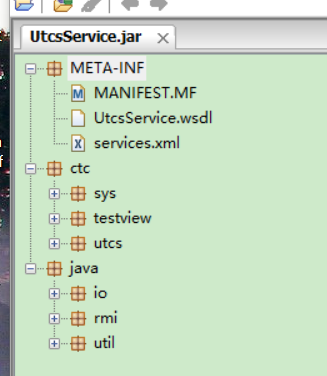
这个就是打成的jar包
http://blog.csdn.net/yanghaitaohhh/article/details/17641303
axis2开发webservice总结的更多相关文章
- Axis2开发WebService客户端 的3种方式
Axis2开发WebService客户端 的3种方式 在dos命令下 wsdl2java -uri wsdl的地址(网络上或者本地) -p com.whir.ezoffi ...
- Axis2开发webservice详解
Axis2开发webservice详解 标签: javawebserviceAxis2 2015-08-10 10:58 1827人阅读 评论(0) 收藏 举报 分类: JAVA(275) 服务器 ...
- axis2开发webservice接口入门到精通详解(转)
最近在开发接口,在网上发现了两篇不错的文章,给大家分享下: 第一篇: 一.Axis2的下载和安装 1.可从http://ws.apache.org/axis2/ 下载Axis2的最新版本: ...
- axis2开发webservice程序
一.环境 eclipse + jdk 6.0 + win7 64位 +tomcat7.0 二.创建服务端程序 1.新建web项目,webserviceTest 2.下载axis2,将lib目录下的ja ...
- CXF和Axis2开发webservice也是可以添加asmx等后缀
在当家互联网时代, 手机APP所需要的后台服务接口经常会变化, 如果前期没有设计好, 把它们的请求地址配置在比较稳定不会经常修改的地址(例如专门一个后台服务用于获取所有最新的数据服务地址)这样不会因为 ...
- axis2开发webservice之编写Axis2模块(Module)
axis2中的模块化开发.能够让开发者自由的加入自己所需的模块.提高开发效率,减少开发的难度. Axis2能够通过模块(Module)进行扩展. Axis2模块至少须要有两个类,这两个类分别实现了Mo ...
- axis2开发webservice入门到精通
1,准备工作: 首先我们要下载:axis2-1.4.1-war(发布webservice),axis2-1.4.1-bin.zip(webservice调用使用的各种包). 下载好了,把axis2-1 ...
- 使用Axis2开发WebService
一.准备 1.下载Axis2.eclipse插件 axis2-1.6.2-war.zip: http://mirror.bjtu.edu.cn/apache//axis/axis2/java/core ...
- Spring注解+Axis2开发WebService
用Spring注解方式: 配置扫描指定包下的类 <context:component-scan base-package="包名" /> 标识类为spring管理的 ...
随机推荐
- linux kernel swap daemon
The name swap daemon is a bit of a misnomer as the daemon does more than just swap modified pages ou ...
- HSSFWorkBooK用法 —Excel表的导出和设置
HSSFWorkBooK用法 —Excel表的导出和设置 2013年02月21日 ⁄ 综合 ⁄ 共 9248字 ⁄ 字号 小 中 大 ⁄ 评论关闭 public ActionResult excelP ...
- selenium(四)操作cookie,伪造cookie
简介: Cookie,有时也用其复数形式 Cookies,指某些网站为了辨别用户身份.进行 session 跟踪而储存在用户本地终端上的数据. 常见的用途就是保留用户登陆信息,登陆时的7天免登陆,记住 ...
- Django(三)url和返回
location 最后一个文件夹名就是project名,我用了Django_Plan. Application 是自动加入的APP名字,我用了Plan 编辑Django_Plan\Django_Pla ...
- html网页设计
对于html文档可以直接通过浏览器打开并解释执行,不需要使用服务器.一个html文档的架构,一般由3对标签构成:<html></html>,<head></h ...
- 安装mysql,mysql创建数据库,创建用户及为用户添加权限
安装mysql a.下载源 wget http://repo.mysql.com/mysql-community-release-el7-5.noarch.rpm b.安装 rpm -ivh mysq ...
- CCScrollView
#ifndef TestCCScrollView_testScene_h #define TestCCScrollView_testScene_h #include "cocos2d.h&q ...
- 高效开发iOS -- 那些不为人知的KVC[转载]
valueForKeyPath 本篇来讲解一下那些不为人知,也经常被忽略掉,并且很实用的KVC干货小技巧 获取数组里的,最大.最小.平均.求和 NSArray *array = @[@"1& ...
- 4.1 shell文本过滤、find、awk、grep
文本过滤涉及到以下知识: 正则表达式.find.grep.awk.sed.合并与分割(sort.uniq.join.cut.paste.split). 正则表达式: 基本元字符集及其含义: 匹配IP地 ...
- 大龄码农那些事——也谈996.ICU
1.背景 近期Github突然有一个开源项目火了,叫“996.icu”,开源地址:https://github.com/996icu/996.ICU ,目前star的人数截止我写这篇博文时已经高达17 ...