
微信小程序 - 展开收缩列表
代码源自于:微信小程序示例官方
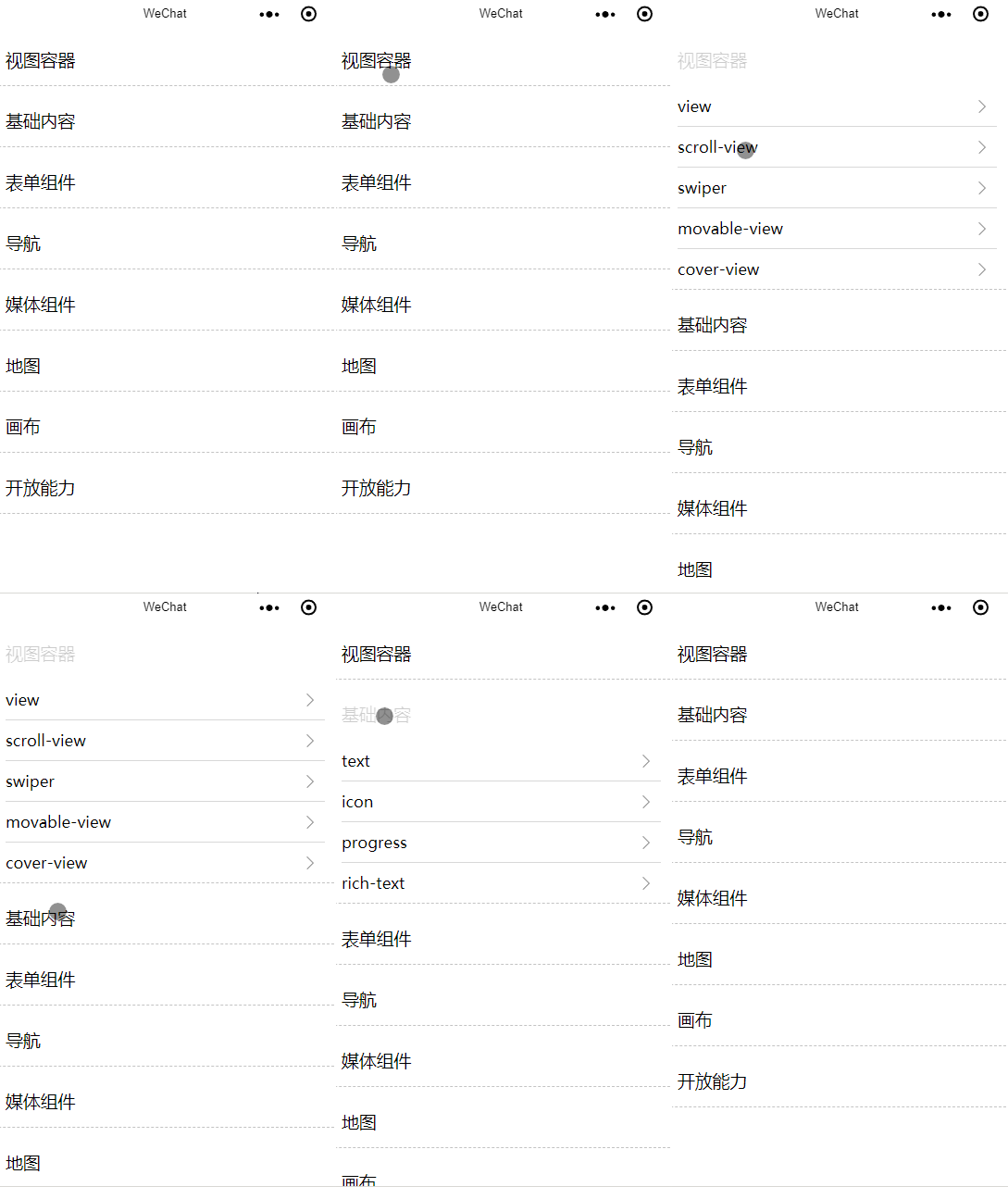
index.wxml
 <block wx:for-items="{{list}}" wx:key="{{item.id}}">

   <view class="kind-list-item">

     <view id="{{item.id}}" class="kind-list-item-hd {{item.open ? 'kind-list-item-hd-show' : ''}}" bindtap="kindToggle">

       <view class="kind-list-text">{{item.name}}</view>

     </view>

     <view class="kind-list-item-bd {{item.open ? 'kind-list-item-bd-show' : ''}}">

       <view class="navigator-box {{item.open ? 'navigator-box-show' : ''}}">

         <block wx:for-items="{{item.pages}}" wx:for-item="page" wx:key="*item">

           <navigator url="pages/{{page}}/{{page}}" class="navigator">

             <view class="navigator-text">{{page}}</view>

             <!-- icon -->

             <view class="navigator-arrow"></view>

           </navigator>

         </block>

       </view>

     </view>

   </view>

 </block>
index.css
 .navigator-box {

   opacity:;

   position: relative;

   background-color: #fff;

   line-height: 1.41176471;

   font-size: 34rpx;

   transform: translateY(-50%);

   transition: 0.3s;

 }

 .navigator-box-show {

   opacity:;

   transform: translateY(0);

 }

 .navigator {

   padding: 20rpx 30rpx;

   position: relative;

   display: flex;

   align-items: center;

 }

 .navigator:before {

   content: " ";

   position: absolute;

   left: 30rpx;

   top:;

   right: 30rpx;

   height: 1px;

   border-top: 1rpx solid #d8d8d8;

   color: #d8d8d8;

 }

 .navigator:first-child:before {

   display: none;

 }

 .navigator-text {

   flex:;

 }

 .navigator-arrow {

   padding-right: 26rpx;

   position: relative;

 }

 .navigator-arrow:after {

   content: " ";

   display: inline-block;

   height: 18rpx;

   width: 18rpx;

   border-width: 2rpx 2rpx 0 0;

   border-color: #888;

   border-style: solid;

   transform: matrix(0.71, 0.71, -0.71, 0.71, 0, 0);

   position: absolute;

   top: 50%;

   margin-top: -8rpx;

   right: 28rpx;

 }

 .kind-list-item {

   margin: 20rpx 0;

   background-color: #fff;

   border-radius: 4rpx;

   overflow: hidden;

   border-bottom: 1px dashed #888;

 }

 .kind-list-item:first-child {

   margin-top:;

 }

 .kind-list-text {

   flex:;

 }

 .kind-list-img {

   width: 60rpx;

   height: 60rpx;

 }

 .kind-list-item-hd {

   padding: 30rpx;

   display: flex;

   align-items: center;

   transition: opacity 0.3s;

 }

 .kind-list-item-hd-show {

   opacity: 0.2;

 }

 .kind-list-item-bd {

   height:;

   overflow: hidden;

 }

 .kind-list-item-bd-show {

   height: auto;

 }
index.js
 Page({

     data: {

     list: [{

       id: 'view',

       name: '视图容器',

       open: false,

       pages: ['view', 'scroll-view', 'swiper', 'movable-view', 'cover-view']

     }, {

       id: 'content',

       name: '基础内容',

       open: false,

       pages: ['text', 'icon', 'progress', 'rich-text']

     }, {

       id: 'form',

       name: '表单组件',

       open: false,

       pages: ['button', 'checkbox', 'form', 'input', 'label', 'picker', 'picker-view', 'radio', 'slider', 'switch', 'textarea']

     }, {

       id: 'nav',

       name: '导航',

       open: false,

       pages: ['navigator']

     }, {

       id: 'media',

       name: '媒体组件',

       open: false,

       pages: ['image', 'audio', 'video', 'camera']

     }, {

       id: 'map',

       name: '地图',

       pages: ['map']

     }, {

       id: 'canvas',

       name: '画布',

       pages: ['canvas']

     }, {

       id: 'open',

       name: '开放能力',

       pages: ['ad', 'open-data', 'web-view']

     }]

   },

   /**

    * 收缩核心代码

    */

   kindToggle(e) {

     const id = e.currentTarget.id

     const list = this.data.list

     for (let i = 0, len = list.length; i < len; ++i) {

       if (list[i].id === id) {

         list[i].open = !list[i].open

       } else {

         list[i].open = false

       }

     }

     /**

      * key和value名称一样时,可以省略

      *

      * list:list=>list

      */

     this.setData({

       list

     })

   }

 })
点击下载源码:示例-小程序展开收缩列表
微信小程序 - 展开收缩列表的更多相关文章
- 微信小程序开发-新闻列表之新闻列表绑定
微信小程序开发-新闻列表之新闻列表绑定开发教程: 1.效果图预览 2.准备工作 在拿到效果图后不要先急着去写代码,而是要去分析一下页面的整体结构,用什么方式定位和布局.小程序里建议使用flex布局,因 ...
- 微信小程序新闻信息列表展示
微信小程序信息展示列表 wxml <!-- 轮播图 --> <view class='haibao' bindtap="seeDetail" id="{ ...
- 微信小程序信息展示列表
微信小程序信息展示列表 效果展示: 代码展示: wxml <view class="head"> <view class="head_item" ...
- 基于微信小程序的用户列表点赞功能
代码地址如下:http://www.demodashi.com/demo/13997.html 一.前言 (1).适合人群 1.微信小程序开发者 2.前端工程师 3.想入门学习小程序开发的人员 4.想 ...
- 图解微信小程序---获取电影列表
图解微信小程序---获取电影列表 代码笔记 list跳转 第一步:编写前端页面获取相关的电影列表参数(对于显示参数不熟悉,可以先写js,通过console Log的方式获取我们电影的相关数据字段,后 ...
- 微信小程序,我的英雄列表
最近微信小程序炒得火热,就跟成都的这个房价一样.昨天我也尝试了一下,做了一个自己的英雄列表.今天将自己的制作过程记录于此. 1.下载微信开发者工具 官网链接:https://mp.weixin.qq. ...
- 微信小程序 - 文字收缩与展开
wxml <view class='containers'> <text class="content {{ellipsis?'ellipsis':'unellipsis' ...
- 小程序展开收缩文字demo
demo效果图: wxml 代码: <view class="{{ellipsis?'ellipsis':'unellipsis'}}">五险一金五五险一金险险一金五五 ...
- 微信小程序云开发-列表数据分页加载显示
一.准备工作 1.创建数据库nums,向数据库中导入108条数据 2.修改数据库表nums的权限 二.新建页面ListPaginated 1.wxml文件 <!-- 显示列表数据 --> ...
随机推荐
- nyoj 211&&poj 3660
Cow Contest 时间限制:1000 ms | 内存限制:65535 KB 难度:4 描述 N (1 ≤ N ≤ 100) cows, conveniently numbered 1..N, ...
- Stirling数,Bell数,Catalan数,Bernoulli数
组合数学的实质还是DP,但是从通式角度处理的话有利于FFT等的实现. 首先推荐$Candy?$的球划分问题集合: http://www.cnblogs.com/candy99/p/6400735.ht ...
- POJ3744 Scout YYF I 概率DP+矩阵快速幂
http://poj.org/problem?id=3744 题意:一条路,起点为1,有概率p走一步,概率1-p跳过一格(不走中间格的走两步),有n个点不能走,问到达终点(即最后一个坏点后)不踩坏点的 ...
- YanghuiTriangle
Demand 1 用实现循环队列 2 参考PPT用循环队列打印杨辉三角 3 用JDB或IDEA单步跟踪排队情况,画出队列变化图,包含自己的学号信息 4 把代码推送到代码托管平台 5 把完成过程写一篇博 ...
- bzoj 3052 树上莫队 待修改
感谢: http://vfleaking.blog.163.com/blog/static/174807634201311011201627/ http://hzwer.com/5250.html 好 ...
- Linux知识(4)----文件系统结构
Ubantu 14.04的文件系统结构如下图所示: 参考资料: 1.http://www.cnblogs.com/wen858636827/archive/2012/12/26/2834373.htm ...
- MariaDB 主从复制
MySQL Replication:NySQL复制,MySQL的复制默认为异步工作模式 mysql的复制功能是mysql内置的,装上它之后就具备了这个功能,而mysql复制是mysql实现大规模 ...
- HDU 4579 Random Walk (解方程组)
Random Walk Time Limit: 5000/2000 MS (Java/Others) Memory Limit: 65535/65536 K (Java/Others)Total ...
- HDU 4577 X-Boxes
X-Boxes Time Limit: 3000/1000 MS (Java/Others) Memory Limit: 65535/32768 K (Java/Others)Total Sub ...
- java反射机制简单介绍
1.字节码.所谓的字节码就是当java虚拟机载入某个类的对象时,首先须要将硬盘中该类的源码编译成class文件的二进制代码(字节码),然后将class文件的字节码载入到内存中,之后再创建该类的对象 2 ...