
SpringBoot集成freemarker和thymeleaf模板
1、在MAVEN工程POM.XML中引入依赖架包
<!-- 引入 freemarker 模板依赖 -->
<dependency>
<groupId>org.springframework.boot</groupId>
<artifactId>spring-boot-starter-freemarker</artifactId>
</dependency>
<!-- 引入 thymeleaf 模板依赖 -->
<dependency>
<groupId>org.springframework.boot</groupId>
<artifactId>spring-boot-starter-thymeleaf</artifactId>
</dependency>
2、在属性系统配置文件中application.properties 加入相关配置
############################################################
#
# freemarker 静态资源配置
#
############################################################
#设定ftl文件路径
spring.freemarker.template-loader-path=classpath:/templates
# 关闭缓存, 即时刷新, 上线生产环境需要改为true
spring.freemarker.cache=false
spring.freemarker.charset=UTF-8
spring.freemarker.check-template-location=true
spring.freemarker.content-type=text/html
spring.freemarker.expose-request-attributes=true
spring.freemarker.expose-session-attributes=true
spring.freemarker.request-context-attribute=request
spring.freemarker.suffix=.ftl
############################################################
#
# thymeleaf 静态资源配置
#
############################################################
spring.thymeleaf.prefix=classpath:/templates/
spring.thymeleaf.suffix=.html
spring.thymeleaf.mode=HTML5
spring.thymeleaf.encoding=UTF-8
spring.thymeleaf.content-type=text/html
# 关闭缓存, 即时刷新, 上线生产环境需要改为true
spring.thymeleaf.cache=false
3、具体的Controller实体类中需要注解
如:FreemarkerController.java
 package com.leecx.controller;

 import org.springframework.stereotype.Controller;

 import org.springframework.ui.ModelMap;

 import org.springframework.web.bind.annotation.RequestMapping;

 @Controller

 @RequestMapping("/ftl")

 public class FreemarkerController {

     @RequestMapping("/freemaker")

     public String index(ModelMap modelMap){

         modelMap.put("name", "duanml");

         return "freemarker/index";

     }

     @RequestMapping("/center")

     public String center(ModelMap modelMap){

         modelMap.put("name", "duanml");

         return "freemarker/center/center";

     }

 }
如:ThymeleafController.java
 package com.leecx.controller;

 import org.springframework.stereotype.Controller;

 import org.springframework.ui.ModelMap;

 import org.springframework.web.bind.annotation.RequestMapping;

 @Controller

 @RequestMapping("/th")

 public class ThymeleafController {

     @RequestMapping("/thymeleaf")

     public String index(ModelMap modelMap){

         modelMap.put("name", "duanml");

         return "thymeleaf/index";

     }

     @RequestMapping("/center")

     public String center(ModelMap modelMap){

         modelMap.put("name", "duanml");

         return "thymeleaf/center/center";

     }

 }
4、在项目的工程中静态资源建立如下的层级关系:
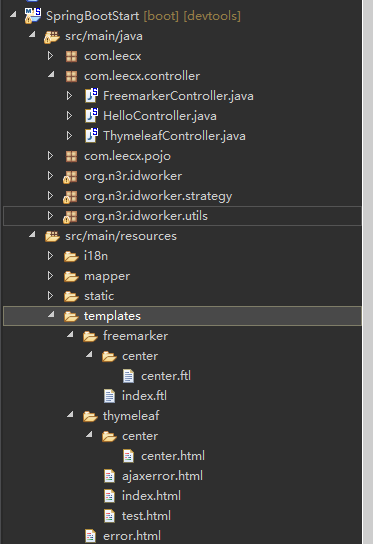
注意freemarker和thymeleaf 两者的静态页面的后缀是不一样的。
SpringBoot集成freemarker和thymeleaf模板的更多相关文章
- springboot之freemarker 和thymeleaf模板web开发
Spring Boot 推荐使用Thymeleaf.FreeMarker.Velocity.Groovy.Mustache等模板引擎.不建议使用JSP. 一.Spring Boot 中使用Thymel ...
- SpringBoot集成Freemarker与Thymeleaf
一:概括 pom.xml添加依赖 配置application.yml HTML页面使用表达式 二:Freemarker模板引擎 1.添加依赖 <!-- ftl模板引擎 --> <de ...
- SpringBoot 集成 FreeMarker 导出 Word 模板文件(底部附源码)
思路解说 word 模板文件(doc 或 docx 文件)另存为 xml 文件 将后缀 xml 改成 html:大部分文档会改成 ftl(FreeMarker 的后缀名),因为 word 文件另存为 ...
- SpringBoot Web开发(4) Thymeleaf模板与freemaker
SpringBoot Web开发(4) Thymeleaf模板与freemaker 一.模板引擎 常用得模板引擎有JSP.Velocity.Freemarker.Thymeleaf SpringBoo ...
- Springboot集成FreeMarker
Apache官网对FreeMarker的解释如下: Apache FreeMarker™是一个模板引擎 :一个基于模板和变化的数据来生成文本输出(HTML网页,电子邮件,配置文件,源代码,等等)的Ja ...
- SpringBoot入门篇--使用Thymeleaf模板引擎进行页面的渲染
在做WEB开发的时候,我们不可避免的就是在前端页面之间进行跳转,中间进行数据的查询等等操作.我们在使用SpringBoot之前包括我在内其实大部分都是用的是JSP页面,可以说使用的已经很熟悉.但是我们 ...
- springboot 集成 freemarker
前面我们已经实现了thymeleaf模板,其实freemarker和thymeleaf差不多,都可以取代JSP页面,实现步骤也差不多,我们来简单实现一下 引入pom.xml依赖如下 <depen ...
- SpringBoot学习笔记(4)----SpringBoot中freemarker、thymeleaf的使用
1. freemarker引擎的使用 如果你使用的是idea或者eclipse中安装了sts插件,那么在新建项目时就可以直接指定试图模板 如图: 勾选freeMarker,此时springboot项目 ...
- springboot笔记06——使用Thymeleaf模板引擎
前言 Springboot 推荐使用Thymeleaf做视图层.Thymeleaf支持 html 原型,然后在 html 标签里增加额外的属性来达到模板+数据的展示方式.浏览器解释 html 时会忽略 ...
随机推荐
- 10.Python运行Scrapy时出现错误: ModuleNotFoundError: No module named 'win32api'
1.在命令行输入:scrapy crawl demo(demo为爬虫标识,是唯一的) 2.报错信息如下所示: 3.解决方法:https://github.com/mhammond/pywin32/re ...
- C#开机启动与退出程序
最新用到的项目中需要使用开机自启和退出程序,于是需要 http://www.cnblogs.com/Gaoswatou/p/6605760.html C# WinForm程序退出的方法 1.this. ...
- linux(7)
第十七单元 Samba服务 [本节内容]1. 掌握samba的功能: samba是一个网络服务器,用于Linux和Windows之间共享文件.2. 掌握samba服务的启动.停止.重启service ...
- 推荐PHP程序员进阶的好书
<UNIX网络编程卷1(第3版)> <UNIX网络编程卷2(第2版)> <UNIX环境高级编程(第3版)> <UNIX编程艺术> <MySQL技术 ...
- Android软键盘弹出将底部栏顶上去并不会挤压界面
界面需要,找到了一种不需要去设置android:windowSoftInputMode属性的解决keyboard和layout不适问题 有关设置android:windowSoftInputMode的 ...
- HttpClient基础用法
一.HttpClient HttpClient是Apache HttpComponents 下的子项目,用来提供高效的.最新的.功能丰富的支持HTTP协议的客户端编程工具包(httpclient-4. ...
- Fastq 常用软件
文章转载于 Original 2017-06-08 Jolvii 生信百科 由于生物信息的大部分工作都是在没有 root 权限的集群上进行的,本期我主要介绍一下非 root 用户怎么安装常用的软件.工 ...
- 局部加权线性回归(Locally weighted linear regression)
首先我们来看一个线性回归的问题,在下面的例子中,我们选取不同维度的特征来对我们的数据进行拟合. 对于上面三个图像做如下解释: 选取一个特征,来拟合数据,可以看出来拟合情况并不是很好,有些数据误差还是比 ...
- redis的二种启动方式
.直接启动 进入redis根目录,执行命令: #加上‘&’号使redis以后台程序方式运行 1 ./redis-server & 2.通过指定配置文件启动 可以为redis服务启 ...
- 神奇的make自动生成include file的功能
嗯,今天研究公司makefile的代码,始终搞不明白有一段下载编译依赖的rule recipe(对这个名词不了解请参考make的官方文档)是怎么执行的.明明在执行的时候并指定的target并没有依赖那 ...