
BuautifulSoup4库详解
1、BeautifulSoup4库简介
What is beautifulsoup ?

答:一个可以用来从HTML 和 XML中提取数据的网页解析库,支持多种解析器(代替正则的复杂用法)
2、安装
pip3 install beautifulsoup4
3、用法详解
(1)、解析器性能分析(第一个参数markup-要解析的目标代码,第二个参数为解析器)
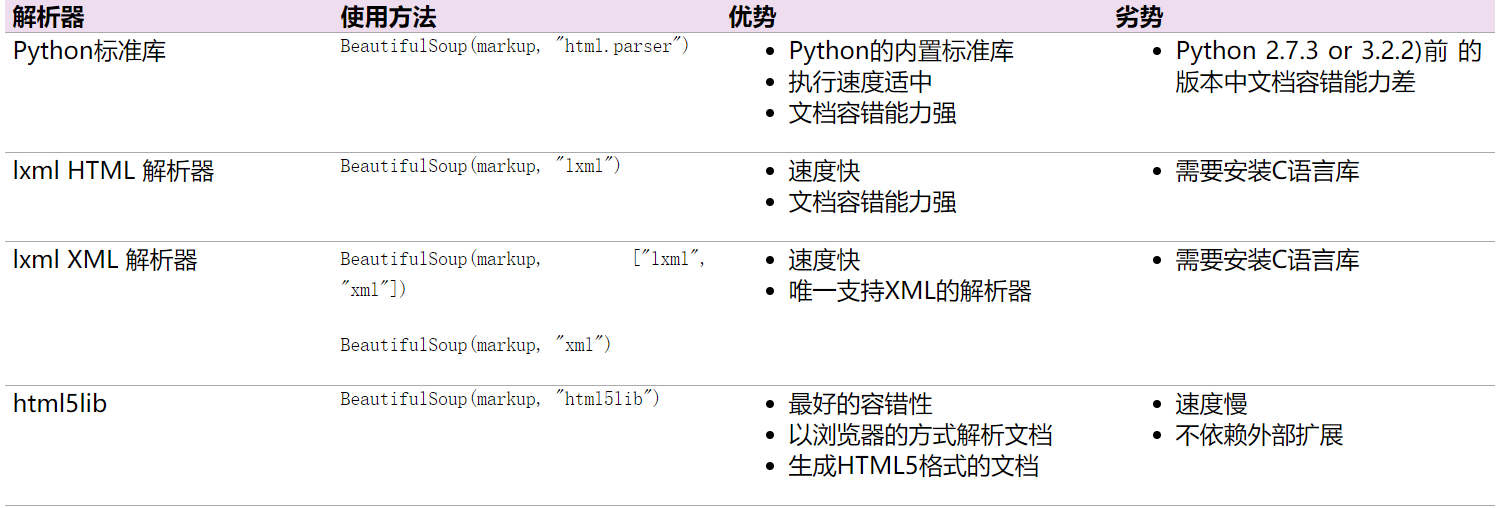
(2)、使用方法(独孤九剑)
1、总诀式:
#author: "xian"

#date: 2018/5/7

#以下为爱丽丝梦游仙境的部分代码

html = """

<html><head><title>The Dormouse's story</title></head>

<body>

<p class="title"><b>The Dormouse's story</b></p>

<p class="story">Once upon a time there were three little sisters; and their names were

<a href="http://example.com/elsie" class="sister" id="link1">Elsie</a>,

<a href="http://example.com/lacie" class="sister" id="link2">Lacie</a> and

<a href="http://example.com/tillie" class="sister" id="link3">Tillie</a>;

and they lived at the bottom of a well.</p>

<p class="story">...</p>

"""

#小试牛刀

from bs4 import BeautifulSoup #从bs4库导入BeautifulSoup类

soup = BeautifulSoup(html,'lxml') #构造名为soup的对象

print(soup.prettify()) #prettify修饰()方法:格式化代码也就是让各位小伙伴释放眼睛压力哈哈!

print(soup.a) #选中a标签

print(soup.a['class'])#打印a标签名为class的属性值

print(soup.a.name) #打印a 标签的名字 soup.a.parent.name 找到a标签的老子

print(soup.a.string) #小伙伴们猜猜看这是干什么?    答:打印a标签的文本

print(soup.find_all('a')) #找到所有的a标签

print(soup.find(id="link3"))#找到id属性值为link3的标签

#找链接

for link in soup.find_all('a'):

    print(link.get('href')) #遍历所有名为a的标签并得到其链接

#找文本

print(soup.a.get_text()) #获取a标签的文本当然小伙伴们可以任意指定想要的内容

#上面的输出

'''<html>

 <head>

  <title>

   The Dormouse's story

  </title>

 </head>

 <body>

  <p class="title">

   <b>

    The Dormouse's story

   </b>

  </p>

  <p class="story">

   Once upon a time there were three little sisters; and their names were

   <a class="sister" href="http://example.com/elsie" id="link1">

    Elsie

   </a>

   ,

   <a class="sister" href="http://example.com/lacie" id="link2">

    Lacie

   </a>

   and

   <a class="sister" href="http://example.com/tillie" id="link3">

    Tillie

   </a>

   ;

and they lived at the bottom of a well.

  </p>

  <p class="story">

   ...

  </p>

 </body>

</html>

<a class="sister" href="http://example.com/elsie" id="link1">Elsie</a>

['sister']

a

Elsie

[<a class="sister" href="http://example.com/elsie" id="link1">Elsie</a>, <a class="sister" href="http://example.com/lacie" id="link2">Lacie</a>, <a class="sister" href="http://example.com/tillie" id="link3">Tillie</a>]

<a class="sister" href="http://example.com/tillie" id="link3">Tillie</a>

http://example.com/elsie

http://example.com/lacie

http://example.com/tillie'''
其他的小伙伴们可以根据需要获取想要的内容,掌握方法即可,具体可参见官网:https://www.crummy.com/software/BeautifulSoup/bs4/doc.zh/
2、破剑式
 #author: "xian"

 #date: 2018/5/7

 html = """

 <html>

     <head>

         <title>The Dormouse's story</title>

     </head>

     <body>

         <p class="story">

             Once upon a time there were three little sisters; and their names were

             <a href="http://example.com/elsie" class="sister" id="link1">

                 <span>Elsie</span>

             </a>

             <a href="http://example.com/lacie" class="sister" id="link2">Lacie</a>

             and

             <a href="http://example.com/tillie" class="sister" id="link3">Tillie</a>

             and they lived at the bottom of a well

         </p>

         <p class="story">...</p>

 """

 #子节点及子孙节点(老子节点与祖宗节点的选择)的选择

 from bs4 import BeautifulSoup

 soup = BeautifulSoup(html,'lxml')

 print(soup.p.contents) #contents方法将得到的结果以列表形式输出

 print(soup.p.children) #是一个迭代器对象,需要用for循环才能得到器内容 children 只后期子节点

 for i,child in enumerate(soup.p.children): #enumerate() 函数用于将一个可遍历的数据对象(如列表、元组或字符串)组合为一个索引序列,同时列出数据和数据下标,一般用在 for 循环当中。

     print(i,child) #接受index 和内特

 print(soup.p.descendants)  #descendants 获取所有的儿子和孙子后代节点

 for i,child in enumerate(soup.p.descendants):

     print(i,child)

 #上面的输出结果

 '''['\n            Once upon a time there were three little sisters; and their names were\n            ', < a

 class ="sister" href="http://example.com/elsie" id="link1" >

 < span > Elsie < / span >

 < / a >, '\n', < a class ="sister" href="http://example.com/lacie" id="link2" > Lacie < / a >, '\n            and\n            ', < a class ="sister" href="http://example.com/tillie" id="link3" > Tillie < / a >, '\n            and they lived at the bottom of a well\n        ']

 < list_iterator object at 0x00000156B2E76EF0 >

 0

             Once upon a time there were three little sisters; and their names were

 1 < a class ="sister" href="http://example.com/elsie" id="link1" >

 < span > Elsie < / span >

 < / a >

 2

 3 < a class ="sister" href="http://example.com/lacie" id="link2" > Lacie < / a >

 4

             and

 5 < a class ="sister" href="http://example.com/tillie" id="link3" > Tillie < / a >

 6

             and they lived at the bottom of a well

 < generator object descendants at 0x00000156B08910F8 >

 0

 Once upon a time there were three little sisters; and their names were

 1 < a class ="sister" href="http://example.com/elsie" id="link1" >

 < span > Elsie < / span >

 < /a >

 2

 3 < span > Elsie < / span >

 4 Elsie

 5

 6

 7 < a class ="sister" href="http://example.com/lacie" id="link2" > Lacie < / a >

 8 Lacie

 9

             and

 10 < a class ="sister" href="http://example.com/tillie" id="link3" > Tillie < / a >

 11 Tillie

 12

         and they lived at the bottom of a well'''

 #老子节点和祖宗节点方法介绍 children -- parent / descendants -- parents 小伙伴们模仿上面的可是动手试试

 #兄弟节点的获取 方法为:next_siblings:获取当前对象后面的兄弟节点 previous_siblings:获取当前对象前面的兄弟节点,小伙伴们可以试试
3、破刀式
 #author: "xian"

 #date: 2018/5/7

 #搜索文档内容 find_all() 和find()

 html = """

 <html><head><title>The Dormouse's story</title></head>

 <p class="title"><b>The Dormouse's story</b></p>

 <p class="story">Once upon a time there were three little sisters; and their names were

 <a href="http://example.com/elsie" class="sister" id="link1">Elsie</a>,

 <a href="http://example.com/lacie" class="sister" id="link2">Lacie</a> and

 <a href="http://example.com/tillie" class="sister" id="link3">Tillie</a>;

 and they lived at the bottom of a well.</p>

 <p class="story">...</p>

 """

 from bs4 import BeautifulSoup

 import re

 soup = BeautifulSoup(html,'lxml')

 #(1)、find_all( name , attrs , recursive , text , **kwargs )

 #name参数用法详解(text参数的使用同name类似如soup.find_all(text=["Tillie", "Elsie", "Lacie"])只返回内容,小伙伴们可查阅官方文档:https://www.crummy.com/software/BeautifulSoup/bs4/doc.zh/)

 print(soup.find_all('head')) #查找head标签

 print(soup.find_all(id='link2')) #查找id='link2'的标签

 print(soup.find_all(href=re.compile("(\w+)"))) #查找所有包含href属性包含字母数字的标签

 print(soup.find_all(href=re.compile("(\w+)"), id='link1')) #多重过滤

 #搜索指定名字的属性时可以使用的参数值包括 字符串 , 正则表达式 , 列表, True

 #attrs参数用法详解

 print(soup.find_all(attrs={'id':'link2'})) #attrs参数以key-value形式传入值 /返回列表类型

 #(2)find( name , attrs , recursive , text , **kwargs )用法同find_all 类似只不过它只返回一个值,小伙伴们可以查找官方用法

 #(3)其他方法汇总:(小伙伴们了解即可具体碰到查文档)

 #find_parents() 和find_parent() 返回祖宗节点 和 返回老子节点

 #find_next_siblings() 和 find_next_sibling() 返回后面所有的兄弟节点 和 返回后面第一个兄弟节点

 #find_previous_siblings() 和 find_previous_sibling() 返回前面所有的兄弟节点 和 返回前面第一个兄弟节点

 #find_all_next() 和 find_next() 返回节点后满足条件所有的节点 和 返回第一个满足条件的节点

 #find_all_previous() 和 find_previous() 返回节点前满足条件所有的节点 和 返回第一个满足条件的节点

 #上面的输出结果:

 '''

 [<head><title>The Dormouse's story</title></head>]

 [<a class="sister" href="http://example.com/lacie" id="link2">Lacie</a>]

 [<a class="sister" href="http://example.com/elsie" id="link1">Elsie</a>, <a class="sister" href="http://example.com/lacie" id="link2">Lacie</a>, <a class="sister" href="http://example.com/tillie" id="link3">Tillie</a>]

 [<a class="sister" href="http://example.com/elsie" id="link1">Elsie</a>]

 [<a class="sister" href="http://example.com/lacie" id="link2">Lacie</a>]

 <class 'bs4.element.ResultSet'>

 '''
4、破枪式
 #author: "xian"

 #date: 2018/5/7

 #CSS选择器详解(通过select()传入css选择器即可成功选择)

 html = """

 <html><head><title>The Dormouse's story</title></head>

 <body>

 <p class="title"><b>The Dormouse's story</b></p>

 <p class="story">Once upon a time there were three little sisters; and their names were

 <a href="http://example.com/elsie" class="sister" id="link1">Elsie</a>,

 <a href="http://example.com/lacie" class="sister" id="link2">Lacie</a> and

 <a href="http://example.com/tillie" class="sister" id="link3">Tillie</a>;

 and they lived at the bottom of a well.</p>

 <p class="story">...</p>

 """

 from bs4 import BeautifulSoup

 soup = BeautifulSoup(html,'lxml')

 print(soup.select('.title')) #选择class属性为title的标签 css选择器使用请小伙伴们查看官网

 #再来一例

 print(soup.select('p a#link1'))# 选择p标签下的a下的id属性为link1的标签

 print(soup.select('a')[1]) #做一个切片拿到第二个a标签

 #获取内容

 print(soup.select('a')[1].get_text())

 #上面的输出:

 '''

 [<p class="title"><b>The Dormouse's story</b></p>]

 [<a class="sister" href="http://example.com/elsie" id="link1">Elsie</a>]

 <a class="sister" href="http://example.com/lacie" id="link2">Lacie</a>

 laci
33 '''
通过以上的实验,小伙伴们对bs4库是否有了一定的了解,赶紧行动起来,试试学习的效果吧!
总结:
1.建议小伙伴使用lxml解析器
2.多用find_all()和find()
3.css的select()方法掌握下
4.多练习,勤能补拙,孰能生巧,才能渐入化境!

BuautifulSoup4库详解的更多相关文章
- Lua的协程和协程库详解
我们首先介绍一下什么是协程.然后详细介绍一下coroutine库,然后介绍一下协程的简单用法,最后介绍一下协程的复杂用法. 一.协程是什么? (1)线程 首先复习一下多线程.我们都知道线程——Thre ...
- Python--urllib3库详解1
Python--urllib3库详解1 Urllib3是一个功能强大,条理清晰,用于HTTP客户端的Python库,许多Python的原生系统已经开始使用urllib3.Urllib3提供了很多pyt ...
- Struts标签库详解【3】
struts2标签库详解 要在jsp中使用Struts2的标志,先要指明标志的引入.通过jsp的代码的顶部加入以下的代码: <%@taglib prefix="s" uri= ...
- STM32固件库详解
STM32固件库详解 emouse原创文章,转载请注明出处http://www.cnblogs.com/emouse/ 应部分网友要求,最新加入固件库以及开发环境使用入门视频教程,同时提供例程模板 ...
- MySQL5.6的4个自带库详解
MySQL5.6的4个自带库详解 1.information_schema详细介绍: information_schema数据库是MySQL自带的,它提供了访问数据库元数据的方式.什么是元数据呢?元数 ...
- php中的PDO函数库详解
PHP中的PDO函数库详解 PDO是一个“数据库访问抽象层”,作用是统一各种数据库的访问接口,与mysql和mysqli的函数库相比,PDO让跨数据库的使用更具有亲和力:与ADODB和MDB2相比,P ...
- STM32 HAL库详解 及 手动移植
源: STM32 HAL库详解 及 手动移植
- 爬虫入门之urllib库详解(二)
爬虫入门之urllib库详解(二) 1 urllib模块 urllib模块是一个运用于URL的包 urllib.request用于访问和读取URLS urllib.error包括了所有urllib.r ...
- Python爬虫系列-Urllib库详解
Urllib库详解 Python内置的Http请求库: * urllib.request 请求模块 * urllib.error 异常处理模块 * urllib.parse url解析模块 * url ...
随机推荐
- 为什么选择PostgreSQL而不是MySQL
David Bolton是一名独立开发者,他使用PostgreSQL和MySQL都已有超过十年的时间.近日,他撰文阐述了选择PostgreSQL而不是MySQL的理由.他认为,MySQL之所以仍然如此 ...
- android scrollview嵌套listview计算高度的问题
ScrollView中只能放一个控件,一般都放LinearLayout,orientation属性值为vertical.在LinearLayout中放需要呈现的内容.ListView也在其中,List ...
- XML跨平台,你懂的
XML跨平台,你懂的 [引子] 90后小妹,问我,"都说XML跨平台,偶真的,不理解.XML语言的这大优势,倒是深深记在脑海里了." 当然,偶立马应声答到,& ...
- C++ Primer 有感(异常处理)(二)
异常就是运行时出现的不正常,例如运行时耗尽了内存或遇到意外的非法输入.异常存在于程序的正常功能之外,并要求程序立即处理.不能不处理异常,异常是足够重要的,使程序不能继续正常执行的事件.如果找不到匹配的 ...
- Linux信号实践(1) --Linux信号编程概述
中断 中断是系统对于异步事件的响应, 进程执行代码的过程中可以随时被打断,然后去执行异常处理程序; 计算机系统的中断场景:中断源发出中断信号 -> CPU判断中断是否屏蔽屏蔽以及保护现场 -&g ...
- 【一天一道LeetCode】#36. Valid Sudoku
一天一道LeetCode 本系列文章已全部上传至我的github,地址:https://github.com/Zeecoders/LeetCode 欢迎转载,转载请注明出处 (一)题目 Determi ...
- How To Transact Move Order Using INV_PICK_WAVE_PICK_CONFIRM_PUB.Pick_Confirm API
In this Document Goal Solution Sample Code: Steps: FAQ References APPLIES TO: Oracle Inven ...
- centos vsftpd 553 Could not create file解决方法
centos vsftpd 553 Could not create file解决方法 问题由于selinux引起的,问题解决办法: www.2cto.com 输入:getsebool - ...
- DBUtils学习总结
这几天闲着无聊,就看了一下DBUtils这个数据库组件.中间有了一些想法,现在记录下来. 文章主要分几部分 1 最简单同时也是最经常使用的一些范例 2 学习源码前的一些知识储备 3 我自己写的mydb ...
- Android的fuzz测试技术之符号执行浅谈-android学习之旅(82)
简单的漏洞越来越少,需要改进目前的方法 : 通过符号执行,得出执行路径,然后在进行fuzzy是较为有效的方法之一 1)为待测单元自动地生成可到达的测试数据,即提高测试目标的覆盖率 2)根据特定的漏洞模 ...