
[.Net Core] 在 Mvc 中简单使用日志组件
在 Mvc 中简单使用日志组件
基于 .Net Core 2.0,本文只是蜻蜓点水,并非深入浅出。
目录
- 使用内置的日志组件
- 简单过渡到第三方组件 - NLog
使用内置的日志
下面使用控制器 HomeController.cs 进行演示。
需要 using Microsoft.Extensions.Logging;
方案一:
    public class HomeController : Controller

    {

        private readonly ILogger _logger ;

        public HomeController(ILoggerFactory loggerFactory)

        {

            _logger = loggerFactory.CreateLogger(typeof(HomeController));

        }

    }
方案二:
    public class HomeController : Controller

    {

        private readonly ILogger _logger ;

        public HomeController(ILogger<HomeController> logger)

        {

            _logger = logger;

        }

    }
方案三:
    public class HomeController : Controller

    {

        private readonly ILogger _logger ;

        public HomeController(ILogger logger)

        {

            _logger = logger;

        }

    }
三种都是通过注入的方式获取日志记录器对象,在过去,我们会自己独立封装类似这些 Debug、Info 和 Error 等不同日志等级的方法,现在我们看看内置的方法是如何使用的?
在 HomeController 内添加 Index() 方法进行测试。
        public IActionResult Index()

        {

            _logger.LogDebug($"测试:{DateTime.Now.ToString(CultureInfo.InvariantCulture)}");

            _logger.LogError($"测试:{DateTime.Now.ToString(CultureInfo.InvariantCulture)}");

            _logger.LogInformation($"测试:{DateTime.Now.ToString(CultureInfo.InvariantCulture)}");

            return Json(Guid.NewGuid());

        }
在输出结果中我们可以看到,不同日志的等级在控制台中会以不同的颜色进行标注。
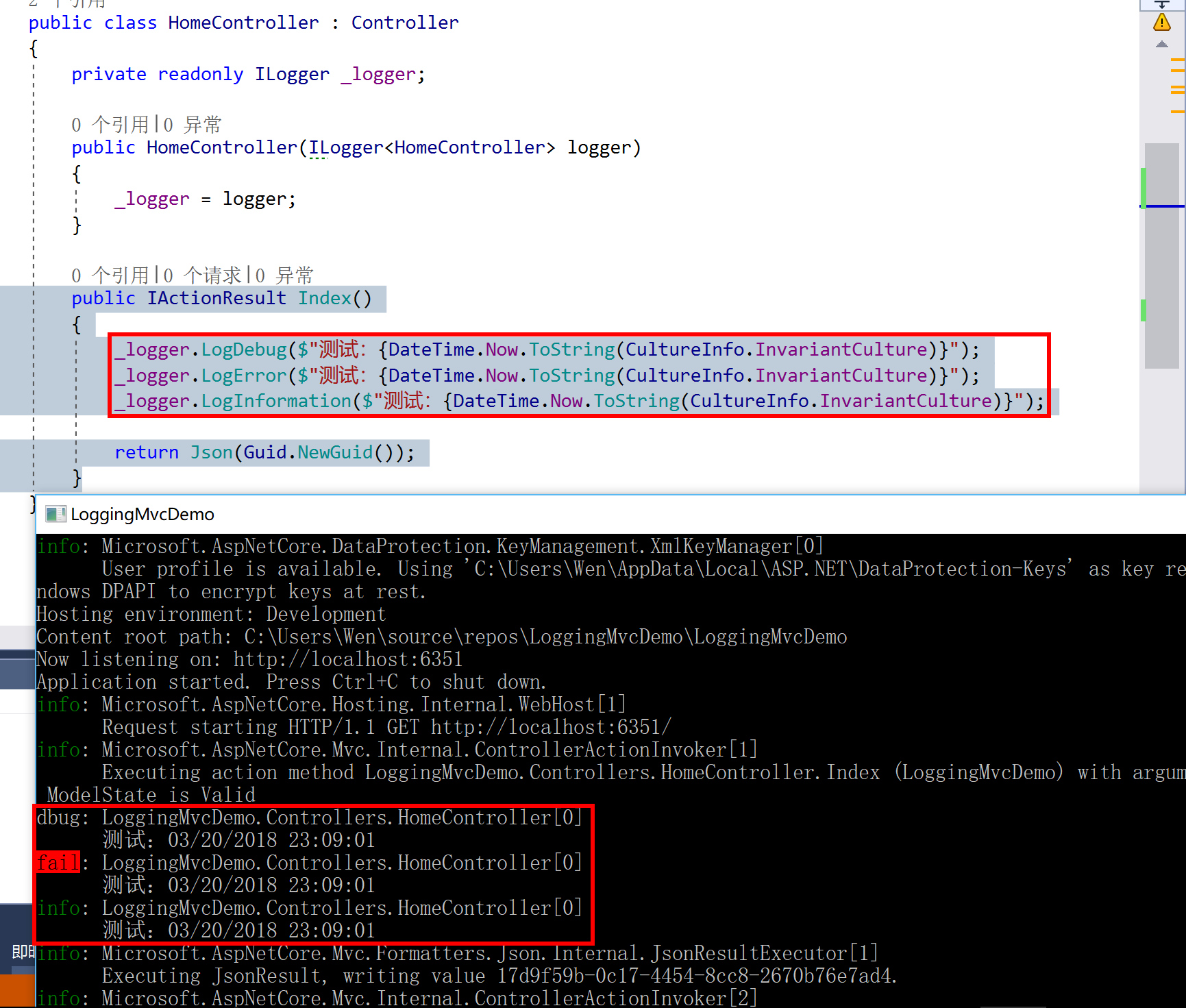
每种级别的 Log 都有多个方法重载,如 LogInformation() ,示例演示的代码中使用的是比较简单一种,也就是最后一种。
        //

        // 摘要:

        //     Formats and writes an informational log message.

        //

        // 参数:

        //   logger:

        //     The Microsoft.Extensions.Logging.ILogger to write to.

        //

        //   eventId:

        //     The event id associated with the log.

        //

        //   message:

        //     Format string of the log message.

        //

        //   args:

        //     An object array that contains zero or more objects to format.

        public static void LogInformation(this ILogger logger, EventId eventId, string message, params object[] args);

        //

        // 摘要:

        //     Formats and writes an informational log message.

        //

        // 参数:

        //   logger:

        //     The Microsoft.Extensions.Logging.ILogger to write to.

        //

        //   exception:

        //     The exception to log.

        //

        //   message:

        //     Format string of the log message.

        //

        //   args:

        //     An object array that contains zero or more objects to format.

        public static void LogInformation(this ILogger logger, Exception exception, string message, params object[] args);

        //

        // 摘要:

        //     Formats and writes an informational log message.

        //

        // 参数:

        //   logger:

        //     The Microsoft.Extensions.Logging.ILogger to write to.

        //

        //   message:

        //     Format string of the log message.

        //

        //   args:

        //     An object array that contains zero or more objects to format.

        public static void LogInformation(this ILogger logger, string message, params object[] args);
其它细节以及详情,或者希望使用其它日志组件可参考官方文档:https://docs.microsoft.com/en-us/aspnet/core/fundamentals/logging/?tabs=aspnetcore2x
简单过渡到第三方组件 - NLog
Nuget 安装 NLog.Web.AspNetCore(目前 Nuget 最新为 4.4.1,但是官方的教程却是 4.5 的,小编使用 4.4.1 进行演示)。如需 4.5+ 可参考官方:https://github.com/NLog/NLog.Web/wiki/Getting-started-with-ASP.NET-Core-2
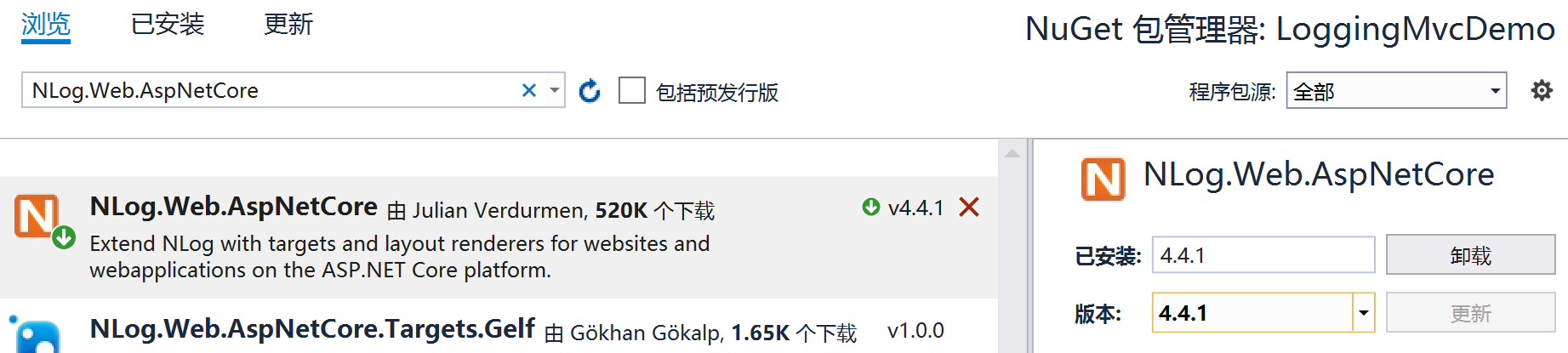
下面演示如何将内置的组件简单的移植到 NLog 中。
先在根目录创建配置文件 nlog.config,记得将属性修改成始终复制到目录:
<?xml version="1.0" encoding="utf-8" ?>

<nlog xmlns="http://www.nlog-project.org/schemas/NLog.xsd"

      xmlns:xsi="http://www.w3.org/2001/XMLSchema-instance"

      autoReload="true"

      internalLogLevel="info"

      internalLogFile="c:\temp\internal-nlog.txt">

  <!-- the targets to write to -->

  <targets>

    <!-- write logs to file  -->

    <target xsi:type="File" name="allfile" fileName="c:\temp\nlog-all-${shortdate}.log"

            layout="${longdate}|${event-properties:item=EventId_Id}|${uppercase:${level}}|${logger}|${message} ${exception:format=tostring}" />

    <!-- another file log, only own logs. Uses some ASP.NET core renderers -->

    <target xsi:type="File" name="ownFile-web" fileName="c:\temp\nlog-own-${shortdate}.log"

            layout="${longdate}|${event-properties:item=EventId_Id}|${uppercase:${level}}|${logger}|${message} ${exception:format=tostring}|url: ${aspnet-request-url}|action: ${aspnet-mvc-action}" />

  </targets>

  <!-- rules to map from logger name to target -->

  <rules>

    <!--All logs, including from Microsoft-->

    <logger name="*" minlevel="Trace" writeTo="allfile" />

    <!--Skip non-critical Microsoft logs and so log only own logs-->

    <logger name="Microsoft.*" maxLevel="Info" final="true" /> <!-- BlackHole without writeTo -->

    <logger name="*" minlevel="Trace" writeTo="ownFile-web" />

  </rules>

</nlog>
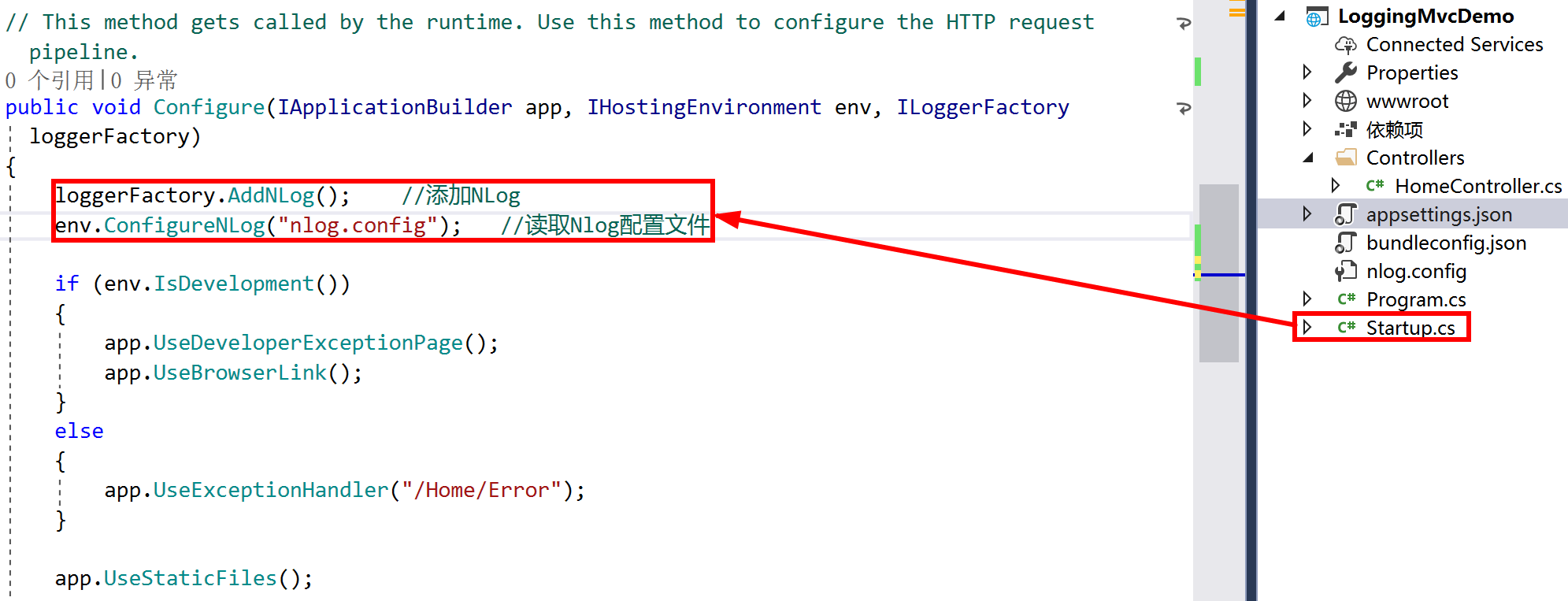
修改 Startup.cs 类中的 Configure() 方法,其它地方都不需要做出任何修改。
        public void Configure(IApplicationBuilder app, IHostingEnvironment env, ILoggerFactory loggerFactory)

        {

            loggerFactory.AddNLog();    //添加NLog

            env.ConfigureNLog("nlog.config");    //读取Nlog配置文件

            //...

        }
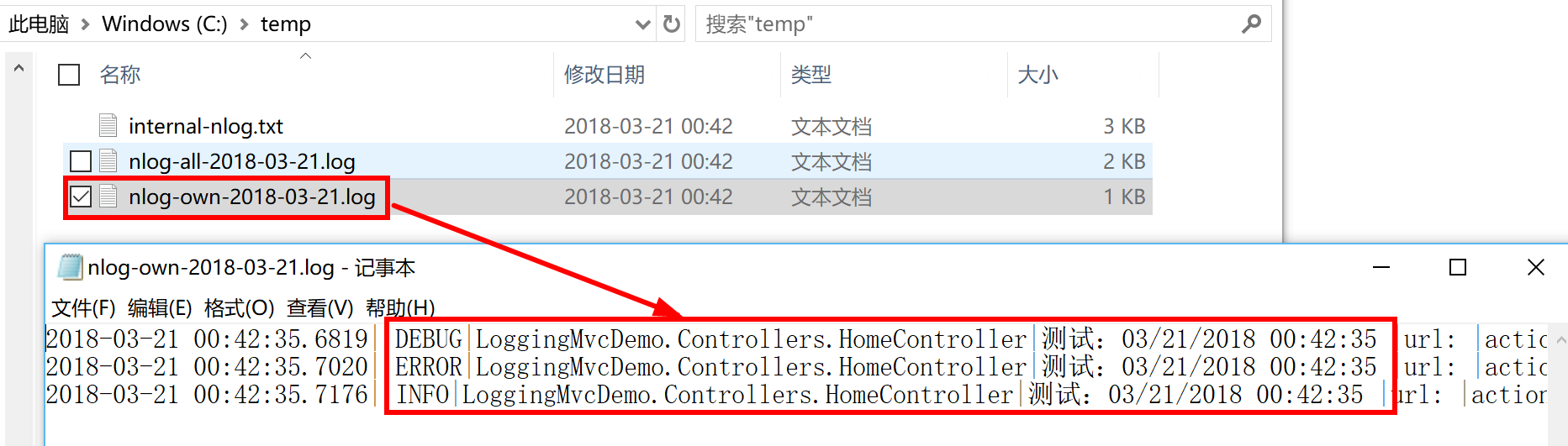
启动程序,你会发现:
【原文】http://www.cnblogs.com/liqingwen/p/8613538.html
相关的文章:
《[.Net Core] 简单使用 Mvc 内置的 Ioc》
《[.Net Core] 简单使用 Mvc 内置的 Ioc(续)》
[.Net Core] 在 Mvc 中简单使用日志组件的更多相关文章
- Asp.Net Core中简单使用日志组件log4net
本文将简单介绍在.NET 6中使用log4net的方法,具体见下文范例. 1.首先新建一个ASP.NET Core空项目 2.通过Nuget包管理器安装下面两个包 log4net Microsoft. ...
- setbuffer和freopen做一个简单的日志组件
目标场景是这样的: 多线程的应用程序要频繁打一些小字节的日志,也不想引用很重的日志库. 设想了一个极其简单的日志组件,main线程中重定向stdout到文件,同时setbuffer设置一个10k的缓冲 ...
- 使用SeasLog打造PHP项目中的高性能日志组件(一)
云智慧(北京)科技有限公司 高驰涛 什么是SeasLog SeasLog是一个C语言编写的PHP扩展,提供一组规范标准的功能函数,在PHP项目中方便.规范.高效地写日志,以及快速地读取和查询日志. 为 ...
- [AspNetCore 3.0] 在RazorPages/MVC 中使用 Blazor (Razor组件)
开发环境 Vs2019 16.3.1 dotnetcore 3.0 一.开始 新建webapp项目 dotnet new webapp -o projectname 或Vs 中新建项目选择 Web应用 ...
- 【ASP.NET Core】MVC中自定义视图的查找位置
.NET Core 的内容处处可见,刷爆全球各大社区,所以,老周相信各位大伙伴已经看得不少了,故而,老周不考虑一个个知识点地去写,那样会成为年度最大的屁话,何况官方文档也很详尽.老周主要扯一下大伙伴们 ...
- MVC 中dapper的日志功能+程序报错修改
由于之前的项目说最好要有日志功能,正好之前看过几篇这方面的文章就弄了点东西. 这是EF日志受启发很大的一个原文: http://www.cnblogs.com/GuZhenYin/p/5556732. ...
- mvc中简单的异常记录
说明:异常处理 1.1 在WebApp的Model中 添加异常处理类 继承于HandleErrorAttribute using System; using System.Collections.Ge ...
- Asp.Net MVC中记录错误日志保存到本地txt文件
为了方便查询系统出错弄个错误日志出来对于维护运维来说是很有必要的. 1.在Asp.Net MVC项目中的App_Start添加一个用于处理异常类的文件ErrorLog让他继承HandleErrorAt ...
- ASP.NET MVC中简单使用Autofac
项目中引入Autofac的目的是为了实现控制反转,即IoC,Inversion of Control.控制反转可以有效的降低类之间的相互依赖关系,增加架构的弹性,降低软件复杂度. 示例代码: IPro ...
随机推荐
- 又是一个愚蠢的错误,皆因.xml而起
论java中的.xml到底有多坑?! 感觉自己都快哭了,再一次被.xml给坑了一下,这次坑的太狠了,一下子导致自己浪费了昨天一下午,一晚上,今天一上午和半个下午呀,中间的过程真的是乏善可陈呀,各 ...
- Zookeeper笔记1-CAP/BASE理论
分布式系统八大谬论: 1.网络相当可靠 2.延迟为0 3.传输带宽是无限的 4.网络相当安全. 5.拓扑结构不会改变 6.必须要有一名管理员 7.传输成本为0 8.网络同质化. 分布式最常出现的问题: ...
- 使用tcpcopy导入线上流量进行功能和压力测试
- 假设我们要上线一个两年内不会宕机的先进架构.在上线前,免不了单元测试,功能测试,还有使用ab,webbench等等进行压力测试. 但这些步骤非生产环境下正式用户的行为.或许你会想到灰度上线,但毕竟 ...
- 【dedecms】DEDE列表页调用文章内容第一张图片(非缩略图)方法
打开 ../ include/ common.func.php 添加代码 //将缩放图转变为文章第一张图片 function firstimg($str_pic) { $str_sub=substr( ...
- 查看dmp文件
1.查看dmp文件,首先要通过以下的链接地址进行下载 http://msdl.microsoft.com/download/symbols/debuggers/dbg_x86_6.11.1.404.m ...
- 致IT同仁 — IT人士常犯的17个职场错误
记得刚参加工作时(那是97年),中国的IT刚刚兴起,那时,作为一个IT人士是一件很光荣的事,而那时的我正在做电气和电子相关的工作.99年第一次跳槽,进入了IT行业做软件开发.至今,中国的IT已经走过了 ...
- List、Map和Set的实现类
List.Map和Set的实现类 1.List实现类 (1)ArrayList (2)Vector 2.Map实现类 (1)HashMap (2)Hashtable 3.Set实现类 (1)HashS ...
- 通过ajax记录网站UV、PV数
1.通过jquery记录网站UV.PV数据 util.track = { log: function () { var referrer = util.browser.getReferrer(), h ...
- httpclient案例一(调用识别接口)
public Map<String, Object> pictureRecognition(String recotype, MultipartFile imageFile) { Stri ...
- 书籍--嵌入式Linux驱动开发
<UNIX环境高级编程>(第2版),史蒂文斯著 <深入理解 Linux 内核>(第三版) ,博韦等著 Linux设备驱动开发详解:基于最新的Linux 4.0内核 宋宝华