
使用代码的方式给EntityFramework edmx 创建连接字符串
在构建上下文的时候动态生成连接字符串:
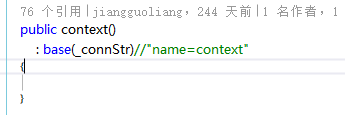
 /// <summary>

        /// 从配置生成连接

        /// </summary>

        private static readonly string _connStr = GetConnStringFromAppSetting();

        public context()

            : base(_connStr)//"name=context"

        {

        }

        protected override void OnModelCreating(DbModelBuilder modelBuilder)

        {

            throw new UnintentionalCodeFirstException();

        }

        private static string GetConnStringFromAppSetting()

        {

            // Specify the provider name, server and database.

            string providerName ="System.Data.SqlClient";

            string providerString = global::System.Configuration.ConfigurationManager.AppSettings["SQLConnectionString"];//sqlBuilder.ToString();

            // Initialize the EntityConnectionStringBuilder.

            EntityConnectionStringBuilder entityBuilder =

                new EntityConnectionStringBuilder();

            //Set the provider name.

            entityBuilder.Provider = providerName;

            // Set the provider-specific connection string.

            entityBuilder.ProviderConnectionString = providerString;

            // Set the Metadata location.

            entityBuilder.Metadata = @"res://*/Model1.csdl|res://*/Model1.ssdl|res://*/Model1.msl";

            var connString= entityBuilder.ToString();

            return connString;

        }
How to: Build an EntityConnection Connection String
This topic provides an example of how to build an EntityConnection.
To run the code in this example
Add the AdventureWorks Sales Model to your project and configure your project to use the Entity Framework. For more information, see How to: Use the Entity Data Model Wizard.
In the code page for your application, add the following
usingstatements (Importsin Visual Basic):C#Copyusing System;
using System.Collections.Generic;
using System.Collections;
using System.Data.Common;
using System.Data;
using System.IO;
using System.Data.SqlClient;
using System.Data.EntityClient;
using System.Data.Metadata.Edm;
Example
The following example initializes the System.Data.SqlClient.SqlConnectionStringBuilder for the underlying provider, then initializes the System.Data.EntityClient.EntityConnectionStringBuilderobject and passes this object to the constructor of the EntityConnection.
// Specify the provider name, server and database.

string providerName = "System.Data.SqlClient";

string serverName = ".";

string databaseName = "AdventureWorks";

// Initialize the connection string builder for the

// underlying provider.

SqlConnectionStringBuilder sqlBuilder =

    new SqlConnectionStringBuilder();

// Set the properties for the data source.

sqlBuilder.DataSource = serverName;

sqlBuilder.InitialCatalog = databaseName;

sqlBuilder.IntegratedSecurity = true;

// Build the SqlConnection connection string.

string providerString = sqlBuilder.ToString();

// Initialize the EntityConnectionStringBuilder.

EntityConnectionStringBuilder entityBuilder =

    new EntityConnectionStringBuilder();

//Set the provider name.

entityBuilder.Provider = providerName;

// Set the provider-specific connection string.

entityBuilder.ProviderConnectionString = providerString;

// Set the Metadata location.

entityBuilder.Metadata = @"res://*/AdventureWorksModel.csdl|

                            res://*/AdventureWorksModel.ssdl|

                            res://*/AdventureWorksModel.msl";

Console.WriteLine(entityBuilder.ToString());

using (EntityConnection conn =

    new EntityConnection(entityBuilder.ToString()))

{

    conn.Open();

    Console.WriteLine("Just testing the connection.");

    conn.Close();

}
See Also
How to: Use EntityConnection with an Object Context
EntityClient Provider for the Entity Framework
Note
使用代码的方式给EntityFramework edmx 创建连接字符串的更多相关文章
- 《Entity Framework 6 Recipes》中文翻译系列 (38) ------ 第七章 使用对象服务之动态创建连接字符串和从数据库读取模型
翻译的初衷以及为什么选择<Entity Framework 6 Recipes>来学习,请看本系列开篇 第七章 使用对象服务 本章篇幅适中,对真实应用中的常见问题提供了切实可行的解决方案. ...
- ASP.NET MVC 5 学习教程:创建连接字符串
原文 ASP.NET MVC 5 学习教程:创建连接字符串 起飞网 ASP.NET MVC 5 学习教程目录: 添加控制器 添加视图 修改视图和布局页 控制器传递数据给视图 添加模型 创建连接字符串 ...
- 【译】ASP.NET MVC 5 教程 - 5:使用 SQL 服务器 LocalDB 创建连接字符串
原文:[译]ASP.NET MVC 5 教程 - 5:使用 SQL 服务器 LocalDB 创建连接字符串 在上一节中,我们创建了MovieDBContext 类来连接数据库.处理Movie 对象和数 ...
- ASP.NET MVC 5 - 创建连接字符串(Connection String)并使用SQL Server LocalDB
您创建的MovieDBContext类负责处理连接到数据库,并将Movie对象映射到数据库记录的任务中.你可能会问一个问题,如何指定它将连接到数据库? 实际上,确实没有指定要使用的数据库,Entity ...
- [转]ASP.NET MVC 5 - 创建连接字符串(Connection String)并使用SQL Server LocalDB
您创建的MovieDBContext类负责处理连接到数据库,并将Movie对象映射到数据库记录的任务中.你可能会问一个问题,如何指定它将连接到数据库? 实际上,确实没有指定要使用的数据库,Entity ...
- ASP.NET没有魔法——ASP.NET MVC 与数据库之EntityFramework配置与连接字符串
前几篇文章中介绍了如何使用Entity Framework来操作数据库,但是对EF的配置.连接字符串的指定仍然存在一些疑问. 本章将对EF的配置进行介绍. EF可以通过两种方式来实现配置,分别是代码方 ...
- ASP.NET开发实战——(十一)ASP.NET MVC 与数据库之EntityFramework配置与连接字符串
前几篇文章中介绍了如何使用Entity Framework来操作数据库,但是对EF的配置.连接字符串的指定仍然存在一些疑问,EF可以通过两种方式来实现配置,分别是代码方式和配置文件. 本章将通过以下几 ...
- 在ASP.NET项目中的web.config文件里配置数据库连接并在程序代码中获取连接字符串
1.在<connectionStrings> 标签里添加连接 <connectionStrings> <add name="ConnectionName&q ...
- 如何用代码的方式取出SAP C4C销售订单创建后所有业务伙伴的数据
比如我创建了一个Sales Order(销售订单)后,如何用代码的方式取出这些通过SAP Partner determination自动填充的Involved Parties信息呢? 一种方法可以使用 ...
随机推荐
- Java反编译工具(Java Decompiler)
Java Decompiler是一种非常实用的JAVA反编译工具,可以对整个jar包进行反编译,也可以将其集成到eclipse上,非常方便的根据class文件的源码.,官网地址http://jd.be ...
- OVS+DPDK Datapath 包分类技术
本文主体内容译于[DPDK社区文档],但并没有逐字翻译,在原文的基础上进行了一些调整,增加了对TSS分类器的详细阐述. 1. 概览 本文描述了OVS+DPDK中的包分类器(datapath class ...
- asp.net core上使用redis探索(1)
基于Ubuntu安装redis, 我找的一个很好的网站: https://www.digitalocean.com/community/tutorials/how-to-install-and-con ...
- 关于iOS9 HTTP不能正常使用的解决方法
在工程的info.plist文件中添加NSAPPTransportSecurity类型为Dictionary,在NSAPPTransportSecurity下添加NSAllowsArbitraryLo ...
- 排序算法入门之快速排序(java实现)
快速排序也是一种分治的排序算法.快速排序和归并排序是互补的:归并排序将数组分成两个子数组分别排序,并将有序的子数组归并以将整个数组排序,会需要一个额外的数组:而快速排序的排序方式是当两个子数组都有序时 ...
- Integer 和int 比较
在jdk1.5的环境下,有如下4条语句: 1 2 3 4 Integer i01 = 59; int i02 = 59; Integer i03 =Integer.valueOf(59); Integ ...
- JavaScript对象添加、删除、修改对象的属性
https://www.cnblogs.com/goweb/p/5357640.html 利用动态特性 function Person(){}; var person = new Person(); ...
- unity零基础开始学习做游戏(三)鼠标输入,来个虚拟摇杆怎么样?
-------小基原创,转载请给我一个面子 现在移动游戏越来越火,大家都拿手机平板玩游戏,没有键盘和手柄输入,所以就不得不看看虚拟摇杆怎么搞?(小基对于没有实体反馈不是很喜欢呢) 首先要清楚,鼠标操作 ...
- Web安全学习计划
http://cisps.org/bbs/viewtopic.php?f=71&t=26125 标题为Web安全学习计划,实属我的愿望:将下面这份Web学习清单完善成为一个Web安全,学习计划 ...
- Ubuntu 安装LAMP
简要记录一下. 环境准备 虚拟机环境 lz@starnight:~$ sudo -i [sudo] password for lz: root@starnight:~# cat /etc/issue ...