
使用代码的方式给EntityFramework edmx 创建连接字符串
在构建上下文的时候动态生成连接字符串:
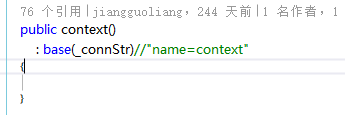
 /// <summary>

        /// 从配置生成连接

        /// </summary>

        private static readonly string _connStr = GetConnStringFromAppSetting();

        public context()

            : base(_connStr)//"name=context"

        {

        }

        protected override void OnModelCreating(DbModelBuilder modelBuilder)

        {

            throw new UnintentionalCodeFirstException();

        }

        private static string GetConnStringFromAppSetting()

        {

            // Specify the provider name, server and database.

            string providerName ="System.Data.SqlClient";

            string providerString = global::System.Configuration.ConfigurationManager.AppSettings["SQLConnectionString"];//sqlBuilder.ToString();

            // Initialize the EntityConnectionStringBuilder.

            EntityConnectionStringBuilder entityBuilder =

                new EntityConnectionStringBuilder();

            //Set the provider name.

            entityBuilder.Provider = providerName;

            // Set the provider-specific connection string.

            entityBuilder.ProviderConnectionString = providerString;

            // Set the Metadata location.

            entityBuilder.Metadata = @"res://*/Model1.csdl|res://*/Model1.ssdl|res://*/Model1.msl";

            var connString= entityBuilder.ToString();

            return connString;

        }
How to: Build an EntityConnection Connection String
This topic provides an example of how to build an EntityConnection.
To run the code in this example
Add the AdventureWorks Sales Model to your project and configure your project to use the Entity Framework. For more information, see How to: Use the Entity Data Model Wizard.
In the code page for your application, add the following
usingstatements (Importsin Visual Basic):C#Copyusing System;
using System.Collections.Generic;
using System.Collections;
using System.Data.Common;
using System.Data;
using System.IO;
using System.Data.SqlClient;
using System.Data.EntityClient;
using System.Data.Metadata.Edm;
Example
The following example initializes the System.Data.SqlClient.SqlConnectionStringBuilder for the underlying provider, then initializes the System.Data.EntityClient.EntityConnectionStringBuilderobject and passes this object to the constructor of the EntityConnection.
// Specify the provider name, server and database.

string providerName = "System.Data.SqlClient";

string serverName = ".";

string databaseName = "AdventureWorks";

// Initialize the connection string builder for the

// underlying provider.

SqlConnectionStringBuilder sqlBuilder =

    new SqlConnectionStringBuilder();

// Set the properties for the data source.

sqlBuilder.DataSource = serverName;

sqlBuilder.InitialCatalog = databaseName;

sqlBuilder.IntegratedSecurity = true;

// Build the SqlConnection connection string.

string providerString = sqlBuilder.ToString();

// Initialize the EntityConnectionStringBuilder.

EntityConnectionStringBuilder entityBuilder =

    new EntityConnectionStringBuilder();

//Set the provider name.

entityBuilder.Provider = providerName;

// Set the provider-specific connection string.

entityBuilder.ProviderConnectionString = providerString;

// Set the Metadata location.

entityBuilder.Metadata = @"res://*/AdventureWorksModel.csdl|

                            res://*/AdventureWorksModel.ssdl|

                            res://*/AdventureWorksModel.msl";

Console.WriteLine(entityBuilder.ToString());

using (EntityConnection conn =

    new EntityConnection(entityBuilder.ToString()))

{

    conn.Open();

    Console.WriteLine("Just testing the connection.");

    conn.Close();

}
See Also
How to: Use EntityConnection with an Object Context
EntityClient Provider for the Entity Framework
Note
使用代码的方式给EntityFramework edmx 创建连接字符串的更多相关文章
- 《Entity Framework 6 Recipes》中文翻译系列 (38) ------ 第七章 使用对象服务之动态创建连接字符串和从数据库读取模型
翻译的初衷以及为什么选择<Entity Framework 6 Recipes>来学习,请看本系列开篇 第七章 使用对象服务 本章篇幅适中,对真实应用中的常见问题提供了切实可行的解决方案. ...
- ASP.NET MVC 5 学习教程:创建连接字符串
原文 ASP.NET MVC 5 学习教程:创建连接字符串 起飞网 ASP.NET MVC 5 学习教程目录: 添加控制器 添加视图 修改视图和布局页 控制器传递数据给视图 添加模型 创建连接字符串 ...
- 【译】ASP.NET MVC 5 教程 - 5:使用 SQL 服务器 LocalDB 创建连接字符串
原文:[译]ASP.NET MVC 5 教程 - 5:使用 SQL 服务器 LocalDB 创建连接字符串 在上一节中,我们创建了MovieDBContext 类来连接数据库.处理Movie 对象和数 ...
- ASP.NET MVC 5 - 创建连接字符串(Connection String)并使用SQL Server LocalDB
您创建的MovieDBContext类负责处理连接到数据库,并将Movie对象映射到数据库记录的任务中.你可能会问一个问题,如何指定它将连接到数据库? 实际上,确实没有指定要使用的数据库,Entity ...
- [转]ASP.NET MVC 5 - 创建连接字符串(Connection String)并使用SQL Server LocalDB
您创建的MovieDBContext类负责处理连接到数据库,并将Movie对象映射到数据库记录的任务中.你可能会问一个问题,如何指定它将连接到数据库? 实际上,确实没有指定要使用的数据库,Entity ...
- ASP.NET没有魔法——ASP.NET MVC 与数据库之EntityFramework配置与连接字符串
前几篇文章中介绍了如何使用Entity Framework来操作数据库,但是对EF的配置.连接字符串的指定仍然存在一些疑问. 本章将对EF的配置进行介绍. EF可以通过两种方式来实现配置,分别是代码方 ...
- ASP.NET开发实战——(十一)ASP.NET MVC 与数据库之EntityFramework配置与连接字符串
前几篇文章中介绍了如何使用Entity Framework来操作数据库,但是对EF的配置.连接字符串的指定仍然存在一些疑问,EF可以通过两种方式来实现配置,分别是代码方式和配置文件. 本章将通过以下几 ...
- 在ASP.NET项目中的web.config文件里配置数据库连接并在程序代码中获取连接字符串
1.在<connectionStrings> 标签里添加连接 <connectionStrings> <add name="ConnectionName&q ...
- 如何用代码的方式取出SAP C4C销售订单创建后所有业务伙伴的数据
比如我创建了一个Sales Order(销售订单)后,如何用代码的方式取出这些通过SAP Partner determination自动填充的Involved Parties信息呢? 一种方法可以使用 ...
随机推荐
- PyCharm导入pymysql包运行报错问题解决:No module named 'PyMySQL'
import pymysql # 导入包 # 报错问题显示: ImportError: No module named 'PyMySQL' 出现该问题提示:找不到该包名. 解决办法如下: ①先下载Py ...
- Word Break(动态规划)
Given a string s and a dictionary of words dict, determine if s can be segmented into a space-separa ...
- rsync+innotify做到同步式更新
innotify主要功能: 他是内核用于通知用户控件程序文件系统变化的机制. 也就是说,当服务器发生了任何的改动,内核都会知道并通知用户. rssync(做同步的)+innotify做到的就是实时的同 ...
- ACCA AI来袭会议笔记
ACCA AI来袭会议笔记 Technology in Accounting 调研报告: http://cn.accaglobal.com/news/professional_report.html ...
- SOFA 源码分析 — 自动故障剔除
前言 集群中通常一个服务有多个服务提供者.其中部分服务提供者可能由于网络,配置,长时间 fullgc ,线程池满,硬件故障等导致长连接还存活但是程序已经无法正常响应.单机故障剔除功能会将这部分异常的服 ...
- 解决iframe在移动端(主要iPhone)上的问题
前言 才发现已经有一段时间没有写博客了,就简单的说了最近干了啥吧.前段时间忙了杂七杂八的事情,首先弄了个个人的小程序,对的,老早就写了篇从零入手微信小程序开发,然后到前段时间才弄了个简单的个人小程序, ...
- python笔记:#005#算数运算符
算数运算符 计算机,顾名思义就是负责进行 数学计算 并且 存储计算结果 的电子设备 目标 算术运算符的基本使用 01. 算数运算符 算数运算符是 运算符的一种 是完成基本的算术运算使用的符号,用来处理 ...
- hive 分组排序,topN
hive 分组排序,topN 语法格式:row_number() OVER (partition by COL1 order by COL2 desc ) rankpartition by:类似hiv ...
- Eeffective C++ 读书笔记( 32-38)
条款三十二:确定你的public继承塑模出is-a关系 1.所谓最佳设计,取决于系统希望做什么事,包括现在和未来. 2.好的接口可以防止无效的代码通过编译,因此你应该宁可采取“在编译期拒绝企鹅飞行”的 ...
- css实现背景颜色渐变效果
自己学的一些渐变:background:linear-gradient(90deg,#4EB9E7 -50%,#3691BE 50%,#2E83B0 100%); IE没有效果 详细访问: http: ...